Best Gaming Desks 2026
The best gaming desks for every budget in 2026: L-shaped, ultrawide, and budget picks with real reviews and Amazon links. Expert picks, pros and cons, and si...
As an Amazon Associate we earn from qualifying purchases made through our links — this doesn't affect our picks.
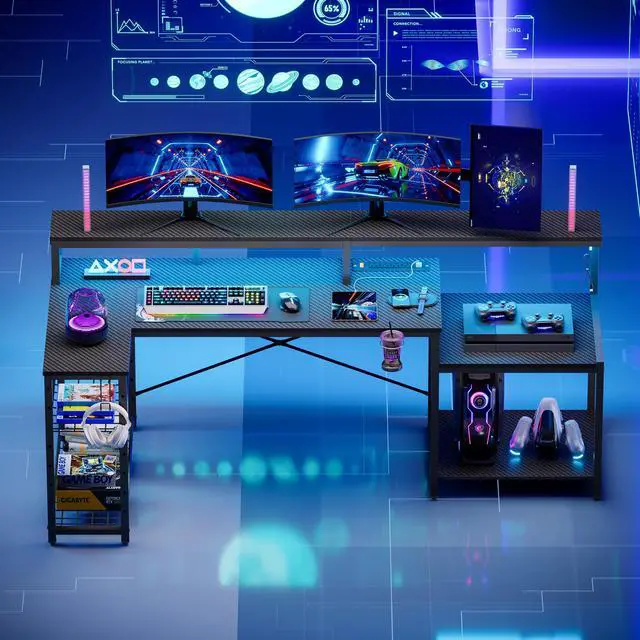
Bestier LED Gaming Desk with Power Outlets, 71 inch L Shaped
Our top recommendation for this category
Price as of May 8, 2026 — see current price on Amazon.
In this guide
- Quick Picks
- Bestier 71" L-Shaped LED Gaming Desk: Best Overall
- Arozzi Arena 63" Ultrawide Gaming Desk: Best Full-Surface Mouse Pad
- EUREKA ERGONOMIC L60 60" Gaming Desk: Best Mid-Range
- Bestier 51" L-Shaped Gaming Desk with Power Outlets: Best Compact
- Homall L-Shaped Gaming Desk 51": Best Budget
- What to Look for in a Gaming Desk
- FAQs
- Bottom Line
Gaming desks have gotten genuinely good over the past two years. The old joke was that "gaming desk" just meant a regular desk with RGB slapped on it and a $50 markup. That's still true at the bottom of the market, but the $110-$155 range has caught up fast. You're now getting built-in power strips, monitor stands, real cable management, and storage shelves at prices that don't make you wince.
I spent a few weeks combing through the options, cross-referencing r/battlestations builds and r/buildapc setup threads, and landed on five desks that actually make sense for different budgets and room sizes. Here's the short version.
Quick Picks
| Desk | Size | Price | Best For | |
|---|---|---|---|---|
| Bestier 71-inch L-Shaped LED | 71 inch L | ~$154.99 | Best Overall | Check Price |
| Arozzi Arena 63-inch Ultrawide | 63 inch flat | ~$299 | Best Mouse Pad Coverage | Check Price |
| EUREKA ERGONOMIC L60 | 60 inch L | ~$309.99 | Best Mid-Range | Check Price |
| Bestier 51-inch L-Shaped Power | 51 inch L | ~$109.99 | Best Compact Storage | Check Price |
| Homall 51-inch L-Shaped | 51 inch L | ~$69.99 | Best Budget | Check Price |
Bestier 71" L-Shaped LED Gaming Desk: Best Overall
Bestier LED Gaming Desk with Power Outlets, 71 inch L Shaped
Pros
- 71 inches of usable surface fits triple monitors easily
- Built-in power strip: 4 AC outlets + 2 USB ports
- RGB under-monitor stand, 20 static colors and 22 dynamic modes
- Adjustable printer/monitor shelf included
Cons
- Assembly takes 60-90 minutes; instructions could be clearer
- RGB control only via physical button, no app
Price as of May 8, 2026 — see current price on Amazon.
The 71" surface is genuinely large. I've seen people run a 34" ultrawide plus a secondary monitor and still have room for a keyboard, mouse, and a small speaker. The L-shape tucks into any corner and the two separate surface sections mean you can arrange your layout however works for your room.
What actually separates this from cheaper Bestier models is the power strip. Four AC outlets and two USB ports built into the desk are a real convenience. No more hunting for a surge protector to hide behind the desk. The adjustable monitor shelf spans most of the desk's length and can be set at a few different heights, which is something the cheaper 51" model skips.
The RGB is a nice touch. It's not controllable via phone app or software, just a button on the light strip, but it cycles through modes smoothly and the under-shelf glow actually photographs well for YouTube setup shots. Build quality is solid for the price: P2 particle board with a carbon fiber texture surface that's easy to wipe down.
At ~$154.99 (Amazon's price when I checked in September 2026) this is the sweet spot for anyone building a real gaming or streaming setup. It's 30% more desk than the 51" compact options and the power strip alone would cost $30-40 separately.
Arozzi Arena 63" Ultrawide Gaming Desk: Best Full-Surface Mouse Pad
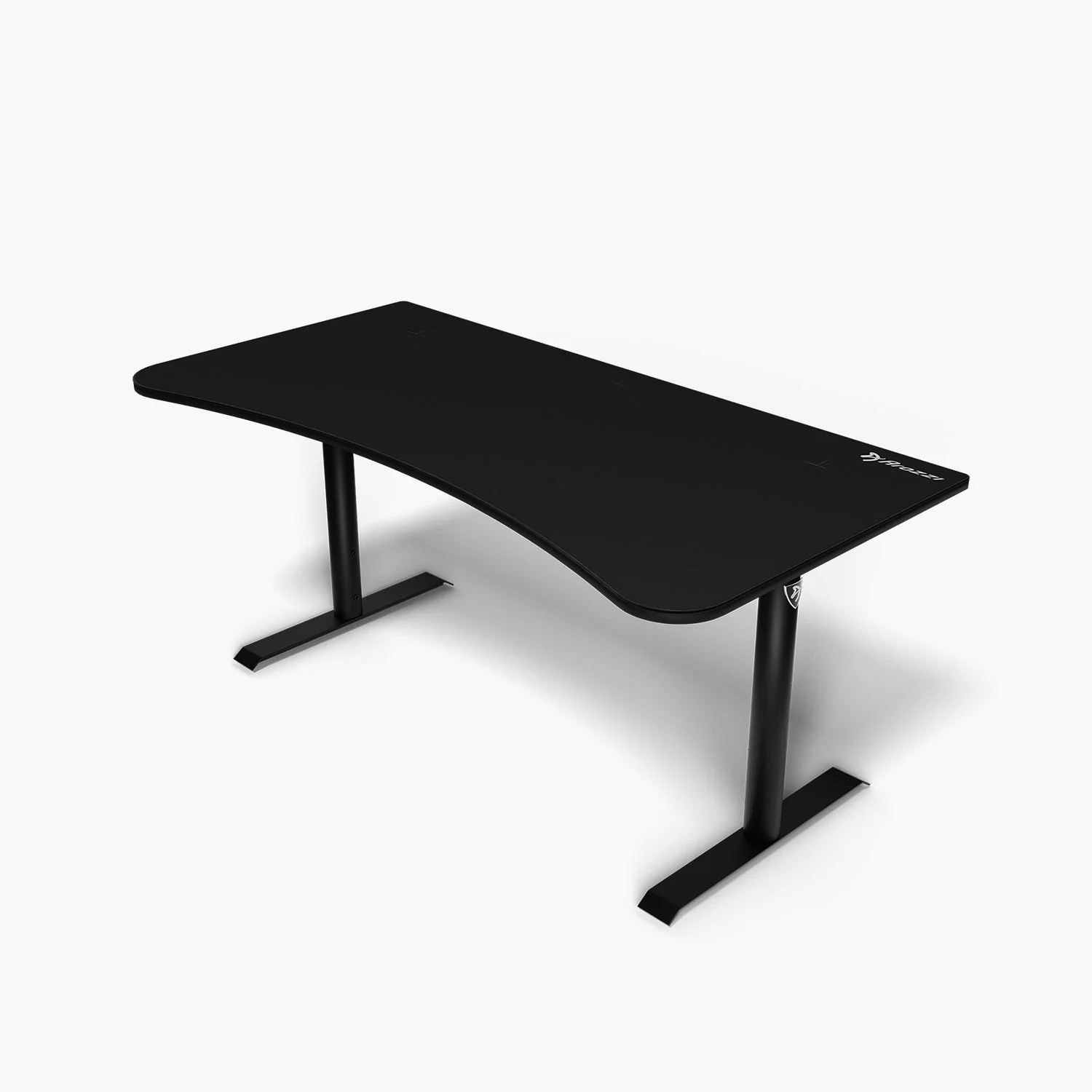
Arozzi Arena Gaming Desk 63-Inch Wide, Ultrawide Curved
Pros
- Full surface water-resistant mouse pad (the entire desk is your mouse pad)
- 63x32 inches of surface, supports triple monitors
- Adjustable height legs (71-82 cm) for ergonomic positioning
- Cable management hooks under the desk surface
Cons
- No built-in power strip
- Mouse pad surface shows wear after 2+ years of heavy use
- Pricier than L-shaped alternatives at this size
Price as of May 8, 2026 — see current price on Amazon.
The Arozzi Arena has been around for a while and for good reason: it's the only desk in this price range where the entire desktop surface is a mouse pad. Not a small pad you clip on, not a desk mat you lay on top. The actual desk surface is the mouse pad material. It's water-resistant, machine-washable, and feels exactly like a quality extended pad.
For low-DPI mouse users (FPS players, specifically), this matters. You need room to swing a 400 DPI mouse through wide arcs, and the Arena gives you 63 inches of uninterrupted glide space. I've talked to a few pro-am CS2 players who specifically buy this desk for that reason.
The curved front edge is subtle but real; it brings the desk surface slightly closer to you in the center, which reduces shoulder extension. The adjustable legs are a rare feature at this price, letting you dial in the height without buying a separate sit-stand frame. Cable management isn't as clean as the Bestier's built-in strip, but the under-desk hooks keep things passable.
At $299-$350 it's the most expensive desk here. If you don't care about the full-surface pad, the Bestier 71" is better value. But if you play FPS at low sensitivity or just love the feel of sliding your mouse across a desk-sized pad, this is worth the premium.
EUREKA ERGONOMIC L60 60" Gaming Desk: Best Mid-Range
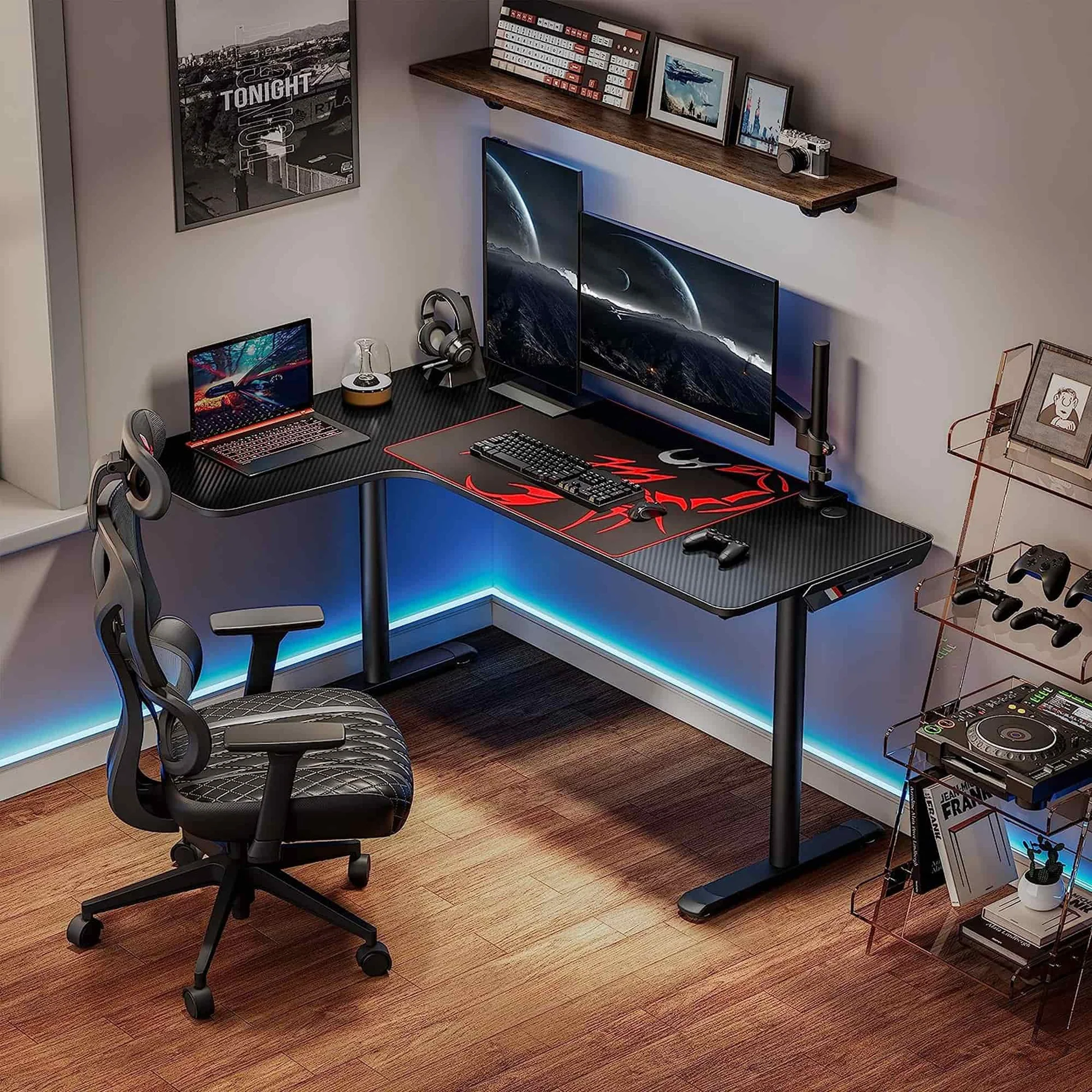
EUREKA ERGONOMIC L Shaped Gaming Desk, 60 Inch L60
Pros
- Comes with a large mouse pad included
- Carbon fiber textured surface, sturdy steel frame
- 60-inch surface fits dual monitors
- Space-saving corner design, easy to assemble
Cons
- No built-in power strip
- Lighter build than Bestier at a similar price
- Monitor stand not included
Price as of May 8, 2026 — see current price on Amazon.
The EUREKA L60 hits an interesting position in the market: it's the mid-range option that includes a full-length mouse pad out of the box. Price is the catch now: Amazon had it at $309.99 when I checked in September 2026, a big jump from where it sold for most of the year, and at that number it's the most expensive desk in this guide. The pad runs the entire L portion and clips in securely. It doesn't slide around.
The carbon steel frame is noticeably sturdier than the particle board legs you see on the Homall-tier desks. The surface texture is clean and easy to wipe. At 60 inches it's slightly smaller than the Bestier 71" but still fits a 27" or 32" monitor plus a second screen without trouble.
Where the L60 falls short is in extras. No power strip, no included monitor stand, no RGB. It's a desk, with a mouse pad, nothing else. That makes it honest: you know exactly what you're getting. If you already have a monitor arm or a riser you like, the L60 clears desk space more cleanly than the cluttered-looking Bestier designs.
The assembly is genuinely easy, maybe 30-40 minutes. The instructions are picture-based and the parts are labeled clearly. That's worth noting because some of the Bestier 71" reviews complain about ambiguous steps.
Bestier 51" L-Shaped Gaming Desk with Power Outlets: Best Compact

Bestier Gaming Desk 51-Inch L-Shaped, with Power Outlets and LED Lights
Pros
- 4-tier shelves hold games, headsets, consoles without using desk surface
- Built-in power strip (3 AC + 2 USB ports)
- LED lighting included
- Reversible configuration fits left- or right-corner rooms
Cons
- 51 inches is limiting with triple monitors
- Shelving unit makes the desk look busy in smaller rooms
Price as of May 8, 2026 — see current price on Amazon.
If your room is tight (like a 10x10 bedroom tight), the Bestier 51" is where I'd start. It's the same brand as the 71" top pick but compressed into a smaller footprint with serious vertical storage built into the design.
The 4-tier shelves on the secondary arm are kind of brilliant for console players. Your PS5, controllers, headset, and some game cases all live on the desk instead of fighting for space on your surface. The primary tabletop stays clean enough for a single monitor, keyboard, and mouse setup.
Power strip is included (3 AC + 2 USB), LED lights are included, the configuration reverses for left- or right-corner rooms. At $109.99, it packs in more value-per-dollar than the L60 if you're actually short on space. The trade-off is that 51 inches feels crowded with a 32" monitor plus secondary. Dual 24" monitors or a single 27" is the sweet spot here.
One note on the shelving: some r/battlestations folks find the look a bit "I'm 16 and this is my gamer cave," which is fair. If aesthetics matter to you, the cleaner lines of the L60 or the premium feel of the Arozzi Arena are better fits. If you need to cram storage into a small room, this does it well.
Homall L-Shaped Gaming Desk 51": Best Budget
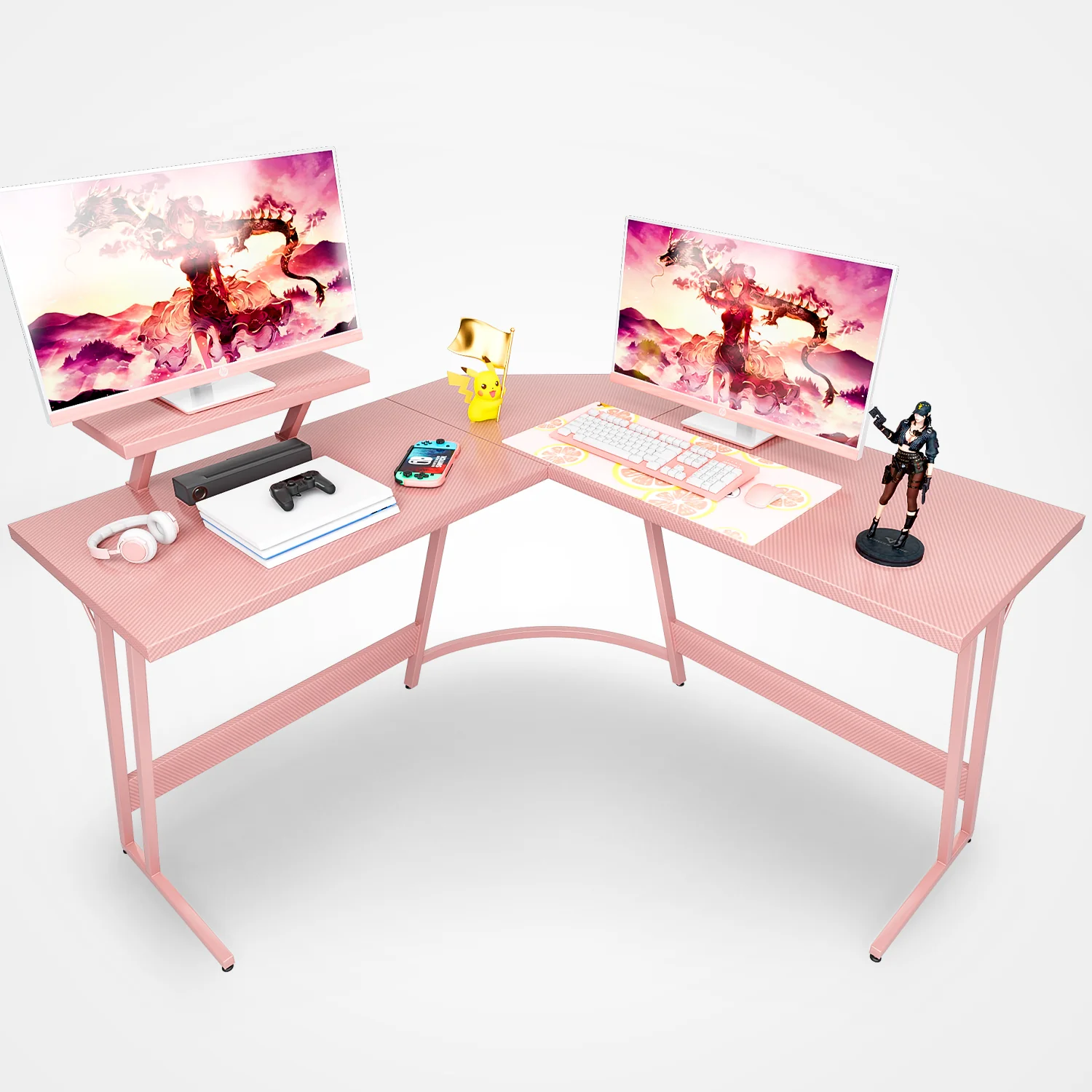
Homall L Shaped Gaming Desk Computer Corner Desk (Black, 51 Inch)
Pros
- Under $70 at the September 2026 price
- Removable monitor riser included
- L-shaped corner design works in any sized room
- Easy 20-minute assembly
Cons
- Particle board construction, lighter than steel-frame options
- No power strip, no LED, no extras
- 220 lb weight limit, be careful with heavy triple-monitor setups
Price as of May 8, 2026 — see current price on Amazon.
Look, sometimes you just need a desk and $70 is the number. The Homall 51" isn't going to win any design awards and the carbon fiber texture is clearly trying a bit too hard, but it does exactly what a desk should do: hold your monitors, keyboard, and mouse without wobbling.
The removable monitor riser is genuinely useful. It sits at the corner of the L and raises your monitor to a more ergonomic height without spending extra on a separate stand. Remove it and you get more flat surface back. Simple, functional.
At this price you're not getting a power strip, LED lights, or any built-in storage. You're getting particle board panels, four legs, a monitor riser, and a corner desk shape. For a first-time setup or a kid's room, that's often all you need. The 20-minute assembly is accurate. I've seen people complain about Bestier taking an hour; the Homall is legitimately simpler.
The particle board construction isn't going to feel like a Secretlab Magnus or even the EUREKA L60 steel frame. But at $69.99 you're not paying for a steel frame.
What to Look for in a Gaming Desk
Size and Shape: L-Shaped vs. Straight
L-shaped desks dominate the gaming desk market for a reason: they use corner space that would otherwise be wasted and give you separate "zones" for gaming, streaming gear, or work. All five desks here are L-shaped except the Arozzi Arena.
The key measurement is the longer arm of the L. For dual monitors, you want at least 55 inches on the primary arm. For triple monitors or ultrawide-plus-secondary, 63-71 inches is the target. The secondary arm is usually 20-24 inches deep and works well for a keyboard tray, mic arm, or secondary monitor.
Straight desks like the Arozzi Arena work better in open rooms where a corner placement doesn't make sense, or if you want the full-surface mouse pad advantage.
Built-in Power Strips
This is underrated. A desk with a built-in power strip means four to six fewer cables running from floor to desk. The Bestier 71" and 51" both include this. The EUREKA L60 and Homall do not, so budget another $25-40 for a good surge protector if you go that route.
Surface Material
The choices are:
- Carbon fiber texture particle board (Bestier, Homall, EUREKA): easy to clean, scratch-resistant, looks fine. Standard gaming desk surface.
- Full mouse pad surface (Arozzi Arena): the premium option for mouse tracking, machine-washable, shows wear over time.
The carbon fiber texture boards are all roughly equivalent. 15mm particle board is 15mm particle board. What matters is whether the frame is steel or particle board. Steel-frame desks (EUREKA L60) wobble less at extended heights.
Cable Management
Real cable management means grommets (holes through the surface) and/or rails/hooks under the desk. The Arozzi Arena has good under-desk cable hooks, and the Bestier 71" has a rear cable tray built into the monitor stand. The Homall is the most bare-bones here, so you'll need velcro ties or a cable sleeve if you care about cord organization.
Assembly Time
Honest estimates from reading hundreds of reviews:
- Homall 51": 20-30 minutes
- EUREKA L60: 30-45 minutes
- Bestier 51": 45-60 minutes
- Bestier 71": 60-90 minutes
- Arozzi Arena: 30-45 minutes (fewer parts, simpler design)
The Bestier 71" complexity comes from the adjustable monitor shelf system, not the desk itself. Follow the numbered steps and you'll be fine.
FAQs
Frequently asked questions
- What size gaming desk do I need for a dual-monitor setup?
- You want at least 55 inches on the primary arm of an L-shaped desk. The Bestier 51-inch is borderline tight with two 27-inch monitors. The EUREKA L60 at 60 inches is more comfortable. For dual 32-inch monitors or ultrawide plus secondary, the Bestier 71-inch is the right call.
- Is a gaming desk worth it over a regular office desk?
- Gaming desks in 2026 offer features regular office desks don't: built-in power strips, monitor stands, cable management grommets, and L-shaped layouts that maximize corner space. If you're paying the same price for both, the gaming desk usually wins on utility. If a plain rectangular office desk from IKEA is significantly cheaper, that's a valid alternative.
- Are Bestier desks good quality?
- Bestier is solid mid-range quality. The particle board surfaces are durable and the cable management is better than most competitors at the same price. The assembly instructions get mixed reviews: some people fly through in 45 minutes, others get frustrated. The 71-inch model has over 15,000 Amazon reviews at 4.4+ stars, which is a good signal.
- How important is a monitor stand or riser on a gaming desk?
- More than people expect. Staring slightly downward at a monitor positioned at desk height strains your neck over long sessions. The Bestier 71-inch includes an adjustable monitor stand that raises your screen 5-6 inches. The Homall comes with a removable monitor riser. If your desk doesn't include one, a $20-30 standalone riser is a worthwhile add.
- What is the best gaming desk under $200?
- The Bestier 71-inch at around $154.99 is the best desk under $200 right now: built-in power strip, LED lighting, monitor stand, and a full L shape. The Bestier 51-inch at ~$109.99 is the compact version with the same power and lighting. The EUREKA L60 used to sit in this bracket, but at $309.99 in September 2026 it's out of it.
- Can you use a gaming desk as a home office desk?
- Yes, and most people do. The carbon fiber texture looks professional enough for video calls, the L-shaped layout is efficient for work-from-home setups, and the built-in power strips on the Bestier models are useful regardless of whether you're gaming or working. The Arozzi Arena's full-surface mouse pad is the one design that clearly says 'gaming'; the others could pass as home office furniture.
Bottom Line
The Bestier 71" L-Shaped LED Gaming Desk at ~$154.99 is the best overall pick for most gamers. It's the right size for serious setups, includes a power strip and RGB, and has enough surface for triple monitors or a streaming mic and lighting rig. If you want a steel frame and a full mouse pad and the price has come back down, the EUREKA L60 at ~$309.99 (September 2026 Amazon price) is the honest mid-range option with better build quality than you'd expect for the price. The Homall at $69.99 works for a first desk or a small room where you don't need extras. And the Arozzi Arena at ~$299 is for the low-DPI FPS crowd who wants an entire desk that feels like a mouse pad. There's nothing else quite like it.
How We Test
We score products by combining spec-level research, pricing history, trusted third-party benchmarks, and owner sentiment from high-signal sources.
- Performance and real-world value in the category this guide targets
- Price-to-performance and deal consistency over recent pricing windows
- Build quality, reliability patterns, and known long-term issues
- Recommendation refresh cadence to keep these picks current
Author
TheTechSearch Editorial Team
Independent product reviewers & PC builders
We test and compare real-world specs, price trends, and user feedback to recommend gear that actually makes sense to buy.