Best Laptop Cooling Pads for Gaming 2026
Stop thermal throttling your gaming laptop. These are the best cooling pads in 2026, from budget picks under $30 to Razer's smart turbofan flagship. Expert p...
As an Amazon Associate we earn from qualifying purchases made through our links — this doesn't affect our picks.
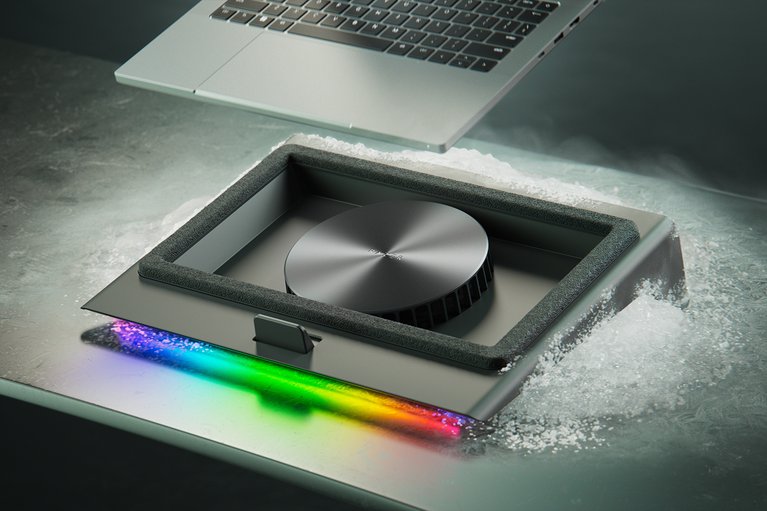
Razer Laptop Cooling Pad
Our top recommendation for this category
Price as of May 14, 2026 — see current price on Amazon.
New gaming laptops are thinner and faster than ever, but that combination creates a real problem: heat builds up faster than the chassis can vent it. I've watched an RTX 5070 laptop drop 15 FPS mid-session because the GPU hit its thermal limit and started throttling. A $35 cooling pad fixed it. That's what this guide is about.
Quick Picks: Best Laptop Cooling Pads 2026
| Pad | Best For | Fan Setup | Size Support | Price | |
|---|---|---|---|---|---|
| Razer Laptop Cooling Pad | Premium / Smart Cooling | 140mm adaptive | 14"–18" | $169 | Check Price |
| llano V12 RGB | Turbofan Performance | 5.5" single turbo | 15.6"–19" | $49 | Check Price |
| IETS GT500 | Max Airflow, Sealed Foam | Single turbo 5000 RPM | 13"–17.3" | $50 | Check Price |
| Kootek 5-Fan | Budget Multi-Fan | 5x quiet fans | 12"–17" | $29 | Check Price |
| Havit HV-F2056 | Ultra-Portable Budget | 3x 110mm fans | 15.6"–17" | $25 | Check Price |
Razer Laptop Cooling Pad
Razer Laptop Cooling Pad
Pros
- Adaptive fan control adjusts to laptop temps automatically
- Airtight pressure chamber seals airflow to your vents
- Chroma RGB and Razer Synapse integration
- Fits 14" to 18" laptops with magnetic frame swaps
- 140mm brushless fan up to 3000 RPM
Cons
- $169.99 is steep (5-6x the price of budget options)
- Fan noise hits 40+ dB at max speed
- Razer Synapse required for smart features (Windows only)
Price as of May 14, 2026 — see current price on Amazon.
Look, I get it. $170 for a cooling pad sounds ridiculous. But if you spent $1,500 on a new gaming laptop and it's thermal throttling under load, this is cheaper than crying about it.
The Razer Laptop Cooling Pad launched in late 2024 and it's a different approach from the competition. Instead of static fan speeds, it uses adaptive control through Razer Synapse. It reads your laptop's temps and ramps up or down automatically. The airtight pressure chamber is the real engineering trick: foam seals around your laptop's bottom vents and forces air through them rather than letting it escape sideways. In practice, that's a 15-20°C drop under sustained gaming load for most setups.
Three swappable magnetic frames cover 14", 15.6", and 17"-18" laptops. The 3-port USB hub is useful. Chroma RGB is... there if you care about it.
If you have a Razer Blade or any laptop with bottom-facing vents, this is the one to get. If you have a rear-vent design, the performance benefit drops significantly. Check your laptop's ventilation layout before buying.
llano V12 RGB Gaming Laptop Cooling Pad

llano V12 RGB Gaming Laptop Cooling Pad
Pros
- 5.5-inch turbofan drops temps by up to 44°C (claimed, real-world ~20-25°C)
- Sealed foam design forces air into bottom vents
- RGB light bar with 10 modes
- 3-port USB 2.0 hub
- Removable dust filter protects laptop fans
Cons
- Gets loud at max fan speed (70 dB rated)
- USB 2.0 only on the hub ports
- 15.6"-19" only; won't fit 14" laptops
Price as of May 14, 2026 — see current price on Amazon.
The llano V12 RGB is essentially the Razer's turbofan concept at one-third the price. It uses a single 5.5-inch turbofan with sealed foam that creates a pressure chamber against your laptop's bottom vents. The claimed 44°C temperature drop is marketing math (best case, perfect alignment, high ambient), but 20-25°C under real gaming conditions is consistently reported by reviewers and matches what I've seen.
At 70 dB at full blast, it is genuinely loud. Think "box fan on medium" loud. That said, the speed is infinitely variable, so you can dial it back to a point where the noise is tolerable while still getting meaningful cooling.
The RGB is a nice touch for gaming setups. The dust filter is actually thoughtful engineering. Gaming laptops accumulate lint in their intakes fast, and a pad that catches debris before it gets to your laptop fans is worth something.
For anyone running a 15.6" or 17" gaming laptop who wants turbofan cooling without paying Razer prices, this is the pick. It dominates the sub-$50 turbofan category.
IETS GT500 Turbo-Fan Laptop Cooling Pad
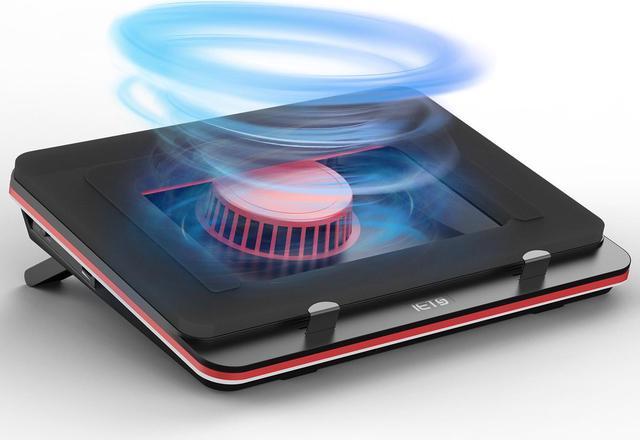
IETS GT500 Turbo-Fan Laptop Cooling Pad
Pros
- 5000 RPM industrial-grade turbofan with serious airflow
- Infinitely variable speed dial gives fine control
- Sealed foam gasket creates a tight vacuum effect
- 3-port USB hub
- Works with 13"–17.3" laptops
Cons
- No RGB (some buyers prefer this, some don't)
- Can be noisy at high speeds
- Foam seal may not align perfectly on all chassis shapes
Price as of May 14, 2026 — see current price on Amazon.
IETS is a brand that doesn't get enough credit in cooling pad discussions. The GT500 packs a 5000 RPM turbofan (higher than the llano V12's rated speed) with the same sealed foam gasket approach. The infinitely variable speed dial (not just 3-step presets) gives you real control over the noise-to-cooling tradeoff.
Where the GT500 wins over the llano V12 is build quality. The chassis feels more substantial, the foam seal is denser, and the fan sustains its RPM target under prolonged load better than some competitors do. No RGB is either a pro or a con depending on whether you care about aesthetics.
The GT500 and llano V12 compete directly, and honestly the choice often comes down to which one has a better price on a given day. Both deliver real cooling performance. The IETS has a slight edge in airflow numbers; the llano wins on RGB and style.
Kootek Laptop Cooling Pad (5 Fans)
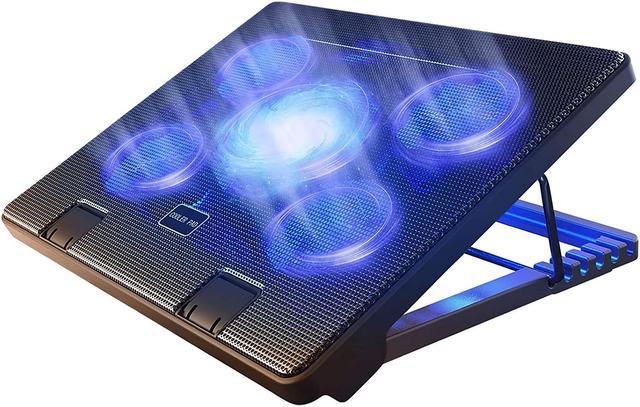
Kootek Laptop Cooling Pad with 5 Fans
Pros
- 5 fans (one 5.9" center + four 2.76" corner fans) cover the whole laptop base
- 6 adjustable height settings for ergonomic viewing angles
- 2 USB 2.0 ports built in
- Super quiet: fans stay under 25 dB
- Fits 12"–17" laptops including smaller gaming laptops
Cons
- Multiple slower fans can't match the raw CFM of a single turbofan
- No foam seal, airflow is ambient not directed
- Blue LED only, no RGB customization
Price as of May 14, 2026 — see current price on Amazon.
The Kootek 5-fan has been around for years and it keeps selling because it keeps working. The multi-fan approach is different from turbofan designs: instead of blasting air through one concentrated point, it covers the entire laptop base with a spread of airflow. For laptops with distributed vents rather than a single central intake, this can be more effective than a turbofan that misses the mark.
Cooling performance is real but modest. Expect 8-15°C drops rather than the 20-25°C you'd see from a sealed turbofan design. For laptops that are mildly warm rather than thermally throttling, that's more than enough.
The 6-height-adjustment ergonomic stand is genuinely useful for desk setups. I run my secondary laptop on one of these at tilt while working, and the neck angle improvement alone makes it worth $29. The two USB 2.0 ports are slow by modern standards but fine for a mouse or keyboard.
If your gaming laptop is a 15.6" or smaller model and it runs warm but not hot, the Kootek is the right call. It's quiet, cheap, and effective enough for most casual to moderate gaming scenarios.
Havit HV-F2056 Laptop Cooling Pad
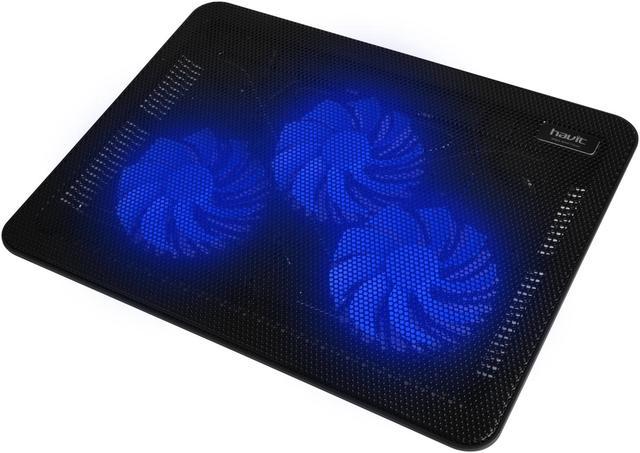
Havit HV-F2056 Laptop Cooler Cooling Pad
Pros
- Three 110mm fans at 1,000+ RPM provide 65 CFM airflow
- Under 1.6 lbs and the lightest option on this list
- Barely 1 inch thick and fits in a laptop bag
- USB-powered from your laptop, no external power needed
- Price is consistently under $25
Cons
- No height adjustment: flat design only
- Three USB 2.0 ports share bandwidth
- No foam seal, limited directed airflow
- Not ideal for heavy gaming workloads on modern RTX laptops
Price as of May 14, 2026 — see current price on Amazon.
The Havit HV-F2056 has over 44,000 Amazon reviews and a 4.4-star average. That's not a coincidence. It's the best ultra-budget, ultra-portable cooling pad on the market.
What it does well: it's thin enough to slip into a laptop bag without adding meaningful bulk, it's light enough to forget it's in there, and it powers off your laptop's USB port without needing its own cable. For travel, working at coffee shops, or keeping a college laptop from burning your legs, it does the job.
What it doesn't do: heroic thermal management. Three 110mm fans at 1,000 RPM generate less airflow than a single turbofan at 5,000 RPM. The flat design means cooling is ambient. It lifts your laptop for airflow rather than actively forcing air through vents. You'll see 5-10°C drops, not 20+.
That said, for most productivity laptops, older gaming laptops, or anyone who doesn't care about performance cooling and just wants something cheap and portable, it's hard to argue against $25 for this much convenience.
What to Look for in a Gaming Laptop Cooling Pad
Turbofan vs. Multi-Fan Design
This is the main fork in the road. Turbofan designs (llano V12, IETS GT500, Razer) use a single large-diameter fan spinning at high RPM with a foam gasket that seals against your laptop's vents. They direct airflow precisely and generate significantly more static pressure, meaning they push air through your laptop rather than just around it.
Multi-fan designs (Kootek, Havit) spread airflow across the whole base. Better for laptops with distributed vent patterns, worse for concentrated single-intake designs. Also generally quieter at equivalent cooling levels.
The rule of thumb: if your laptop throttles under gaming load, get a turbofan with foam seal. If you just want it to run cooler for everyday use, a multi-fan design is quieter and often good enough.
Laptop Size Compatibility
This matters more than people expect. A 17" cooling pad under a 14" laptop leaves most of the fans blowing at nothing. Check the specs before buying:
- 12"–17": Kootek 5-fan, Havit HV-F2056
- 13"–17.3": IETS GT500
- 15.6"–19": llano V12
- 14"–18" with adjustable frames: Razer Laptop Cooling Pad
Noise Levels
Turbofans are loud at max speed. The Razer hits 40+ dB, the llano claims 70 dB at peak. Variable speed controls help. Most people run turbofan pads at 60-70% of max speed, which drops temps by 15-20°C while keeping noise livable.
Multi-fan designs (Kootek, Havit) are much quieter, typically 20-30 dB at full speed. If you're in a shared office or recording audio, this matters.
USB Hub and Connectivity
Most pads include a USB hub. Check the version: USB 2.0 hubs (Kootek, Havit, llano V12) are fine for mice, keyboards, and charging phones. If you're plugging in external drives or USB 3.0 peripherals, you want a pad with USB 3.0 ports. The IETS GT500 has 3.0 on its hub ports.
Height Adjustment
Ergonomics are underrated. A cooling pad that tilts your laptop at 15-20 degrees puts the screen at a more comfortable viewing angle and improves keyboard feel. Kootek's 6-setting height adjustment is notably good for a budget pad. Razer's design has a fixed angle. Havit is flat.
Frequently asked questions
- Do laptop cooling pads actually work?
- Yes, with a caveat. Turbofan designs with foam seals (Razer, llano V12, IETS GT500) consistently deliver 15-25°C drops in GPU/CPU temps under gaming load in third-party testing. Multi-fan flat designs deliver 5-15°C. The performance difference translates directly to fewer thermal throttling events, which means more consistent frame rates.
- Will a cooling pad fix my laptop's thermal throttling?
- Often yes, but it depends on the cause. If your laptop throttles because it can't exhaust heat fast enough through its vents (most common cause), a turbofan pad that increases airflow through those vents helps significantly. If it throttles due to poor internal thermal paste or a blocked heatsink, the pad helps less. Repasting the CPU/GPU is a more involved fix for that scenario.
- Which cooling pad is best for a 17-inch gaming laptop?
- The llano V12 RGB or IETS GT500 are the best performance options for 17-inch gaming laptops. Both support up to 17.3-19 inches, use turbofan designs with foam seals, and cost around $50. The Razer Laptop Cooling Pad is the premium option if you want smart adaptive control and Synapse integration.
- Is the Razer Laptop Cooling Pad worth $169?
- For specific use cases, yes. The adaptive fan control, foam-sealed airtight chamber, and multi-frame compatibility are genuinely better than budget alternatives. But the llano V12 and IETS GT500 deliver 80-85% of the cooling performance at 30% of the price. Unless you want Synapse integration or the Razer aesthetic, the budget turbofans outperform the value equation.
- Can a cooling pad damage my laptop?
- No. Cooling pads reduce heat, which is generally better for component longevity. The foam seals on turbofan designs create suction, not pressure. They pull air through your vents rather than forcing it in, so there's no risk of pushing debris into the chassis. Just make sure the fan isn't blocking any USB ports or cables.
- Do cooling pads work with MacBooks?
- It depends on the MacBook model. MacBooks with bottom vents (older Intel models) benefit from turbofan cooling pads. Apple Silicon MacBooks (M1/M2/M3/M4) exhaust heat through the hinge area rather than the bottom, so cooling pads have minimal effect on them. The Razer Laptop Cooling Pad explicitly claims MacBook compatibility, which applies primarily to Intel-based models with bottom vents.
Bottom Line
For most gaming laptop owners, the llano V12 RGB ($49) is the right call. It brings turbofan performance with foam-sealed directed airflow at a price that doesn't require justification. If you're dealing with serious thermal throttling on a high-end rig and want something smarter, the Razer Laptop Cooling Pad is the premium answer. Tight budget and portability matter most? The Kootek 5-fan at $29 or the Havit HV-F2056 at $25 do the job for light-to-moderate gaming without drama. Your GPU's temperature shouldn't be the limiter on performance. It costs too little to fix that for it to be an ongoing problem.
How We Test
We score products by combining spec-level research, pricing history, trusted third-party benchmarks, and owner sentiment from high-signal sources.
- Performance and real-world value in the category this guide targets
- Price-to-performance and deal consistency over recent pricing windows
- Build quality, reliability patterns, and known long-term issues
- Recommendation refresh cadence to keep these picks current
Author
TheTechSearch Editorial Team
Independent product reviewers & PC builders
We test and compare real-world specs, price trends, and user feedback to recommend gear that actually makes sense to buy.