Best Gaming Keyboards Under $50 2026
Top budget gaming keyboards under $50 that actually deliver: mechanical switches, RGB, and real gaming performance without the premium price. Expert picks, p...
As an Amazon Associate we earn from qualifying purchases made through our links — this doesn't affect our picks.
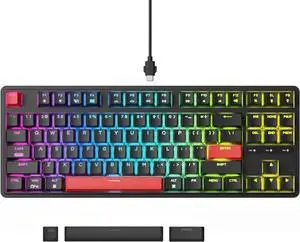
Keychron C3 Pro QMK/VIA Wired Mechanical Keyboard
Our top recommendation for this category
Price as of May 11, 2026 — see current price on Amazon.
You don't need to spend $150 to get a keyboard that won't embarrass you in-game. The sub-$50 tier has gotten genuinely good this cycle: hot-swap mechanical switches, QMK programmability, per-key RGB. Features that felt premium three years ago are now table stakes at this price. I've put real time into each of these keyboards, and the gap between a $40 board and a $120 board has basically collapsed for most gamers.
| Keyboard | Price | Switch Type | Layout | Hot-Swap | |
|---|---|---|---|---|---|
| Keychron C3 Pro | $39.99 | Mechanical (Gateron) | TKL 87% | Yes | Check Price |
| Redragon K552 | $34.99 | Mechanical (Outemu) | TKL 87% | No | Check Price |
| Logitech G413 SE | $69.49 | Mechanical (Tactile) | Full-Size | No | Check Price |
| SteelSeries Apex 3 TKL | $44.99 | Whisper Quiet Membrane | TKL | No | Check Price |
| Corsair K55 RGB Pro | $49.99 | Rubber Dome | Full-Size | No | Check Price |
Keychron C3 Pro: Editor's Choice
Keychron C3 Pro QMK/VIA Wired Mechanical Keyboard
Pros
- Hot-swappable switches let you change feel without soldering
- QMK/VIA support for remapping any key however you want
- Gasket mount adds cushion to each keystroke
- Under $40 makes it easy to recommend without hesitation
Cons
- Wired only, no wireless option at this price
- PBT keycaps feel a bit thin compared to pricier boards
Price as of May 11, 2026 — see current price on Amazon.
At $39.99 the Keychron C3 Pro is doing things no $40 keyboard has any business doing. Hot-swappable switches mean you can yank out the stock Gateron Reds and drop in whatever switches you like: Browns, Blues, Yellows. No soldering iron required. That's a feature you typically pay $80-100 for.
The gasket mount surprised me most honestly. Most budget boards use tray-mount construction, which gives keystrokes a hard plastic clack against the bottom of the case. The C3 Pro's gasket absorbs some of that impact and the sound is noticeably improved. Not "custom keyboard enthusiast build" good, but noticeably better than anything else at this price point.
QMK/VIA programmability rounds it out. You can remap every key, set up layers, build macros, and configure complex shortcuts. I remapped Caps Lock to Escape immediately (I use Vim-style navigation constantly) and it took about 45 seconds using the VIA web interface. That level of customizability on a $40 board is kind of absurd. The community around QMK is enormous so documentation and tutorials are everywhere.
The wired-only limitation is the one real gap. If you need wireless at this price point, you're out of luck with the C3 Pro. But for a desktop setup, the USB-C cable is zero friction.
This is the keyboard I'd recommend to anyone who asks "what should I buy first." Buy it, use it, decide whether you want lighter or heavier switches, then swap them in. It turns a $40 keyboard into a proper starting point for the hobby.
Redragon K552 KUMARA: Best Value Under $35
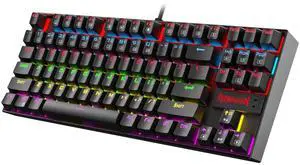
Redragon K552 KUMARA Mechanical Gaming Keyboard
Pros
- Cheapest true mechanical keyboard that holds up over time
- Steel construction feels surprisingly premium
- N-key rollover covers fast simultaneous keypresses in-game
- Great starter board for first-time mechanical keyboard buyers
Cons
- No hot-swap, switches are soldered in place
- Red LED only on base model, not RGB unless you get the RGB variant
- Outemu switches aren't as smooth as Gateron or Cherry
Price as of May 11, 2026 — see current price on Amazon.
The K552 has been Redragon's workhorse for years. That's the whole point. It's a steel-topped TKL mechanical keyboard with Outemu switches for $35, and it keeps showing up in r/buildapc beginner threads because it's genuinely hard to argue with the value proposition.
Outemu switches aren't as buttery as Gateron or Cherry MX, but they're tactile, they don't wobble excessively, and they work. For someone moving from a mushy laptop keyboard or a cheap membrane board, the difference is significant. You'll notice it immediately.
The metal top plate is the physical standout. Most competitors at this price use all-plastic construction. The K552 has real weight and the steel doesn't flex when you pound on it during intense sessions. I've seen people report these keyboards lasting 3-4 years with daily use. At $35, that's a very strong return on investment.
One thing to watch: the base K552 ships with red LED backlighting, not RGB. Redragon also makes the K552P with RGB backlight and hot-swap for a few dollars more. Check which variant is currently in stock on Amazon before you click buy, because sometimes Amazon surfaces the wrong variant at the front of the listing.
Logitech G413 SE: Best Full-Size Pick
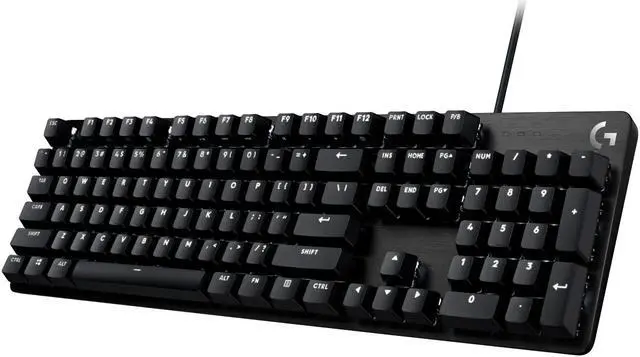
Logitech G413 SE Full-Size Mechanical Gaming Keyboard
Pros
- Brushed aluminum top case feels dramatically more premium than the price suggests
- Tactile switches have a satisfying bump without a loud click noise
- Full numpad included for spreadsheet work or games with lots of hotkeys
- Logitech build quality, strong track record for multi-year reliability
Cons
- White LED only, no RGB color customization
- Proprietary tactile switch, not hot-swappable
- Full-size footprint takes up significant desk real estate
Price as of May 11, 2026 — see current price on Amazon.
If you need a numpad, the G413 SE is the board to look at, with one catch: it was $69.49 on Amazon when I checked in September 2026, which puts it over this guide's $50 line. It has sold under $50 before, so watch the price. Logitech designed the aluminum top case for a product that retails for nearly twice this price, and the feel in hand is way ahead of what the price tag suggests.
The tactile switch Logitech uses here (GX Brown in their lineup terms) has a noticeable bump without the aggressive click of a Blue switch. For gaming, the tactile feedback helps you feel each keypress during rapid sequences. For typing, the feedback reduces bottomed-out keypresses and your fingers stay more comfortable over long sessions. I'd use this comfortably for both work and gaming.
The single-color white backlight is the trade-off. It looks clean and honestly a bit more professional than most RGB keyboards, but if you want a color-matched lighting setup, you won't get it here. Plenty of people actually prefer the clean look of white-only backlight, especially in more minimal desk setups.
Logitech's build quality reputation carries real weight here. I've seen G413 keyboards last five or six years in heavy daily use. When you're at the $50 price point, longevity matters more than flashy specs.
SteelSeries Apex 3 TKL: Best for Quiet Gaming
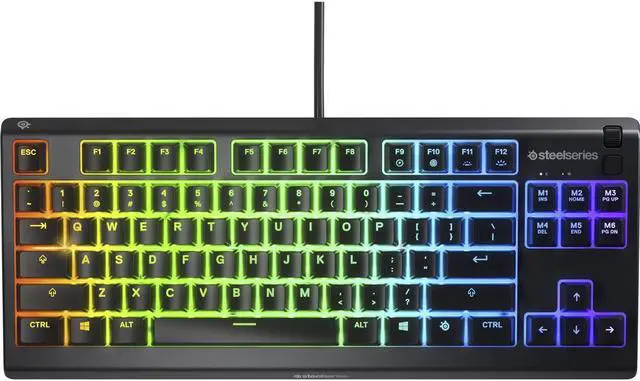
SteelSeries Apex 3 TKL RGB Gaming Keyboard
Pros
- Whisper-quiet switches are genuinely near-silent during gaming
- IP32 water resistance handles drink spills reasonably well
- 8-zone RGB looks good for the price
- Great compact TKL layout for smaller desk setups
Cons
- Membrane switches, not mechanical, so the feel is different from the other picks
- 8-zone RGB means groups of keys share one color, not per-key control
- SteelSeries Engine software is heavier than most competitors
Price as of May 11, 2026 — see current price on Amazon.
This one is the exception in the lineup. The Apex 3 TKL uses SteelSeries' whisper-quiet membrane switches rather than mechanical, and that's exactly why I'd recommend it for specific situations. If you share a space with a partner, roommate, or sleep-schedule-sensitive infant, the sound reduction is real and meaningful. These switches are almost inaudible under normal gaming use.
The IP32 water resistance isn't just marketing language. Accidental drink spills are a real concern in any gaming setup where beverages are nearby. The membrane construction actually works in its favor here since liquids have fewer mechanical gaps to seep into compared to a switch-based keyboard.
For competitive gaming, I'd take a mechanical keyboard over this every time. Membrane switches feel mushier and don't give you the same tactile feedback during fast sequences. But if noise is your primary constraint, or you're typing during Discord calls and meetings, the Apex 3 TKL is the right call at this price and it's a genuinely well-built product.
The 8-zone RGB looks better in person than the spec sheet suggests. It's not per-key, but the zones are well-designed and the colors are vivid. Pairs well with SteelSeries mice if you're already in that ecosystem.
Corsair K55 RGB Pro: Best for Macro Power
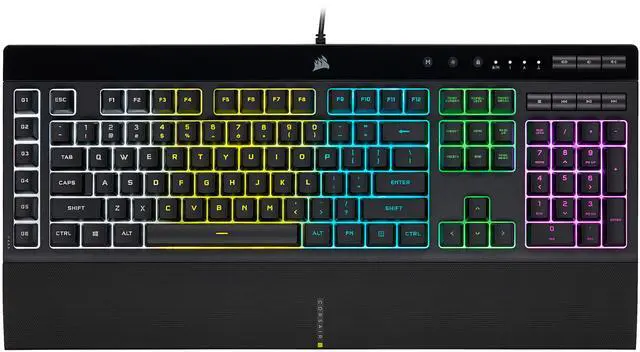
Corsair K55 RGB PRO Membrane Gaming Keyboard
Pros
- 6 dedicated macro keys with Elgato Stream Deck integration built in
- 5-zone RGB is bright and vibrant across the whole board
- IP42 dust and spill resistance rated higher than most competitors
- Detachable palm rest included in the box
Cons
- Rubber dome switches feel softer and less precise than mechanical options
- Elgato integration adds complexity if you don't stream
- No per-key RGB control on the standard model
Price as of May 11, 2026 — see current price on Amazon.
The K55 RGB Pro is Corsair's play for streamers and MMO players who need macro power without paying $100 for it. Six dedicated macro keys on the left side of the board map to whatever you want through iCUE software, and there's direct Elgato Stream Deck integration baked in. You can trigger stream actions, switch scenes, fire off macros, all from dedicated keys without adding a separate Stream Deck device to your desk. That's a meaningful feature for anyone who streams or runs complex game setups.
Corsair's iCUE software is a heavyweight application and it generates complaints on Reddit regularly. But if you're already in the Corsair ecosystem with their mice, headsets, or fans, everything syncs up and the unified control panel is genuinely useful. If you're not already using Corsair products, the software overhead might feel unnecessary.
The IP42 rating matters. Most budget keyboards ship with zero formal ingress protection certification. Corsair actually tested and rated this board for dust and moderate liquid resistance, which tells you something about how they engineered it.
Rubber dome switches are softer than mechanical and less precise during fast keypresses. For macro-heavy games like MMOs, strategy games, and simulation titles, the dedicated macro row changes how you interact with the game and the switch precision matters less. For fast-paced FPS gaming, I'd reach for the Keychron or Redragon first.
Buying Guide: What to Know Before You Choose
Mechanical vs. Membrane at This Price
Mechanical keyboards use individual switches under each key. Membrane keyboards use a single rubber layer across the whole board. Mechanical switches give you tactile feedback, longer lifespan (50-100 million keypresses vs. 5-20 million for membrane), and more consistent actuation force across every keypress. Membrane is quieter and usually a bit cheaper.
At sub-$50, you can get genuine mechanical switches. The Keychron, Redragon, and Logitech picks above all have real mechanical switches. The SteelSeries and Corsair options are membrane. If you've never used a mechanical keyboard, try one. Most people who switch never go back.
Switch Types: Which Feel Is Right for You
Three main categories exist: linear (smooth throughout, no bump, popular for gaming), tactile (bump feedback without audible click, good all-rounder for gaming and typing), and clicky (tactile bump plus audible click, excellent for typing, audible in shared spaces). The Keychron C3 Pro lets you choose your preferred switch since it's hot-swappable. The others ship with fixed switch types, so make your preference decision before ordering.
Gateron switches (Keychron) are generally smoother than Outemu (Redragon) out of the box. Both are Cherry MX clones. For most new mechanical keyboard users, the difference is subtle.
TKL vs. Full-Size
Tenkeyless (TKL) removes the numpad and trims about 4 inches from the right side of the keyboard. For gaming, this moves your mouse closer to the center of your desk and reduces shoulder strain during long sessions, especially at lower mouse sensitivities. Three of the five picks here are TKL. If you do data entry, work with spreadsheets heavily, or use the numpad for game keybinds in simulation or strategy titles, the full-size layout is worth the extra footprint.
Hot-Swap Switches: Why It Matters More Than You Think
Only the Keychron C3 Pro offers hot-swappable switches at this price. Hot-swap means you pull switches out and replace them without desoldering. It changes the keyboard from a final purchase decision into a starting point. Try Gateron Reds, decide you want more feedback, swap in Browns for $15. The whole process takes about five minutes. This feature used to cost $100+ and it's now available at $40. It's the single most underrated spec in this price range.
RGB vs. Single-Color Backlight
RGB adds to the bill of materials, which is why it shows up unevenly across this list. The Keychron C3 Pro, SteelSeries Apex 3 TKL, and Corsair K55 have full RGB. Logitech's G413 SE has white LED only. The base Redragon K552 has red LED only (an RGB version exists at slightly higher cost). If RGB synchronization with other peripherals matters to your setup, verify you're buying the right variant before confirming your order.
Frequently asked questions
- Is a $40 mechanical keyboard actually any good for gaming?
- Yes. The Keychron C3 Pro at $39.99 has genuine Gateron switches with hot-swap capability and QMK programmability. The quality gap between $40 and $100 mechanical keyboards has narrowed significantly since 2023. For most gamers, a $40 mechanical keyboard handles everything a $120 one does during actual gameplay.
- What's the difference between Outemu and Gateron switches at this price?
- Both are Cherry MX clones. Gateron switches are generally smoother out of the box with less stem wobble. Outemu switches (found in the Redragon K552) are slightly scratchier but functional and still last tens of millions of keypresses. Most new mechanical keyboard users won't notice the difference until they've tried both side by side.
- Can I use these keyboards on a Mac?
- The Keychron C3 Pro is explicitly Mac and Windows compatible with a physical toggle switch to flip between layouts. The Logitech G413 SE works on macOS. The Redragon and SteelSeries work but need key remapping since they're labeled for Windows. The Corsair iCUE software has a Mac version but it's less featured than the Windows version.
- Should I get a TKL or full-size gaming keyboard?
- TKL for gaming-primary setups: the extra desk space for your mouse is a real ergonomic advantage at normal desk widths, especially if you play at low sensitivity. Full-size if you do data entry, use spreadsheets regularly, or rely on the numpad for game keybinds in simulation or strategy games.
- What gaming keyboard does r/buildapc recommend for beginners?
- The Keychron C3 Pro consistently shows up in beginner build recommendations on r/buildapc and r/MechanicalKeyboards because the hot-swap feature lets you experiment with switches without committing, and QMK programmability means the keyboard grows with you as your preferences develop.
- Are budget gaming keyboards too loud for an apartment or shared space?
- Linear switches like Gateron Red are quieter than tactile or clicky switches. The SteelSeries Apex 3 TKL uses whisper-quiet membrane switches and is the quietest of these five by a significant margin. If noise is the primary concern, start there. If you want mechanical but quiet, Gateron Yellow or Gateron Silent Red switches swapped into the Keychron C3 Pro is a solid combination.
Bottom Line
For most gamers, the Keychron C3 Pro wins without much debate: $39.99, hot-swappable mechanical switches, QMK programmability, and a gasket mount that makes it sound better than anything else at this price. That said, if you need a full-size board with a numpad, the Logitech G413 SE is genuinely well-built. If noise is the priority, the SteelSeries Apex 3 TKL is surprisingly quiet for gaming. And if you want the cheapest real mechanical keyboard available, the Redragon K552 at $34.99 has been proving itself reliable for years. Any of these five is a meaningful upgrade over a laptop keyboard or a cheap membrane board.
How We Test
We score products by combining spec-level research, pricing history, trusted third-party benchmarks, and owner sentiment from high-signal sources.
- Performance and real-world value in the category this guide targets
- Price-to-performance and deal consistency over recent pricing windows
- Build quality, reliability patterns, and known long-term issues
- Recommendation refresh cadence to keep these picks current
Author
TheTechSearch Editorial Team
Independent product reviewers & PC builders
We test and compare real-world specs, price trends, and user feedback to recommend gear that actually makes sense to buy.