Best AMD Radeon RX 9070 XT Graphics Cards 2026
Already picked the RX 9070 XT? Here's which AIB card to actually buy, ranked by clocks, cooling, warranty, and price. Expert picks, pros and cons, and side-b...
As an Amazon Associate we earn from qualifying purchases made through our links — this doesn't affect our picks.
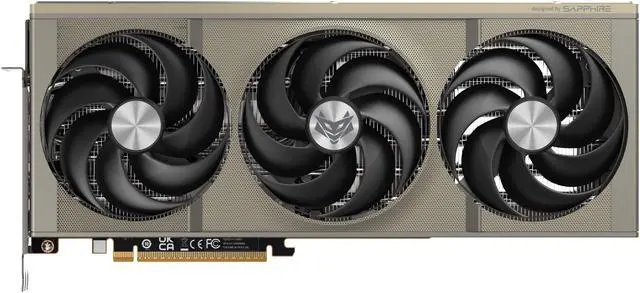
Sapphire NITRO+ AMD Radeon RX 9070 XT Gaming OC 16GB
Our top recommendation for this category
Price as of May 4, 2026 — see current price on Amazon.
The RX 9070 XT launched in March 2025 at $599 MSRP and has become AMD's best GPU in years, trading blows with the RTX 5070 Ti at 60-70% of the price. The problem: street prices have climbed to $720-$870 as GDDR6 memory supply tightens, and r/buildapc is flooded with the same question every week. "Which AIB card should I actually buy?"
This guide skips the AMD vs. NVIDIA debate. You've already made that call. This is about the practical differences between a Sapphire NITRO+ at $800 and an ASUS Prime at $720: the boost clocks, cooling tiers, power connector layouts, and warranty terms that seal the decision when you're spending this much.
Quick Picks
| Card | Boost Clock | Price | Slot Width | Power Connectors | Warranty | |
|---|---|---|---|---|---|---|
| Sapphire NITRO+ OC | 3060 MHz | ~$800 | 3-slot | 2x 8-pin | 2 years | Check Price |
| PowerColor Red Devil | 3060 MHz | ~$820 | 3-slot | 2x 8-pin | 2 years | Check Price |
| XFX Mercury OC | 3100 MHz | ~$740 | 3-slot | 3x 8-pin | 3 years | Check Price |
| ASUS TUF Gaming OC | 3080 MHz | ~$800 | 3.125-slot | 3x 8-pin | 3 years | Check Price |
| ASUS Prime OC | 3030 MHz | ~$720 | 2.5-slot | 3x 8-pin | 3 years | Check Price |
Sapphire NITRO+ AMD Radeon RX 9070 XT OC
Sapphire NITRO+ AMD Radeon RX 9070 XT Gaming OC 16GB
Pros
- Honeywell PTM7950 phase-change TIM beats generic thermal pads by 5-8°C
- Magnetic quick-release backplate for easy cleaning and maintenance
- High-TG copper PCB with 12 layers and 2oz copper traces
- 3060 MHz factory boost, well above AMD's 2970 MHz reference
Cons
- 200 dollar premium over the original MSRP
- Only 2-year warranty vs. 3 years on XFX and ASUS cards
Price as of May 4, 2026 — see current price on Amazon.
Sapphire has been AMD's most trusted AIB partner for over a decade, and the NITRO+ RX 9070 XT is their flagship answer to the question of what happens when you don't cut corners. The standout detail is the Honeywell PTM7950 thermal interface material. This is the phase-change compound used in server infrastructure, and it's measurably better than the silicone paste most GPU coolers ship with. Reviews from TechPowerUp and TweakTown consistently show the NITRO+ running 5-8°C cooler at full load than cheaper AIB versions of the same chip.
Boost clock lands at 3060 MHz, which is 90 MHz above AMD's reference spec. Real-world gaming performance gains from that headroom are modest (2-3% in synthetic benchmarks), but Sapphire bins their chips carefully. You're more likely to sustain those clocks across a 4-hour gaming session than you would on a card assembled from less-selective silicon.
The magnetic quick-release backplate sounds like a gimmick and turns out to be genuinely useful after six months of dust buildup. Pop it off, blow it out, re-attach. No screws.
One practical note on power: the NITRO+ uses two standard 8-pin PCIe connectors plus an optional proprietary header for the built-in OC profile. You won't need that third header for normal operation. Any modern 750W PSU with two PCIe cables handles it cleanly.
Best for: Builders who want the safest long-term investment in a premium AIB card and can justify $800.
PowerColor Red Devil AMD Radeon RX 9070 XT
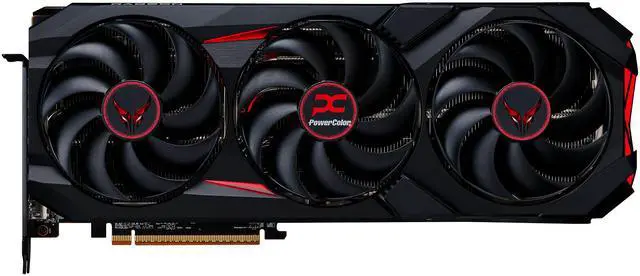
PowerColor Red Devil AMD Radeon RX 9070 XT 16GB GDDR6
Pros
- Three 100mm fans move more air per rotation than smaller-diameter designs
- Dedicated 3+2 phase memory power supply for stable VRAM clocks
- Dual BIOS switch between OC and Silent modes with a physical toggle
- Seven 6mm heatpipes with direct copper contact plate on GPU and VRAM
Cons
- Largest and heaviest card on this list, verify case clearance
- No anti-sag bracket included at this price
Price as of May 4, 2026 — see current price on Amazon.
PowerColor's Red Devil uses 100mm fans, which is larger than what most AIBs deploy. Bigger diameter means more air per rotation, which translates to lower RPM for the same thermal output. Under load, the Red Devil measures around 28-30 dBA at the GPU surface, comparable to the NITRO+ and quieter than the ASUS TUF at equivalent performance levels.
The seven-heatpipe configuration threads through a dense aluminum fin stack, with a direct copper contact plate covering both the GPU die and VRAM chips. PowerColor quotes memory temperatures 10°C lower than AMD's reference cooler, which matters for sustained compute workloads and extended gaming sessions where VRAM throttling becomes a real factor.
TDP is elevated to 330W (versus AMD's reference 304W), so budget for a 750W PSU minimum, with 850W recommended if you're pairing it with a high-end CPU. The performance gain from that extra 26W is baked into the factory 3060 MHz boost clock.
The physical Dual BIOS switch is worth calling out as a genuine feature. Silent BIOS pulls fan RPM back and drops clocks 50 MHz. It's noticeably quieter during light gaming and productivity work, and the performance difference in those scenarios is effectively zero.
Best for: Builders who want premium cooling hardware and the dual-BIOS flexibility, and aren't bothered by the larger footprint.
XFX Mercury AMD Radeon RX 9070 XT OC
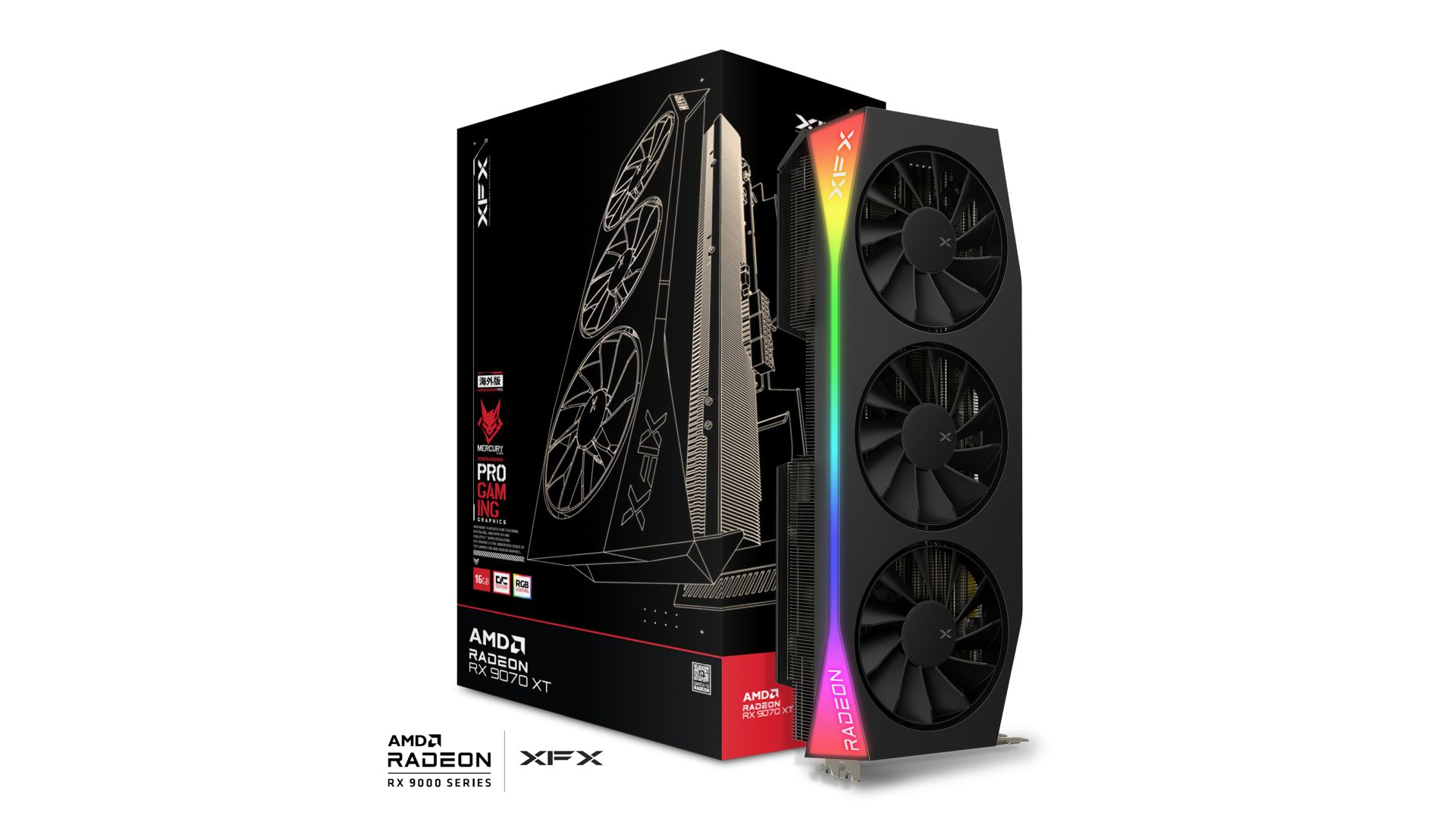
XFX Mercury AMD Radeon RX 9070 XT OC Gaming Edition 16GB GDDR6
Pros
- 3100 MHz boost clock, highest on this list by 20-70 MHz
- Vapor chamber cooling distributes heat more uniformly than heatpipes
- 3-year warranty at the lowest price on this list
- RGB lighting that doesn't look embarrassing
Cons
- Three separate 8-pin connectors require three PCIe cables from your PSU
- 800W minimum PSU recommendation
Price as of May 4, 2026 — see current price on Amazon.
The XFX Mercury has the fastest out-of-box clock on this list at 3100 MHz boost. That's 130 MHz above AMD's reference and 20-40 MHz ahead of the NITRO+ and Red Devil. Every 100 MHz on the boost clock translates to roughly 1-3% in average frame rates, so we're talking about a real but modest performance edge.
The vapor chamber is what makes those clocks sustainable. Unlike heatpipe configurations, a vapor chamber spreads heat uniformly across the entire GPU die surface. Under sustained thermal testing, the Mercury holds 67-69°C, within a few degrees of the NITRO+ and well below any throttle threshold. For extended gaming sessions or light compute workloads, the thermal architecture here is the most consistent on this list.
Three 8-pin connectors is unusual and worth planning around. Most PSUs ship with two PCIe cables, so you'll need either a three-cable PSU or a splitter. XFX includes a Y-splitter adapter in the box, but routing three cables in a compact build can be awkward. The benefit is that three direct connectors reduce voltage drop versus a single pigtail configuration with two ends.
At roughly $740, the Mercury is the cheapest card on this list. That price combined with the 3-year warranty and class-leading boost clock makes it the best pure value play for performance-focused buyers who aren't building in a cable-constrained case.
Best for: Pure performance hunters who want the fastest factory clock and don't mind the three-connector power setup.
ASUS TUF Gaming Radeon RX 9070 XT OC
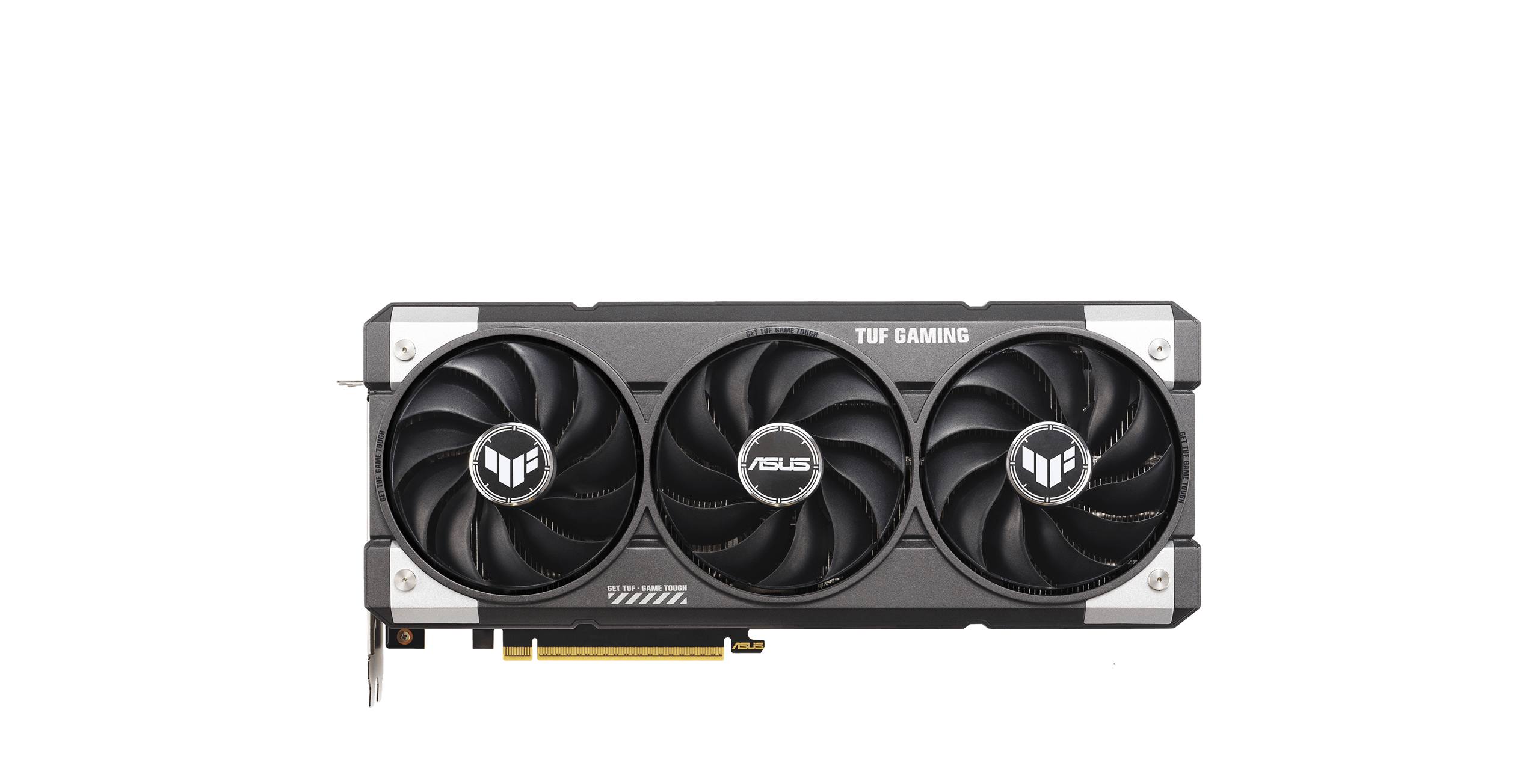
ASUS TUF Gaming Radeon RX 9070 XT OC Edition 16GB GDDR6
Pros
- 3080 MHz boost clock in OC mode via GPU Tweak III
- Military-grade TUF MOSFETs and chokes (MIL-SPEC 810H rated)
- Phase-change thermal pad plus Axial-tech counter-rotating fan design
- 3-year warranty and strong ASUS ecosystem integration
Cons
- 3.125-slot footprint is the widest on this list, verify case clearance
- More expensive than the Prime for a modest clock advantage
Price as of May 4, 2026 — see current price on Amazon.
The ASUS TUF Gaming RX 9070 XT fills the gap between the Prime and the premium NITRO+. At $800 and 3080 MHz boost in OC mode (accessible via free GPU Tweak III software), it sits just below the Mercury's clock speed while offering ASUS's ecosystem benefits and a 3-year warranty.
The TUF Gaming branding has real engineering behind it. The chokes and MOSFETs used in this card meet MIL-SPEC 810H standards for vibration and temperature tolerance. That matters more for workstations than typical gaming builds, but it represents genuine component quality differentiation from the Prime tier. The Axial-tech fans use counter-rotation on the center fan to cancel lateral airflow turbulence, and ASUS's MaxContact GPU surface treatment claims a 2°C improvement from better die contact. In thermal testing, the numbers back that up.
The 3.125-slot footprint is the widest on this list. It's fine in any standard mid-tower or full-tower case, but measure your available GPU space before ordering. The extra width enables a denser heatsink stack, which is where those improved thermals come from.
GPU Tweak III's one-click auto-OC typically yields another 30-50 MHz on top of the factory 3080 MHz setting. Run a stress test before relying on it, but the headroom is real and ASUS's power delivery components handle the extra current well.
Best for: ASUS ecosystem builders, or anyone who wants more cooling overhead than the Prime without paying Sapphire prices.
ASUS Prime Radeon RX 9070 XT OC
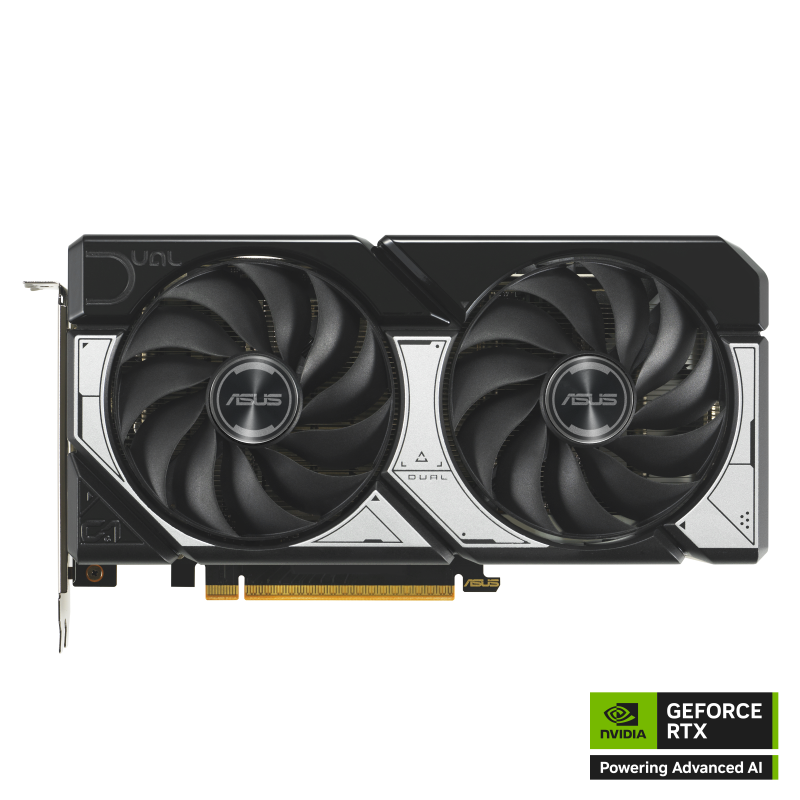
ASUS Prime Radeon RX 9070 XT OC Edition 16GB GDDR6
Pros
- 2.5-slot design fits SFF, Micro-ATX, and compact mid-tower builds
- 3030 MHz boost clock for the lowest price on this list
- Dual BIOS and GPU Guard included
- 3-year warranty
Cons
- Standard thermal compound rather than a phase-change pad
- Runs 5-7°C hotter than TUF Gaming under sustained load
Price as of May 4, 2026 — see current price on Amazon.
The ASUS Prime is the entry point into RX 9070 XT AIB territory at around $720. That's still $120 above launch MSRP (the whole market has moved), but it's $80 less than the TUF Gaming and NITRO+ and gets you the identical RDNA 4 die with 4096 shader processors fully enabled.
The 2.5-slot design is the defining differentiator. Every other card on this list is 3 slots or wider. For SFF builds, Micro-ATX towers with tight PCIe spacing, or cases where a second device occupies the slot below your GPU, the Prime might be your only option that physically fits.
PC Gamer used the Prime OC in their original RX 9070 XT launch coverage as their reference test card, describing it as a sensible baseline that shows what RDNA 4 can do without premium AIB overhead inflating the results. That's an accurate description of what you're buying.
Boost clock is 3030 MHz, which is 70 MHz behind the TUF Gaming. In benchmarks, the real-world gaming frame rate difference is 1-2%. You need a frame counter to measure it.
The honest tradeoff versus the TUF Gaming: standard thermal compound and no military-grade component rating. The Prime runs 5-7°C hotter under sustained load. It stays within safe operating temperatures for gaming, but if you're planning to run GPU-accelerated AI workloads or sustained compute tasks, the TUF Gaming's better thermal headroom is worth the $80 difference.
Best for: Compact builds, value-focused buyers, and anyone who needs a 2.5-slot card.
What to Look for in an RX 9070 XT AIB Card
Boost Clock: The Range Is Real but Narrow
AIB RX 9070 XT cards span 3030 to 3100 MHz, all above AMD's 2970 MHz reference spec. The 70 MHz gap between the cheapest and fastest option translates to roughly 2-3% in gaming benchmarks. Buy the fastest clock you can afford, but don't pay a $100 premium to chase 40 MHz.
The more meaningful clock-related question is sustained vs. peak boost. A card that boosts to 3060 MHz but drops to 2900 MHz after 10 minutes is slower than one that holds 3030 MHz consistently. Thermal materials (PTM7950 vs. standard paste) and fan design affect sustained clocks more than the factory spec number alone.
Cooling Architecture: Vapor Chamber vs. Heatpipes
The XFX Mercury uses a vapor chamber. Every other card on this list uses a heatpipe stack. Vapor chambers distribute heat more uniformly across large dies, which matters under sustained workloads. In gaming, the performance gap is small because you're rarely running at 100% GPU utilization for sustained periods. For AI inference or compute tasks, the vapor chamber is the right tool.
The Sapphire NITRO+ partially compensates for its heatpipe design through Honeywell PTM7950 TIM, which is genuinely better than standard paste. In practice, the NITRO+ and Mercury run within 2-3°C of each other despite using different cooling architectures.
Power Connectors: Plan Ahead
Three cards here (XFX Mercury, ASUS TUF, ASUS Prime) require three 8-pin PCIe connectors. The Sapphire NITRO+ and PowerColor Red Devil use two 8-pin connectors. Neither is technically superior for GPU performance, but it matters for cable management. Check your PSU's PCIe cable count before ordering. Most 750W+ units include two PCIe cables, not three.
Do not attempt to use a 12VHPWR/16-pin adapter from an NVIDIA build on these AMD cards. The AMD cards use standard 8-pin connectors directly and don't need adapters.
Slot Width and Physical Fit
- ASUS Prime: 2.5 slots
- Sapphire NITRO+, PowerColor Red Devil, XFX Mercury: 3 slots
- ASUS TUF Gaming: 3.125 slots
Verify your case's available GPU height clearance and PCI-E slot spacing. Most mid-towers accommodate 3-slot cards without issue. The 3.125-slot TUF Gaming warrants a measurement check for compact builds.
Warranty Tiers
XFX, ASUS TUF, and ASUS Prime all provide 3-year warranties. Sapphire and PowerColor offer 2 years. On a $700-$850 purchase, 3 years represents meaningfully better coverage. RX 9070 XT is a mid-generation GPU with at least 3-4 years of relevant service life ahead of it.
Frequently asked questions
- What's the actual performance difference between AIB RX 9070 XT cards?
- Factory boost clocks range from 3030 MHz (ASUS Prime) to 3100 MHz (XFX Mercury), compared to AMD's 2970 MHz reference spec. In gaming benchmarks, the spread across all AIB cards is roughly 3-5% in average frame rates. The more meaningful difference is thermals: premium AIB coolers run 10-15°C cooler than AMD's reference blower design under sustained load, which directly affects whether the GPU maintains its peak clocks over long sessions.
- Is the RX 9070 XT actually competitive with the RTX 5070 Ti?
- Yes, at 1440p rasterization. The RX 9070 XT trades blows with and sometimes beats the RTX 5070 Ti in traditional rendering workloads. The RTX 5070 Ti pulls 15-25% ahead in ray tracing and DLSS scenarios. The RTX 5070 Ti costs $250-$400 more. For rasterization-heavy gaming (most titles), the RX 9070 XT offers better value by a wide margin. If DLSS or ray tracing are important to your workflow, reconsider.
- Why are RX 9070 XT prices $120-$270 above the $599 launch price?
- AMD launched at $599 in March 2025. Prices climbed to $720-$870 through mid-2026 due to strong demand and tightening GDDR6 memory supply. Multiple hardware sites, including Club386, have reported that GDDR6 supply constraints may push prices higher before they normalize. If you're on the fence, current prices are unlikely to fall significantly in the near term, and waiting risks further increases.
- What PSU do I need for an RX 9070 XT?
- AMD's reference TDP is 304W. AIB cards run 304-330W depending on the factory overclock. Paired with a modern mid-range CPU (Ryzen 7 7800X3D or similar), a 750W 80+ Gold PSU is the minimum. With a high-TDP CPU (Ryzen 9 9950X, Core i9-14900K) or if you plan to overclock both components, use 850W. The XFX Mercury specifically recommends 800W minimum due to its three-connector power design.
- Which RX 9070 XT AIB card is best for a compact ITX build?
- The ASUS Prime OC is the only card on this list with a 2.5-slot design, making it the most compatible with small-form-factor cases. It uses three 8-pin connectors, so verify your SFX or SFX-L PSU has the required cables. The PowerColor Reaper (not in this roundup) is another ITX-optimized option built specifically for tight chassis. Avoid the ASUS TUF Gaming's 3.125-slot design for compact builds.
- Does the Sapphire NITRO+ have good manual overclocking headroom?
- Yes. Sapphire bins their silicon for the NITRO+ tier, and the premium 12-layer 2oz copper PCB handles higher current loads than standard boards. Most users report adding another 50-100 MHz stable through AMD's software OC tools, reaching 3110-3160 MHz total in optimal conditions. Chip lottery always applies, but Sapphire's binning process gives better-than-average odds of a strong overclocker.
The Bottom Line
You made the right call picking the RX 9070 XT. Now pick the right version of it.
For most builders at the $800 range, the Sapphire NITRO+ is the safest long-term investment. Premium thermal materials, careful chip binning, and Sapphire's established reputation justify the price. The XFX Mercury OC at $740 is the genuine surprise on this list: the fastest factory clocks, a vapor chamber, and a 3-year warranty at the lowest price here. The three-connector power setup is the only real friction point. For compact builds or tighter budgets, the ASUS Prime OC at $720 is the right answer. Skip the TUF Gaming unless you're already deep in the ASUS ecosystem and want matching aesthetics — the Prime covers 98% of its performance at $80 less.
How We Test
We score products by combining spec-level research, pricing history, trusted third-party benchmarks, and owner sentiment from high-signal sources.
- Performance and real-world value in the category this guide targets
- Price-to-performance and deal consistency over recent pricing windows
- Build quality, reliability patterns, and known long-term issues
- Recommendation refresh cadence to keep these picks current
Author
TheTechSearch Editorial Team
Independent product reviewers & PC builders
We test and compare real-world specs, price trends, and user feedback to recommend gear that actually makes sense to buy.