Best 60% Gaming Keyboards 2026
The best 60% keyboards for competitive gaming in 2026: rapid trigger hall effect boards, wireless options, and the safe rapid trigger pick. Expert picks, pro...
As an Amazon Associate we earn from qualifying purchases made through our links — this doesn't affect our picks.
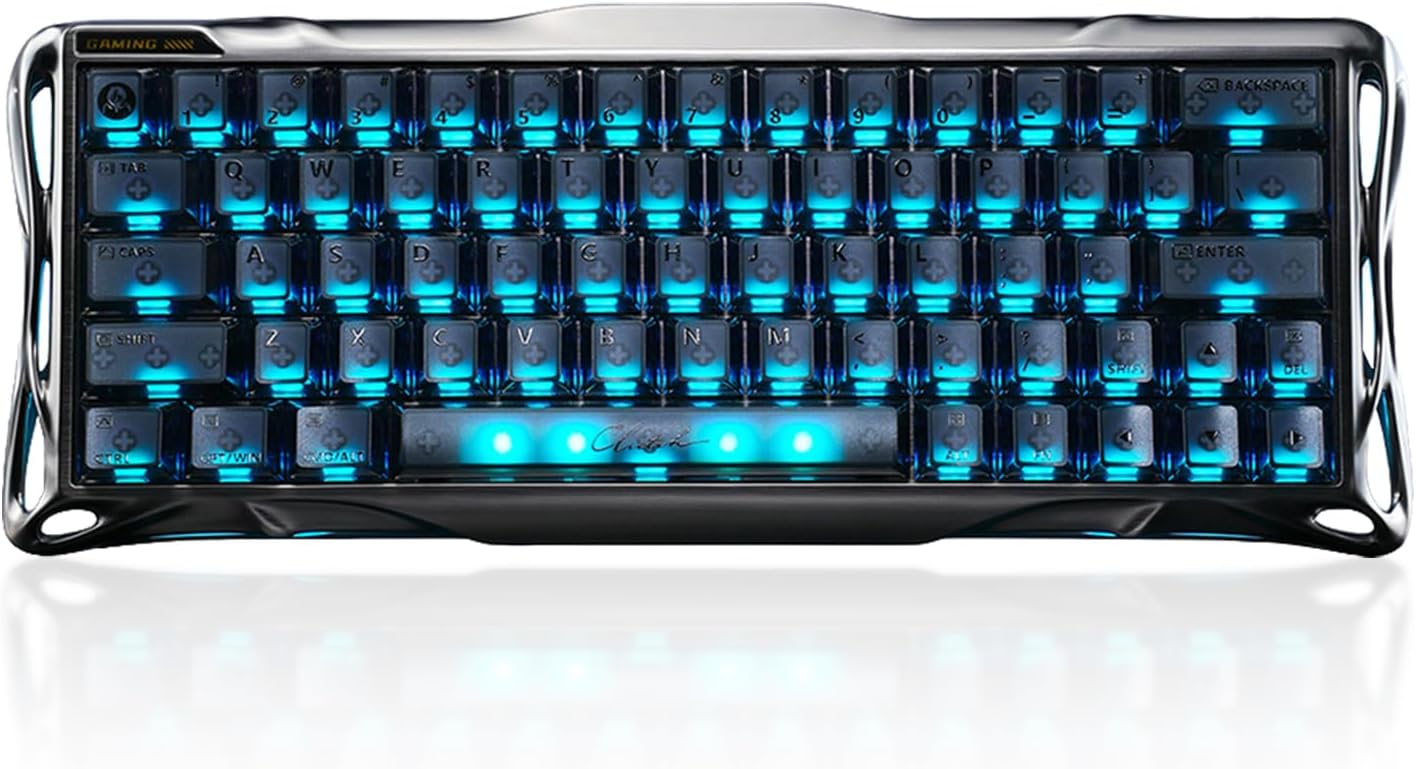
GravaStar Mercury V60 Pro 60% HE Magnetic Gaming Keyboard
Our top recommendation for this category
Price as of May 21, 2026 — see current price on Amazon.
In this guide
- GravaStar Mercury V60 Pro: The 8K Hall Effect Board You Can Actually Buy
- Logitech G PRO X 60 Lightspeed: Tournament Wireless Done Right
- Razer Huntsman V3 Pro Mini: The Safe Rapid Trigger Pick
- MONSGEEK FUN60 Ultra: 8K Polling and Rapid Trigger, Wireless
- A note on the Royal Kludge RK61 Plus
- How to Choose: What Actually Matters in a 60% Keyboard
- Bottom Line
Professional VALORANT players don't use full-size keyboards. Most of them don't even use TKL. The 60% format (no function row, no arrow keys, just the core 61-key grid) took over the competitive FPS scene somewhere around 2023, and in 2026 it's basically the default for anyone serious about CS2 or ranked play.
That said, a 60% keyboard isn't for everyone, and picking the right one means understanding the tradeoffs. Some of these boards are purpose-built for rapid trigger and adjustable actuation. Others prioritize wireless for the tournament traveler. And a few genuinely solid options come in under $60. This guide covers the best of each.
| Keyboard | Price | Switch Type | Polling Rate | Rapid Trigger | Wireless | |
|---|---|---|---|---|---|---|
| GravaStar Mercury V60 Pro | $199.95 | Hall Effect (magnetic) | 8,000Hz | Yes (0.005mm) | Not stated | Check Price |
| Logitech G PRO X 60 | $109.98 | GX Optical | 1,000Hz | No | Yes (LIGHTSPEED) | Check Price |
| Razer Huntsman V3 Pro Mini | $138.99 | Analog Optical Gen 2 | 1,000Hz | Yes (0.1mm) | No | Check Price |
| MONSGEEK FUN60 Ultra | $149.99 | TMR Magnetic | 8,000Hz | Yes (0.01mm) | Yes (multi-mode) | Check Price |
GravaStar Mercury V60 Pro: The 8K Hall Effect Board You Can Actually Buy
GravaStar Mercury V60 Pro 60% HE Magnetic Gaming Keyboard
Pros
- True 8,000Hz polling with 0.125ms latency, per the listing
- Dynamic rapid trigger with 0.005mm adjustable actuation
- Full aluminum frame
- Hall effect magnetic switches, so nothing wears at the contact point
Cons
- $199.95 is the most expensive board in this guide
- Wireless is not stated on the listing, so treat it as a desk board
- Newer brand with a shorter track record than Razer or Logitech in pro play
Price as of May 21, 2026 — see current price on Amazon.
First, the elephant in the room. The Wooting 60HE+ held this slot, and it's still the board at the center of every "what keyboard do pros use" thread on r/ValorantCompetitive. But every Wooting listing on Amazon is now unavailable, and the 60HE v2 that replaced it is sold direct from Wooting only. We don't recommend what you can't buy through the link, so it's out of this guide.
The GravaStar Mercury V60 Pro is the in-stock board that matches the spec sheet Wooting made famous. Working from the Amazon listing: hall effect magnetic switches, dynamic rapid trigger with actuation adjustable in 0.005mm steps, true 8,000Hz polling at 0.125ms latency, and a full aluminum frame. That's the same 8K-polling hall effect recipe, with a finer actuation step than the 0.1mm the Wooting advertised.
The honest caveats: the listing doesn't state wireless, so treat it as a wired desk board, and GravaStar doesn't have Wooting's pro-scene track record or Wootility's polish. If you want proven rapid trigger from a brand with years of support behind it, the Razer below is the safer buy. If you want the 8K hall effect spec on your desk today, this is the one that's actually available.
Logitech G PRO X 60 Lightspeed: Tournament Wireless Done Right

Logitech G PRO X 60 Lightspeed Gaming Keyboard
Pros
- LIGHTSPEED wireless feels genuinely wired in latency
- 65-hour battery life
- Includes hard carry case
- Dual-shot PBT keycaps hold up well over time
Cons
- No rapid trigger, which feels dated for competitive play in 2026
- 1,000Hz polling (not 8K)
- Only makes sense at its current $109.98 street price, not the $179.99 launch price
Price as of May 21, 2026 — see current price on Amazon.
Logitech designed the G PRO X 60 alongside more than 70 professional esports athletes, and it shows. The LIGHTSPEED 2.4GHz connection delivers 1ms wireless response that, in practice, you cannot distinguish from wired. The 65-hour battery life means you're charging this thing maybe once a week. And it ships with a hard carry case, which is actually useful when you're moving between setups.
The catch is that rapid trigger didn't make the cut. As of mid-2026, this is the PRO X 60's biggest weakness. The GravaStar and Razer boards both have adjustable actuation and rapid trigger; the Logitech has GX optical switches that work well but don't deliver that feature. For casual-to-mid-tier competitive gaming it honestly doesn't matter much. But if you watch pro play and care about the technical edge, you'll know the difference.
If wireless is non-negotiable and you need the most reliable tournament-grade wireless solution in the 60% form factor, this is still the answer, and at $109.98 on Amazon right now it's cheaper than the rapid trigger boards. Just know what you're trading.
Razer Huntsman V3 Pro Mini: The Safe Rapid Trigger Pick
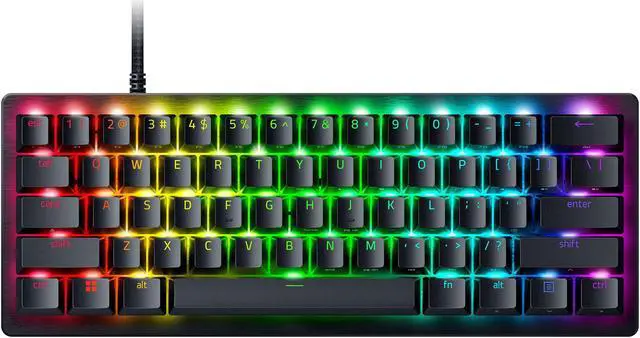
Razer Huntsman V3 Pro Mini 60% Esports Gaming Keyboard
Pros
- Rapid trigger and Snap Tap built in
- Onboard adjustment system with no software needed
- Analog optical switches feel fast and snappy
- $138.99 on Amazon as of this update, well under its $179.99 list price
Cons
- Wired only
- 1,000Hz polling vs 8,000Hz on the GravaStar and MONSGEEK
- Analog optical not as precise as true hall effect
Price as of May 21, 2026 — see current price on Amazon.
The Huntsman V3 Pro Mini is the middle path. You get rapid trigger, you get Snap Tap (which handles simultaneous opposite directional inputs cleanly for movement canceling), and you get Razer's Analog Optical Gen 2 switches. All in a 60% that ships immediately, not backordered for weeks.
The onboard adjustment system is underrated. You can tweak actuation points and rapid trigger thresholds without opening any software. Handy if you're at a LAN borrowing someone's PC and can't install Synapse.
At its $179.99 list price it's a tough sell against the 8,000Hz hall effect boards. But Amazon has it at $138.99 as of this update, and at that price it's an easy call: proven rapid trigger, Snap Tap, and Razer's support network for $60 less than the GravaStar. That's why it carries the Editor's Choice badge now.
MONSGEEK FUN60 Ultra: 8K Polling and Rapid Trigger, Wireless
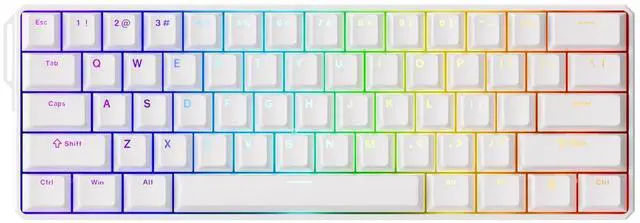
MONSGEEK FUN60 Ultra Rapid Trigger Gaming Keyboard
Pros
- 0.01mm rapid trigger resolution
- 8,000Hz polling in wireless mode
- CNC aluminum chassis feels premium
- Surprisingly quiet despite the metal build
Cons
- Battery only lasts a few hours at 8K polling with RGB on
- Mode switch is awkwardly placed under the CapsLock key
- Software learning curve is real
Price as of May 21, 2026 — see current price on Amazon.
The MONSGEEK FUN60 Ultra was a $95 giant-killer when this guide first went up. Amazon has it at $149.99 now, which changes the value math but not the hardware. PCWorld reviewed it and came away genuinely surprised. TMR (Tunnel Magneto Resistance) technology lets it achieve 0.01mm rapid trigger resolution, ten times finer than the 0.1mm most rapid trigger boards advertise. The polling rate hits 8,000Hz even in wireless mode, which almost no other wireless keyboard can claim, and that's the reason to buy it at this price over the wired Razer.
The CNC-milled aluminum build feels solid. Sound is muted and satisfying. The MagMech feature means you can mix magnetic and standard mechanical switches in the same board, which is an odd but real selling point for keyboard enthusiasts who have a switch collection.
The battery life trade-off is real though. Running at full 8K polling with RGB on, you're looking at a few hours of use. Drop down to 1K polling and turn off RGB and it stretches to a reasonable all-day session. The software is also legitimately confusing to start with. Neither of these things is a dealbreaker, but walk in with eyes open.
A note on the Royal Kludge RK61 Plus
The RK61 Plus was the sub-$50 entry point here. Both of its Amazon listings had no buy box when I re-checked in September 2026, so the card is gone until it's back in stock. If you just want to try the 60% layout cheaply, wait for it to return rather than paying up for one of the boards above.
How to Choose: What Actually Matters in a 60% Keyboard
Rapid Trigger: Worth It or Hype?
Rapid trigger lets the keyboard re-activate a key the moment you release it past a set threshold, sometimes as small as 0.1mm. In CS2, this means you can movement-cancel faster because the system sees your key release before you've fully lifted your finger.
Does it matter? For ranked play below Diamond/Global Elite: probably not. Your crosshair placement and timing will be the bottleneck, not your keyboard. For anyone playing at a high competitive level or on LAN: yes, it's a real mechanical advantage. The GravaStar, Razer Huntsman V3 Pro Mini, and MONSGEEK FUN60 Ultra all have it. The Logitech and RK61 don't.
60% vs TKL: The Real Trade-off
The 60% format removes the function row and arrow keys. The rest of the characters live on a Fn layer. You gain significant mouse space. Most gaming desks see 3-4 inches of extra room to the right when you swap a TKL for a 60%.
The adaptation period is real. Arrow keys show up enough in everyday use that the first week feels awkward. By week three, most people stop thinking about it. If you do a lot of spreadsheet work or text editing outside of gaming, seriously consider whether you'll make the trade.
Hall Effect vs Optical Analog vs Mechanical
Hall effect switches (GravaStar, MONSGEEK) use magnetic sensors. They never wear out because nothing physically contacts the sensing element. The polling latency characteristics are excellent and rapid trigger works with extremely fine granularity.
Analog optical switches (Razer Huntsman V3 Pro Mini) work on a light-sensor principle. They're fast and durable, but the rapid trigger resolution isn't quite as fine as hall effect. In real gaming, the difference is largely imperceptible.
Standard mechanical switches (Logitech GX Optical) use physical contacts or optical barriers. No rapid trigger. Still totally valid for gaming; plenty of world-class players used nothing else for years. They're just not the leading edge anymore.
Wireless: When Does It Matter?
If you never leave your desk, wireless is a nice-to-have that adds complexity. If you travel to LANs, bring your keyboard to a friend's setup, or have a particularly cable-averse desk build, it matters a lot. The Logitech G PRO X 60 LIGHTSPEED is the premium wireless option here. The MONSGEEK and RK61 both offer wireless at their respective price points.
Frequently asked questions
- Do I need a 60% keyboard to be competitive in FPS games?
- No. Plenty of high-ranked players use TKL or even full-size boards. The advantage of a 60% is desk space and the advantage of hall effect boards is rapid trigger. Neither is a requirement for competitive play. They're edge cases that matter most at the highest skill levels.
- What happened to the arrow keys on a 60% keyboard?
- They move to a Fn layer, typically Fn + WASD or Fn + IJKL, depending on the board. Most people adapt within two to three weeks. If you use arrow keys constantly for work outside of gaming, TKL might be a better fit.
- Is the GravaStar Mercury V60 Pro worth $199.95 over the Razer Huntsman V3 Pro Mini?
- Only if the spec sheet is the point. The GravaStar listing states 8,000Hz polling, 0.005mm actuation steps and hall effect switches, versus 1,000Hz and analog optical on the Razer. The Razer is $61 cheaper at $138.99, ships from a brand with a long pro-play record, and its rapid trigger is proven. Most players should buy the Razer. Buy the GravaStar if you specifically want 8K hall effect and can't get a Wooting.
- Can I use a 60% keyboard for work and not just gaming?
- Yes, but check your workflow first. If you live in Excel or write a lot and rely on arrow keys constantly, the missing keys will slow you down. Most productivity tasks adapt fine to the Fn layer with muscle memory after a few weeks. The bigger question is whether you mind the function row being gone.
- How does the MONSGEEK FUN60 Ultra compare to the GravaStar on rapid trigger?
- On paper they're close: the MONSGEEK advertises 0.01mm resolution and the GravaStar listing states 0.005mm actuation steps. In actual gameplay differences that small are hard to perceive. The MONSGEEK adds wireless at 8,000Hz and costs $50 less at $149.99. The GravaStar has the aluminum frame and a wired-only, lower-latency pitch. Neither has the Wooting's software polish, which is the real thing you give up when Wooting isn't on Amazon.
- Will a 60% keyboard work on Mac?
- Yes, all four boards listed here work on Mac via USB-C or wireless. The GravaStar uses a web-based driver per its listing, and the MONSGEEK is Windows-focused for its customization software, but the hardware functions normally on macOS. The Royal Kludge RK61 Plus has decent Mac key mapping support out of the box.
Bottom Line
The 60% format isn't going anywhere. It's the dominant choice for competitive FPS players and it delivers a real quality-of-life improvement for desk space even if you don't care about gaming edge cases. The Razer Huntsman V3 Pro Mini at $138.99 is the pick for most people: proven rapid trigger from a brand that will still be around. Pick the GravaStar Mercury V60 Pro if you want 8,000Hz hall effect on your desk today, since Wooting's boards are no longer sold on Amazon. Pick the Logitech G PRO X 60 if wireless is your priority and you're willing to forgo rapid trigger, and the MONSGEEK FUN60 Ultra if you want rapid trigger and wireless in one board. And if you're not sure 60% is right for you yet, the Royal Kludge RK61 Plus is the lowest-risk way to find out.
How We Test
We score products by combining spec-level research, pricing history, trusted third-party benchmarks, and owner sentiment from high-signal sources.
- Performance and real-world value in the category this guide targets
- Price-to-performance and deal consistency over recent pricing windows
- Build quality, reliability patterns, and known long-term issues
- Recommendation refresh cadence to keep these picks current
Author
TheTechSearch Editorial Team
Independent product reviewers & PC builders
We test and compare real-world specs, price trends, and user feedback to recommend gear that actually makes sense to buy.