Best Flight Sim Joysticks and HOTAS 2026
Four HOTAS picks for MSFS 2024, DCS and Star Citizen: the Thrustmaster T16000M FCS for PC, the $79 T.Flight HOTAS One and VelocityOne for Xbox. Expert picks,...
As an Amazon Associate we earn from qualifying purchases made through our links — this doesn't affect our picks.
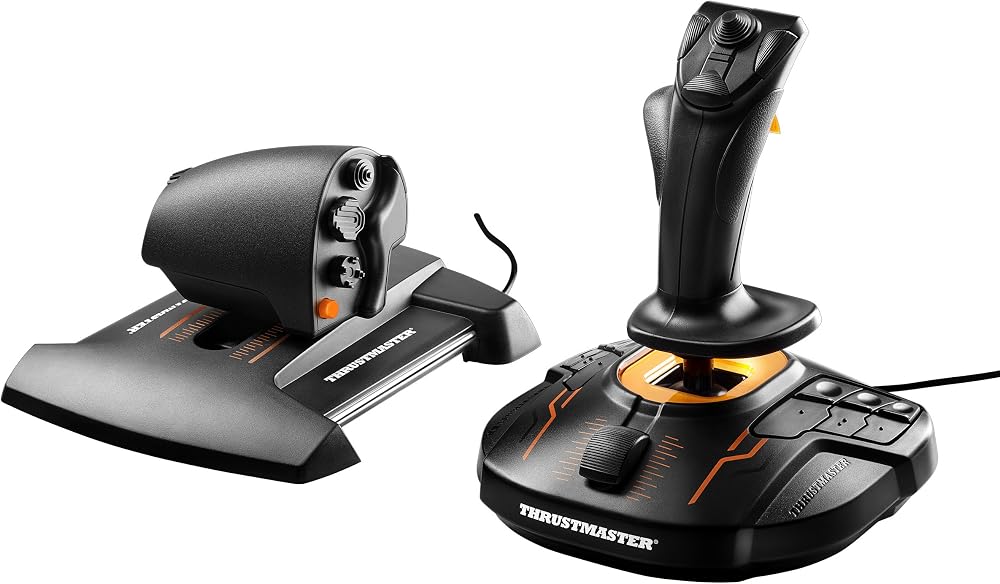
Thrustmaster T16000M FCS HOTAS
Most PC pilots
Price as of Nov 22, 2026 — see current price on Amazon.
The Thrustmaster T16000M FCS HOTAS is the flight stick most PC pilots should buy. It pairs a Hall effect stick with a full throttle at $147.99, and nothing else here gives you that much control for the money.
- Best for most PC pilots: Thrustmaster T16000M FCS HOTAS: magnetic stick sensors, an ambidextrous grip and a separate throttle.
- Best for a first HOTAS on Xbox: Thrustmaster T-Flight HOTAS One: the cheapest pick on this page and licensed for Xbox and PC.
- Best for serious Xbox pilots: Turtle Beach VelocityOne H.O.T.A.S.: 73 programmable inputs and a telemetry display on the stick base.
- Best for space sims: Logitech G X56 H.O.T.A.S.: 189 programmable controls and two mini analog sticks for strafing.
Prices as of November 22, 2026.
A flight sim on a gamepad works. It just never feels like flying. A real stick gives you fine pitch and roll control that thumbsticks can't match, and a separate throttle frees your other hand for the switches a modern jet expects you to reach without looking. The big question here isn't price. It's which platform you fly on, because only two of these four work on an Xbox at all.
| HOTAS | Platform | Stick sensors | Inputs | Price | |
|---|---|---|---|---|---|
| Thrustmaster T16000M FCS HOTAS | PC | Hall effect (H.E.A.R.T) | 16 on the stick | $147.99 | Check Price |
| Thrustmaster T-Flight HOTAS One | Xbox, PC | Not published | 14 buttons | $79.00 | Check Price |
| Turtle Beach VelocityOne H.O.T.A.S. | Xbox, PC | 16-bit Hall effect | 73 inputs | $229.99 | Check Price |
| Logitech G X56 H.O.T.A.S. | PC | 16-bit Hall effect | 189 controls | $199.99 | Check Price |
Thrustmaster T16000M FCS HOTAS: Best for Most PC Pilots
Thrustmaster T16000M FCS HOTAS
Best for: Most PC pilotsPros
- Magnetic Hall effect stick sensors with no wiper contacts to wear
- Stick swaps between right and left-handed setups
- Separate TWCS throttle with a thumb mini stick and three hats
- Thrustmaster's T.A.R.G.E.T mapping software
Cons
- PC only, no Xbox support
- Plastic build throughout
- Light enough to shift on a desk without a mount
Price as of Nov 22, 2026 — see current price on Amazon.
The T16000M earns the top spot on its sensors. Thrustmaster's H.E.A.R.T system reads the stick with magnets instead of the wiper contacts that wear out in cheaper sticks, so the center stays where it should.
GamingTrend's review counts twelve buttons on the stick's base, three on top plus a trigger, and an 8-way hat. The TWCS throttle adds an analog thumb stick, three more hats and a rudder paddle, which map nicely to a targeting pod or a radar cursor. Southpaws can switch the stick to a left-handed setup, which almost nothing else here allows.
What you give up is metal. It's all plastic, and it can shift on a desk under hard input unless you mount it. At $147.99 it's still the right place for most PC pilots to start.
Thrustmaster T-Flight HOTAS One: Best Budget and Best Cheap Xbox Option
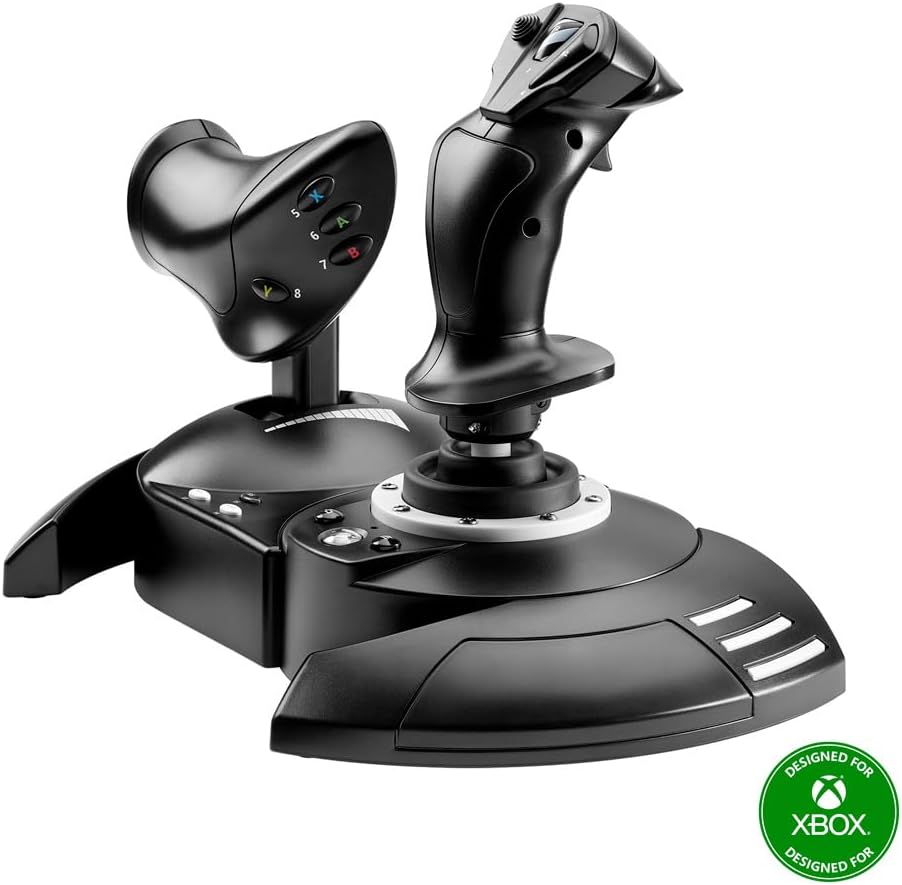
Thrustmaster T-Flight HOTAS One
Best for: A first HOTAS on Xbox or PCPros
- Officially licensed for Xbox and also works on PC
- Detachable throttle
- Dual rudder controls
- Adjustable stick resistance
Cons
- 14 programmable buttons runs out fast in combat sims
- Thrustmaster doesn't publish the sensor type
- Rudder pedals are a separate purchase
Price as of Nov 22, 2026 — see current price on Amazon.
At $79.00 this is the cheapest HOTAS on this page and the one to buy if you're not sure flight sims will stick. It's licensed for Xbox, so it plugs into a console as well as a Windows PC.
The throttle can sit attached to the stick as one compact unit, or come off and sit to the left like a real cockpit. That flexibility matters on a coffee table in front of a TV, where there's rarely room for two separate bases.
Its listing counts 14 programmable buttons. That's enough for general aviation and casual combat. It's not enough for a full DCS module, where you'll end up reaching for the keyboard, and that ceiling is why the T16000M sits one step up.
Turtle Beach VelocityOne H.O.T.A.S.: Best for Xbox
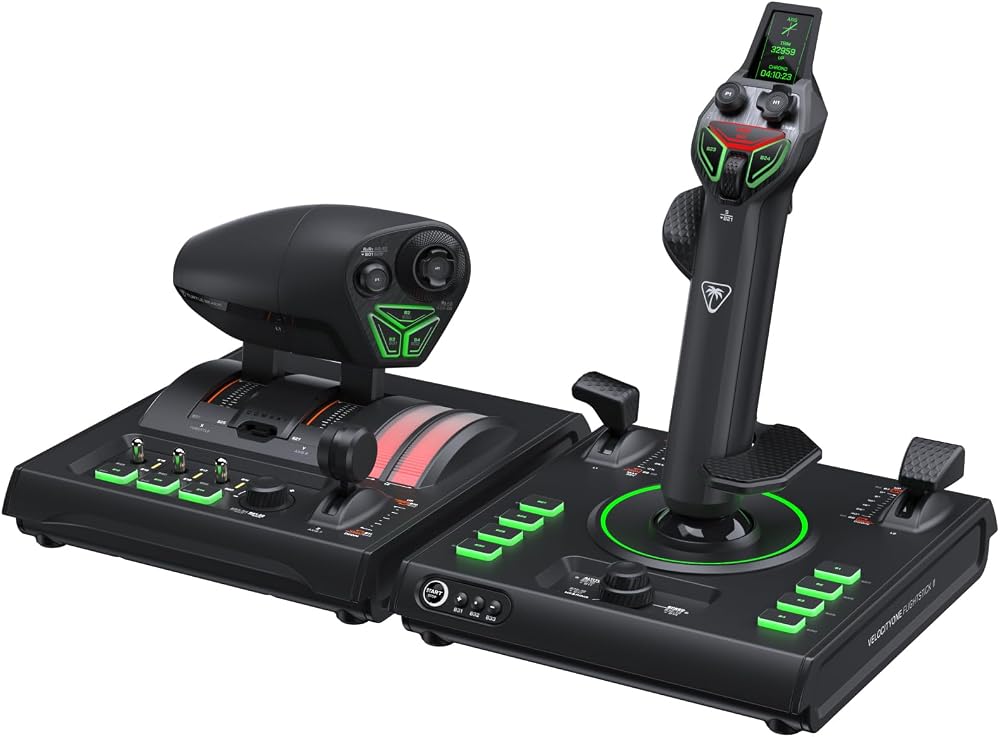
Turtle Beach VelocityOne H.O.T.A.S.
Best for: Serious pilots on XboxPros
- Licensed for Xbox Series X|S, also works on Windows PCs
- 73 programmable inputs and 15 axes
- Full-color flight display on the stick base
- Swappable throttle detents for afterburner, idle and reverse
Cons
- Costs the most here
- On Xbox, the Dual Throttle connects through the Flightstick II
- Two USB-A ports needed on PC
Price as of Nov 22, 2026 — see current price on Amazon.
The VelocityOne H.O.T.A.S. pairs the Flightstick II with a Dual Throttle, and it's the most capable HOTAS you can plug into an Xbox.
Per Turtle Beach's product page, the stick uses 16-bit Hall effect sensors with over 65,000 input counts per axis. It has 38 inputs and 8 axes, three spring tension settings, and a twist rudder you can lock out when you add pedals. The Dual Throttle brings 35 inputs and 7 axes, with twin levers that lock together for single-engine aircraft.
The display on the stick base shows flight data, and the Flight Hangar app handles dead zones and per-aircraft profiles. Turtle Beach's full price is $279.99, so Amazon's $229.99 sits under the brand's own list.
Logitech G X56 H.O.T.A.S.: Best for Space Sims
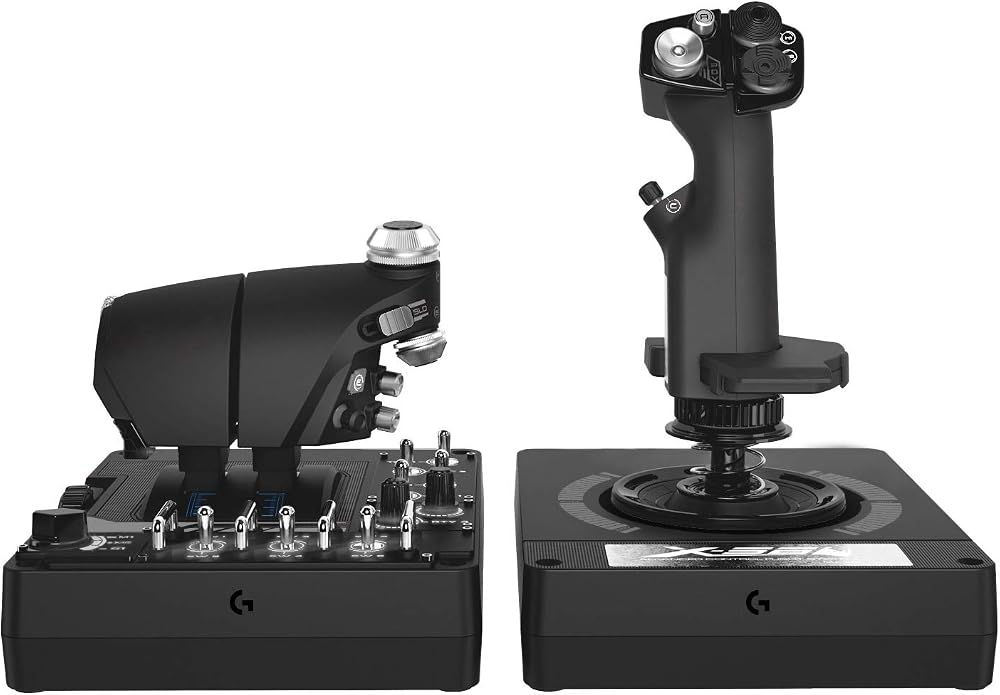
Logitech G X56 H.O.T.A.S.
Best for: Space sims like Star CitizenPros
- 189 programmable controls
- Mini analog sticks on both the stick and the throttle
- Four interchangeable springs, or none at all
- Twin throttles
Cons
- PC only
- 189 controls take real time to map
- Costs $52 more than the T16000M
Price as of Nov 22, 2026 — see current price on Amazon.
The X56 was built for games like Star Citizen and Elite Dangerous, where you strafe up, down and sideways as well as pitch and roll. Two mini analog sticks, one on the stick and one on the throttle, give you those extra axes without leaving the grip.
Logitech's US store page lists contact-free Hall effect sensors on the 16-bit aileron and elevator axes. Four springs of different tension let you set it light for space or heavy for fighter jets, and you can run it with no spring at all if you prefer a loose stick.
Logitech's regular US price is $249.99, and Amazon's $199.99 sits under it. That's $52 above the T16000M, and the extra money buys control count and space-sim flexibility rather than build quality.
How to Choose a Flight Sim Joystick
Your platform decides half of it
Xbox only accepts licensed controllers. Of these four, that's the T-Flight HOTAS One and the VelocityOne H.O.T.A.S. The other two are PC only. PlayStation has a much smaller list of flight peripherals, and none of these four is sold for it.
Hall effect sensors are worth paying for
Cheap sticks use potentiometers: a contact rubbing along a resistive track. Over time they wear, and you get jitter or a center that drifts. Hall effect sensors read a magnet's position without touching anything. Three of the four picks here use them on the stick, and it's the single best reason to step up from the cheapest option.
HOTAS vs a stick alone vs a yoke
A HOTAS suits fighters, helicopters with a collective mapped to the throttle, and space sims. A yoke suits airliners and light aircraft in MSFS 2024. If you mostly fly a Cessna or an A320, a yoke and throttle quadrant will feel more natural than any stick in this guide.
Plan for the desk
Twisting rudders and hard stick inputs move lightweight bases. A clamp mount or a chair-mounted rig fixes that, and the VelocityOne has threaded holes for hard-mounting. The same problem shows up with racing wheels, which the best sim racing wheels guide covers.
Think about pedals later
Every stick here has a twist rudder. That's fine to start. Rudder pedals free up the twist axis, add toe brakes, and make taxiing and crosswind landings far easier. Thrustmaster and Turtle Beach both sell pedals that fit their sticks.
Frequently asked questions
- What does HOTAS stand for?
- Hands On Throttle And Stick. It describes a setup where a flight stick and a separate throttle each carry enough buttons that you can fly without reaching for a keyboard, the way real fighter cockpits are designed.
- Which HOTAS works on Xbox?
- Only Xbox-licensed models. Of the four in this guide, the Thrustmaster T-Flight HOTAS One at $79.00 and the Turtle Beach VelocityOne H.O.T.A.S. at $229.99 work on Xbox. Both also work on Windows PCs.
- Is the T16000M or the X56 better?
- The T16000M is the better choice for most PC pilots. It costs $147.99 and has Hall effect stick sensors and an ambidextrous stick. The X56 costs $199.99 and adds 189 controls and two mini analog sticks, which matter most in space sims like Star Citizen and Elite Dangerous.
- Do I need a HOTAS for Microsoft Flight Simulator 2024?
- No, MSFS 2024 is playable on a gamepad. A HOTAS makes fighters and helicopters much more precise. For airliners and light aircraft, a yoke and throttle quadrant is the better fit.
Bottom Line
For most PC pilots, the Thrustmaster T16000M FCS HOTAS at $147.99 is the right stick: Hall effect sensors, enough buttons for serious sims, and a price that leaves room for pedals. On Xbox, start with the $79.00 T-Flight HOTAS One, or go straight to the VelocityOne H.O.T.A.S. if you already know you're hooked. Space sim fans should look at the X56.
How We Pick
We pick products by combining spec-level research, price checks, trusted third-party benchmarks, and owner sentiment from high-signal sources.
- Performance and real-world value in the category this guide targets
- Price-to-performance and deal consistency over recent pricing windows
- Build quality, reliability patterns, and known long-term issues
- Recommendation refresh cadence to keep these picks current
Author
TheTechSearch Editorial Team
Independent product reviewers & PC builders
We compare real-world specs, reviews and owner reports, price trends, and user feedback to recommend gear that actually makes sense to buy.