Best Gaming Headsets Under $50 in 2026
The best gaming headsets under $50 right now. Wired picks from HyperX, Logitech, Corsair, Razer, and SteelSeries that actually sound good. No $150 headsets r...
As an Amazon Associate we earn from qualifying purchases made through our links — this doesn't affect our picks.

HyperX Cloud Stinger 2
Our top recommendation for this category
Price as of Feb 25, 2026 — see current price on Amazon.
In this guide
- Our top picks at a glance
- What $50 actually gets you in a gaming headset
- Best overall: HyperX Cloud Stinger 2
- Best mic quality: Logitech G335
- Most compatible: Corsair HS35 v2
- Best for competitive gaming: Razer Blackshark V2 X
- Best for console + PC: SteelSeries Arctis 1
- Buying guide: what to look for under $50
The gaming headset market under $50 is confusing on purpose. Brands advertise "7.1 surround sound" and "HD microphones" at $25 and $35 price points, and most of it is marketing noise. Real 7.1 surround requires software processing. "HD microphone" can mean anything from excellent to barely usable.
The honest version: a good $40 wired gaming headset sounds better for gaming than a $100 wireless headset from a no-name brand. The major manufacturers, HyperX, Logitech, Corsair, Razer, SteelSeries, have figured out how to build solid headsets in the $40-50 band, and those are what you should buy.
This guide covers wired headsets under $50 from brands with track records. No wireless at this price (battery life and connection quality suffer). No unknown brands.
Our top picks at a glance
| Headset | Connectivity | Mic Type | Weight | Price | |
|---|---|---|---|---|---|
| HyperX Cloud Stinger 2 | 3.5mm / USB-A | Fixed cardioid | 275g | $50 | Check Price |
| Logitech G335 | 3.5mm | Flip-to-mute cardioid | 240g | $40 | Check Price |
| Corsair HS35 v2 | 3.5mm | Flexible omni-directional | 300g | $49 | Check Price |
| Razer Blackshark V2 X | 3.5mm | Cardioid condenser | 240g | $48 | Check Price |
| SteelSeries Arctis 1 | 3.5mm / USB-C | Retractable bidirectional | 259g | $44 | Check Price |
What $50 actually gets you in a gaming headset
Before the reviews: here's what budget headsets do and don't do well.
They do well: Comfortable wired stereo audio that accurately represents in-game sound. Decent microphones that teammates can understand. Light enough to wear for 3-4 hour sessions.
They don't do: Spatial audio that rivals headphones twice the price. Wireless that's actually reliable. Active noise cancellation. Sound isolation that blocks out roommates or loud environments.
If you're gaming on a desk, sharing audio with no one, and communicating in squad games, a $40 headset handles all of that. If you need wireless, spatial audio, or ANC, this isn't the right tier.
Best overall: HyperX Cloud Stinger 2
HyperX Cloud Stinger 2
Pros
- HyperX build quality and audio tuning without crossing $50
- Steel slider frame holds up to daily bending and adjustment
- 50mm drivers sound better than most headsets at this price
- Swivel-to-mute mic is instant and tactile
- Works on PC, PlayStation, Xbox, and Switch via 3.5mm
- USB version adds volume/mic controls
Cons
- Fixed mic can't be removed or repositioned
- Ear cushions are leatherette, not fabric (warmer on ears)
- No inline controls on the 3.5mm version
- No virtual surround without additional software
- Minimal passive noise isolation
Price as of Feb 25, 2026 — see current price on Amazon.
HyperX built their reputation on the original Cloud headset, comfortable, great audio, reasonable price. The Cloud Stinger 2 carries that forward. At $49.99 it sits right at the ceiling of this list, and it earns the spot on drivers and comfort rather than on being the cheapest thing here.
The audio signature is slightly V-shaped: boosted bass and treble, slightly recessed mids. For gaming, that means clear footsteps and impactful explosion effects. Music is another matter, and it's less accurate there. For voice communication, it's fine, the mic captures clearly and teammates hear you without complaints.
The steel slider frame is the detail that separates this from similarly priced competitors. Plastic headbands crack. Steel sliders don't. HyperX uses a thin steel strip that flexes without failing, and the result is a headset that survives years of daily use where cheaper builds show their age in months.
The swivel-to-mute mic works exactly as the name suggests, rotate it up to mute, down to unmute. It's faster than finding a software mute button mid-game. The fixed mic position isn't ideal (you can't angle it precisely in front of your mouth), but the pickup pattern is wide enough to compensate.
If you're buying one budget headset and don't want to think about it, this is the pick.
Best mic quality: Logitech G335

Logitech G335
Pros
- Flip-to-mute cardioid mic is clear and accurate
- Lightest headset on this list at 240g
- Fabric ear cups are more breathable than leatherette
- Comes in multiple colors (white, black, lilac, mint)
- Flexible headband adjusts smoothly
- 3.5mm universal compatibility
Cons
- Fabric earpads pick up grime faster than leatherette
- No USB version, 3.5mm only
- Audio is balanced rather than boosted, some find it flat
- Mic is fixed, not removable
- Less bass impact than HyperX Cloud Stinger 2
Price as of Feb 25, 2026 — see current price on Amazon.
The G335 is Logitech's answer to "I want a headset with a good mic that doesn't feel like a gamer product." It's available in white, black, lilac, and mint, unusual color options for gaming headsets, and the fabric ear cushions look less aggressive than the typical gaming headset aesthetic.
Its microphone is where this earns its spot. The cardioid condenser mic picks up voice clearly while rejecting background noise, and the flip-to-mute design is immediate. In recorded Discord calls and gaming sessions, voice clarity is noticeably better than the HyperX or Corsair at similar prices.
The audio signature is flatter than competitors. Logitech tuned this for balanced representation rather than boosted gaming frequencies. Footsteps and environmental audio translate accurately. Some players find it less exciting than a V-shaped signature; competitive players who rely on audio cues for positional information often prefer it.
At 240g, it's the lightest headset on this list, which matters for marathon gaming sessions. The fabric ear cups don't trap heat the way leatherette does. If you game for 4+ hours at a stretch, comfort matters, and this is the most comfortable option under $50.
Most compatible: Corsair HS35 v2
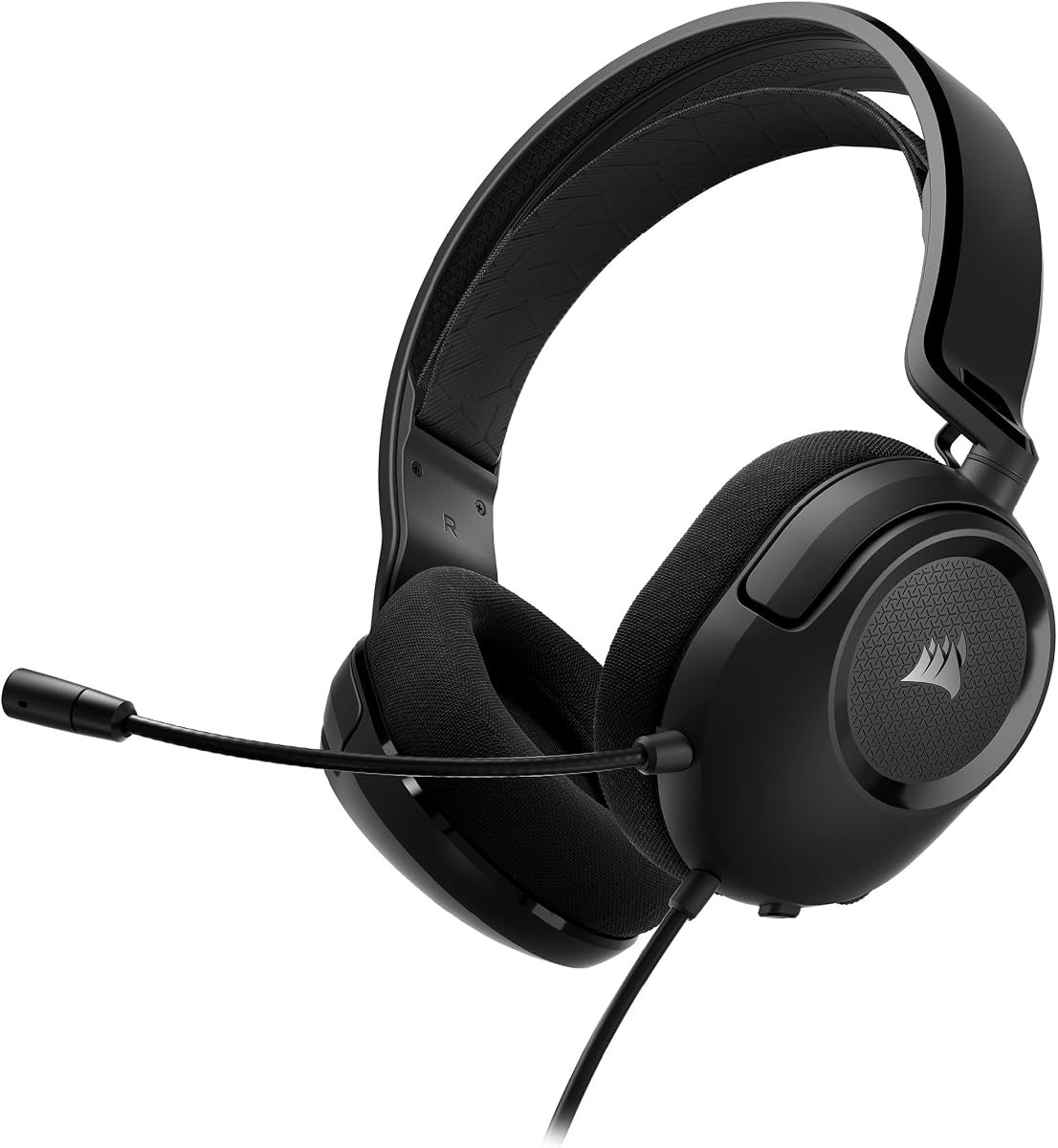
Corsair HS35 v2
Pros
- Flexible omni-directional boom bends where you want it and stays there
- Multi-platform: PC, Mac, PS5, PS4, Xbox, Switch and mobile all work natively
- Universal 3.5mm connection, no dongle or software needed
- Memory foam ear cushions with breathable fabric
- Passive noise isolation better than average for this price
Cons
- Audio is conservative, not bass-heavy like HyperX
- Omni-directional mics pick up more room noise than a cardioid
- The mic does not detach, unlike the original HS35
- Ear cups aren't the largest, won't fit all ears
- No USB option
Price as of Feb 25, 2026 — see current price on Amazon.
Corsair replaced the original HS35 with the v2, and the swap costs you the detachable mic. What you get back is a flexible omni-directional boom that holds whatever shape you bend it into, which is easier to position well than the stiff arms on most headsets at this price.
Omni-directional is the trade-off to understand. A cardioid mic listens mostly forward and rejects the room behind it. An omni capsule hears everything, so it captures your voice evenly no matter where the boom sits, and it also captures your keyboard and your fan. In a quiet room it's fine. In a loud one, the Arctis 1 below does better.
Multi-platform compatibility is genuine. The 3.5mm connection works natively on PS5 (controller), Xbox (controller), Nintendo Switch, and mobile. You don't need adapters, software, or USB connections. If you game across multiple systems, the HS35 v2 is the simplest option on this list.
The audio signature is conservative, less bass boost than the HyperX. If you want thumpy gaming audio, the Stinger 2 sounds more exciting. If you want accurate positional audio in competitive games, the v2's balanced tuning is actually an advantage.
Best for competitive gaming: Razer Blackshark V2 X

Razer Blackshark V2 X
Pros
- Titanium-coated 50mm drivers deliver cleaner highs than most budget headsets
- TriForce driver design separates bass/mid/treble for cleaner audio separation
- Cardioid condenser mic tested and endorsed by esports organizations
- Leatherette ear cushions with passive noise isolation
- Lightweight at 240g
- Razer's competitive audio tuning favors clarity over bass
Cons
- Only the white colourway has a live listing at this price
- PC-only optimizations unless you use Razer Synapse
- Mic doesn't detach
- Leatherette seals tightly, warmer but less breathable than fabric
- Bass is present but not impactful compared to HyperX
Price as of Feb 25, 2026 — see current price on Amazon.
Razer positions the Blackshark V2 X toward competitive players. The audio tuning prioritizes sound separation and clarity over raw bass impact, which helps with positional audio, hearing whether footsteps are to your left or right in a tense CS2 or Valorant match.
The TriForce driver design divides the 50mm driver into three frequency zones (bass, mid, treble), reducing crossover distortion. In practice, this makes voices in the game (announcer callouts, team radio) sound clearer, and high-frequency sounds like bullet impacts or glass breaking separate better from background music.
The cardioid condenser mic is the same capsule technology Razer uses in their $100+ headsets, scaled down. It captures voice accurately and several esports organizations have used the Blackshark line as their standard team headset. At $47.99, you're getting meaningful trickle-down from the pro gaming tier.
If you play competitive multiplayer where audio precision matters, this is the pick, and it comes in $2 under the HyperX Cloud Stinger 2. If you play single-player games and want the bassier, more theatrical presentation, the HyperX is still the one to get.
Best for console + PC: SteelSeries Arctis 1

SteelSeries Arctis 1
Pros
- Retractable bidirectional mic completely hides when not in use
- USB-C model works with Switch, Android phones, and newer PCs
- Signature Arctis ski-goggle headband is genuinely comfortable
- ClearCast bidirectional mic tested for low background noise pickup
- Available in wired USB-C and 3.5mm versions
- Clean, minimalist aesthetic
Cons
- ClearCast mic sounds slightly different (less warmth) than Razer/HyperX
- USB-C version limits to devices with USB-C ports
- Driver size (40mm) is smaller than competitors
- Arctis ski-goggle band takes getting used to
- Less bass than HyperX or Razer
Price as of Feb 25, 2026 — see current price on Amazon.
The Arctis 1 brings SteelSeries' signature ski-goggle headband to the sub-$50 tier. The ClearCast bidirectional microphone, the same mic type used in the $100+ Arctis 7 and 9, captures voice with noticeably lower background noise pickup than standard cardioid mics. If you're gaming in a room with noise (fans, roommates, traffic), this mic rejects that background better than the other headsets here.
The retractable mic design is the functional highlight. When gaming alone or watching content, the mic fully retracts into the left ear cup and disappears. No dangling boom arm. No capping an exposed element. It's a design choice that makes the Arctis 1 feel more like a proper headphone.
The USB-C version is uniquely useful if you game on Nintendo Switch in handheld mode. Most gaming headsets require adapters for Switch; the Arctis 1 USB-C plugs directly into the Switch's USB-C port and gives you voice chat natively. It also works with Android phones and newer laptops.
For gamers who regularly move between multiple platforms, PC at a desk, Switch on the couch, mobile on the go, the Arctis 1's versatility justifies the $44 price.
Buying guide: what to look for under $50
Wired vs wireless at this price
Every headset on this list is wired. That's intentional.
Wireless gaming headsets under $50 exist, but they compromise significantly: 2.4GHz wireless with noticeable latency, or Bluetooth with compression artifacts. Battery life at this tier is often 10-15 hours with fast degradation. The wired headsets here sound better and connect more reliably.
If you need wireless, the floor for a good gaming wireless headset is around $80-100. Under $50, buy wired.
3.5mm vs USB
3.5mm analog:
- Works everywhere, PC, console, mobile, laptop
- Audio quality depends on your soundcard
- No software required
- Better for multi-platform gamers
USB:
- Uses the headset's built-in DAC/amp, bypassing your soundcard
- More consistent audio quality across different PCs
- Often enables software features (EQ, virtual surround)
- PC-only (typically)
For most people: 3.5mm is simpler and more portable. If you're on PC exclusively and your motherboard has a noisy headphone output (buzzing or interference), USB might solve it.
Mic types explained
Fixed boom mic: Most common at this price. Positioned where it is, captures in a roughly cardioid pattern. Works fine in most environments.
Flip-to-mute: Same capsule as fixed, just rotates up to mute. No signal drop when flipped, it physically disconnects or mutes. Faster than software mute.
Retractable: Hides inside the headset when not in use. SteelSeries Arctis line uses this. More convenient but the capsule is smaller.
Removable: Physically detaches. Most flexible (use without mic for music/mobile), but the connector adds cost and a potential failure point.
Weight and comfort
For gaming sessions under 2 hours, weight matters less. For 4+ hour sessions:
- Under 250g is comfortable for extended wear
- Fabric ear cups breathe better than leatherette
- Suspended headbands (Arctis ski-goggle style) distribute weight differently than padded headbands, try before deciding if possible
Frequently asked questions
- Is a $40 gaming headset good enough for serious gaming?
- Yes. HyperX, Logitech, Corsair, Razer, and SteelSeries all make competent headsets at this price. The difference between a $40 headset from these brands and a $100 headset is real but not dramatic for gaming, better passive noise isolation, more accurate soundstage, and longer comfort over time. For casual to intermediate gaming, $40 is entirely sufficient.
- What's the best gaming headset under $50 for PS5?
- The Corsair HS35 v2 and HyperX Cloud Stinger 2 both work natively with PS5's 3.5mm jack on the DualSense controller. Plug in and play, no adapters, no configuration. The Stinger 2 also works plugged straight into the PS5 console USB port in its USB-A version.
- Does surround sound matter in gaming headsets?
- Virtual surround sound (marketed as 7.1) is software processing applied to stereo audio. It can create a wider soundstage in some games but also introduces phase artifacts that reduce audio accuracy in competitive games. Most competitive players prefer stereo with good spatial imaging. The virtual surround features that come with budget headsets are often worse than no processing at all.
- Can I use a gaming headset for music?
- Yes, but these headsets are tuned for gaming, not music. V-shaped frequency responses (boosted bass and treble) can make music sound exciting but less accurate. For music at this price, open-back audiophile headphones like the Audio-Technica ATH-M20x ($49) are better. For a headset that does gaming and music reasonably well, the Logitech G335's balanced tuning is the best option on this list. For more gaming audio options, see our best gaming headsets 2026 guide.
- HyperX Cloud Stinger 2 vs Razer Blackshark V2 X, which is better?
- Depends on use case. Want fun, bassy gaming audio? HyperX Cloud Stinger 2 at $50. For competitive gaming where positional accuracy matters, and for a couple of dollars less: Razer Blackshark V2 X at $47.99. Both are excellent. Neither is wrong.
How We Pick
We pick products by combining spec-level research, price checks, trusted third-party benchmarks, and owner sentiment from high-signal sources.
- Performance and real-world value in the category this guide targets
- Price-to-performance and deal consistency over recent pricing windows
- Build quality, reliability patterns, and known long-term issues
- Recommendation refresh cadence to keep these picks current
Author
TheTechSearch Editorial Team
Independent product reviewers & PC builders
We compare real-world specs, reviews and owner reports, price trends, and user feedback to recommend gear that actually makes sense to buy.