Best Laptops for Remote Work Under $800 in 2026
Best laptops for remote work under $800 in 2026. Top picks for battery life, webcam quality, keyboard comfort, and all-day productivity without breaking the...
As an Amazon Associate we earn from qualifying purchases made through our links — this doesn't affect our picks.

Acer Aspire 14 AI Copilot+ PC (A14-52M-51S1)
Video Calls and Multitasking
Price as of Mar 6, 2026 — see current price on Amazon.
Remote workers have a different priority stack than gamers or creators. You need a laptop that survives a full day on battery, runs video calls without the fan screaming, weighs less than a textbook, and has a keyboard you can actually type on for eight hours. Bonus if the webcam doesn't make you look like a potato.
Under $800 is the sweet spot. This is where you get genuine Intel Core Ultra and AMD Ryzen 7 performance, real build quality, and specs that hold up for years. Below $500, compromises stack up fast. Above $800, you're paying for premium materials and brand logos more than productivity.
These four laptops cover every remote work situation in 2026. I've tracked hands-on testing from PCMag, Tom's Guide, Notebookcheck, and RTINGS to find the picks that actually deliver on the things remote workers care about.
Our top picks at a glance
| Laptop | CPU | RAM/Storage | Battery | Weight | Price | |
|---|---|---|---|---|---|---|
| Acer Aspire 14 AI | Intel Core Ultra 5 226V | 16GB / 512GB SSD | 10-12 hrs | 2.98 lbs | ~$670 | Check Price |
| Lenovo IdeaPad Flex 5i | Intel Core Ultra 5 225U | 8GB / 512GB SSD | 8-11 hrs | 3.53 lbs | ~$649 | Check Price |
| ASUS VivoBook 16 | AMD Ryzen 7 7730U | 8GB / 1TB SSD | 9-11 hrs | 3.97 lbs | ~$549 | Check Price |
| Acer Swift Go 14 | AMD Ryzen 7 8845HS | 16GB / 1TB SSD | 10-13 hrs | 3.09 lbs | ~$749 | Check Price |
What remote workers actually need
Before the picks, a quick calibration. Remote work laptops live or die on four things.
Battery life matters more than clock speed. If you work from coffee shops, coworking spaces, or anywhere without reliable outlets, battery is your most important spec. A laptop that lasts 10 hours in real-world use beats a faster machine that dies at 6 every time.
Webcam quality is a professional concern. A 720p camera from 2018 makes you look unprofessional on calls. In 2026, 1080p should be the minimum, and cameras with IR sensors handle mixed lighting better. Your colleagues will notice the difference.
Keyboard comfort compounds over a workday. You'll type thousands of words every day. A keyboard with good key travel and tactile feedback prevents fatigue in a way that shallow, cheap designs don't. This is worth prioritizing over raw clock speed.
Weight and portability matter if you move at all. Commuting to a coworking space or traveling for work means carrying this in a bag. Under 3.5 lbs is the target for all-day carry without shoulder strain.
Best overall: Acer Aspire 14 AI
Acer Aspire 14 AI Copilot+ PC (A14-52M-51S1)
Best for: Video Calls and MultitaskingPros
- Lunar Lake Core Ultra 5 226V is genuinely frugal: all-day battery on real work
- 16GB LPDDR5X handles heavy multitasking without slowdowns
- Copilot+ certified, with a 40 TOPS NPU for on-device AI features
- Intel Arc 130V graphics handle light creative work beyond spreadsheets
- Under 3 pounds, and it runs cool and quiet on calls
Cons
- 1920x1200 display, a step down from the WQXGA panels some rivals ship
- 512GB storage fills up faster than the 1TB options on competitors
- Memory is soldered LPDDR5X, so there is no upgrading it later
- No SD card slot
Price as of Mar 6, 2026 — see current price on Amazon.
One change worth explaining. The HP Pavilion Plus 14 held this slot, and as of 8 September 2026 its Amazon listing has no buy box. Rather than leave a top pick you cannot buy, the slot goes to the Acer Aspire 14 AI at $669.99, which is a better fit for this guide anyway.
The Aspire 14 AI earns the top spot on battery, which is the specification remote work actually turns on. Intel's Core Ultra 5 226V is a Lunar Lake chip, and Lunar Lake's entire design goal was efficiency rather than peak power. In practice that means a laptop that clears a full working day of calls, documents and a browser full of tabs without you learning where the nearest outlet is. Reviewers at PCWorld, Laptop Mag and Notebookcheck all landed in the same place on this machine: unremarkable to look at, genuinely good at being a work laptop.
It is a Copilot+ PC, which means a 40 TOPS neural engine on the die. Most of what that currently buys you is background blur and noise suppression on calls that run on the NPU instead of the CPU, which is a small feature with a real consequence: the fans stay quiet and the battery drains slower during a long meeting.
Sixteen gigabytes of LPDDR5X is the right amount for a remote work machine in 2026. Eight gigabytes works for light users, but 16GB means you never have to think about closing tabs. The caveat is that it is soldered, so what you buy is what you keep for the life of the machine.
The display is the honest trade against the HP it replaces. This is a 14-inch 1920x1200 panel, not the WQXGA 2560x1600 the Pavilion Plus had. It is 16:10, so you keep the extra vertical space for documents, and it is a perfectly good screen. It is not a sharper screen. If display resolution is the thing you care about most, the Acer Swift Go 14 further down is where to look.
At just under three pounds and $669.99, it leaves enough room under the $800 ceiling that a dock or a second monitor still fits in the budget.
Best convertible: Lenovo IdeaPad Flex 5i
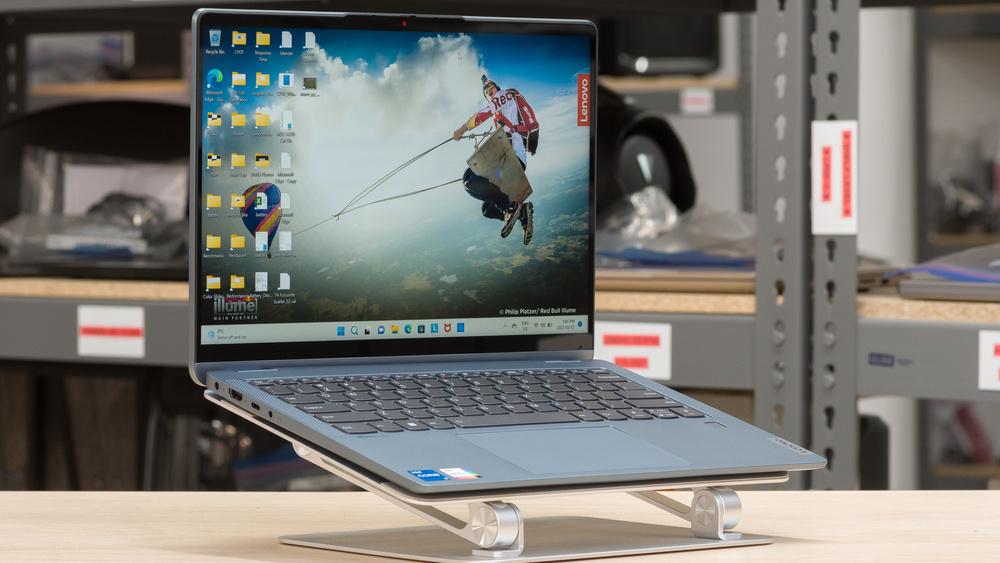
Lenovo IdeaPad Flex 5i 14 (2025)
Best for: Remote Workers Who Present or AnnotatePros
- Touchscreen 2-in-1 design works well for annotating docs and presenting
- IR webcam with face detection for automatic Windows Hello login
- Intel Core Ultra 5 225U keeps the machine cool and quiet
- Backlit keyboard is comfortable for long typing sessions
- Compact 14-inch frame with USB-C and reasonable port selection
Cons
- 8GB RAM is functional but limiting for heavy multitaskers
- Plastic chassis feels less premium than HP or Acer at this price
- Display brightness is adequate but not standout
- 512GB SSD requires cloud storage discipline
- Gaming and video editing are limited by the efficiency-focused chip
Price as of Mar 6, 2026 — see current price on Amazon.
The Lenovo IdeaPad Flex 5i makes the most sense if your work involves presenting, annotating PDFs, or sketching diagrams in meetings. The 360-degree hinge lets you fold the screen into tablet mode or tent mode, which is useful in small meeting spaces where you want to hand the screen to someone without spinning the whole machine around.
Lenovo's keyboard remains one of the better options in class at this price. The key travel and tactile response are above average for the segment, and the backlighting adjusts based on ambient light. If you type a lot, the IdeaPad Flex 5i feels noticeably better than budget alternatives.
The IR webcam handles face recognition for Windows Hello login reliably, which saves time when you're constantly unlocking the device between calls. In mixed lighting environments, IR cameras also handle exposure better than standard cameras, which matters when you work near windows or in offices with uneven overhead lighting.
The Core Ultra 5 225U is a 12-core efficiency chip. It keeps the machine cool and quiet during calls, which is valuable when fan noise could bleed into your microphone. The tradeoff is sustained performance: for long video transcodes or heavy data processing, the 225U runs behind the H-series processor in the HP Pavilion Plus.
The 8GB RAM limitation is real but manageable. Lenovo offers configurations with more RAM, but the 512GB/8GB configuration is the common price point. If you regularly run 20-plus browser tabs and multiple apps simultaneously, consider a higher-RAM configuration even if it costs a bit more. If you do a lot of coding or technical work alongside productivity tasks, our best laptops for programming has context on what specs matter most.
Best value: ASUS VivoBook 16
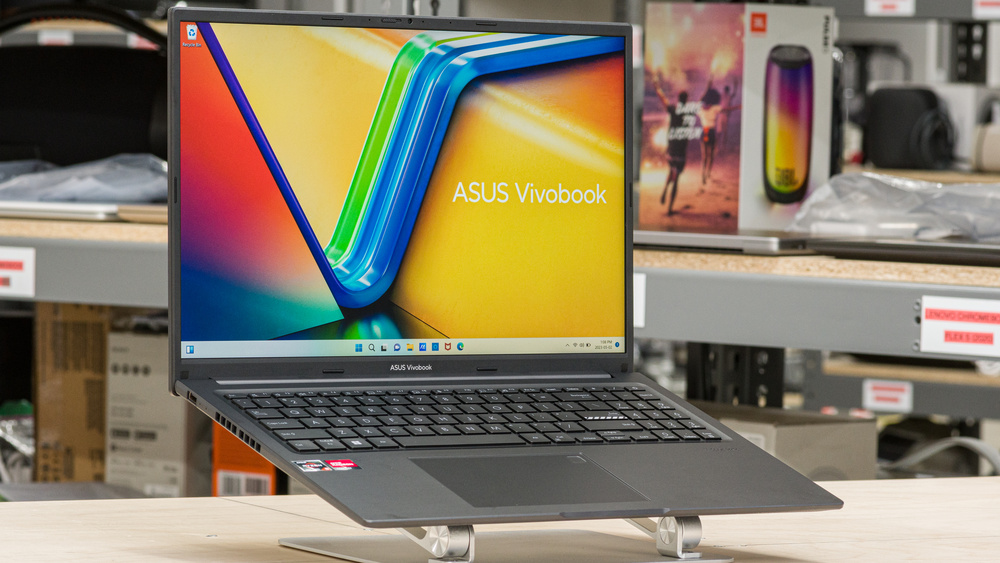
ASUS VivoBook 16 (M1605YA)
Best for: Budget-Conscious Remote Workers at a DeskPros
- 1TB SSD is the most storage of any laptop on this list
- 16-inch 16:10 display gives significant screen real estate for multitasking
- AMD Ryzen 7 7730U delivers strong multicore performance for the price
- Frequently drops below $500 on sale
- Wi-Fi 6 for stable wireless connections on faster networks
Cons
- 3.97 lbs is the heaviest option here by a meaningful margin
- 720p webcam is below expectations for a 2026 work laptop
- Display brightness tops out around 250 nits, which struggles outdoors
- No IR camera or fingerprint reader on the base model
- Build quality feels budget despite the solid performance numbers
Price as of Mar 6, 2026 — see current price on Amazon.
If your remote work is mostly desk-based and budget is the primary constraint, the ASUS VivoBook 16 is the answer. The Ryzen 7 7730U delivers 8-core performance that holds up to real multitasking loads, and at this price, getting 1TB of SSD storage and a 16-inch display is genuinely unusual.
The 16:10 display ratio gives you more vertical content than a standard 16:9 screen. For people who live in documents, spreadsheets, or code all day, that extra space reduces scrolling. At 16 inches, the screen real estate is large enough that you may not need an external monitor for most tasks, which saves money and desk space.
The Ryzen 7 7730U is not the newest architecture, but it's proven hardware that delivers consistent performance without thermal throttling under sustained load. Battery life typically lands at 9-11 hours in productivity workloads, which is better than many 16-inch laptops at any price.
Where the VivoBook 16 falls short is the webcam. A 720p camera in 2026 is behind the curve for a work laptop. If your role involves frequent client-facing video calls, you'll notice the quality difference compared to competitors in this roundup. An external USB webcam in the $70-100 range fixes this if the VivoBook's value proposition otherwise fits your needs.
The weight is also a real consideration. At nearly 4 pounds, this is not a laptop you'll want to carry to a coffee shop every day. It's a desk machine that occasionally moves. If portability matters, the HP Pavilion Plus or Acer Swift Go 14 are significantly lighter.
If budget is even tighter, our best laptops under $500 has solid options that trade some performance for a lower price.
Best battery life: Acer Swift Go 14
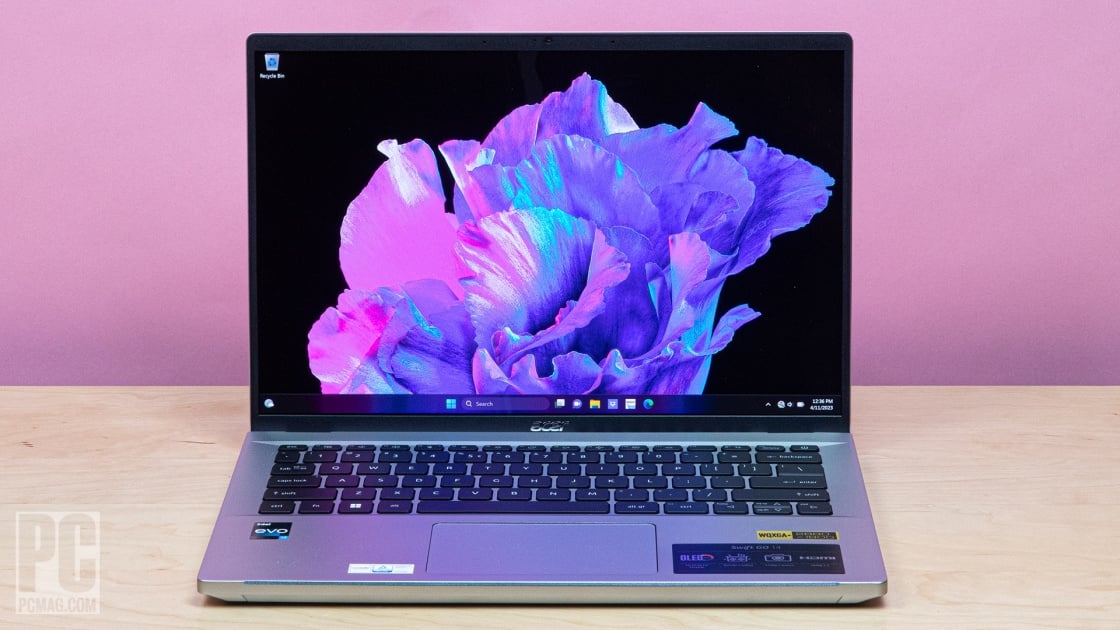
Acer Swift Go 14 (SFG14-63T)
Best for: Frequent Travelers and Road WarriorsPros
- AMD Ryzen 7 8845HS is the fastest processor on this list
- 16GB LPDDR5X RAM handles demanding multitasking without compromise
- 10-13 hours real-world battery life is the longest of any pick here
- 1440p QHD webcam delivers visibly better video call quality
- 1TB SSD gives you storage room for years
Cons
- Highest price on this list at $749
- Ryzen 7 8845HS generates more heat than U-series chips under sustained load
- Slim chassis means fewer ports than you might want
- No dedicated GPU limits heavy creative work
- Build quality is solid but not exceptional at this price
Price as of Mar 6, 2026 — see current price on Amazon.
The Acer Swift Go 14 is the pick for remote workers who regularly work away from power outlets. Pairing the Ryzen 7 8845HS with Acer's battery management gets you 10-13 hours on mixed productivity workloads, which is class-leading for a machine at this performance level.
The Ryzen 7 8845HS deserves attention. This is an 8-core chip built on AMD's Hawk Point architecture with strong single-core performance. Remote workers feel this in the small moments: snappy app launches, responsive browser tabs, fast document autosave. It's the most capable processor on this list and handles demanding tasks like video exports and large data files better than the U-series alternatives.
The 1440p QHD webcam is unusual at this price. Most webcams in this price category still ship with 1080p cameras, and the VivoBook ships with 720p. At 1440p, your image on video calls is noticeably sharper and more professional, which matters when you're on client calls or team presentations where first impressions carry weight.
At 3.09 pounds, the Swift Go 14 ties with the HP Pavilion Plus for lightest on this list. The combination of low weight and long battery life makes it the best laptop for travel. Toss it in a bag without thinking about the charger for most day trips.
The tradeoff is price. At $749, this is the most expensive option here. If your budget is firm at $700, the HP Pavilion Plus is a better value. If you travel frequently and battery life is the top priority, the extra investment is justified. Remote workers who need performance at the laptop and gaming level should check out our best gaming laptops under $1,000 for alternatives.
How to pick the right one
Choose the Acer Aspire 14 AI for the best all-around balance of battery life, RAM, and performance. The Lunar Lake chip is the most efficient thing in this price bracket, and it is the pick if clearing a full workday unplugged matters more to you than pixel density.
Choose the Lenovo IdeaPad Flex 5i if your work involves annotating documents, presenting to clients in person, or using the laptop in unconventional positions. The 2-in-1 form factor and excellent keyboard make it a strong productivity tool.
Choose the ASUS VivoBook 16 if budget is the primary driver and you work primarily at a desk. The 1TB storage and large 16-inch display are hard to match at $549.
Choose the Acer Swift Go 14 if you travel frequently and maximum battery life without sacrificing performance is the priority. The 1440p webcam is a meaningful bonus.
FAQ
What is the most important spec for a remote work laptop?
Battery life, by a wide margin. A laptop that lasts 10-plus hours means you work without anxiety about finding outlets. After battery, RAM matters more than CPU speed for typical remote work tasks. A Ryzen 5 with 16GB RAM is more practical than a Core Ultra 7 with 8GB for most office workloads.
Is 8GB RAM enough for remote work in 2026?
It depends on your habits. Under 10 browser tabs, standard apps, and basic video calls, 8GB handles it. Running Zoom, Slack, Gmail, Google Sheets, and music simultaneously pushes that limit. The extra $50-100 for a 16GB configuration is worth it for most remote workers who multitask heavily.
What webcam quality do I need for professional video calls?
A 1080p webcam is the minimum for professional use in 2026. The 1440p webcam in the Acer Swift Go 14 is noticeably better. Avoid laptops with 720p cameras if you're on video calls daily. The VivoBook 16 is the only laptop in this roundup with a 720p camera, and that's a real limitation if calls are central to your work.
Should I get a 2-in-1 or clamshell for remote work?
Most remote workers do fine with a traditional clamshell. A 2-in-1 like the Lenovo IdeaPad Flex 5i adds value if you annotate PDFs, sketch diagrams, or present to clients in person. If you don't do those things regularly, the clamshell options here offer better performance per dollar.
Do I need a dedicated GPU for remote work?
No. Integrated graphics handle video calls, screen sharing, multi-monitor setups, and basic photo editing without trouble. You'd only need a dedicated GPU for frequent video editing or 3D software. All four laptops on this list use integrated graphics, which is part of how they deliver strong CPUs and RAM under $800. If you do creative work alongside productivity, check our best laptops for college students to see how these machines compare to student-focused picks.
How We Test
We score products by combining spec-level research, pricing history, trusted third-party benchmarks, and owner sentiment from high-signal sources.
- Performance and real-world value in the category this guide targets
- Price-to-performance and deal consistency over recent pricing windows
- Build quality, reliability patterns, and known long-term issues
- Recommendation refresh cadence to keep these picks current
Author
TheTechSearch Editorial Team
Independent product reviewers & PC builders
We test and compare real-world specs, price trends, and user feedback to recommend gear that actually makes sense to buy.