Best Laptops for Minecraft in 2026 (Java, Mods and Shaders)
Five laptops that actually run Minecraft well in 2026, from vanilla at $549 to full shader packs with an RTX 4060, ranked for every budget. Expert picks, pro...
As an Amazon Associate we earn from qualifying purchases made through our links — this doesn't affect our picks.
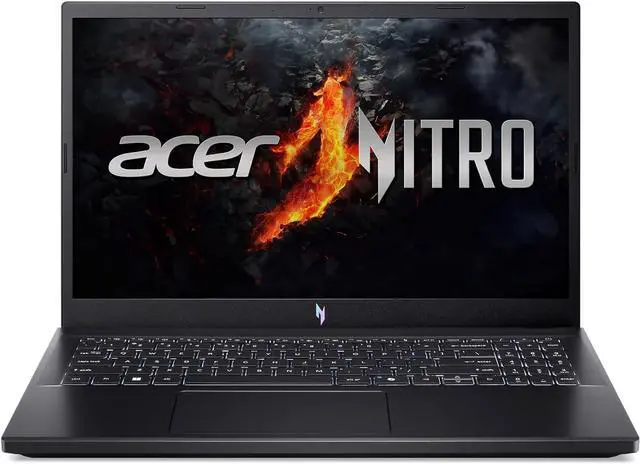
Acer Nitro V 15 Gaming Laptop
Our top recommendation for this category
Price as of Sep 1, 2026 — see current price on Amazon.
Minecraft is weirdly deceptive about hardware. Vanilla survival? It'll run on a laptop from 2019. Then you add BSL shaders, a 200-mod Forge pack, or push render distance to 32 chunks, and suddenly you're watching frames collapse on hardware that handles everything else fine.
The RTX 4050/4060 laptop generation hit a price floor this year that hasn't happened before. I'm seeing RTX 4060 machines under $800, which used to be a $1,100+ proposition. For Minecraft specifically (mods, shaders, Java Edition with realistic lighting packs), these five are what I'd tell someone to buy right now.
| Laptop | GPU | CPU | RAM | Display | Price | |
|---|---|---|---|---|---|---|
| Acer Nitro V 15 | RTX 4050 | Ryzen 5 7535HS | 16GB DDR5 | 15.6" 144Hz | $549 | Check Price |
| HP Victus 15 | RTX 4050 | Ryzen 7 7445HS | 16GB DDR5 | 15.6" 144Hz | $649 | Check Price |
| ASUS TUF Gaming A15 | RTX 4050 | Ryzen 7 7435HS | 16GB DDR5 | 15.6" 144Hz | $699 | Check Price |
| MSI Katana 15 | RTX 4060 | Core i7-13620H | 16GB DDR5 | 15.6" 144Hz | $749 | Check Price |
| Lenovo LOQ 15ARP9 | RTX 4060 | Ryzen 7 7435HS | 16GB DDR5 | 15.6" 144Hz | $799 | Check Price |
Acer Nitro V 15, Best Budget Pick
Acer Nitro V 15 Gaming Laptop
Pros
- RTX 4050 runs Minecraft with BSL shaders at 70-90 FPS
- Ryzen 5 7535HS handles large modpacks without major frame dips
- 144Hz IPS display, smoother than you'd expect at this price
- 16GB DDR5 out of the box, no upgrades needed for Minecraft
Cons
- Ryzen 5 7535HS shows lag in heavily modded packs vs Ryzen 7
- 512GB SSD fills up fast with multiple mod packs and world saves
- Plastic build feels lightweight, fine for a desk, less great for travel
Price as of Sep 1, 2026 — see current price on Amazon.
The Nitro V is Acer's no-frills gaming laptop, and for Minecraft that's actually a selling point. No RGB pulling extra watts, no 240Hz display that makes zero difference for Minecraft, just a solid 144Hz IPS panel, RTX 4050 6GB, and enough CPU to handle mid-size modpacks.
Vanilla Minecraft on this thing is overkill. You'll sit at 200+ FPS on any render distance you'd realistically play at. Flip on BSL shaders via Optifine or Sodium and you're looking at 70-90 FPS. Drop to Complementary Reimagined at medium settings and it locks at 60+ with render distance at 16 chunks. That's a good experience.
The Ryzen 5 7535HS is where it shows its limits, though. Six cores, and heavily threaded Forge packs, 100+ mods, aggressive world generation, stuff like Create: Above and Beyond or any kitchen-sink ATM pack, will dip frames in ways the Ryzen 7 options below won't. If that's you, spend the extra $100. For vanilla, SMP play, and moderate modpacks, this is the right call under $600.
HP Victus 15, Best Bang for Buck

HP Victus 15 Gaming Laptop
Pros
- Ryzen 7 7445HS handles 150+ mod Forge packs cleanly
- RTX 4050 + 16GB DDR5 is the right combo for Minecraft shader performance
- HP's build quality is noticeably better than Acer at this price tier
- 144Hz IPS display looks great for the price
Cons
- Only 512GB SSD, plan for an external drive or upgrade
- Battery life under gaming load is 2-3 hours, similar to all RTX 4050 laptops
- HP Victus fan noise under full load can be audible in a quiet room
Price as of Sep 1, 2026 — see current price on Amazon.
The jump from Ryzen 5 to Ryzen 7 costs $100 and is genuinely worth it for Minecraft modding. The 7445HS has eight cores running at up to 4.7GHz, which matters when you're loading 200 mods at startup or exploring freshly generated chunks with a world-gen-heavy pack.
In practice, the HP Victus runs the same GPU (RTX 4050 6GB) as the Acer, so shader performance is essentially identical. What you gain is chunk loading speed, faster world generation, and smoother performance in modpacks that stress the CPU more than the GPU. Minecraft Java is more CPU-bound than people expect.
For $100 more, I'd take this over the Nitro V unless budget is the hard constraint.
ASUS TUF Gaming A15, Editor's Choice
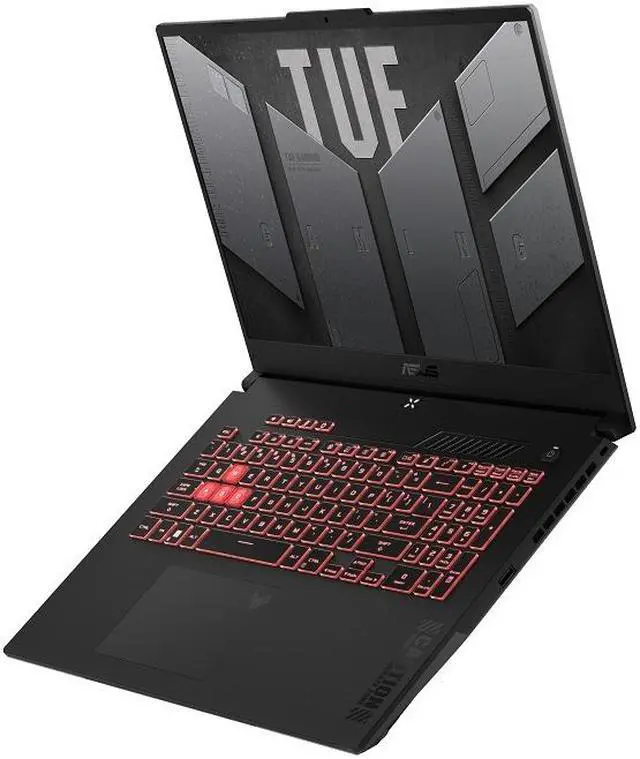
ASUS TUF Gaming A15 Gaming Laptop
Pros
- MIL-STD-810H durability rating, survives actual backpack use
- 100% sRGB display is noticeably more vibrant than budget panels
- RTX 4050 at up to 140W TGP, higher than most RTX 4050 laptops
- Ryzen 7 7435HS + 16GB DDR5 handles any Minecraft scenario smoothly
Cons
- Heavier than the Acer at 4.85 lbs
- Only 512GB SSD
- Slightly higher price than HP Victus for similar raw specs
Price as of Sep 1, 2026 — see current price on Amazon.
Here's what actually sets the TUF A15 apart: ASUS runs the RTX 4050 at up to 140W TGP, versus 115W on most budget alternatives. Same chip, but 10-15% better real-world shader performance. BSL at high settings hits 90-100 FPS instead of 75-80. Not dramatic, but real and consistent.
The 100% sRGB display matters more for Minecraft than most games because of how saturated the color palette is. Creeper green, lapis blue, redstone red. These look noticeably different on an accurate panel versus a washed-out budget display. This is a difference you'll see immediately when you put the two laptops side by side.
And the MIL-STD-810H certification. Worth mentioning plainly: if this laptop leaves your desk, dorm room, backpack, a flight, just getting knocked around, it was built for that. The Acer and HP would probably survive everyday use too, but the TUF was certified for it. That's not marketing language; it's a specific set of drop and vibration tests.
MSI Katana 15, Best RTX 4060 Value
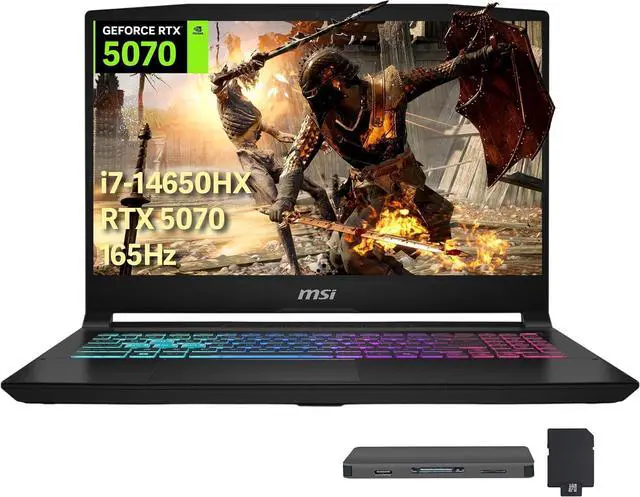
MSI Katana 15 Gaming Laptop
Pros
- RTX 4060 8GB unlocks Minecraft ray tracing and ultra shaders
- Intel Core i7-13620H is strong for modded Java performance
- 1TB NVMe SSD, double the storage of most options here
- MUX switch support for better GPU utilization
Cons
- Intel runs warmer than AMD Ryzen under sustained gaming load
- At 5.07 lbs it's the heaviest laptop on this list
- Fan noise under RTX 4060 load is louder than the Ryzen options
Price as of Sep 1, 2026 — see current price on Amazon.
If ray tracing in Minecraft Bedrock Edition is on your list, you need 6GB+ VRAM and preferably an RTX 4060. The jump from RTX 4050 to RTX 4060 is meaningful here: ray tracing went from single-digit FPS to playable (40-60 FPS at medium settings). For Java Edition with Continuity + Iris shaders pushing photorealistic textures, the extra VRAM lets you go 32-chunk render distance without stuttering.
The Core i7-13620H is a 12-core chip (4P + 8E) that handles chunk pre-generation and heavy mod loading faster than any Ryzen 5 option. I wouldn't call it a flat win over Ryzen 7 across the board, but for Minecraft's mix of sustained simulation load and burst chunk generation, it's competitive.
The 1TB SSD sealed this pick for me. A full Minecraft setup with 3-4 large modpacks, world saves, shader packs, and resource packs easily hits 150-200GB. Not having to immediately buy an external drive or swap the internal SSD is a real quality-of-life difference.
Lenovo LOQ 15ARP9, Top Performer
Lenovo LOQ 15ARP9 Gaming Laptop
Pros
- RTX 4060 8GB at 140W TGP, top-tier performance for this GPU
- Ryzen 7 7435HS handles extremely large modpacks cleanly
- Excellent thermal design, quieter than MSI Katana under same load
- 144Hz IPS display with good color accuracy
Cons
- Only 512GB SSD at this price is frustrating
- Lenovo LOQ's keyboard feel is mediocre for long typing sessions
- No webcam in the lid, odd omission for streaming or video calls
Price as of Sep 1, 2026 — see current price on Amazon.
The Lenovo LOQ 15 is the laptop I'd buy for Minecraft if budget wasn't the constraint. The RTX 4060 runs at up to 140W on this system, that's a full 30W above budget RTX 4060 implementations, and it shows. Continuity shaders with ray tracing enabled at high settings in Java Edition hits 50-65 FPS at 1080p. Ultra graphics packs that would stutter on an RTX 4050 run smoothly here.
Lenovo's thermal design on the LOQ is noticeably quieter than MSI's at equivalent load. Both achieve the same GPU frequencies, but the LOQ does it with lower fan speeds and less noise. For a bedroom or office setup, that matters more than it sounds.
The Ryzen 7 7435HS also handles the AMD side of optimization better, Minecraft Java's garbage collection is tuned well for Zen 4 architecture, and you'll see that in smoother chunk loading on very large render distances.
The missing webcam is genuinely weird on a $799 machine. But if your plan is to Twitch stream Minecraft and you're using a separate webcam anyway, it's a non-issue.
Buying Guide: What Specs Actually Matter for Minecraft
GPU: When Does It Matter?
Vanilla Minecraft with Optifine runs at 200+ FPS on integrated graphics in 2026. A dedicated GPU matters specifically for shaders, ray tracing, and modpacks that add detailed entity rendering or realistic lighting. If you're running shaders: RTX 4050 minimum. For ray tracing: RTX 4060 minimum. For vanilla + light mods: literally anything modern.
RAM: 16GB Is the Starting Point
Minecraft Java is a memory-hungry JVM application. Vanilla Minecraft needs 2-4GB allocated, but modern Forge modpacks routinely need 6-10GB for the JVM alone. 16GB total system RAM means Windows can run comfortably alongside a 6GB JVM allocation. 8GB is workable but tight. 32GB is only necessary for the most extreme kitchen-sink packs.
CPU: Cores Help More Than You'd Expect
Unlike most games, Minecraft's world generation, chunk loading, and entity simulation are CPU-bound rather than GPU-bound. A faster CPU with more cores processes chunks faster, loads modpacks faster at startup, and keeps the simulation ticking without dipping FPS. Ryzen 7 or Core i7 is worth it over Ryzen 5 or Core i5 specifically for Minecraft.
Storage: Size Up Front Saves Money Later
A single Minecraft instance with one modpack and a few worlds fits in 5-10GB. But multiple modpacks, multiple world saves, shader packs, texture resource packs, backup exports, it compounds quickly. On a 512GB drive with Windows already using 80-100GB, you might have 300GB available. That's 4-5 large modpacks before you're hunting for space. If you can get 1TB SSD from the start, do it.
Display: 144Hz Changes How Minecraft Feels
Even at lower FPS, Minecraft's mouse look and movement feel smoother on a 144Hz panel. This is especially true in fast-paced PVP or exploration on a server. All five laptops on this list hit 144Hz, which is the right baseline for 2026. 60Hz displays are fine at a desk with a monitor, but on a laptop you'll notice it.
Frequently asked questions
- What is the minimum laptop spec to run Minecraft well?
- For vanilla Minecraft at 60+ FPS: any modern laptop with 8GB RAM and an Intel 12th gen or AMD Ryzen 5000 series CPU. Iris Xe or AMD Radeon integrated graphics handle it. For Minecraft with shaders: you need a dedicated GPU. RTX 4050 is the minimum for BSL or Complementary shaders at playable frame rates. For ray tracing in Bedrock: RTX 4060 minimum.
- Does Minecraft run better on Intel or AMD laptops?
- It depends on the scenario. AMD Ryzen performs well in sustained chunk simulation and garbage collection. Intel's single-core speed can be faster for certain world generation tasks. In practice, both Ryzen 7 and Core i7 options on this list perform similarly, the GPU matters more than the CPU brand for shader performance.
- Can a gaming laptop handle Minecraft AND other games?
- Absolutely. An RTX 4050 laptop that runs Minecraft with shaders at 80 FPS also handles Valorant at 200+ FPS, Fortnite at 100+ FPS, and Elden Ring at 60 FPS. Minecraft's requirements aren't uniquely demanding. Any laptop on this list will handle a typical PC game library.
- How much RAM should I allocate to Minecraft?
- For vanilla Minecraft: 4GB. For a small Forge pack under 50 mods: 6GB. For a large modpack with 100-200 mods: 8-10GB. Never allocate more than 50-60% of your total system RAM to the JVM, leaving headroom for Windows and background apps matters. On a 16GB laptop: 8GB to Minecraft max.
- Is ray tracing in Minecraft worth it on a laptop?
- Ray tracing in Minecraft Bedrock Edition at 40+ FPS requires an RTX 4060 or better, and even then you'll be running at medium settings. The visual result is genuinely stunning, real-time global illumination changes how the game looks completely. Whether it's worth it depends on whether you're in it for visuals or pure gameplay. For performance-focused Minecraft: shaders on Java Edition are more efficient at equivalent visual quality.
- Do I need a gaming laptop or will a regular laptop work for Minecraft?
- A regular laptop handles vanilla Minecraft fine. A 2025-era Lenovo IdeaPad or Dell Inspiron with Intel Core i5 and 16GB RAM will run vanilla Minecraft Java at 100+ FPS without issue. You only need a gaming laptop (dedicated GPU) for shaders, ray tracing, or very large modpacks that push GPU-heavy world rendering. If someone just wants to play Survival or Creative vanilla: save money, skip the gaming label.
Bottom Line
For most Minecraft players in 2026, the ASUS TUF Gaming A15 at $699 hits the right balance, RTX 4050 running at a high TGP, a color-accurate display, MIL-STD durability, and a Ryzen 7 that handles any modpack you'd realistically run. Step down to the Acer Nitro V if $549 is the ceiling. Step up to the Lenovo LOQ 15ARP9 if you're running shaders and ray tracing regularly. Any of these five handles Minecraft well, the differences show up in how far you push shaders and how many mods you pile on.
How We Pick
We pick products by combining spec-level research, price checks, trusted third-party benchmarks, and owner sentiment from high-signal sources.
- Performance and real-world value in the category this guide targets
- Price-to-performance and deal consistency over recent pricing windows
- Build quality, reliability patterns, and known long-term issues
- Recommendation refresh cadence to keep these picks current
Author
TheTechSearch Editorial Team
Independent product reviewers & PC builders
We compare real-world specs, reviews and owner reports, price trends, and user feedback to recommend gear that actually makes sense to buy.