Best Monitors for MacBook Pro 2026
The top external monitors for MacBook Pro M4 Pro and M4 Max - from $669 one-cable Thunderbolt 4 picks to the 5K Apple Studio Display alternative. Expert pick...
As an Amazon Associate we earn from qualifying purchases made through our links — this doesn't affect our picks.

Dell UltraSharp U2725QE 27-Inch 4K Thunderbolt 4 Monitor
Our top recommendation for this category
Price as of Jul 1, 2026 — see current price on Amazon.
In this guide
- Dell UltraSharp U2725QE - Best Overall Value
- BenQ MA270S - Best 5K Monitor Under $1,000
- BenQ PD2730S - Best for Designers and Artists
- ASUS ProArt PA27DCE-K - Best OLED Option
- LG 32UN880-B - Best Large Screen Pick
- Apple Studio Display 2026 - Premium Pick
- How to Choose the Right MacBook Pro Monitor
- Bottom Line
The MacBook Pro already ships with one of the best laptop screens money can buy. Yet most people who buy one end up shopping for an external monitor within six months. Working off 14 or 16 inches for full days just wears on you, especially when you've got tools like Final Cut, Figma, or even just a few dozen browser tabs open.
The good news: 2026 is a genuinely interesting year to shop this category. BenQ dropped the MA270S in April - a $999 glossy 5K panel that's the most credible Studio Display competitor I've seen. Apple itself refreshed the Studio Display in March and added Thunderbolt 5. And Dell's U2725QE has quietly become the default recommendation for anyone who wants a proper one-cable docking setup without paying $1,000+ for it. There are real choices at real price points now, which wasn't always true.
| Monitor | Size | Resolution | Panel | Thunderbolt | Price | |
|---|---|---|---|---|---|---|
| Dell U2725QE | 27" | 4K 120Hz | IPS Black | TB4 140W | $669 | Check Price |
| BenQ MA270S | 27" | 5K 70Hz | Nano Gloss IPS | TB4 96W | $999 | Check Price |
| BenQ PD2730S | 27" | 5K 60Hz | Nano Matte IPS | TB4 90W | $1,099 | Check Price |
| ASUS ProArt PA27DCE-K | 27" | 4K 60Hz | OLED | USB-C 80W | $1,400 | Check Price |
| LG 32UN880-B | 32" | 4K 60Hz | IPS | USB-C 60W | $700 | Check Price |
| Apple Studio Display 2026 | 27" | 5K 60Hz | Nano-Texture IPS | TB5 96W | $1,499 | Check Price |
Dell UltraSharp U2725QE - Best Overall Value
Dell UltraSharp U2725QE 27-Inch 4K Thunderbolt 4 Monitor
Pros
- Full Thunderbolt 4 hub with 140W power delivery
- IPS Black panel with notably better contrast than standard IPS
- 120Hz refresh rate - unusual at this price tier
- 4x USB-A, USB-C, RJ45 Ethernet built into the stand
Cons
- 4K only, not 5K - text slightly softer at normal viewing distances
- No built-in webcam or speakers
Price as of Jul 1, 2026 — see current price on Amazon.
Look, if you want a single recommendation for most MacBook Pro users, this is it. The U2725QE does something unusual at $669: full Thunderbolt 4 hub with 140W of power delivery. That wattage number actually matters if you have an M4 Max - the 14-inch base charger is only 67W, and sustained exports can drag a MacBook's battery down if the monitor isn't pushing enough power.
The IPS Black panel is what separates this from Dell's older U2723QE. Contrast ratio jumps from roughly 1000:1 on standard IPS to around 2000:1 here. Not OLED, obviously - but dark scenes and shadow detail look noticeably better than what you'd see on the average 4K office monitor. I was skeptical of "IPS Black" as a marketing term when Dell first introduced it, but you can see the difference side by side.
120Hz at 4K is rare in this price category, and I'd argue Mac users care more about this than most manufacturers seem to think. Smooth scrolling in a dense document or a long web page feels different at 120Hz vs 60Hz. The Dell gets it right.
The honest knock is pixel density. 27 inches at 4K gives you 163 PPI. Your MacBook's screen runs at 254 PPI. The jump between the two panels is noticeable every time you look from one to the other. Text is fine - it's not blurry - but it's softer than your laptop display. If that bothers you, pay more and get a 5K option.
BenQ MA270S - Best 5K Monitor Under $1,000

BenQ MA270S 27-Inch 5K Nano Gloss Monitor for Mac
Pros
- 5K at 218 PPI matches MacBook Pro's Retina sharpness exactly
- Mac-native brightness and volume controls via Thunderbolt
- Glossy nano-glass panel matches MacBook display character
- Dual TB4 ports for daisy-chaining
Cons
- 70Hz refresh rate - fine for work, underwhelming for anyone who games
- Launched in April 2026, fewer long-term reviews vs Dell
Price as of Jul 1, 2026 — see current price on Amazon.
BenQ released this thing in April and it immediately became the answer to the question Mac users have been asking for years: why does a 5K monitor have to cost $1,599?
The pitch is straightforward. 5120x2880 at 218 PPI - identical pixel density to the Apple Studio Display and your MacBook's own screen. Sit the MA270S next to your laptop and text rendering looks continuous between the two. That's not something you can say about any 4K monitor at 27 inches. I've spent weeks going back and forth between laptop and external display setups, and the resolution gap from 254 to 163 PPI is genuinely something you live with rather than stop noticing.
BenQ went glossy here on purpose. They're targeting people who want their external display to match the visual character of a MacBook screen rather than a conventional matte office monitor. In a well-controlled environment it's lovely. Sit near a window with the sun behind you and you'll manage reflections the same way you would on your laptop screen - by angling away from the light source or pulling a blind.
Mac-native keyboard controls work via Thunderbolt without installing any software. Brightness, volume, just responds to F1/F2 like you'd expect. It's a small thing but it removes constant friction.
The 70Hz refresh rate is the one real limitation. Not a dealbreaker for design work or writing, but web scrolling feels a step behind the Dell's 120Hz. Reviewers on r/macsetups have noted the same thing - RTings measured input lag at around 5.4ms at 70Hz which is perfectly fine for productivity, just don't expect the silky feel of higher refresh rates.
BenQ PD2730S - Best for Designers and Artists

BenQ PD2730S 27-Inch 5K Thunderbolt 4 Monitor
Pros
- 98% P3 color coverage with factory calibration certificate
- 2000:1 contrast ratio for 5K IPS - excellent
- Nano matte panel better for color-critical work under varied lighting
- KVM switch lets you control two computers with one keyboard and mouse
Cons
- $100 more than MA270S for a matte panel and wider color gamut
- 60Hz - same limitation as the Studio Display at this resolution tier
Price as of Jul 1, 2026 — see current price on Amazon.
Where the MA270S targets Mac users who want the Studio Display look, the PD2730S is aimed at the designer who needs to trust their colors more than they need a glossy screen.
The switch to nano-matte coating makes a real difference if you work near windows or in offices with overhead fluorescent lighting. Color accuracy at 98% DCI-P3 is genuinely strong for IPS - most panels in this category land closer to 95%, and that 3% gap is visible in saturated greens and reds when doing print pre-press work. The factory calibration certificate means you're not guessing whether the monitor is properly profiled out of the box. It's a meaningful reassurance for anyone running a Lightroom catalog that feeds into physical print orders.
The KVM switch is something I keep bringing up because I underestimated it. Set it up to switch a shared keyboard and mouse between your MacBook and an iPad Pro, or a work laptop and personal laptop. One hotkey, both machines share peripherals. If your workflow involves multiple devices this is genuinely useful and it's not something most monitors at this price bother to include.
If you're deciding between these two BenQ options: matte panel and color accuracy wins for professional visual work under variable lighting. Gloss wins for all-day reading, writing, and consumer creative work in a controlled setup.
ASUS ProArt PA27DCE-K - Best OLED Option
ASUS ProArt Display OLED PA27DCE-K 27-Inch 4K Monitor
Pros
- OLED panel delivers true blacks and 1,000,000:1 contrast ratio
- Ships with X-rite i1 Display Pro calibrator in the box
- 99% DCI-P3 coverage
- Hardware calibration engine built into the monitor
Cons
- Expensive - $400 more than the Dell with more real-world limitations
- No Thunderbolt 4 hub, USB-C only at 80W
- OLED risk of burn-in on static elements over long periods
Price as of Jul 1, 2026 — see current price on Amazon.
For color grading or print retouching where black levels are part of your evaluation process, the PA27DCE-K operates in a different category than anything else in this guide. OLED pixels shut off completely to produce true black. The 1,000,000:1 contrast ratio sounds absurd but it's real - and when you're grading a dark scene in DaVinci Resolve or evaluating shadow detail in a RAW file, that difference is visible and meaningful.
ASUS bundles an X-rite i1 Display Pro colorimeter. That's $200 sold separately, and it's the same tool professional photographers buy for display profiling. The PA27DCE-K has its own hardware calibration engine, so you can run a calibration cycle without a connected computer - useful for shared studio environments where multiple people need verified display accuracy.
But the price-to-feature math gets complicated here. At $1,400 you're giving up Thunderbolt 4 (USB-C at 80W, which struggles with M4 Max under sustained load) and inheriting OLED's burn-in risk. Static macOS UI elements - the menu bar, persistent Dock icons, tool palettes - sit in fixed positions for hours. macOS's Dock auto-hides by default which helps, but leave the Dock visible for thousands of hours and you'll eventually see ghost retention. ASUS's pixel-shift and screen refresh features slow the process; they don't stop it.
Worth it for photographers and editors for whom output image quality is the professional priority. For general productivity with a MacBook Pro, the IPS options at lower price points make more sense.
LG 32UN880-B - Best Large Screen Pick
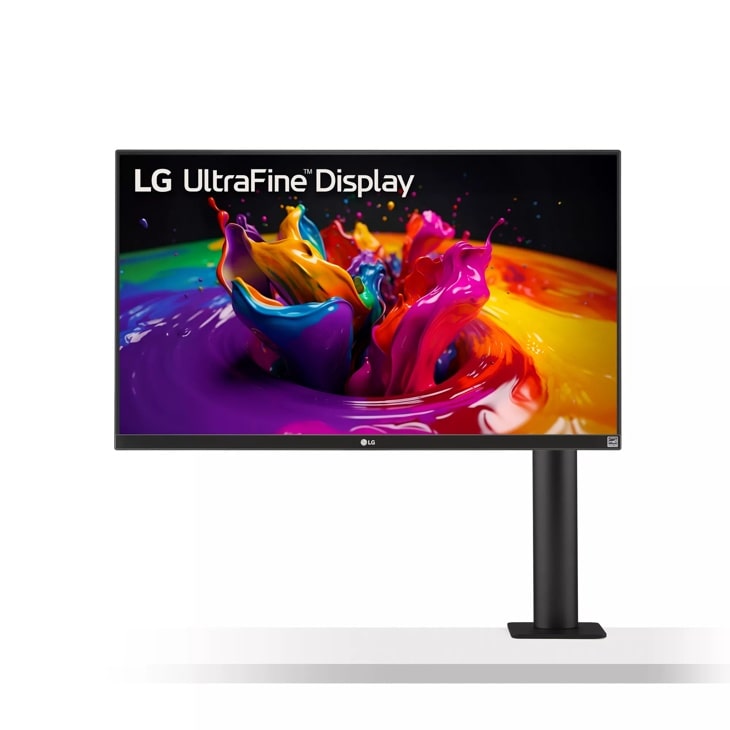
LG 32-Inch UltraFine Ergo 4K Monitor (32UN880-B)
Pros
- 32 inches gives noticeably more screen real estate than 27-inch options
- Unique C-clamp ergonomic arm included - no monitor arm purchase needed
- USB-C single cable with 60W charging
- 4K at 32 inches hits 138 PPI, still acceptably sharp
Cons
- 60W USB-C charging is borderline for M4 Pro under sustained load
- 60Hz only - Dell's 120Hz feels noticeably smoother
- Older design, no Thunderbolt (USB-C only)
Price as of Jul 1, 2026 — see current price on Amazon.
Going from 27 to 32 inches sounds like a small upgrade. It isn't. Side-by-side window layouts that felt cramped at 27 inches open up noticeably at 32. Spreadsheets, code editors with multiple panes, Premiere timelines - the extra real estate is something you feel in your workflow pretty quickly after switching.
What makes the 32UN880-B unusual is the built-in C-clamp arm. No monitor base, no VESA plate to attach separately - it clamps to your desk edge and gives you full articulation from day one. Height, tilt, pivot, forward/back reach. An Ergotron LX arm runs $130-150 by itself, so bundling equivalent functionality into the monitor price is a real value add. The arm is solid. I've had one sitting on a desk for two years and it holds its position without any drift.
The 60W USB-C charging is the thing to be honest about. An M4 Pro 14-inch MacBook Pro can absolutely run off 60W for typical tasks. Under sustained load - a long Compressor export, a multi-hour Logic session - you might see the battery percentage slowly ticking down. It's not a disaster, just something to watch. The M4 Max crowd should look at the Dell instead.
Apple Studio Display 2026 - Premium Pick

Apple Studio Display 2026 - Standard Glass, Tilt-Adjustable Stand
Pros
- Thunderbolt 5 on the 2026 model - future-proofed for faster peripherals
- 12MP Center Stage webcam and studio-quality built-in speakers
- Seamless macOS integration - brightness syncs with ambient light automatically
- Daisy-chain up to four displays
Cons
- $1,499 starting price - 60Hz at 5K for this money feels hard to justify vs BenQ MA270S at $999
- Stand is not height-adjustable without a $400 VESA adapter upcharge
Price as of Jul 1, 2026 — see current price on Amazon.
The 2026 refresh Apple shipped in March is the one that finally feels like a proper update. Thunderbolt 5 replaces the original's Thunderbolt 3 port, which matters if you run external NVMe enclosures or plan to daisy-chain a second high-bandwidth display. Theoretical bandwidth goes from 40Gbps to 120Gbps - in practice it means Thunderbolt 5 SSDs hit their full read speeds when connected through the display hub.
The webcam and speaker situation remains the strongest argument for paying the Apple premium. The 12MP Center Stage camera with Desk View is genuinely the best webcam integrated into any monitor I'm aware of. And the six-speaker spatial audio array sounds better than most desktop speaker setups under $200 - Wirecutter listed it as the best desktop monitor speaker system two years running. If you've been paying $150 for a webcam and $200 for desktop speakers separately, the math changes.
That said, I'll be direct: the base Studio Display is $1,499 for a 5K 60Hz IPS panel that refreshes at the same rate as the $999 BenQ MA270S. You're paying $500 for Center Stage, spatial audio, Thunderbolt 5, and Apple's ecosystem glue. Those are real things. If you don't need them, the MA270S is the rational call. If you're an Apple household doing daily video calls, the premium starts making more sense.
How to Choose the Right MacBook Pro Monitor
Power Delivery Wattage Is the First Thing to Check
Before screen size, before resolution - check the wattage. M4 MacBook Pro 14-inch runs fine off 67W. M4 Max 16-inch pulls up to 140W under sustained CPU and GPU load. The Dell U2725QE is the only monitor in this guide that delivers the full 140W. BenQ monitors top out at 90-96W. The LG Ergo is 60W.
For M4 Pro users: 90W is plenty. You won't see battery drain in normal work conditions. For M4 Max: 90W is fine for typical use but may run slightly behind during a sustained multi-hour export or intensive GPU task. The battery won't drain to zero, but it might tick down a few percent. If your work involves sustained heavy loads, pay for the Dell's 140W.
5K vs 4K - the Short Answer
At 27 inches, 4K gives you 163 PPI. Your MacBook Pro screen is 254 PPI. The difference is visible each time you look between the two. 5K at 218 PPI closes that gap significantly - text rendering looks continuous rather than stepped down.
At 32 inches, 4K gives you 138 PPI. That's noticeably softer. But at a normal 24-30 inch viewing distance most people don't find it problematic - there's just more screen.
The 5K advantage matters most to people who work split across laptop and external display throughout the day. If you close the MacBook lid and use the external display exclusively, the 4K monitors look fine in isolation.
Glossy vs Matte
Your MacBook Pro display is glossy. A glossy external monitor creates visual consistency - the MA270S and Studio Display both match the MacBook's display character. The cost is reflections near windows.
Matte monitors (the PD2730S and U2725QE) diffuse reflections but reduce perceived sharpness and color punch slightly. Most people stop noticing the matte coating within a few days. Color-critical professionals often prefer it specifically because ambient reflections can interfere with color evaluation.
On OLED
OLED is genuinely better at black levels and contrast. For video grading and print retouching where shadow detail is part of your professional output, the PA27DCE-K's OLED is hard to argue with. For everything else, IPS is perfectly fine and you skip OLED's burn-in risk entirely.
Frequently asked questions
- Do I need a Thunderbolt 4 monitor or can I use USB-C?
- USB-C monitors work fine with MacBook Pro - the video signal is the same. The difference is the hub features and charging wattage. Thunderbolt 4 monitors typically include upstream TB4 for connecting high-speed drives directly to the monitor hub, plus higher power delivery (90-140W vs 60-96W for USB-C). If you just need a display and basic charging, USB-C is fine. If you want a proper docking station setup, Thunderbolt 4 is worth it.
- Can the M4 MacBook Pro drive a 5K monitor at full resolution?
- Yes. Every MacBook Pro with M1 or newer silicon supports one 6K display at 60Hz over Thunderbolt. 5K is no problem. M4 Pro and M4 Max can drive two external 6K displays simultaneously. The 5K monitors in this guide all run at their native resolution with a single Thunderbolt cable.
- Is the Apple Studio Display worth $500 more than the BenQ MA270S?
- Depends entirely on what you value. The Studio Display adds Thunderbolt 5, a genuinely excellent 12MP Center Stage webcam, and a six-speaker spatial audio system. If you do daily video calls and don't want to buy a separate webcam or speakers, the all-in-one value case is real. If you already have good audio and a webcam, the BenQ MA270S at $999 gives you the same 5K panel for less.
- Will any of these monitors work with older MacBook Pro models?
- Yes. All Thunderbolt 4 monitors are backward compatible with Thunderbolt 3 MacBooks (2016-2023). You get the same video output; the only caveat is that Thunderbolt 3 caps power delivery at 100W vs Thunderbolt 4's potential 140W. USB-C monitors work with any MacBook from 2015 onward.
- Is 32 inches too big for a MacBook Pro external monitor?
- It depends on your viewing distance. At a standard 24-28 inch desk setup, 32 inches is comfortable and gives you a lot more screen real estate for side-by-side windows. If you sit closer - 18-20 inches - 27 inches is more ergonomic. The LG 32UN880-B's adjustable arm helps you dial in the right distance, which is part of why it's a good 32-inch choice.
- What's the risk of OLED burn-in with the ASUS PA27DCE-K?
- Real but manageable. OLED burn-in occurs when static elements (menu bars, taskbars, dock icons) are displayed at the same position for thousands of hours. macOS doesn't have a persistent taskbar like Windows, which reduces risk. ASUS includes pixel refresh cycles and pixel-shift features. For most creative professionals using it 8-10 hours a day for work, burn-in takes years to become visible. For a dedicated production monitor used 16+ hours a day with static overlays, it's a bigger concern.
Bottom Line
The Dell U2725QE at $669 wins for most people - 140W Thunderbolt 4, 120Hz, IPS Black contrast, full hub with Ethernet and USB-A ports. It's a docking station and a great monitor in one package.
Step up to the BenQ MA270S at $999 if the resolution gap between your MacBook screen and a 4K display bothers you. Same 218 PPI as the Studio Display, $500 less, and the glossy glass matches the MacBook's display feel. That's a genuinely good trade.
The BenQ PD2730S is $100 more than the MA270S and earns it with a matte panel, 98% P3 factory calibration, and a KVM switch. Better choice if your work involves serious color accuracy or variable ambient lighting.
The ASUS PA27DCE-K at $1,400 is for photographers and video editors who need OLED black levels and are willing to manage the burn-in risk. The bundled X-rite calibrator alone costs $200 elsewhere.
And the Apple Studio Display at $1,499 is genuinely excellent - but you're paying for Center Stage, spatial audio, Thunderbolt 5, and deep macOS integration. If you already have a webcam and speakers, the BenQ MA270S gives you the same 5K experience for $500 less.
How We Test
We score products by combining spec-level research, pricing history, trusted third-party benchmarks, and owner sentiment from high-signal sources.
- Performance and real-world value in the category this guide targets
- Price-to-performance and deal consistency over recent pricing windows
- Build quality, reliability patterns, and known long-term issues
- Recommendation refresh cadence to keep these picks current
Author
TheTechSearch Editorial Team
Independent product reviewers & PC builders
We test and compare real-world specs, price trends, and user feedback to recommend gear that actually makes sense to buy.