Best Prebuilt Gaming PCs 2026
The best prebuilt gaming PCs with RTX 5060, 5070, and 5070 Ti: top picks from $899 to $2,199 for every level of gamer. Expert picks, pros and cons, and side-...
As an Amazon Associate we earn from qualifying purchases made through our links — this doesn't affect our picks.
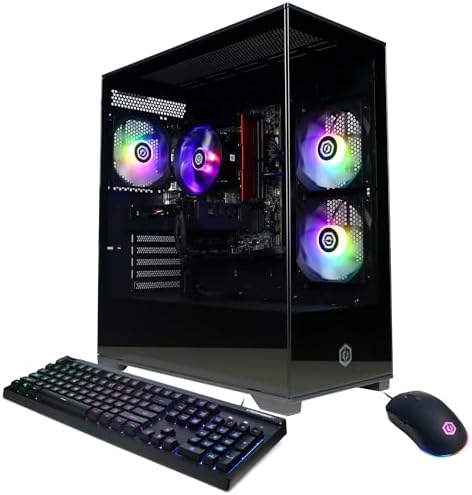
CyberPowerPC Gamer Xtreme VR Gaming PC (RTX 5060, i5-13400F)
Our top recommendation for this category
Price as of Apr 25, 2026 — see current price on Amazon.
In this guide
Nvidia's RTX 50-series finally landed in prebuilt systems at sane prices, and this changes the math on building vs buying considerably. For the first time in a few years, you can walk away with an RTX 5070-powered machine for around $1,500 without sourcing parts yourself, dealing with compatibility headaches, or gambling on GPU availability.
The catch? Not all prebuilts are created equal. Some brands stuff in cheap PSUs, skip the thermal paste application, or pair a great GPU with a CPU that bottlenecks it at 1440p. Drawing on Tom's Hardware benchmarks, Reddit threads, and the actual components inside each box, these are the five systems worth your money in 2026.
Quick Picks
| System | GPU | CPU | RAM | Price | |
|---|---|---|---|---|---|
| CyberPowerPC Gamer Xtreme | RTX 5060 8GB | i5-13400F | 16GB DDR5 | $899 | Check Price |
| iBUYPOWER Slate MESH | RTX 5070 12GB | i7-14700F | 32GB DDR5 | $1,499 | Check Price |
| Skytech King 95 | RTX 5070 12GB | Ryzen 7 9700X | 32GB DDR5 | $1,599 | Check Price |
| CyberPowerPC Gamer Supreme | RTX 5070 12GB | Ryzen 7 9800X3D | 32GB DDR5 | $1,799 | Check Price |
| Corsair Vengeance a7500 | RTX 5070 Ti 16GB | Ryzen 7 7800X3D | 32GB DDR5 | $2,199 | Check Price |
CyberPowerPC Gamer Xtreme VR: Best Budget Prebuilt
CyberPowerPC Gamer Xtreme VR Gaming PC (RTX 5060, i5-13400F)
Pros
- RTX 5060 handles 1080p at high/ultra settings
- No bloatware, clean Windows 11 install
- Upgrade-friendly mid-tower case
- WiFi 6 and DDR5 included at this price
Cons
- 16GB RAM is tight for 2026, plan to upgrade
- i5-13400F shows its age at high CPU loads
- 1TB fills up fast
Price as of Apr 25, 2026 — see current price on Amazon.
Here is what you're buying. The i5-13400F is a 13th-gen chip that launched in 2023, and in a 2026 machine that's noticeable. But the RTX 5060 8GB is the part that matters for 1080p gaming, and DLSS 4 support stretches it further in supported titles.
What CyberPowerPC does well: clean installs. Tom's Hardware specifically called out "no bloatware" in their review of the 2025 Gamer Xtreme line, and that carries forward. You boot up and you're just in Windows. No trial software, no weird manufacturer overlays.
The case is a standard ATX mid-tower with room to add drives later. The PSU is a 500W unit, enough for this configuration but tight if you ever want to upgrade to an RTX 5070. Budget an extra $100 for a 650W PSU down the line if you go that route.
For someone who's never built a PC and just wants something to play games on without spending $1,500+, this is the honest answer. It's not glamorous. It works.
iBUYPOWER Slate MESH: Best Value at $1,499
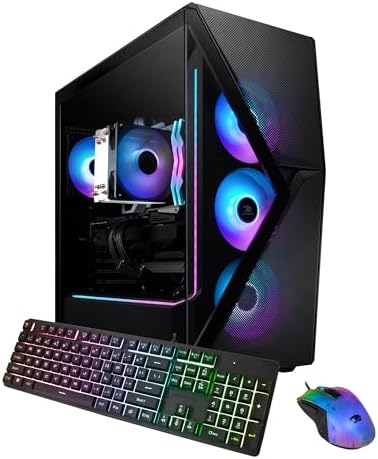
iBUYPOWER Slate MESH Gaming PC (RTX 5070, i7-14700F)
Pros
- RTX 5070 crushes 1440p at high/ultra
- i7-14700F handles streaming and multitasking well
- 32GB DDR5 is future-proof
- Keyboard and mouse included
Cons
- Mesh case has limited dust filtration
- DLSS 4 dependency for top framerates at 1440p
- Can be hard to find in stock
Price as of Apr 25, 2026 — see current price on Amazon.
This is the sweet spot right now. The i7-14700F has 20 cores (8P + 12E) and handles game streaming, video editing, and background tasks without breaking a sweat. The RTX 5070 12GB GDDR7 is where most buyers should land. It is NVIDIA's 1440p card this generation, and DLSS 4 Multi Frame Generation raises frame rates further in supported games.
The Slate MESH case uses a mesh front panel for airflow, RGB lighting throughout, and a tempered glass side panel, the same ingredients as a mid-range custom build at this price.
One thing to flag: iBUYPOWER sometimes runs stock shortages on its popular SKUs. If you're seeing it in stock, don't sleep on it. The Amazon listing comes with a keyboard and mouse, which saves you another $50-80 if you're starting from zero.
The 1TB SSD is fine to start. Plan on adding a second 2TB drive within six months because game sizes are getting ridiculous and 1TB goes fast.
Skytech King 95: Best AMD Build
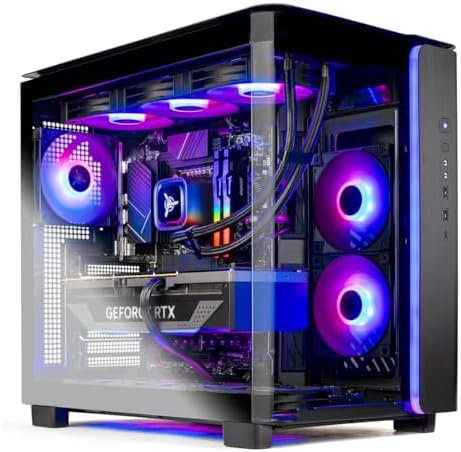
Skytech King 95 Gaming PC (RTX 5070, Ryzen 7 9700X)
Pros
- Ryzen 7 9700X is stronger at sustained workloads than i7-14700F
- 360mm AIO liquid cooling keeps thermals in check
- 850W Gold PSU leaves room for future upgrades
- 1-year warranty with US-based support
Cons
- $100 more than iBUYPOWER for similar GPU tier
- Aesthetics are divisive, very RGB-heavy
- No peripherals included
Price as of Apr 25, 2026 — see current price on Amazon.
Skytech has built a reputation for using quality components across their King 95 line, and that 850W Gold PSU is a bigger deal than it sounds. Budget prebuilts often ship with cheap 500-600W PSUs that limit your upgrade path. An 850W unit means you could drop in an RTX 5080 three years from now without swapping the power supply.
The Ryzen 7 9700X (Zen 5 architecture, 8 cores/16 threads at 5.5GHz boost) performs slightly better than the i7-14700F in purely gaming workloads. Zen 5's wider IPC improvement shows up in CPU-limited titles like CS2 and Valorant where you want 200+ fps.
The 360mm AIO is another plus. Most prebuilts in this range use 240mm or even 120mm coolers, so this one has more cooling headroom.
If you're an AMD fan or you're already in the AMD ecosystem, this is your pick.
CyberPowerPC Gamer Supreme: Best for Competitive Gaming
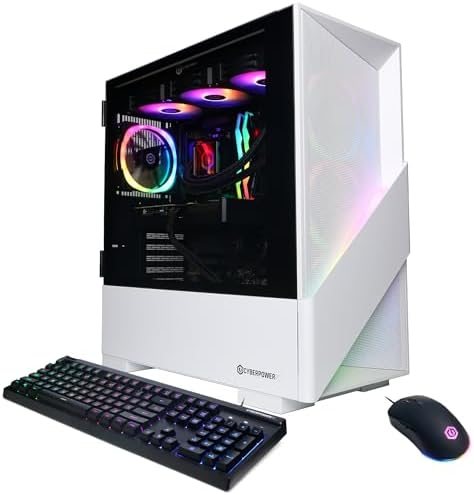
CyberPowerPC Gamer Supreme Gaming PC (RTX 5070, Ryzen 7 9800X3D)
Pros
- Ryzen 7 9800X3D is the fastest gaming CPU money can buy
- RTX 5070 + 3D V-Cache = top 1% FPS at 1440p
- Handles 4K in many titles at high settings
- Strong resale value, premium CPU holds price
Cons
- $200 premium over the Skytech for the CPU upgrade
- Overkill for casual 1080p gaming
Price as of Apr 25, 2026 — see current price on Amazon.
The Ryzen 7 9800X3D is the best gaming CPU available right now. That 3D V-Cache (64MB stacked on top of the L3 cache) reduces the CPU bottleneck in fast-paced competitive titles. For anyone chasing 1440p 240Hz or 1080p 360Hz performance in competitive games, that cache is the reason to pay more.
The RTX 5070 partners well with it. You're not CPU-bottlenecked in modern AAA games, and in esports titles the CPU headroom is massive. This is the config competitive players who want a prebuilt should be looking at.
Is the $200 premium over the Skytech worth it? If you play CS2, Valorant, Apex, or any competitive title where CPU fps matters: yes. If you mainly play slow-paced story games: probably not. The 9700X gets you to the same place.
Corsair Vengeance a7500: Best High-End Prebuilt
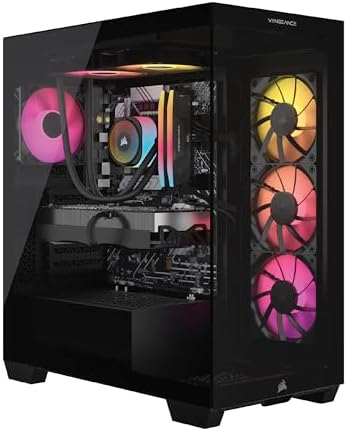
Corsair Vengeance a7500 Gaming PC (RTX 5070 Ti, Ryzen 7 7800X3D)
Pros
- RTX 5070 Ti 16GB GDDR7 is a true 4K gaming card
- Liquid-cooled with a 240mm AIO and six fans
- Two-year warranty, longer than most competitors
- Premium case with tidy cable routing
Cons
- $2,200 is a significant investment
- 7800X3D is last-gen vs the 9800X3D, strong but not newest
- Overkill if you're only gaming at 1440p
Price as of Apr 25, 2026 — see current price on Amazon.
Tom's Hardware picked the Corsair Vengeance a7500 as their best overall gaming PC in 2026, and it's not hard to see why. The RTX 5070 Ti 16GB with its GDDR7 memory is a clear step above the standard RTX 5070, with 4GB more VRAM for 4K textures.
Corsair uses a proper Nautilus 240mm AIO cooling setup and six 120mm fans with its AirGuide technology. That cooling hardware is built for low noise, which matters if the PC is in your bedroom or a small room.
The two-year warranty is a legitimate differentiator. Most prebuilt brands offer one year. Corsair standing behind their systems for two years signals confidence in the build quality.
The 7800X3D is still an excellent CPU. Ryzen 7 7800X3D vs 9800X3D is about 5-10% in most gaming workloads, not 30-40%. The $400 you're spending over the CyberPowerPC Gamer Supreme is buying you the better GPU (5070 Ti vs 5070), the premium cooling, and that extra warranty year.
What to Look for in a Prebuilt Gaming PC
PSU Quality and Wattage
This is the most overlooked factor. A 500W PSU in a $1,500 system is a red flag. You want 650W minimum for an RTX 5070 build, and 850W if you think you'll upgrade the GPU in the future. The Skytech King 95 and Corsair Vengeance both ship with 850W Gold-rated units. The CyberPowerPC Gamer Xtreme's 500W is fine for the RTX 5060 it ships with, but don't plan on upgrading that GPU without swapping the PSU too.
Gold-rated vs Bronze-rated efficiency matters slightly for electricity costs but mostly signals that the manufacturer used a reputable OEM unit rather than a no-name fire hazard.
CPU and GPU Balance
A common prebuilt trap is pairing a mediocre CPU with a good GPU. An RTX 5070 paired with an i5-12400F (a four-year-old chip) would bottleneck in CPU-demanding games. All five picks above have reasonably balanced CPU/GPU pairings for their price tier.
The 9800X3D exception is deliberate. That's a case where the CPU is slightly "overpowered" for the GPU, which actually makes sense for competitive gaming. You want the CPU headroom.
RAM: 16GB vs 32GB in 2026
Some AAA titles in 2026 recommend 32GB. Hogwarts Legacy, Star Wars Outlaws, and Black Myth: Wukong all benefit from 32GB in the background app scenario most gamers live in (game + Discord + Chrome + Spotify). The CyberPowerPC Gamer Xtreme ships with 16GB, which works but you'll notice stuttering if you run a lot of background apps. The four other systems in this guide all ship with 32GB. At $1,500+, that's table stakes.
Warranty and Support
iBUYPOWER and Skytech typically offer one year. CyberPowerPC offers one year on parts but has a reputation for solid US-based phone support. Corsair goes to two years, and user reports rate its parts replacement as quick.
Storage Space
1TB fills up fast in 2026. Call of Duty alone is 200GB. Plan to add a second NVMe drive. All the systems in this guide use standard M.2 slots, so adding a 2TB PCIe 4.0 SSD (around $80) is a 10-minute job.
Frequently asked questions
- Is a prebuilt gaming PC worth it in 2026, or is building your own better?
- With RTX 50-series GPU prices at or above MSRP in the DIY market, prebuilts are actually competitive right now. The CyberPowerPC Gamer Xtreme at $899 would cost you $950-$1,050 to replicate DIY after accounting for a case, PSU, OS license, and cooler. The premium over DIY has shrunk to $50-$150 on mid-range configs. If you've never built a PC, that's worth paying for the convenience and warranty.
- What's the difference between RTX 5060 and RTX 5070?
- The RTX 5060 has 8GB GDDR7 and targets 1080p gaming at high settings. The RTX 5070 has 12GB GDDR7 and targets 1440p at high to ultra settings. For 1440p gaming in 2026, the 5070 is the right call. The 5060 is still worth buying if budget is the priority and you're sticking to 1080p.
- Does the Ryzen 7 9800X3D really matter for gaming?
- Yes, but mainly in competitive esports titles and CPU-heavy games, where the 3D V-Cache lifts frame rates above a standard Ryzen 7 9700X. In story-driven AAA games like Cyberpunk or Elden Ring, the GPU sets the pace and the CPU gap shrinks. If you play competitive titles on a high-refresh monitor, the 9800X3D is worth the premium. Otherwise the 9700X or i7-14700F gets you there fine.
- Can you upgrade components in these prebuilts later?
- Yes, for most components. All five systems use standard ATX motherboards, standard DDR5 DIMMs, and standard M.2 slots. Adding RAM and storage is easy. Upgrading the GPU is straightforward if the PSU is adequate. That's why the 850W units in the Skytech and Corsair matter. The CyberPowerPC Gamer Xtreme's 500W PSU limits future GPU upgrades.
- What resolution is the RTX 5070 built for?
- The RTX 5070 12GB GDDR7 is squarely aimed at 1440p gaming at high to ultra settings, and DLSS 4 Multi Frame Generation raises frame rates further in supported games. It can run 4K at medium-high settings in many titles, making it viable if you have a 4K monitor. For native 4K at ultra settings, the RTX 5070 Ti is a better fit.
- Which prebuilt brand is most reliable?
- Corsair consistently gets the best marks for build quality and support, followed by Skytech. iBUYPOWER and CyberPowerPC are solid budget to mid-range builders but occasionally use cheaper secondary components (fans, cable management). The Reddit consensus in r/buildapc is to avoid brands like Cybertron and some lesser-known Amazon sellers. Stick to the five brands in this guide and you're in good hands.
Bottom Line
For most buyers, the iBUYPOWER Slate MESH at $1,499 hits the best combination of GPU performance (RTX 5070), CPU capability (i7-14700F), and value. If you're on a strict budget, the CyberPowerPC Gamer Xtreme at $899 with RTX 5060 is a solid 1080p machine with no junk preinstalled. Competitive gamers who want the absolute best fps at 1440p should look at the CyberPowerPC Gamer Supreme with the 9800X3D. And if money is less of a concern and you want the best-built system that'll handle 4K gaming now and for the next few years, the Corsair Vengeance a7500 at $2,199 is hard to argue with.
Whatever you pick: add more storage within the first month and make sure the PSU wattage matches your future upgrade plans.
How We Pick
We pick products by combining spec-level research, price checks, trusted third-party benchmarks, and owner sentiment from high-signal sources.
- Performance and real-world value in the category this guide targets
- Price-to-performance and deal consistency over recent pricing windows
- Build quality, reliability patterns, and known long-term issues
- Recommendation refresh cadence to keep these picks current
Author
TheTechSearch Editorial Team
Independent product reviewers & PC builders
We compare real-world specs, reviews and owner reports, price trends, and user feedback to recommend gear that actually makes sense to buy.