Best AMD Radeon RX 9070 Graphics Cards 2026
The RX 9070 hits 1440p gaming with 16GB GDDR6 for $549. Here's which AIB card to actually buy, ranked by cooling, clocks, and build quality. Expert picks, pr...
As an Amazon Associate we earn from qualifying purchases made through our links — this doesn't affect our picks.

Sapphire Pulse AMD Radeon RX 9070 Gaming 16GB
Our top recommendation for this category
Price as of Jul 17, 2026 — see current price on Amazon.
The RX 9070 launched in March 2025 at $549 and spent most of its first year being completely overlooked because everyone was obsessing over the 9070 XT. That's changing. With AIB cards now regularly hitting their MSRP and the RTX 5070 still commanding $599+ for 12GB of VRAM, the non-XT 9070 is quietly becoming one of the most sensible GPU purchases you can make in mid-2026.
This guide isn't about whether to buy the RX 9070. You've already made that call, or you're close to it. This is about the practical differences between the $549 ASRock Challenger and the $599 ASUS TUF: the cooling tiers, boost clocks, slot widths, and power connector setups that actually matter when you're spending this much.
Quick Picks
| Card | Boost Clock | Price | Slot Width | Warranty | |
|---|---|---|---|---|---|
| Sapphire Pulse RX 9070 | 2700 MHz | ~$549 | 2.7-slot | 2 years | Check Price |
| ASUS TUF Gaming OC | 2670 MHz | ~$599 | 3.125-slot | 3 years | Check Price |
| XFX Swift OC | 2520 MHz | ~$559 | 2.5-slot | 3 years | Check Price |
| ASRock Challenger OC | 2520 MHz | ~$549 | 2.7-slot | 3 years | Check Price |
| ASUS Prime OC | 2520 MHz | ~$569 | 2.5-slot | 3 years | Check Price |
Sapphire Pulse AMD Radeon RX 9070 16GB
Sapphire Pulse AMD Radeon RX 9070 Gaming 16GB
Pros
- 2700 MHz factory boost, highest on this list by 30+ MHz
- Sapphire's Pulse cooler runs whisper-quiet at full load
- Compact 2.7-slot footprint fits most mid-tower builds
- Strong brand reliability and AMD AIB track record
Cons
- 2-year warranty vs. 3 years on ASUS and ASRock cards
- No RGB lighting if that matters to your build aesthetic
Price as of Jul 17, 2026 — see current price on Amazon.
Sapphire is AMD's longest-running AIB partner, and the Pulse RX 9070 is their practical answer to the $549 price point. The headline number is the 2700 MHz factory boost, which is 180 MHz above AMD's reference 2520 MHz spec. That translates to a real (if modest) 2-4% gaming performance edge over the baseline AIB cards here, and Sapphire bins their silicon well enough that you'll actually see those clocks maintained across long sessions.
What Club386's review makes clear, and other coverage backs up, is that the Pulse's cooler is genuinely quiet. At full load gaming it runs under 36 dBA, which you won't notice over a game's audio. GPU temps stay in the low-to-mid 70s Celsius under sustained load with the Pulse's dual HDMI/dual DisplayPort configuration.
The 2.7-slot design fits comfortably in a standard mid-tower without blocking adjacent PCIe slots. No RGB, which either matters to you or it doesn't. If you want lights, the ASUS TUF has them. If you want the best cooled $549 non-XT 9070 without paying extra for branding, the Pulse is it.
The 2-year warranty is the only thing that gives me pause at this price. ASUS and ASRock both offer 3 years. Sapphire's cards tend to be reliable, but that extra year of coverage is worth factoring in if you're keeping this card for 4+ years.
Best for: Builders who want Sapphire's binning and cooling quality at MSRP, and don't need the longest warranty on the market.
ASUS TUF Gaming Radeon RX 9070 OC 16GB
ASUS TUF Gaming AMD Radeon RX 9070 OC Edition 16GB GDDR6
Pros
- Military-grade MIL-SPEC 810H rated MOSFETs and chokes
- Axial-tech triple-fan design with counter-rotating center fan
- 3-year warranty at $599 price point
- Phase-change thermal pads on GPU and VRAM
Cons
- 3.125-slot footprint is the widest on this list, verify case clearance
- 50 dollar premium over the Sapphire and ASRock at MSRP
Price as of Jul 17, 2026 — see current price on Amazon.
The TUF Gaming RX 9070 OC is what you buy when you want this card to be the last GPU you think about for 4-5 years. The MIL-SPEC 810H component rating isn't marketing fluff: the chokes and MOSFETs in this card are tested against vibration, temperature cycling, and humidity standards that regular consumer electronics skip. Most people will never stress-test their hardware that hard, but the component quality shows up in thermal performance and long-term stability.
ASUS's Axial-tech fan design uses a counter-rotating center fan to cancel lateral airflow turbulence between the fans. The result is more direct airflow through the heatsink fins. Under ASUS's MaxContact GPU surface treatment, the TUF Gaming RX 9070 runs 5-7 degrees cooler than the reference AMD card design, and within a few degrees of the premium Sapphire Pulse despite its lower 2670 MHz factory boost.
Look, the 3.125-slot width is real and worth checking. Most ATX mid-towers handle it fine, but if you've got a compact mATX case or something with tight PCIe spacing, measure before ordering. The extra slot width is exactly where those better thermals come from.
At $599 you're paying $50 over MSRP for ASUS build quality and an extra year of warranty. For most people that's a reasonable trade. For people who push their systems hard or plan to run GPU-accelerated workloads alongside gaming, the TUF's thermal headroom justifies the premium more concretely.
Best for: Builders who keep hardware for 4+ years, workstation users, or anyone who wants to stop thinking about GPU temps.
XFX Swift AMD Radeon RX 9070 OC 16GB

XFX Swift AMD Radeon RX 9070 OC Triple Fan Gaming Edition 16GB GDDR6
Pros
- Slim 2.5-slot design with triple-fan cooling, unusual combination
- 3-year warranty at $559
- Nickel-plated copper cold plate for efficient heat transfer
- Clean, understated black aesthetic
Cons
- 2520 MHz boost matches AMD reference, no factory overclock advantage
- XFX brand recognition lower than Sapphire or ASUS for resale value
Price as of Jul 17, 2026 — see current price on Amazon.
The XFX Swift makes one engineering trade-off you don't often see: a 2.5-slot card with three fans. Most slim GPU designs get two fans. XFX squeezes three 90mm fans into a thinner chassis by running smaller-diameter fans at slightly higher RPM. The result is a card that fits tight builds without the thermal compromise you'd expect from a 2-slot design.
Thermal performance from independent testing (The FPS Review covered this at launch) lands the Swift in the mid-tier: warmer than the Pulse and TUF Gaming, cooler than a reference design, roughly comparable to the ASRock Challenger. GPU temps peak around 77-80°C under a long gaming session, which is well within safe operating limits. Fan noise is audible but not distracting.
The 2520 MHz boost clock matches AMD's reference spec. XFX didn't push the factory overclock here, which is an honest call given the slim chassis. You're not buying the Swift for clock speed. You're buying it because you have a compact case or just want a card that doesn't dominate the visual real estate inside your build.
3-year warranty at $559 is a strong deal. That's where XFX consistently wins: solid warranty coverage at competitive pricing.
Best for: Compact or SFF-adjacent builds where you need three fans but not three slots.
ASRock Challenger Radeon RX 9070 16GB OC
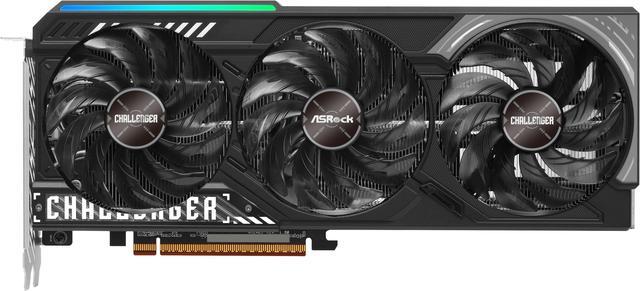
ASRock Radeon RX 9070 Challenger 16GB OC Graphics Card
Pros
- At or below MSRP regularly, best value on this list
- Triple-fan cooling handles the 220W TDP without drama
- 3-year warranty from ASRock
- PCIe 5.0, 2x8-pin power connectors, solid build quality
Cons
- 2520 MHz reference boost, no factory overclock edge
- Less brand cache than Sapphire or ASUS in enthusiast circles
Price as of Jul 17, 2026 — see current price on Amazon.
Tom's Hardware ran a headline specifically about the ASRock Challenger RX 9070 when it dropped to $549: "get more VRAM than an RTX 5070 for the same amount of green." That's a good one-line summary of what you're buying. ASRock's Challenger series sits in the mid-tier of their GPU lineup, using a sensible triple-fan design and a 2-ounce copper PCB without the premium materials or aggressive binning you'd pay for at the Sapphire or ASUS TUF level.
The result is a card that does exactly what the RX 9070 die is capable of without adding much overhead. Thermal testing shows GPU temps around 76-79°C at full load, fan noise is low at moderate gaming loads, and the 2520 MHz boost clock (same as AMD's spec) holds without issues.
What you're actually getting at $549: 3584 shader processors, 16GB of GDDR6 on a 256-bit bus, PCIe 5.0, FSR 4 support, and 3 years of warranty. ASRock's customer service reputation has improved significantly over the past few years. I've seen enough positive RMA experiences in r/hardware threads to feel comfortable recommending this as a real option, not just the fallback when everything else is sold out.
If price is your primary criterion and you don't need premium thermal materials or 2700 MHz factory clocks, the Challenger is the answer.
Best for: Budget-conscious builders who want the full RX 9070 feature set without paying for premium AIB overhead.
ASUS Prime Radeon RX 9070 OC 16GB
ASUS Prime Radeon RX 9070 OC Edition 16GB GDDR6
Pros
- 2.5-slot design from ASUS with their full component quality
- Dual BIOS switch for Silent mode gaming
- 3-year ASUS warranty
- GPU Guard anti-sag bracket included
Cons
- More expensive than ASRock for similar performance at the base clock tier
- Standard thermal compound (not phase-change) vs. TUF Gaming
Price as of Jul 17, 2026 — see current price on Amazon.
The ASUS Prime OC is where ASUS's TUF component quality meets a 2.5-slot design. If you want ASUS engineering without the 3.125-slot footprint of the TUF Gaming, this is it. Same 3-year warranty, same GPU Guard bracket (an actual physical anti-sag bracket, which most $549 cards skip), same ASUS power delivery quality. You trade away the military-grade MOSFETs and phase-change pads for a thinner card.
Thermal performance with standard compound and a smaller cooling stack runs 5-8 degrees warmer than the TUF Gaming. Still safe for gaming. Still within spec. But if you're pushing GPU-accelerated AI inference alongside gaming, the Prime's thermal headroom is more limited than the TUF's.
The Dual BIOS is worth a mention. Silent mode pulls fan RPM down noticeably during lighter gaming and general desktop use. The performance delta in casual games is effectively zero. It's the kind of feature that sounds like marketing until you're watching a movie with the fans spinning down and you actually notice the difference.
At $569, the Prime costs $20 more than the ASRock Challenger for ASUS build quality and the 2.5-slot advantage. That's a defensible premium if case clearance is tight or brand preference matters.
Best for: Compact builds that need ASUS quality without the TUF Gaming's wide footprint.
What to Look For in an RX 9070 AIB Card
Factory Boost Clock: The Range Is Narrow
The cards on this list span 2520 to 2700 MHz, versus AMD's reference spec of 2520 MHz. The 180 MHz gap between the cheapest factory clock and the Sapphire Pulse's 2700 MHz boost translates to about 3-4% in gaming benchmarks at 1440p. That's measurable but not the deciding factor. If it's close between two cards, go with the better cooling system; sustained thermals affect average clocks more than the marketing spec number.
Cooling Tiers: When It Matters
The Sapphire Pulse and ASUS TUF Gaming sit in the premium cooling tier. The XFX Swift, ASRock Challenger, and ASUS Prime are mid-tier. At 1440p gaming in a reasonably airflow-capable case, mid-tier is fine. Temps stay under 80°C and performance doesn't throttle. Where premium cooling actually matters: sustained compute workloads, AI inference, video encoding, or gaming in hot ambient conditions (summer, poorly ventilated rooms).
If you're building a pure gaming machine in a decent mid-tower, the ASRock Challenger or XFX Swift will serve you well. If you're also running Stable Diffusion or encoding 4K video between gaming sessions, step up to the Pulse or TUF Gaming.
The VRAM Advantage Over RTX 5070
The RX 9070 ships with 16GB of GDDR6 on a 256-bit memory bus. The RTX 5070, which is priced similarly and performs comparably in rasterization at 1440p, has 12GB. That 4GB difference doesn't matter for most 1440p games running today. It starts mattering with 4K texture packs, modded games with high-res asset replacement, and future titles that push VRAM requirements up. The 16GB buffer is why the 9070 makes sense as a longer-term purchase even when frame rate comparisons with the RTX 5070 are close.
Power Planning
The RX 9070's TDP is 220W. All five cards here use two standard 8-pin PCIe connectors. A 650W 80+ Gold PSU is the realistic minimum when paired with a mid-range CPU (Ryzen 7 7800X3D or Core i5 equivalent). With a high-TDP CPU, 750W is more comfortable. None of these cards require the 12VHPWR/16-pin connector that caused so many issues with NVIDIA's 40-series launch.
Frequently asked questions
- What's the real difference between the RX 9070 and RX 9070 XT?
- The RX 9070 uses 56 compute units (3584 shaders) versus the XT's 64 CUs (4096 shaders). At 1440p, the performance gap is roughly 8-10% in most titles. The 9070 XT typically retails for $599-$620 while the 9070 sits at $549. Both cards ship with 16GB GDDR6. If you're gaming at 1440p and the 8-10% performance gap doesn't justify $50-70 extra, the non-XT 9070 is the more sensible buy.
- How does the RX 9070 compare to the RTX 5070 at 1440p?
- They trade blows in rasterization. The RX 9070 wins some benchmarks by 2-5%, the RTX 5070 wins others by a similar margin. Where they differ: the RTX 5070 pulls ahead in DLSS 4 and ray tracing scenarios by 15-20%. The RX 9070 has 16GB GDDR6 vs the RTX 5070's 12GB. If you play games heavily dependent on DLSS or ray tracing, the RTX 5070 is worth the similar price. For pure rasterization gaming, the RX 9070 is at minimum equal and costs the same or less.
- What PSU do I need for the RX 9070?
- AMD's TDP is 220W, and all five AIB cards here use two standard 8-pin PCIe connectors. With a typical gaming CPU (Ryzen 7 7800X3D, Core i5-14600K), a 650W 80+ Gold unit is sufficient. If you have a higher-TDP CPU or plan to run sustained compute workloads alongside gaming, 750W gives you more headroom. The RX 9070 doesn't require a 12VHPWR connector.
- Is the Sapphire Pulse worth the 2-year warranty limitation?
- For most buyers, yes. Sapphire's reliability reputation in AMD GPU circles is strong, and the Pulse cooler's thermal performance at the 2700 MHz boost clock is the best combination of speed and cooling on this list at $549. If you're keeping this card beyond 2 years and want warranty coverage, the ASUS TUF at $599 gives you 3 years with comparable build quality. But the Sapphire's cooling quality tends to reduce the chance you'd need a warranty claim in the first place.
- Does the RX 9070 support FSR 4?
- Yes. All RDNA 4 cards including the RX 9070 support AMD FSR 4, which uses on-chip AI accelerators for the upscaling algorithm. In supported games, FSR 4 quality has closed the gap with DLSS 4 significantly compared to FSR 3. The RX 9070's second-gen AI accelerators handle FSR 4 inference faster than any previous RDNA architecture.
- Which RX 9070 AIB card is best for a small form factor build?
- The XFX Swift and ASUS Prime are both 2.5-slot designs that work in compact cases. The XFX Swift gets three fans into that thinner chassis, while the ASUS Prime prioritizes ASUS build quality. The ASRock Challenger is 2.7-slot if you have slightly more room. Avoid the ASUS TUF Gaming's 3.125-slot footprint for anything smaller than a standard mid-tower.
The Bottom Line
The RX 9070 is one of the better GPU purchases at the $549 price point in mid-2026. You're getting 16GB of GDDR6, RDNA 4 architecture with FSR 4 support, and 1440p gaming performance that keeps pace with the RTX 5070 in most titles.
For most builders, the Sapphire Pulse at $549 is the right call. The 2700 MHz factory boost and Sapphire's thermal engineering give you the best performance-per-dollar combination on this list. If 3-year warranty coverage matters more than the boost clock edge, the ASRock Challenger at the same $549 is the honest budget pick. And if you're keeping this card for 5 years and running it hard beyond gaming, the extra $50 for the ASUS TUF Gaming and its MIL-SPEC components is money well spent.
How We Pick
We pick products by combining spec-level research, price checks, trusted third-party benchmarks, and owner sentiment from high-signal sources.
- Performance and real-world value in the category this guide targets
- Price-to-performance and deal consistency over recent pricing windows
- Build quality, reliability patterns, and known long-term issues
- Recommendation refresh cadence to keep these picks current
Author
TheTechSearch Editorial Team
Independent product reviewers & PC builders
We compare real-world specs, reviews and owner reports, price trends, and user feedback to recommend gear that actually makes sense to buy.