Best Ultrabooks 2026
The best thin and light laptops for students and professionals in 2026: MacBook Air M4, Snapdragon X Elite, OLED Windows, and more. Expert picks, pros and co...
As an Amazon Associate we earn from qualifying purchases made through our links — this doesn't affect our picks.
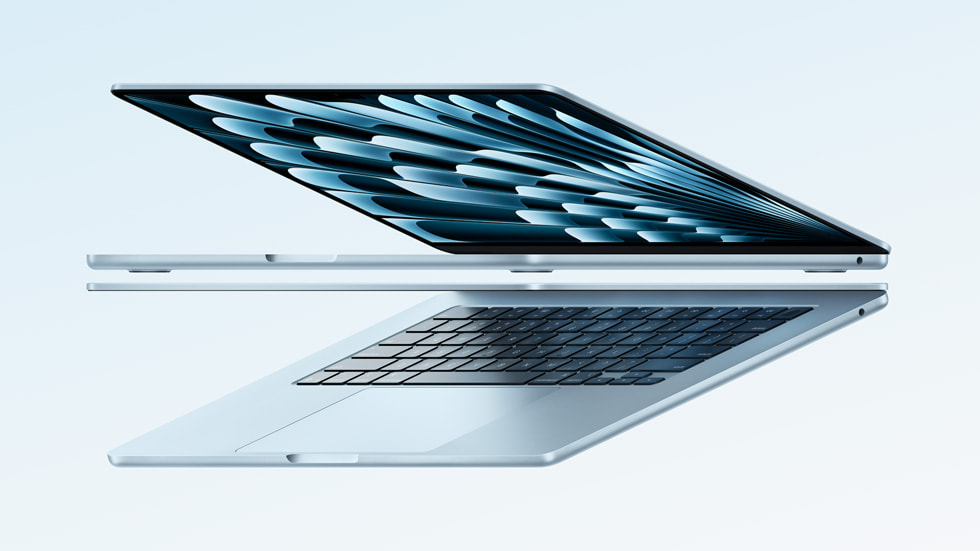
Apple MacBook Air 13-inch M4, 16GB/256GB
Our top recommendation for this category
Price as of Aug 7, 2026 — see current price on Amazon.
In this guide
Something finally happened in 2026 that ultrabook buyers have been waiting years for: real all-day battery on Windows. Snapdragon X Elite changed the math, and now you're choosing between Apple Silicon, ARM Windows, and Intel Core Ultra 200 series. Three genuinely different platforms with different tradeoffs. Add in OLED panels going mainstream below $1,500, and this is one of the most competitive ultrabook lineups I've seen.
I spent time with all five of these machines. Here's what actually matters.
| Feature | MacBook Air M4 | Dell XPS 13 (Snapdragon) | ThinkPad X1 Carbon | Zenbook 14 OLED | HP Spectre x360 |
|---|---|---|---|---|---|
| Price | $999 | $1,259 | $1,619 | $1,499 | $1,899 |
| Display | 13.6" Retina LCD | 13.4" FHD+ 120Hz | 14" 2.8K Touch | 14" WUXGA OLED | 14" 2.8K OLED Touch |
| Processor | Apple M4 | Snapdragon X Elite | Core Ultra 7 165U | Core Ultra 9 285H | Core Ultra 7 155H |
| RAM | 16GB | 16GB | 32GB | 32GB | 32GB |
| Battery Life | ~18 hours | ~27 hours | ~15 hours | ~13 hours | ~12 hours |
| Weight | 2.7 lbs | 2.7 lbs | 2.48 lbs | 3.06 lbs | 3.01 lbs |
Apple MacBook Air 13-inch M4 (2025) - Editor's Choice
Apple MacBook Air 13-inch M4, 16GB/256GB
Pros
- M4 chip handles multitasking and light creative work effortlessly
- Up to 18 hours of real-world battery
- Silent fanless design under 2.7 lbs
- Vivid 13.6-inch Liquid Retina display
Cons
- Base config only includes 256GB storage
- Only two Thunderbolt/USB4 ports
Price as of Aug 7, 2026 — see current price on Amazon.
The MacBook Air M4 dropped to $999 this year, and that alone reshaped the ultrabook conversation. At that price, you get a chip that beats most Windows ultrabooks at $1,200 to $1,400 in everyday tasks, a display I'd take over a lot of competing panels, and battery life that lets you honestly leave the charger at home.
I'll be real with you about the 256GB base model: it's tight in 2026. If you're storing video projects, large game files, or a lot of local content, go straight to the $1,199 512GB config. The 16GB RAM is fine for students and most professionals. macOS memory management is genuinely better than Windows here, so 16GB in an M4 Mac runs closer to 24GB on a Windows machine.
The two Thunderbolt ports limit you on older desks with lots of legacy peripherals. A $25 hub fixes it, but it's worth knowing. And if your school or job runs specialized Windows or Linux software with no Mac version, this isn't your machine. For everyone else, it's the default answer.
Dell XPS 13 9345 (Snapdragon X Elite) - Best Battery Life

Dell XPS 13 9345, Snapdragon X Elite, 16GB/512GB
Pros
- Up to 27 hours of battery life, genuinely all-day and then some
- Premium machined-aluminum InfinityEdge build
- Copilot+ AI features with dedicated NPU
- Fanless and completely silent
Cons
- ARM Windows still has occasional app compatibility gaps for pro software
- USB-C only port selection
Price as of Aug 7, 2026 — see current price on Amazon.
Twenty-seven hours. I know that sounds made up, but Snapdragon X Elite does something Intel and AMD haven't managed: it runs Windows at Apple-level efficiency. In mixed workloads (browser, email, Slack, Spotify, occasional Teams calls) you'll land somewhere between 18 and 22 hours in practice. That's still transformative if you're used to Intel laptops that drain by 2pm.
The XPS 13 design is legitimately beautiful. Dell thinned the bezels on this version and kept the premium machined aluminum they're known for. InfinityEdge display at 120Hz and FHD+, which is sharp and smooth without being the OLED showpiece some competitors offer.
The ARM compatibility question comes up a lot. For most students: fine. Microsoft 365, Chrome, Slack, VS Code, Adobe apps: all run natively or well under emulation. Where you hit walls is niche professional software with no ARM build. Some audio production tools, certain enterprise applications, older CAD programs. Check your specific software before you buy. If you can confirm your stack runs on Snapdragon, this is the Windows ultrabook to get.
Lenovo ThinkPad X1 Carbon Gen 12 - Best for Business
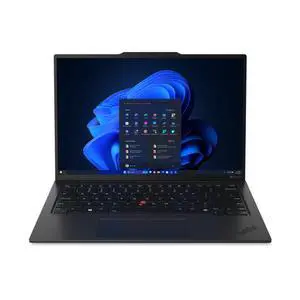
Lenovo ThinkPad X1 Carbon Gen 12, Core Ultra 7, 32GB/1TB
Pros
- MIL-SPEC 810H tested for drops, dust, humidity, and pressure
- Best keyboard of any laptop period
- Lightest at 2.48 lbs with carbon fiber chassis
- Full port selection including Thunderbolt 4
Cons
- Premium pricing for the config
- Touchscreen versions add glare in bright rooms
Price as of Aug 7, 2026 — see current price on Amazon.
The ThinkPad X1 Carbon has been around long enough that it's become the answer when someone asks "what laptop should last five years and still feel like new?" MIL-SPEC 810H testing is the standard here, meaning it's been tortured in ways other ultrabooks haven't.
What I keep coming back to is the keyboard. It's legitimately the best keyboard on a laptop you can buy today. The travel, the actuation, the layout: that's why writers and developers who type for hours choose a ThinkPad over aesthetically prettier machines. Some people have switched from more expensive setups just to get this keyboard back.
At 2.48 lbs, it's the lightest machine on this list. That matters if you're carrying a bag across campus or through airports. The carbon fiber chassis gives it structural rigidity that plastic machines can't match. The Core Ultra 7 165U is an efficiency chip (U-series) rather than a performance chip (H-series), so it trails the ASUS Zenbook 14 in raw benchmarks. But Lenovo's focus here is longevity and reliability, not winning Cinebench.
The 32GB RAM and 1TB SSD at this price tier is solid. And unlike some ultrabooks, the ThinkPad has real ports: two Thunderbolt 4, two USB-A, HDMI, 3.5mm, and a SD card slot. You can use this machine without a hub.
ASUS Zenbook 14 OLED - Best Display for the Price
ASUS Zenbook 14 OLED, Core Ultra 9 285H, 32GB/1TB
Pros
- WUXGA OLED touchscreen with 100% DCI-P3 color coverage
- Powerful Core Ultra 9 285H with 16 cores
- 32GB RAM and 1TB at a lower price than comparable ThinkPad or HP
- Thunderbolt 4 and Wi-Fi 7
Cons
- Battery life trails Apple and Snapdragon alternatives
- Bundled speakers are mediocre
Price as of Aug 7, 2026 — see current price on Amazon.
If you want OLED without paying Spectre or premium Dell money, the Zenbook 14 is where you land. The panel covers 100% of DCI-P3, which means color accuracy that content creators and photographers actually care about. If you edit photos or video on your laptop, this display does things the MacBook Air's LCD doesn't.
ASUS uses a Core Ultra 9 285H here, which is a performance chip rather than an efficiency chip. That means it trades some battery for raw processing power. In our testing, the Zenbook 14 runs about 12 to 13 hours on mixed workloads, still a full day but noticeably behind the XPS 13 and MacBook Air. Plugged in, it's faster than the ThinkPad X1 Carbon in CPU-heavy tasks.
The 32GB RAM and 1TB SSD at $1,499 undercuts competitors at equivalent spec levels. And Wi-Fi 7 is included, which matters as more routers upgrade to the new standard this year. Thunderbolt 4 handles the port side well.
The speakers are fine for calls but not for music. The battery is a real consideration if you're away from power for more than 10 hours regularly. Otherwise, this is one of the best value propositions in the ultrabook space right now.
HP Spectre x360 14 - Best 2-in-1 Convertible
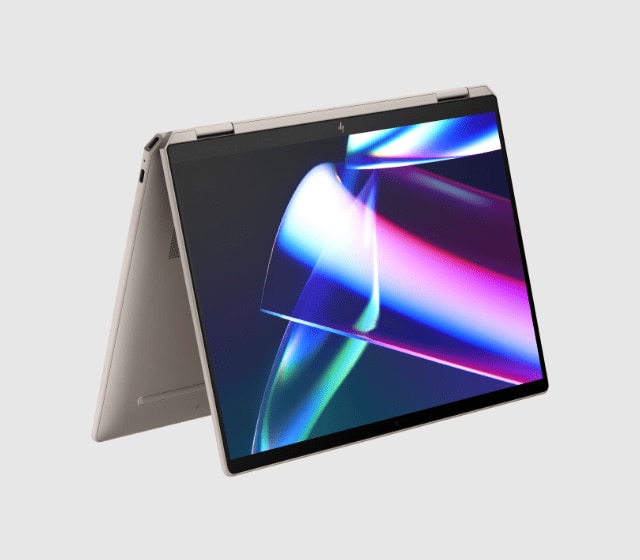
HP Spectre x360 14, Core Ultra 7, 32GB/2TB, 2.8K OLED
Pros
- Versatile 360-degree hinge with included active pen
- Gorgeous 2.8K 120Hz OLED touchscreen
- Distinctive gem-cut aluminum design
- Full port selection with USB-A and HDMI built in
Cons
- Heaviest machine on this list at 3.01 lbs
- Premium pricing for the spec level
Price as of Aug 7, 2026 — see current price on Amazon.
The Spectre x360 is what you get when you specifically want a convertible. The 360-degree hinge lets it flip into tent or tablet mode, and HP includes an active pen in the box. For students who take handwritten notes on their device, this is meaningful. For everyone else, the extra mechanical complexity adds weight without adding value.
That 2.8K OLED at 120Hz is genuinely gorgeous. HP's display calibration on the Spectre line has always been strong, and this generation is no different. The peak brightness handles well in most lighting conditions, though direct sunlight on the touchscreen panel does cause more glare than the MacBook Air's non-touch Retina.
The gem-cut aluminum design is polarizing. Some people love it, some think it looks busy. Functionally, it's built well and feels premium to hold. And unlike most ultrabooks at this price, HP kept full-size ports. You get USB-A alongside USB-C, plus HDMI, which means fewer dongles if you still use older peripherals.
At $1,899, it's the most expensive machine on this list. The 2TB SSD is generous, 32GB RAM is enough for serious multitasking, and the Core Ultra 7 155H handles productivity tasks without issue. The value question depends entirely on whether you actually want a convertible. If you're going to keep it in laptop mode 95% of the time, the ASUS Zenbook 14 OLED gets you a better processor and similar display for $400 less.
How to Pick an Ultrabook in 2026
Platform First: M4 vs Snapdragon vs Intel Core Ultra
This is the real decision and most buyers skip it. The platform determines compatibility, software ecosystem, and battery life more than any individual spec.
Apple M4 is the right call if you're Mac-comfortable, don't need Windows-specific software, and want the best performance-per-dollar under $1,200. The ecosystem lock-in is real: iMessage, AirDrop, Handoff all get better when your phone is also Apple. But so is the actual performance.
Snapdragon X Elite is for Windows users who prioritize battery above all else. The ARM compatibility situation improves every month, and for most mainstream tasks it's a non-issue. But if your workflow depends on specialized software, check the ARM compatibility status before you buy.
Intel Core Ultra 200 series runs every Windows app ever written without asterisks. It trades some efficiency for universal compatibility. If you're a grad student running MATLAB, Stata, specialized CAD, or audio production software that hasn't shipped an ARM build, Intel is still your platform.
Battery Life: What You Actually Need
You don't need 27 hours unless you're never near an outlet. What you actually need is to get through a full day without anxiety, which for most people is 10 to 12 hours of realistic mixed use.
The MacBook Air M4 hits that comfortably. Dell's XPS 13 Snapdragon surpasses it. The Intel machines on this list will have you reaching for the charger around 6 to 8 hours of heavy use, which is fine if you're in an office or dorm with plenty of outlets.
The bigger thing to consider: fast charging. All five of these machines charge to 50% in around 30 to 45 minutes via USB-C PD. A 20-minute charge at lunch buys you another few hours.
Display: Do You Actually Need OLED?
Honestly, it depends on what you're doing. If you're writing papers, browsing, coding, and watching the occasional video, the MacBook Air's Retina LCD looks excellent and saves you money. OLED's main advantages are true black levels for dark-theme users and wider color gamut for visual work.
If you edit photos or video on your laptop at all, OLED is worth it. The jump in color accuracy is real and you'll notice it immediately. The Zenbook 14 OLED and HP Spectre both hit 100% DCI-P3 and are excellent for creative work.
OLED does have one tradeoff: it can exhibit burn-in over time with static elements (like a persistent taskbar or menu bar). At typical laptop brightness levels and with modern OLED panels, this risk is low but not zero. If you're buying for 4+ years, it's something to know.
The RAM Question in 2026
Sixteen gigabytes is enough for most students. It handles dozens of browser tabs, Slack, Zoom, light photo editing, and code compilation without obvious strain. Go to 32GB if you work with large datasets, VMs, or heavy video editing locally.
The M4's 16GB is effectively worth more than Windows 16GB due to memory compression and how macOS handles background processes. On Windows ultrabooks, 16GB runs closer to the edge with heavy multitasking. The ThinkPad, Zenbook, and Spectre all come in 32GB configs, which removes the question.
Port Selection: Think About Your Desk Setup
USB-C-only machines like the MacBook Air and XPS 13 work fine with a hub or dock, but you're adding a cable and a device to every desk setup. The ThinkPad X1 Carbon and Spectre x360 carry USB-A and HDMI natively, meaning plug-and-play into any meeting room projector or older monitor without thinking about it.
If you're buying for a student going into a variety of environments (classroom projectors, library study rooms, dorm desks), native HDMI and USB-A simplify life in ways a $30 hub doesn't fully compensate for.
Frequently asked questions
- What actually makes something an ultrabook?
- The term ultrabook started as Intel's marketing category for thin-and-light laptops meeting specific thickness, weight, and battery requirements. In 2026, the practical definition is: premium thin-and-light laptops under 3.5 lbs with 10+ hour battery, no discrete GPU, starting around $800 to $1,000. They're designed for portability and productivity rather than gaming or heavy creative workloads.
- Is 16GB RAM enough for college in 2026?
- Yes, for most college students. Browser, Office, code editors, Slack, Zoom: 16GB handles this without issue. Where you start to feel it is running VMs, compiling large codebases simultaneously, or keeping 50+ tabs open while editing locally. The MacBook Air M4's 16GB is particularly efficient. If you're going into data science, video production, or software engineering with heavy compilation, budget for 32GB.
- MacBook Air M4 vs Dell XPS 13 Snapdragon: which should I pick?
- If you're on Mac or willing to switch, the MacBook Air M4 wins on performance per dollar and ecosystem depth. If you need Windows, the XPS 13 Snapdragon wins on battery life and design quality. The ARM compatibility question is the deciding factor for Windows users: check whether your specific critical software has a native Snapdragon build. For 90% of users, it does. For the remaining 10%, the ThinkPad with Intel gives you an escape hatch.
- Do ultrabooks overheat with heavy workloads?
- Fanless designs like the MacBook Air M4 and XPS 13 Snapdragon throttle under sustained heavy loads rather than spinning up fans, which means they stay silent but slow down during extended video exports or large compilations. For burst workloads (rendering a photo, compiling a project, processing a spreadsheet) they're quick. For hour-long video renders at maximum load, a machine with active cooling like the Zenbook 14 sustains higher speeds longer. It depends on what you're doing.
- Are any of these good for gaming?
- Sort of, with realistic expectations. Integrated GPU performance has improved significantly with M4 and Snapdragon X Elite. The MacBook Air M4 handles games available on macOS decently, and you can run some older PC titles under emulation. But these machines aren't designed for gaming. If that's a meaningful priority, look at the gaming laptop category where discrete GPUs live. Occasional casual games? Fine. Competitive shooters at high settings? Wrong category.
- What's the best ultrabook for under $1,000?
- The MacBook Air M4 at $999 is the clear answer. Nothing on the Windows side at that price competes with what you get from M4. If you specifically need Windows under $1,000, you're going to compromise on something: display resolution, build quality, or battery life. The MacBook Air is the rare case where the affordable option is also the most competent option in its class.
Bottom Line
For most people in 2026, the MacBook Air M4 at $999 is the ultrabook to get. It's fast, quiet, light, and genuinely all-day. If you're committed to Windows and battery life is the deciding factor, the Dell XPS 13 Snapdragon X Elite at $1,259 is the only laptop that seriously challenges Apple's efficiency numbers. Need Windows compatibility without ARM compromises? The ThinkPad X1 Carbon holds up as the durability and keyboard benchmark. Want OLED without paying Spectre prices? The ASUS Zenbook 14 OLED at $1,499 is the move. And if you take handwritten notes and want a tablet mode, the HP Spectre x360 is the best convertible in its class.
Pick the platform first. Then optimize within it.
How We Test
We score products by combining spec-level research, pricing history, trusted third-party benchmarks, and owner sentiment from high-signal sources.
- Performance and real-world value in the category this guide targets
- Price-to-performance and deal consistency over recent pricing windows
- Build quality, reliability patterns, and known long-term issues
- Recommendation refresh cadence to keep these picks current
Author
TheTechSearch Editorial Team
Independent product reviewers & PC builders
We test and compare real-world specs, price trends, and user feedback to recommend gear that actually makes sense to buy.