Is an Ultrawide Monitor Worth It for Gaming? (2026 Guide)
Honest answer: ultrawides are incredible for some games and borderline useless for others. Here's who should buy one and which models are actually worth the...
As an Amazon Associate we earn from qualifying purchases made through our links — this doesn't affect our picks.
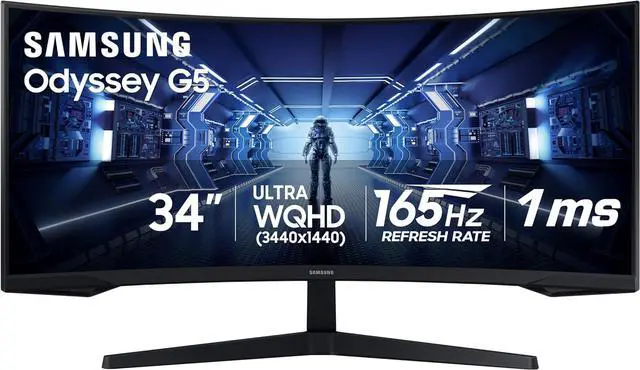
Samsung Odyssey G5 34-Inch Ultrawide Gaming Monitor (LC34G55TWWNXZA)
Our top recommendation for this category
Price as of Sep 15, 2026 — see current price on Amazon.
The short answer is yes, but only if you play the right games. A 34-inch ultrawide makes some games dramatically better and does absolutely nothing for others.
If you play open-world RPGs, racing sims, flight sims, strategy games, or anything story-driven and immersive, an ultrawide will change how you experience those games. Red Dead Redemption 2, Microsoft Flight Simulator, Cyberpunk 2077, Total War, cockpit racers -- the wider field of view turns these into something that feels genuinely cinematic. But if you mainly play competitive FPS like Valorant, CS2, or Overwatch, you might actually want to skip it. Some competitive titles don't support 21:9 properly, and the extra horizontal space can introduce visual distractions you don't want.
That's the real decision here: what do you play?
| Monitor | Size | Panel | Refresh Rate | Price | |
|---|---|---|---|---|---|
| Samsung Odyssey G5 | 34 inch | VA 1000R | 165Hz | $280 | Check Price |
| LG 34GP83A-B | 34 inch | Nano IPS | 144Hz | $499 | |
| Alienware AW3423DWF | 34 inch | QD-OLED | 165Hz | $499 | Check Price |
| Dell U3423WE | 34 inch | IPS Black | 60Hz | $740 | Check Price |
Who Should Buy an Ultrawide
Racing and flight sim players. No question. Driving games like Assetto Corsa Competizione and Forza Horizon 5 fill your peripheral vision with road and scenery the way a real windshield does. It's not a gimmick -- it legitimately makes you better at spotting corners and reading traffic. Same with flight sims where the horizon actually looks like a horizon.
Open-world and RPG players. Cyberpunk 2077's Night City at 3440x1440 is genuinely breathtaking. The Witcher 3, Elden Ring, Baldur's Gate 3 -- anything where the world itself is part of the appeal benefits from more of it being visible at once.
RTS and city-builder players. More screen means more map visible at once without zooming out. For Civilization, Anno, or anything where you're managing large areas, the extra width is genuinely useful information, not just aesthetics.
Content creators who game. If your monitor also serves as your editing workspace, the 21:9 aspect ratio is genuinely excellent for video timelines. You get a wider timeline and still have the monitor usable for dual-pane work.
Who Should Skip an Ultrawide
Competitive shooter players. Valorant, CS2, Overwatch 2, Apex Legends -- most of these games are balanced around 16:9. Some don't support ultrawide natively and will letterbox. Even those that do technically support it may give you a disadvantage by showing enemies at weird angles in your periphery, or the stretched FOV can make targets feel smaller. RTX 5060 Ti owners building specifically for competitive play are better served by a 1440p 240Hz panel.
Budget-constrained builders. You're paying at minimum $280 for the cheapest decent ultrawide. That money spent on a 27-inch 1440p 165Hz IPS monitor like the LG 27GP850-B gives you better pixel density, better response times, and broader game compatibility. The ultrawide premium only makes sense if your game library will actually use it.
Small desk owners. A 34-inch ultrawide needs roughly 32 inches of horizontal depth clearance. That's a lot. If your setup is tight, a 27-inch standard monitor will actually be more comfortable to use daily.
Our Picks: The Best Ultrawides Worth Buying in 2026
Samsung Odyssey G5 34-inch: Best Budget Ultrawide
Samsung Odyssey G5 34-Inch Ultrawide Gaming Monitor (LC34G55TWWNXZA)
Pros
- $280 price is genuinely hard to beat for a 34-inch ultrawide
- 165Hz keeps gaming smooth
- 1000R curve feels natural at this size
- HDR10 support included
Cons
- VA panel can look dim in bright rooms
- 1ms MPRT response time is measured differently than GtG -- motion clarity is decent but not exceptional
- Colors are punchy but not accurate out of box
Price as of Sep 15, 2026 — see current price on Amazon.
At $280, this is where most people should start if they want to try ultrawide without a huge financial commitment. The 34-inch 3440x1440 resolution is the sweet spot -- enough pixels that it doesn't look soft, and the 165Hz refresh rate is smooth enough for most gaming scenarios.
The 1000R curve is one of the more aggressive curves available. Sitting about 2-3 feet from the screen, it wraps naturally around your field of view. Some people love this, some hate it. The VA panel delivers deep blacks that IPS panels can't match, which makes darker games and movies look genuinely good.
That said, VA panels have slower pixel response times in certain transitions, and you can sometimes see motion blur in fast movement. For competitive gaming, this is a real drawback. For single-player and story-focused games, you probably won't care.
LG 34GP83A-B: The Nano IPS Mid-Range Pick
(Amazon doesn't carry the 34GP83A-B new right now. B&H and Best Buy sometimes have open-box units.)
The LG 34GP83A-B ran as the standard recommendation for mid-range ultrawide gaming for a reason: Nano IPS color coverage (~98% DCI-P3) and 1ms GtG response time in a 144Hz panel. Motion clarity is significantly better than the Samsung G5 above -- if you ever play anything with fast movement, you'll notice the difference.
The discontinuation is worth acknowledging. This model isn't being manufactured new anymore, so you're looking at renewed or open-box units, which is how it still shows up around $499. If that makes you nervous, bump up to the Alienware below. But if you're comfortable with a certified renewed unit, this is still one of the best-value ultrawide panels available.
Alienware AW3423DWF: The One to Get if You Can Stretch

Alienware AW3423DWF 34-Inch QD-OLED Curved Gaming Monitor
Pros
- QD-OLED delivers true blacks and 99.3% DCI-P3 color
- 0.1ms GtG response is the best available
- 165Hz with FreeSync Premium Pro
- The 'wow factor' is real -- this panel looks different from anything IPS
Cons
- OLED burn-in risk is real (use static image protection features)
- Price varies -- Dell.com has hit $499 but Amazon listings often run higher
- Reflective panel surface is noticeable in bright rooms
Price as of Sep 15, 2026 — see current price on Amazon.
QD-OLED changed what ultrawide gaming looks like. The AW3423DWF uses the same Samsung QD-OLED panel that Digital Foundry and Hardware Unboxed have called the best gaming panel currently available. True blacks, 0.1ms GtG response, and colors that just look different from any IPS or VA panel.
For immersive gaming specifically -- space games, RPGs, racing -- this is kind of the end-game option. Night scenes in games like Cyberpunk 2077 are where the panel's contrast shows most. Any game with dynamic lighting benefits from real black levels.
The burn-in concern is real but overblown for gaming use. OLED panels have improved significantly. The monitor has built-in pixel refresh and static image protection. Use them. It's still a legitimate consideration if you frequently pause games on static HUDs.
Dell.com has been selling these as low as $499 at periodic clearance events. Amazon pricing fluctuates higher. Worth keeping an eye on the direct Dell page.
Dell U3423WE: For the Gaming and Work Hybrid Setup
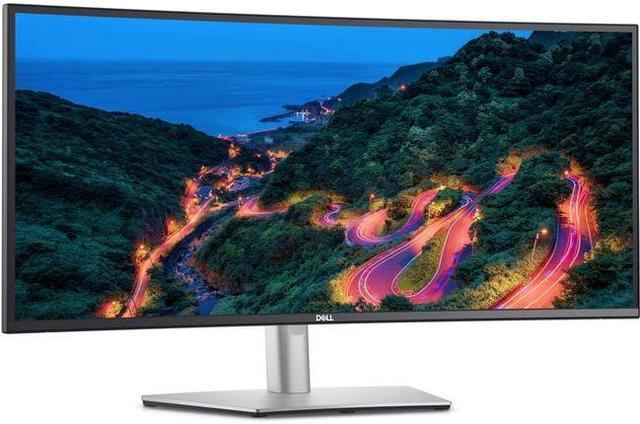
Dell UltraSharp U3423WE 34-Inch Curved USB-C Hub Monitor
Pros
- IPS Black panel -- deeper blacks than standard IPS, better than average VA accuracy combined
- USB-C 90W power delivery charges your laptop
- Built-in Ethernet hub, multiple USB ports
- Excellent factory color accuracy for content work
Cons
- 60Hz refresh rate makes it unsuitable as a primary gaming monitor
- Expensive at $740 for what gaming performance you get
- 90W PD covers most laptops but not all high-drain models
Price as of Sep 15, 2026 — see current price on Amazon.
Look, the Dell U3423WE is not a gaming monitor. The 60Hz refresh rate makes that clear. But a lot of people asking whether ultrawide is worth it aren't purely gamers -- they're people who game and work at the same machine, and for that use case this monitor makes real sense.
The IPS Black panel technology is genuinely interesting: it achieves contrast ratios closer to VA (around 2000:1) while keeping IPS color accuracy and wide viewing angles. For content work alongside gaming, it's a compelling combination. The USB-C hub means one cable from your laptop docks it, charges it, and connects it to your peripherals. That workflow value is real.
If gaming is your primary use, skip this. If you game 2-3 hours in the evening and spend the rest of the day working, this deserves serious consideration.
Ultrawide Buying Guide: What Actually Matters
Resolution: 3440x1440 vs 2560x1080
Almost every decent ultrawide runs at 3440x1440 WQHD. This is the resolution you want. The cheaper 2560x1080 ultrawides look noticeably soft at 34 inches -- that resolution spread across a wider panel means lower pixel density than even a standard 1080p 27-inch monitor. Avoid them.
Curved vs Flat
Most ultrawides are curved, and at 34 inches this actually makes sense. The curvature (typically 1800R or 1000R) compensates for the fact that the edges of the screen are farther from your eyes than the center. 1800R is subtle. 1000R (like the Samsung G5 above) is more aggressive -- some people love it for immersion, others find it disorienting. If possible, see one in person before buying.
GPU Requirements
A 34-inch 3440x1440 panel has 4.95 million pixels, compared to 3.69 million for 1440p and 8.29 million for 4K. You'll need a solid GPU. An RTX 4070 or RTX 5060 Ti is roughly the entry point for comfortable ultrawide gaming at high settings. Anything below that and you'll be dropping settings significantly in demanding titles. The Alienware QD-OLED specifically -- that panel rewards a powerful GPU; don't pair it with a midrange card.
Frequently asked questions
- Do all games support ultrawide monitors?
- No. Most modern games support 21:9 natively, but some titles (especially older ones and some competitive multiplayer games) letterbox to 16:9 or don't officially support it. Check the game's documentation or look up 21:9 support on widescreen gaming forums before buying primarily for a specific title. Roughly 75% of new releases in 2025-2026 have native 21:9 support.
- Is ultrawide bad for competitive FPS gaming?
- Somewhat, yes. Games like CS2 and Valorant technically support 21:9, but competitive players often find the wider FOV distracting. More importantly, some tournaments restrict ultrawide resolutions. If you're focused on competitive shooters, a 1440p 240Hz standard panel is a better investment for your goals.
- How much desk space does a 34-inch ultrawide need?
- Plan for at least 32 inches of horizontal width and around 12-13 inches of depth for the stand. The panel itself is about 32 inches wide, but you need some clearance on each side. If your desk is under 48 inches wide, you'll feel cramped, and a 27-inch standard monitor will be more comfortable to use daily.
- Is QD-OLED worth the premium over IPS for gaming?
- If budget allows, yes -- the visual difference is substantial. True blacks, near-instant pixel response, and color that looks qualitatively different from any IPS panel. The burn-in concern is real but manageable with normal usage habits. For single-player and immersive gaming specifically, QD-OLED is hard to go back from once you've seen it.
- What refresh rate do I need on an ultrawide?
- At least 144Hz for gaming. Anything below that and the ultrawide format actually highlights motion issues more than a standard panel would, because your peripheral vision registers motion in a wider arc. The Samsung G5 (165Hz) and Alienware AW3423DWF (165Hz) both hit a good balance. The Dell U3423WE at 60Hz is really for work-primary users who game occasionally.
Bottom Line
Ultrawide monitors are worth it if you primarily play immersive, single-player, or simulation games -- and you have the GPU to drive them. The Alienware AW3423DWF at $499 (when you can catch Dell's periodic sales) is the outright best ultrawide gaming experience available right now. The Samsung Odyssey G5 at $280 is the smart entry point if you want to try the format without overcommitting.
But if your game library is mostly competitive shooters, or your desk is small, or you're on a tight build budget: buy a 1440p 165Hz standard panel instead. You'll get better value and broader game compatibility. Ultrawide is a specific tool for specific games -- and it's spectacular when it fits.
How We Pick
We pick products by combining spec-level research, price checks, trusted third-party benchmarks, and owner sentiment from high-signal sources.
- Performance and real-world value in the category this guide targets
- Price-to-performance and deal consistency over recent pricing windows
- Build quality, reliability patterns, and known long-term issues
- Recommendation refresh cadence to keep these picks current
Author
TheTechSearch Editorial Team
Independent product reviewers & PC builders
We compare real-world specs, reviews and owner reports, price trends, and user feedback to recommend gear that actually makes sense to buy.