Is WiFi 7 Worth It in 2026? Here's the Honest Answer
WiFi 7 prices have dropped, but most homes don't need it yet. We break down exactly who should upgrade now and who should wait. Expert picks, pros and cons,...
As an Amazon Associate we earn from qualifying purchases made through our links — this doesn't affect our picks.
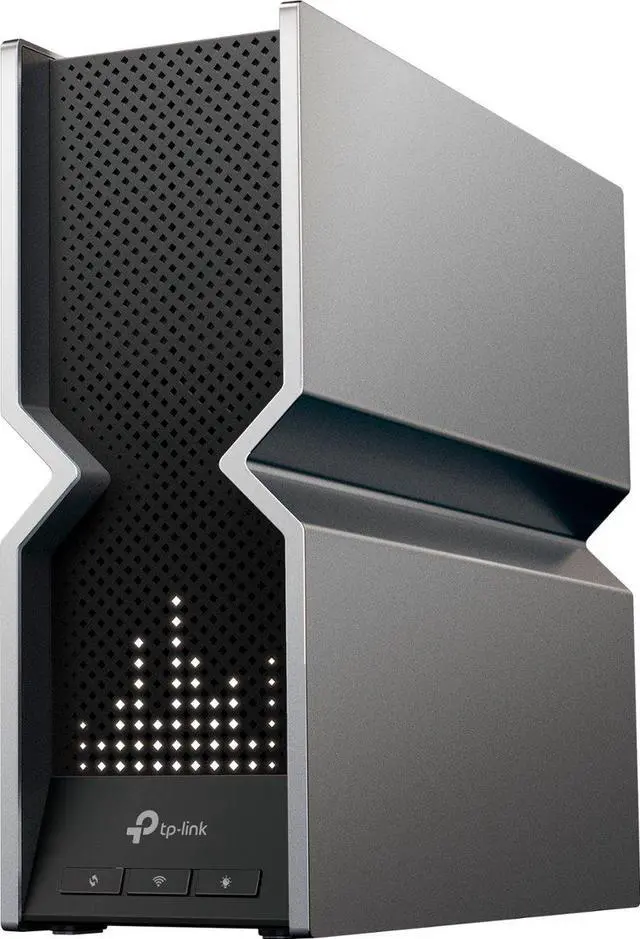
TP-Link Archer BE800
Our top recommendation for this category
Price as of Aug 24, 2026 — see current price on Amazon.
The short answer: probably yes, if you're buying a new router anyway. WiFi 7 prices have come down a lot in 2026. The TP-Link Archer BE800 starts at $349, which is actually less than what a solid WiFi 6E router cost two years ago. But if your current router works fine and your internet plan is 1 Gbps or slower, there's no real urgency here.
The gap between "I should think about this" and "I need to do it now" is wider than the marketing suggests. Let me give you the honest breakdown, because I see a lot of people paying $500 for WiFi 7 when their internet connection is the actual bottleneck.
What WiFi 7 Actually Changes
The headline numbers are wild - WiFi 7 tops out at 46 Gbps theoretical max vs WiFi 6's 9.6 Gbps. But you'll never see those speeds at home, and honestly that's not the point.
What actually matters for real-world use is three things:
Multi-Link Operation (MLO). This is the biggest actual improvement. Your devices can connect to two bands simultaneously - say, 5 GHz and 6 GHz at the same time - and the router dynamically shifts traffic between them. Real-world result: lower latency and more consistent speeds under load, especially in homes with a lot of concurrent activity.
320 MHz channels on 6 GHz. WiFi 6E opened up the 6 GHz band but capped channels at 160 MHz. WiFi 7 doubles that to 320 MHz, which makes a difference in practice for devices within good range of the router.
4096-QAM modulation. This bumps data density by about 20% over WiFi 6E's 1024-QAM. It's a smaller gain than MLO but it compounds with the other improvements.
You'll notice the difference most in two scenarios: homes with 20+ connected devices, and situations with heavy local network traffic like streaming from a NAS or backing up large files over WiFi. For a two-person apartment with eight devices and a 500 Mbps internet plan? Your existing router is probably fine.
Who Should Upgrade Now
You should get a WiFi 7 router today if any of these apply:
Your router is dead or more than four years old. If you're buying anyway, WiFi 7 makes sense. Entry-level WiFi 7 at $350 is competitive with what good WiFi 6E routers cost at their peak. The premium over buying WiFi 6 new is minimal.
You have multi-gig internet. If your ISP plan is 2.5 Gbps, 5 Gbps, or higher, you need a router with a 10G WAN port to actually use that speed. Every decent WiFi 7 router ships with a 10G WAN port as standard. WiFi 6 routers mostly do not.
You have 25 or more devices on your network. Smart home gear, phones, laptops, TVs, gaming consoles - it adds up fast in 2026. MLO and better spectrum management mean WiFi 7 handles dense device environments noticeably better than WiFi 6.
You're running a home office alongside gaming or streaming. The latency improvements from MLO are real and noticeable in mixed-use scenarios where multiple people are doing demanding things at once.
Who Should Wait
Be honest with yourself here.
If your current router is less than three years old and working fine, the performance uplift from upgrading to WiFi 7 is probably less than you'd get from just repositioning your existing router or adding a range extender.
If your internet plan is 1 Gbps or slower, the bottleneck isn't the router - it's the ISP pipe coming into your home. WiFi 6 handles gigabit plans without breaking a sweat, and the router is not what's limiting you.
And if most of your devices are older than 2023, you can't use full WiFi 7 features anyway. MLO and 320 MHz channels only activate when both ends support them. Most phones and laptops from 2024 and later have WiFi 7, so this is becoming less of a concern, but it's worth checking your device list before buying a $500 router.
The Four WiFi 7 Routers Worth Considering
Here's how the main options stack up before we dig into each one:
| Router | Price | Class | Best For | |
|---|---|---|---|---|
| TP-Link Archer BE800 | $349 | BE19000 | Best entry value | Check Price |
| ASUS RT-BE96U | $499 | BE19000 | Power users, AiMesh | Check Price |
| Netgear Nighthawk RS700S | $549 | BE19000 | Clean setup | Check Price |
| TP-Link Deco BE85 2-Pack | $899 | BE22000/node | Large homes | Check Price |
TP-Link Archer BE800
Pros
- Best price-to-performance ratio in WiFi 7 right now
- 10G WAN port with both RJ45 and SFP+ combo options
- Built-in LED display shows real-time network status
- EasyMesh compatible - add a second unit later if needed
Cons
- HomeShield advanced features need a subscription
- Eight large antennas are visually imposing on a desk
Price as of Aug 24, 2026 — see current price on Amazon.
This is the one I keep recommending. At $349, you get the same BE19000 wireless class as the $499 to $549 alternatives, with a useful LED display that actually shows you what the router is doing, and both RJ45 and SFP+ options on the 10G port. The EasyMesh support means you can scale to a mesh system later without replacing the hardware.
The HomeShield parental controls are subscription-gated for advanced features, which is a real annoyance. But the core routing performance and the value proposition are hard to beat at this price.
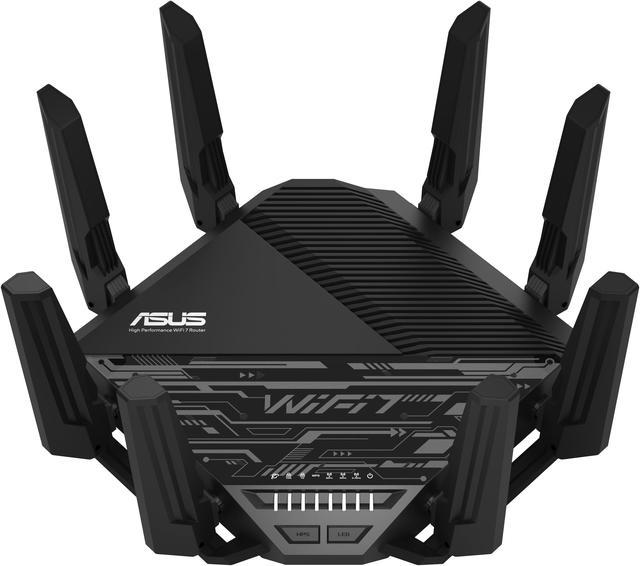
ASUS RT-BE96U
Pros
- AiProtection Pro (Trend Micro) is free for life - no subscription
- Two 10G WAN ports for flexible multi-gig setups
- AiMesh extends into a proper mesh network easily
- ASUS router app is the best in class for configuration
Cons
- $499 is real money
- Fan noise is audible under sustained load - not silent
Price as of Aug 24, 2026 — see current price on Amazon.
ASUS loads the RT-BE96U with features that cost extra on competing routers. The lifetime AiProtection Pro subscription alone runs $50 to $70 per year on other platforms, so over a five-year ownership period the ASUS actually starts to look like the cheaper option. If you have complex networking needs - multiple VLANs, VPN, guest networks with separate policies, a home lab setup - this is the one.
The fan noise is worth flagging. It's not loud, but in a quiet room late at night you'll hear it. If the router lives in a closet or utility room, non-issue. On a desk in a bedroom, potentially annoying.
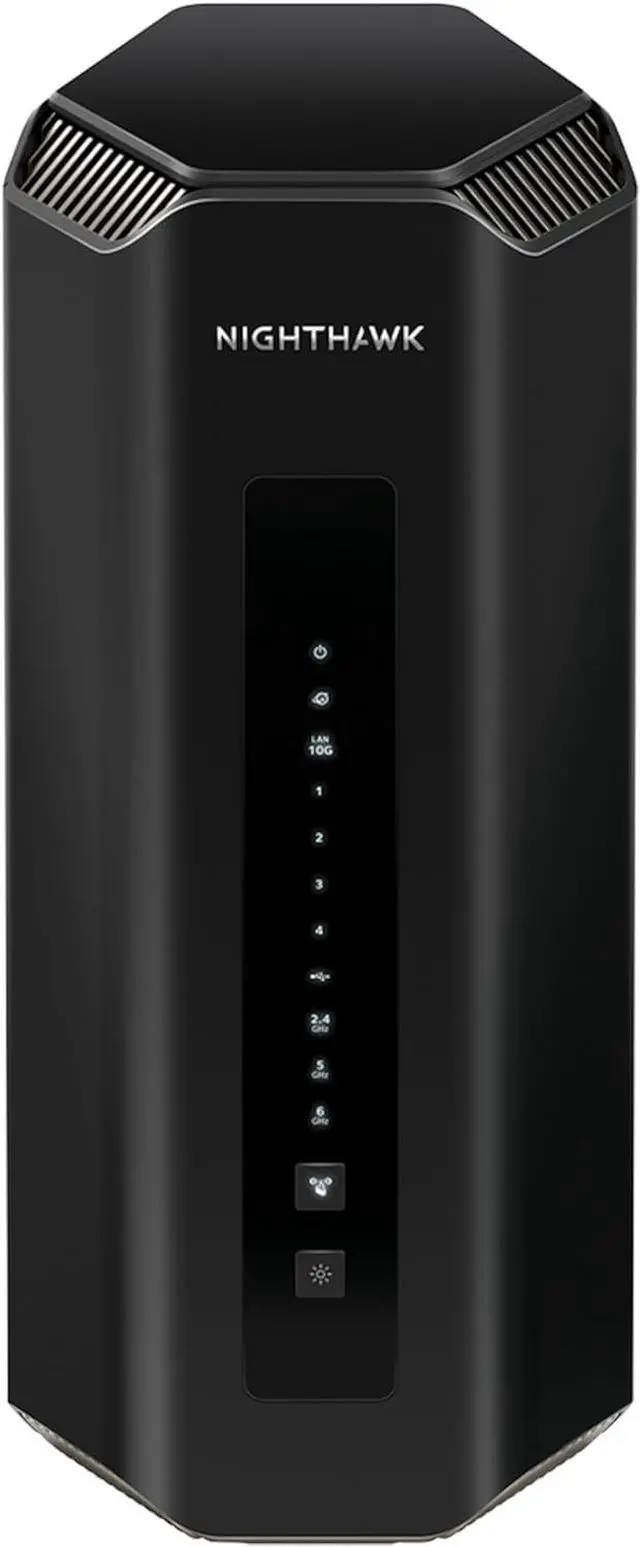
Netgear Nighthawk RS700S
Pros
- Compact form factor that doesn't look like a science experiment
- Netgear Armor security included for the first year
- Up to 3,500 sq ft from one unit
- Straightforward Nighthawk app for setup
Cons
- More expensive than ASUS for similar wireless specs
- Armor subscription hits $100/year after year one - steep
- LAN ports are 1G only, not 2.5G
Price as of Aug 24, 2026 — see current price on Amazon.
The RS700S is the pick for people who want WiFi 7 performance without the eight-antenna spider look. It covers up to 3,500 square feet from one unit in a compact package that actually looks decent in a living room. The Nighthawk app makes setup straightforward.
The Armor security subscription becoming $100 per year after the included first year is a real consideration. If you want the security features long-term, factor that into the total cost of ownership. If you'd rather skip the subscription features, the ASUS gives you lifetime AiProtection at a lower price point.
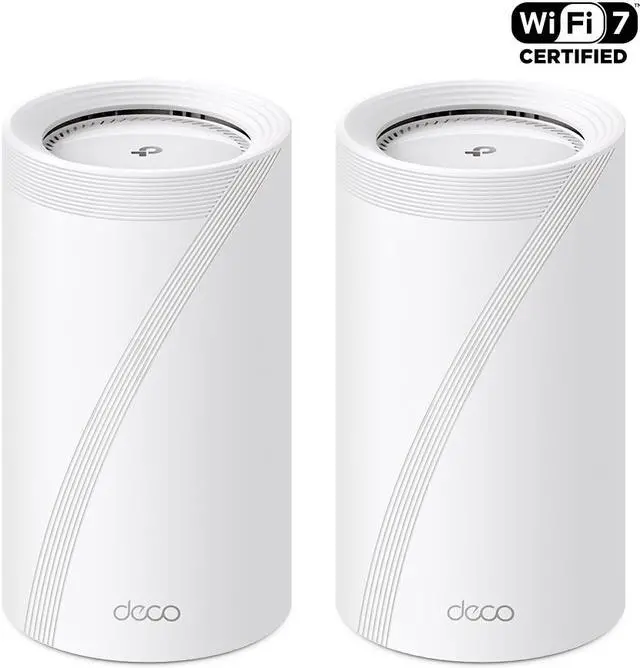
TP-Link Deco BE85 Mesh 2-Pack
Pros
- Two nodes cover virtually any home layout with dead zones
- Wired backhaul support dramatically improves throughput
- BE22000 class per node beats single-router BE19000 options
- Seamless roaming as you move between rooms
Cons
- $899 is a serious investment for a home network
- Two large nodes require thoughtful placement
- HomeShield subscription needed for full parental controls
Price as of Aug 24, 2026 — see current price on Amazon.
The Deco BE85 pair is the pick for large homes or floor plans with dead zones and thick walls. The wired backhaul capability is the real differentiator - when the two nodes communicate over ethernet instead of over-the-air, your wireless clients get the full bandwidth rather than sharing it with backhaul traffic. A lot of mesh systems skip this, so it's worth calling out.
At $899 for two nodes, you're committing real money. But for a 3,000+ square foot home that currently has dead spots, this will outperform any single router you buy.
What to Look For When Buying
10G Ports vs Gigabit
If you have multi-gig internet or a NAS on your local network, you need at least one 10G port. All four picks above have this on the WAN side. The Netgear RS700S has a 10G WAN port but 1G LAN ports, which matters if you want 10G throughput to a local NAS.
Mesh vs Single Router
A single premium router outperforms a mesh system when the router is centrally located in a manageable floor plan. For multi-story homes or layouts with thick concrete walls or long hallways, two mesh nodes with wired backhaul will beat a single router every time. Single-router coverage claims assume ideal conditions - they rarely apply to real houses.
Security Subscription Costs
The Netgear Armor subscription is $100 per year after year one. TP-Link's HomeShield advanced tier is around $55 per year. ASUS AiProtection Pro is free forever. This is a meaningful cost difference over five years, and the ASUS advantage here is real.
Device Compatibility
You don't need WiFi 7 devices to use a WiFi 7 router - they're backward compatible with everything you already own. But you won't get MLO or 320 MHz channel benefits until your devices support those features. Phones from 2024 onward, including iPhone 16 and Samsung Galaxy S24 series, support WiFi 7. Most new laptops from 2025 do as well.
Frequently asked questions
- Do I need WiFi 7 for gaming?
- Not specifically. WiFi 7 reduces latency through MLO, but a well-positioned WiFi 6 router serves most gaming setups just fine. If you're already experiencing lag on a good WiFi 6 setup, a wired ethernet connection will help more than upgrading to WiFi 7 will.
- Will my current devices work with a WiFi 7 router?
- Yes. WiFi 7 routers are backward compatible with WiFi 4, 5, 6, and 6E devices. Nothing needs replacing. You just won't get WiFi 7-specific features like MLO until you have a WiFi 7 capable client device connected.
- What internet speed do I need to justify WiFi 7?
- Most people who see clear value from WiFi 7 have 2.5 Gbps or faster internet plans, or dense networks with 20 or more active devices. For plans at 1 Gbps or below, WiFi 6 handles the load without limitations.
- Is WiFi 7 worth it for a small apartment?
- Probably not as an upgrade from a working WiFi 6 router. In a small space with a handful of devices, the difference will be hard to notice in daily use. But if you're buying a new router anyway, the price gap is small enough that getting WiFi 7 makes sense for future-proofing.
- What is MLO and does it actually make a difference?
- Multi-Link Operation lets a WiFi 7 device connect to two frequency bands at once - for example, 5 GHz and 6 GHz simultaneously. The router dynamically load balances between them. Real-world testing shows 20 to 40 percent latency improvements over WiFi 6 in busy environments with many concurrent connections.
- How long will WiFi 7 stay current?
- WiFi standards typically stay relevant for seven to ten years. WiFi 7 was finalized in early 2024, so expect it to be the mainstream standard through at least 2030 to 2031. Routers generally last five to seven years before needing replacement, so buying WiFi 7 now means this decision is off the table for a long time.
Bottom Line
WiFi 7 is worth it if you're already in the market for a new router. The TP-Link Archer BE800 at $349 is the best entry point - it's a real WiFi 7 router with a 10G port and legitimate specs, not a budget compromise. And the price gap over WiFi 6E has narrowed to where buying the older standard doesn't make much sense anymore.
But if your router works and your internet is 1 Gbps or slower, wait. The upgrade that will actually help you is either a faster ISP plan or moving your gaming setup to ethernet. Both will do more than swapping routers.
How We Test
We score products by combining spec-level research, pricing history, trusted third-party benchmarks, and owner sentiment from high-signal sources.
- Performance and real-world value in the category this guide targets
- Price-to-performance and deal consistency over recent pricing windows
- Build quality, reliability patterns, and known long-term issues
- Recommendation refresh cadence to keep these picks current
Author
TheTechSearch Editorial Team
Independent product reviewers & PC builders
We test and compare real-world specs, price trends, and user feedback to recommend gear that actually makes sense to buy.