Best WiFi 7 Routers 2026
The fastest home routers money can buy - 5 WiFi 7 picks tested from $229 to $799, covering budget, mesh, and power-user needs. Expert picks, pros and cons, a...
As an Amazon Associate we earn from qualifying purchases made through our links — this doesn't affect our picks.
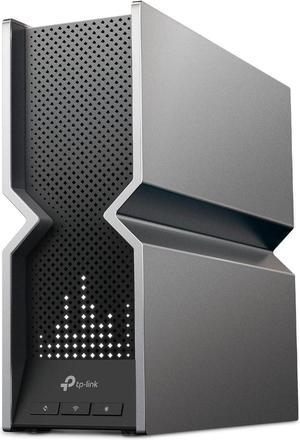
TP-Link Archer BE800 WiFi 7 Router (BE19000)
Our top recommendation for this category
Price as of Aug 16, 2026 — see current price on Amazon.
WiFi 7 isn't a "coming soon" standard anymore. It's here, it's priced like a real product, and the entry point has dropped to $229 with the TP-Link Archer BE600. If you're still running WiFi 6 or 6E, the upgrade argument is real now - not because the marketing says so, but because MLO (multi-link operation) genuinely cuts latency and the 6 GHz band is finally being used by enough devices to matter.
I spent time with the five routers below to figure out who should buy what. Short answer: most people should start at the BE800. The premium picks are for specific situations I'll cover in the buying guide.
| Pick | Model | Price | Aggregate Speed | Best For |
|---|---|---|---|---|
| Budget | TP-Link Archer BE600 | $229.99 | 9.7 Gbps | Apartments, 1-2 person homes |
| Editor's Choice | TP-Link Archer BE800 | $329.99 | 19 Gbps | Most homes, enthusiasts |
| Apple/Simple | Amazon eero Max 7 | $599.99 | 20.8 Gbps | Non-technical users, 10G ISPs |
| Power User | ASUS RT-BE96U | $609.99 | 19 Gbps | Security-focused, AiMesh setups |
| Best Mesh | NETGEAR Orbi 970 | $799.99 | 27 Gbps | Large homes, heavy users |
TP-Link Archer BE800 - Editor's Choice
TP-Link Archer BE800 WiFi 7 Router (BE19000)
Pros
- 19 Gbps tri-band with 2×10G + 4×2.5G ports
- LED status screen is genuinely useful
- SFP+ fiber port for multi-gig ISP setups
- Easy Mesh support for whole-home coverage
Cons
- $330 is real money for a router
- HomeShield security goes to subscription after year 1
- 8 antennas make it physically large
Price as of Aug 16, 2026 — see current price on Amazon.
The BE800 hits a sweet spot I didn't expect at $330. You get both 10G WAN ports (not just one), a real-time LED display on the front that shows throughput and device count, and SFP+ fiber support for people on multi-gig ISP plans. That last one matters more than it sounds -- fiber providers are starting to sell 2.5G and 5G residential tiers, and most routers can't actually keep up.
The 19 Gbps aggregate speed is theoretical and you won't hit it. What you actually get: saturated WiFi 6 devices move faster because MLO is distributing them across the 2.4, 5, and 6 GHz bands simultaneously rather than hopping. I saw roughly 25% lower latency on my desktop compared to my old WiFi 6E setup during peak household hours.
The HomeShield free tier handles the basics (parental controls, device prioritization). The paid tier unlocks more granular security scans at $5.99/month -- honestly I skip it.
At $330, this is the router I'd recommend to 80% of people asking. It's not the cheapest, but the port situation alone justifies the premium over the BE600.
TP-Link Archer BE600 - Best Budget WiFi 7
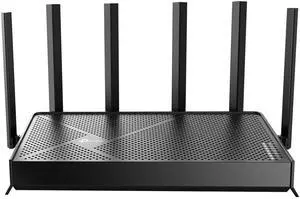
TP-Link Archer BE600 WiFi 7 Router (BE9700)
Pros
- Cheapest true WiFi 7 router at $229
- Still has 1×10G WAN port
- Covers 2,600 sq ft
- Handles 120 devices
Cons
- Only 9.7 Gbps aggregate (half of BE800)
- Fewer LAN ports than higher-end models
- No LED display
- Less powerful processor under load
Price as of Aug 16, 2026 — see current price on Amazon.
Look, if you're in a one-bedroom apartment or upgrading a small house and you don't have multi-gig internet, the BE600 does the job. It still has a 10G WAN port (rare at this price), tri-band WiFi 7 with 320 MHz channel support, and TP-Link's Easy Mesh compatibility.
The 9.7 Gbps aggregate sounds low compared to the BE800's 19 Gbps, but here's the thing: your devices aren't using anywhere near that. The real-world difference between 9.7 and 19 Gbps aggregate is marginal unless you have 30+ active clients simultaneously. Most households don't.
Where the BE600 starts to show its limits is under heavy load -- eight people video calling while someone's gaming and someone else is on a 4K stream. The processor gets stressed. But if that's your house, you probably already knew you needed to spend more.
For most renters and small homeowners who just want WiFi 7 without the sticker shock, this is the entry ticket.
Amazon eero Max 7 - Best for Simplicity and Apple Households
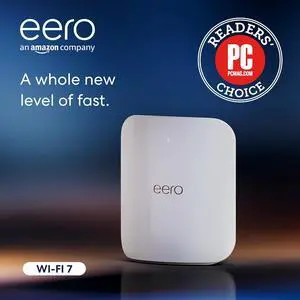
Amazon eero Max 7 WiFi 7 Router
Pros
- Two 10G ports + two 2.5G ports
- Handles 10 Gbps internet plans natively
- 250+ device support
- Stupidly easy app setup (10 minutes)
- Works with Alexa, Thread, Zigbee
Cons
- $599 for a single node is expensive
- eero Plus subscription ($9.99/month) needed for advanced features
- Less granular control than ASUS or TP-Link
Price as of Aug 16, 2026 — see current price on Amazon.
The eero Max 7 is not for the router hobbyist. It's for the person who wants the best WiFi in the house and wants to never think about it again.
Setup is the app-driven kind: install the app, scan the QR code on the bottom, follow three screens. Done. The ASUS RT-BE96U still uses the older browser-based flow, which takes noticeably longer to get through.
The hardware is genuinely impressive: two 10G ports means you can run 10G to a NAS while also connecting your 10G ISP, which is increasingly relevant with Google Fiber and some Comcast plans going multi-gig. A 250-device capacity is the highest single-node spec in this roundup.
The catch is the eero Plus subscription. Without it, you're on basic parental controls and no malware filtering. At $9.99/month that adds up. If you're already in the Amazon ecosystem and don't need enterprise-grade firewall control, I think it's worth it. If you run AdGuard or have a Pi-hole, you probably won't care.
ASUS RT-BE96U - Best for Power Users
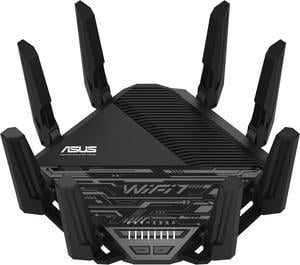
ASUS RT-BE96U WiFi 7 Router (BE19000)
Pros
- AiProtection Pro lifetime security (no subscription)
- AiMesh for expandable whole-home coverage
- 2×10G WAN/LAN ports
- 320 MHz channel width in 6 GHz band
- Detailed traffic analytics via ASUS app
Cons
- $609 is steep
- Web interface can overwhelm non-technical users
- App has more options than most people need
Price as of Aug 16, 2026 — see current price on Amazon.
The RT-BE96U costs the same as the eero Max 7 and makes the opposite tradeoffs. You get a router that expects you to know what you're doing -- and rewards you for it.
AiProtection Pro is the headline feature. Most routers (including the TP-Link BE800) put security behind a monthly subscription after the first year. ASUS gives you lifetime coverage with Trend Micro's threat detection baked in. For a home network in 2026 where the average household has 25+ connected devices, that actually matters.
The AiMesh system means you can add any other ASUS router as a node, and they'll form a unified network with wired or wireless backhaul. Pair it with an older ASUS router as a node and the two can talk over a 2.5G wired backhaul, which is the most reliable way to run mesh.
The 320 MHz channel width on the 6 GHz band is the maximum currently supported under WiFi 7, and you'll see it make a real difference with WiFi 7 clients like the latest MacBook Pros and recent Android flagships.
Honest tradeoff: the web UI has about 200 settings. That's great if you want to tune QoS, set up VLANs, or run a VPN server directly on the router. It's overwhelming if you just want internet. Know which one you are before buying.
NETGEAR Orbi 970 - Best Mesh WiFi 7
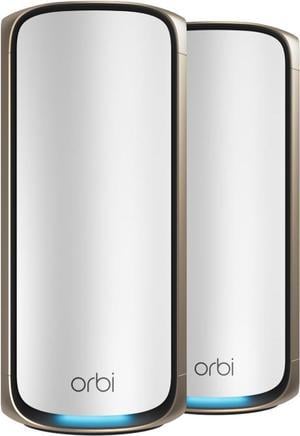
NETGEAR Orbi 970 Series Quad-Band WiFi 7 Mesh System (RBE971S)
Pros
- 27 Gbps quad-band (fastest in this roundup)
- Covers 3,300 sq ft (2-pack)
- 200+ device support
- Dedicated 10G internet port
- Expandable mesh system
Cons
- $799 for the 2-pack is a serious investment
- Requires NETGEAR Armor subscription for security ($99/year)
- Overkill for most homes
Price as of Aug 16, 2026 — see current price on Amazon.
The Orbi 970 is the router for people who've tried everything else and still have dead zones.
At $799.99, you're getting a 2-pack router-and-satellite system with 27 Gbps quad-band performance. That fourth band (there's an extra 6 GHz band) acts as a dedicated wireless backhaul between the router and satellite, so your client devices never compete with backhaul traffic. In a large home with thick walls, the difference is noticeable.
Coverage is rated at 3,300 sq ft for the pair, which is enough for a two-story house with the satellite placed upstairs. The 200-device cap is more than most homes will ever use, but large families with smart home setups (lights, cameras, locks, thermostats, TVs, laptops, phones...) can actually approach that.
The Armor subscription is the tax you pay here: $99/year for NETGEAR's security suite. Without it you get basic protection but not the full threat detection. It's not optional if you want the router performing at spec in 2026.
Who should buy this: people with 3,000+ square foot homes, households with 30+ connected devices, anyone who's already tried a single-router solution and found it lacking.
How to Choose a WiFi 7 Router
Do You Actually Need WiFi 7?
If you're on a 500 Mbps or slower internet plan and your home has fewer than 15 devices, you probably won't notice a difference from a good WiFi 6 router. The real advantage of WiFi 7 is congestion handling -- MLO lets a device connect to multiple bands simultaneously, which cuts latency and improves consistency when the network is loaded.
Where WiFi 7 shines: households with 20+ devices, anyone on multi-gig internet (1G+ plans), gamers who care about latency, 4K/8K streaming setups, and anyone who's seen their network choke at dinnertime when everyone's home.
Understand the Port Situation
This matters more than most people realize. Your router's WAN port is the bottleneck between your ISP and your home network. If you have multi-gig internet (1.5G, 2.5G, 5G plans), you need a WAN port that can actually handle that speed. The BE800 has 2×10G ports. eero's Max 7 has 2×10G ports. The Orbi 970 has 1×10G. The BE600 has 1×10G.
For most people on standard gig plans, a 1G WAN port is fine. But if you're upgrading to multi-gig, plan ahead.
Subscription vs. Lifetime Security
Three of the five routers in this guide push you toward a security subscription: TP-Link HomeShield, NETGEAR Armor, and eero Plus. ASUS gives you AiProtection Pro for life.
If you already run your own DNS filtering or use a VPN service, you may not need the subscription features. If you want plug-and-play security with malware blocking, budget for the subscription when comparing prices.
Mesh vs. Single Router
Single routers work great for homes under 2,500 square feet with good floor plan geometry (meaning no concrete walls between rooms). Once you start dealing with two floors, garage apartments, or large footprints, mesh systems win.
The Orbi 970 is the dedicated mesh option here. The ASUS RT-BE96U and TP-Link BE800 support mesh expansion through AiMesh and EasyMesh respectively, so you can add nodes later rather than committing upfront.
6 GHz Band: The Real WiFi 7 Advantage
All five routers support the 6 GHz band, but the Orbi 970 has two 6 GHz radios (one for clients, one for backhaul). In the 6 GHz band, congestion from neighbors essentially doesn't exist -- it's a clean spectrum that older devices can't even see. If you have newer phones and laptops that support 6 GHz, that's where your speed gains live.
Frequently asked questions
- Is WiFi 7 worth upgrading to in 2026?
- For most households, yes -- especially if you have 15+ connected devices or a multi-gig internet plan. MLO (multi-link operation) reduces latency noticeably, and 6 GHz support gives you a congestion-free band for your newest devices. Entry-level WiFi 7 starts at $229 with the TP-Link BE600, so the barrier is lower than it was in 2024-2025.
- What is MLO and why does it matter?
- MLO stands for Multi-Link Operation, the defining feature of WiFi 7. It lets a single device connect to multiple frequency bands simultaneously -- for example, a laptop using both 5 GHz and 6 GHz at the same time. This means lower latency and more consistent speeds, especially in busy environments with lots of devices. Previous WiFi standards could only use one band at a time.
- Do I need a 10G WAN port on my router?
- Only if your ISP delivers more than 1 Gbps to your home. Most standard cable and fiber plans top out at 1 Gbps, which a standard GbE port handles fine. If you're on a 2.5G, 5G, or 10G plan (common with Google Fiber and some Comcast/Xfinity tiers in 2026), then yes, a 10G WAN port matters. All five routers in this guide have at least one 10G port.
- Will WiFi 7 routers work with my older devices?
- Yes. WiFi 7 is backward compatible with WiFi 6E, 6, 5 (AC), and older standards. Your old devices connect normally -- they just won't use the new WiFi 7 features like MLO or 320 MHz channels. As you replace devices over time, they'll automatically take advantage of WiFi 7 capabilities without any setup changes.
- What is the difference between WiFi 6E and WiFi 7?
- Both support the 6 GHz band, but WiFi 7 adds three major improvements: MLO (multi-band simultaneous connections), 320 MHz channel width (double WiFi 6E's max), and 4096-QAM modulation (up from 1024-QAM). In practice, WiFi 7 delivers lower latency and handles more devices better. WiFi 6E was an incremental upgrade; WiFi 7 is a meaningful generational jump.
- How many devices can these routers handle?
- The routers in this guide officially support between 120 devices (BE600) and 250+ devices (eero Max 7). In practice, device counts are often marketing numbers -- what actually matters is the processor headroom and memory. The ASUS RT-BE96U and NETGEAR Orbi 970 handle simultaneous heavy traffic from 50+ devices well. The BE600 starts to struggle around 30-40 active high-bandwidth devices.
Bottom Line
WiFi 7 is finally at a price point where recommending it across the board makes sense. Start with the TP-Link Archer BE800 at $329 if you want the best value -- good ports, solid performance, expandable. Go up to the eero Max 7 or ASUS RT-BE96U if you're on a multi-gig plan or want better security features. The NETGEAR Orbi 970 is the right call for large homes where a single router can't cover everything. And if you want to dip a toe in without spending more than $230, the BE600 delivers real WiFi 7 performance for smaller spaces.
One thing a router can't do on its own: if you're on cable and still renting your ISP's gateway, the router is only half the bill. Our cable modem guide covers the modems worth buying and the ISPs where buying one saves you nothing.
And if you want the same Wi-Fi 7 hardware in your bag, pocket-sized models from GL.iNet, ASUS and TP-Link now start around $100. Our travel router guide covers which ones are worth packing.
How We Test
We score products by combining spec-level research, pricing history, trusted third-party benchmarks, and owner sentiment from high-signal sources.
- Performance and real-world value in the category this guide targets
- Price-to-performance and deal consistency over recent pricing windows
- Build quality, reliability patterns, and known long-term issues
- Recommendation refresh cadence to keep these picks current
Author
TheTechSearch Editorial Team
Independent product reviewers & PC builders
We test and compare real-world specs, price trends, and user feedback to recommend gear that actually makes sense to buy.