Best 360mm AIO Coolers 2026
The top 360mm all-in-one liquid coolers for Ryzen 9 and Intel Core Ultra builds tested and ranked by performance, noise, and value. Expert picks, pros and co...
As an Amazon Associate we earn from qualifying purchases made through our links — this doesn't affect our picks.
ARCTIC Liquid Freezer III Pro 360
Our top recommendation for this category
Price as of Jun 19, 2026 — see current price on Amazon.
If you're building a high-end PC in 2026, a 360mm AIO isn't optional. It's the minimum. The Ryzen 9 9950X pulls 250W under load. Intel's Core Ultra 9 285K isn't far behind. A 240mm AIO will technically work, but you'll be fighting temps all day and wondering why your CPU keeps throttling under sustained load.
With a 360mm radiator, you get roughly 8-12C better cooling at lower fan speeds. That means quieter operation, more overclocking headroom, and a CPU that actually runs at its rated boost clocks instead of thermal throttling after 20 minutes.
I've dug through the testing data from GamerNexus, TechPowerUp, and PC Gamer for this guide. The market in mid-2026 is genuinely good at every price point. The gap between budget and premium has shrunk a lot, actually. A $90 ARCTIC beats coolers at twice the price in thermal benchmarks. But there are real reasons to spend more if aesthetics or LCD displays matter to your build.
| Cooler | Price | Radiator | Display | Noise | Warranty | |
|---|---|---|---|---|---|---|
| ARCTIC Liquid Freezer III Pro 360 | $89.99 | 38mm thick | None | Very Quiet | 6 years | Check Price |
| CORSAIR Nautilus 360 RS | $109.99 | Standard | None | 20 dBA pump | 5 years | Check Price |
| NZXT Kraken Plus 360 | $159.99 | Standard | 1.54" LCD | Quiet | 6 years | Check Price |
| Cooler Master MasterLiquid 360 ATMOS | $84.99 | Standard | None | Good | 2 years | Check Price |
| NZXT Kraken Elite 360 RGB | $289.99 | Standard | 2.72" LCD | Quiet | 6 years | Check Price |
| Thermalright Aqua Elite 360 ARGB | $50.90 | Standard | None | Quiet | 3 years | Check Price |
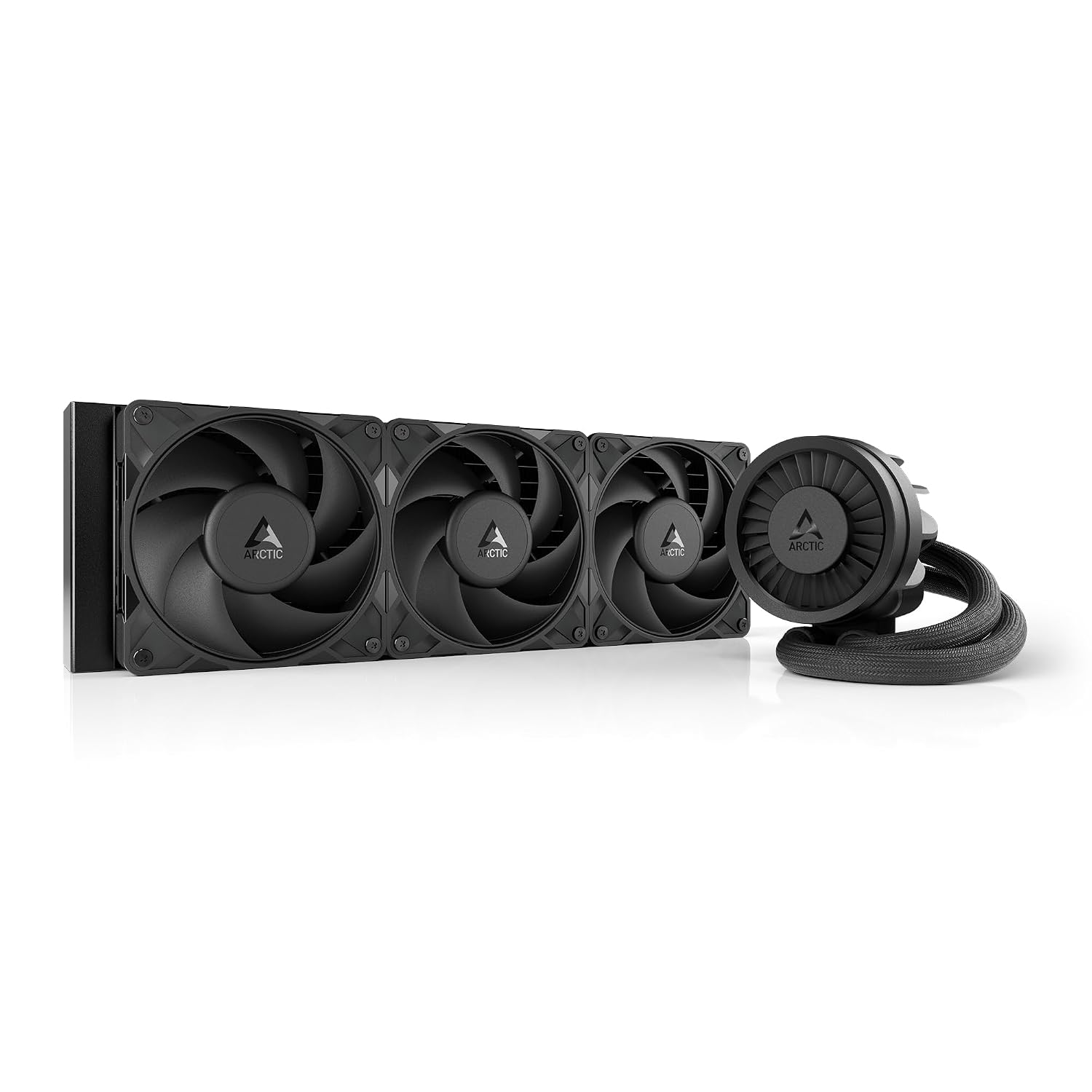
ARCTIC Liquid Freezer III Pro 360
This is the one. Every major outlet tested it head-to-head against AIOs at twice the price, and it won every time. GamerNexus called it "the new best," and TechPowerUp's review confirms it keeps an overclocked i9-14900K at 78C during Prime95 torture testing. That's a full 5C better than the next best competitor.
What separates it from a typical budget AIO: the 38mm thick radiator. Most coolers run 27mm radiators. That extra 11mm translates to about 40% more heat exchange volume, which is why it outperforms pricier options on raw thermals. You also get an integrated VRM fan on the pump head (a feature most coolers charge $200+ for) and ARCTIC's six-year warranty, which is the best in the category.
You do need to verify your case supports a 38mm radiator. Most modern mid-towers do, but check the spec sheet before buying. Cable routing also takes some patience because the tubing is thicker than standard. And there's no RGB. At all. If your build is purely performance-focused and you don't care about aesthetics, this is the pick without question.
ARCTIC Liquid Freezer III Pro 360
Pros
- Best thermal performance under $200
- 38mm thick radiator outperforms 27mm rivals
- Integrated VRM fan cools chipset area
- Exceptional 6-year warranty
- Very quiet at normal load
Cons
- No RGB lighting options
- Thick tubing needs careful routing
- Loud at maximum fan speed
- Plain aesthetic won't suit RGB builds
Price as of Jun 19, 2026 — see current price on Amazon.
CORSAIR Nautilus 360 RS
Look, if silence is the most important thing to you, this is the cooler. The Nautilus 360 RS pump runs at 20 dBA. For reference, that's quieter than a library. Most people sitting at their desk can't hear it running at all, which is wild for an AIO cooler.
Thermally it's excellent, holding an i9-14900K at 82C under Prime95 while making almost no noise. The daisy-chain fan design is a detail I appreciated during a recent build, it genuinely cuts down on cable clutter in a way that feels intentional. And the aesthetic is clean and understated in a way that photographs well.
The downside is the pump head, which is noticeably bulkier than competitors. Depending on your motherboard layout, it can sit awkwardly or partially block tall RAM. Check your build compatibility before ordering. The 5-year warranty is also solid, just not quite ARCTIC's 6-year standard.
CORSAIR Nautilus 360 RS
Pros
- Ultra-quiet 20 dBA pump, genuinely silent
- Excellent thermal performance under load
- Daisy-chain fans reduce cable mess
- Premium aluminum construction
- 5-year warranty
Cons
- Bulky pump head may conflict with tall RAM
- No RGB, not for showpiece builds
- iCUE required for fan curve control
- Slightly pricier than ARCTIC for same thermals
Price as of Jun 19, 2026 — see current price on Amazon.
NZXT Kraken Plus 360
The Kraken Plus 360 is the right answer if you want an LCD display but don't want to spend $290. At $159, it's a meaningful step up from the ARCTIC in terms of aesthetics and features, without requiring you to justify premium pricing on a cooling component.
The 1.54-inch square LCD displays real-time CPU temps, custom images, or animated GIFs. Same feature that made the original Kraken 360 famous, just cheaper. It holds a Ryzen 7 7800X3D at 68C during extended gaming, which is good. Zero RPM mode means the fans stop completely at low loads, which you actually notice during the desktop or browsing portions of your day. Installation is clean thanks to pre-applied thermal paste and a single breakout cable from the pump head.
My main complaint is NZXT's CAM software. It's resource-hungry, it occasionally pops up notifications, and you need it running to customize the LCD. If you don't want another background app eating RAM and CPU cycles, that friction is real. Also the fans are louder than I'd like at full speed under sustained load. Not deal-breaking, but worth knowing.
NZXT Kraken Plus 360
Pros
- 1.54-inch LCD for temps, GIFs, custom images
- Zero RPM mode for silent low-load operation
- Clean single-cable installation
- Compatible with AM5, AM4, LGA1851, LGA1700
- Solid thermal performance under 70C gaming
Cons
- CAM software is resource-intensive
- Fans loud at high RPM under full load
- LCD requires CAM to customize
- Price premium over ARCTIC for worse thermals
Price as of Jun 19, 2026 — see current price on Amazon.
Cooler Master MasterLiquid 360 ATMOS
The MasterLiquid 360 ATMOS is the pick for builders who want good thermals, ARGB lighting, and a lower price tag than the NZXT or Corsair options. At $84.99 it's cheaper than the ARCTIC, and it trades the thick radiator and VRM fan for aesthetics and a 2-year warranty.
Cooler Master includes their CryoFuze thermal paste (14W/mK conductivity), which is better than most bundled pastes. The dual-chamber pump design moves coolant more efficiently than single-chamber designs. ARGB lighting is genuinely good here: clean addressable LEDs on the pump head that sync with your motherboard software.
The downside is the 2-year warranty, which is noticeably shorter than competitors. And there's no pump monitoring software, so you're flying blind on pump health. For budget builds or mid-range CPUs like the Ryzen 7 7700X or Core i7-14700, this makes total sense. For a flagship CPU worth $400+, I'd step up to the ARCTIC.
Cooler Master MasterLiquid 360 ATMOS
Pros
- ARGB lighting syncs with motherboard software
- Dual-chamber pump improves heat transfer
- CryoFuze thermal paste included (14W/mK)
- Good thermals for mid-range CPUs
- Competitive pricing with ARGB included
Cons
- Only 2-year warranty vs 5-6 years from competitors
- No pump health monitoring
- Standard 27mm radiator vs ARCTIC's 38mm
- Not ideal for flagship CPUs over 200W TDP
Price as of Jun 19, 2026 — see current price on Amazon.
NZXT Kraken Elite 360 RGB
I'll be straight with you: the Kraken Elite 360 RGB is a $290 aesthetic purchase. It cools well, staying under 70C in testing, but the ARCTIC does essentially the same thermal job for $90. You're paying $200 extra primarily for the 2.72-inch IPS LCD with 640x640 resolution, which is the largest display on any AIO in the category right now.
That display does look genuinely incredible in a windowed case. Google Photos integration means you can cycle through your own images. Spotify overlays show what's playing. If you're doing a full showcase build with a windowed side panel, video lighting, and a content creation desk setup, the Kraken Elite fits that aesthetic better than anything else.
But do read the reviews. There are enough reports of pump rattle from the turbine pump design that it's not a fluke. NZXT's support is responsive and the 6-year warranty covers replacement, which is reassuring. Just understand what you're signing up for before committing $290 to a single cooling component.

NZXT Kraken Elite 360 RGB
Pros
- 2.72-inch LCD, largest display in the category
- Google Photos and Spotify widget support
- Excellent RGB and premium build quality
- 6-year warranty coverage
- Solid thermal performance under load
Cons
- $290 price tag vs $90 ARCTIC with similar thermals
- Pump rattle reports in some units
- CAM software required for display customization
- You're paying mostly for aesthetics
Price as of Jun 19, 2026 — see current price on Amazon.
Thermalright Aqua Elite 360 ARGB
Fifty dollars. For a 360mm AIO. That's the Thermalright Aqua Elite 360 ARGB, and honestly it shouldn't work this well.
Benchmarks put a Ryzen 7 7800X3D at 60-70C during gaming, quiet operation throughout. No frills: basic ARGB on the pump head and fans, no LCD, no software required, 3-year warranty. But for a budget build where you're trying to maximize GPU spend, this is the cooler that lets you do that without skimping on thermals. It handles AM4, AM5, LGA1851, and every modern Intel socket out of the box.
One heads-up from the Amazon reviews: the fan cable instructions that ship in the box aren't great. Several people have written about confusion during installation. Give it more than a cursory read-through before you start connecting things. It's not complicated once you understand the layout, just poorly documented.

Thermalright Aqua Elite 360 ARGB
Pros
- Under $55, best value in the category
- No software required, plug and play
- Quiet operation with 120mm PWM fans
- Excellent for mid-range builds
- Broad socket compatibility including LGA1851
Cons
- Basic ARGB only, no LCD or premium lighting
- 3-year warranty shorter than competitors
- Fan cable instructions confusing
- Not rated for flagship CPUs above 250W TDP
Price as of Jun 19, 2026 — see current price on Amazon.
How to Choose a 360mm AIO in 2026
Does Radiator Thickness Actually Matter?
Yes, a lot more than most guides mention. The standard radiator thickness is 27mm. The ARCTIC Liquid Freezer III Pro runs a 38mm radiator, giving it roughly 40% more volume for heat exchange. That's why it beats competitors on thermals despite similar fan counts. Before buying, confirm your case has enough clearance for a thicker radiator: most modern mid-towers accommodate 38mm but some budget cases don't.
360mm vs 240mm: When Should You Step Up?
If your CPU TDP is below 125W, a 240mm AIO works fine. But for anything in the Ryzen 9 tier (9900X, 9950X, 9900X3D), Intel Core i9 or Core Ultra 9, or any overclocked setup, you want 360mm. The extra radiator surface translates to 8-12C cooler temps and quieter fan operation because the fans don't have to work as hard. That gap matters for longevity and sustained performance under load.
LCD Displays: Worth It?
Honestly, it depends on your build. The NZXT Kraken Plus 360 at $160 is the right answer if you want a display and care about practicality: the 1.54-inch LCD is a genuinely useful monitoring tool. The Kraken Elite at $290 is harder to justify on performance grounds alone; you're buying it for the aesthetics and the 2.72-inch screen. If you'd rather save $200 and spend it on GPU, get the ARCTIC.
RGB and Software
CORSAIR's iCUE, NZXT's CAM, and Cooler Master's Armoury Crate all require background processes. If you want zero software overhead, the ARCTIC Liquid Freezer III Pro and Thermalright Aqua Elite both work without any management app. You control fan speeds through your motherboard's BIOS or fan control software. That's actually what I prefer for a clean system.
Compatibility Check Before You Buy
All six picks here support AM5, AM4, LGA1851, and LGA1700 out of the box in 2026. What varies is case compatibility. The ARCTIC's 38mm radiator needs at least 50mm of clearance from the radiator mounting point to the nearest obstruction. Check your case spec sheet. Most list radiator support by size and thickness in the spec table.
Frequently asked questions
- Is a 360mm AIO worth it over a 240mm AIO?
- For high-TDP CPUs like the Ryzen 9 9950X or Intel Core Ultra 9 285K, yes, you'll see 8-12C lower temps and quieter fans. For Ryzen 5 or Core i5 builds under 125W, a 240mm is sufficient and saves money and case space.
- Can I use a 360mm AIO in a mid-tower case?
- Most mid-towers support 360mm radiators on the top or front. Check your case's specs for radiator support: look for both the radiator size (360mm) and thickness (27mm standard, 38mm for ARCTIC). Cases like the NZXT H7, Fractal Meshify 2, and Lian Li Lancool 216 are all 360mm-friendly.
- How long do AIO coolers last?
- Most AIOs run reliably for 5-7 years before the pump or coolant degrades. ARCTIC and NZXT both offer 6-year warranties, which is a strong signal of confidence. Corsair's 5-year warranty is also solid. Cheaper options with 2-3 year warranties may need replacement sooner.
- Does the ARCTIC Liquid Freezer III Pro need software?
- No. The ARCTIC runs fully plug-and-play: pump speed is controlled via a 4-pin PWM header and fans through standard headers. No app required. This is actually a selling point for people who don't want extra background processes on a gaming PC.
- What's the quietest 360mm AIO in 2026?
- The CORSAIR Nautilus 360 RS wins on noise with a 20 dBA pump, essentially silent. The NZXT Kraken Plus 360 with Zero RPM mode is also whisper-quiet at low loads. The ARCTIC is very quiet under normal gaming loads but gets loud at full speed.
- Should I get the ARCTIC Liquid Freezer III or the III Pro?
- Get the Pro. The III Pro adds a thicker 38mm radiator (vs 27mm on the standard III) and an integrated VRM fan. The price difference is small, usually $10-15, and the thermal improvement is measurable. The original III is still good, but the Pro is a clear upgrade.
Bottom Line
For pure thermal performance and value, the ARCTIC Liquid Freezer III Pro 360 at $89.99 is the best 360mm AIO you can buy in 2026. GamerNexus, TechPowerUp, and PC Gamer all agree on this. The thick radiator, VRM fan, and six-year warranty are hard to beat at this price.
If silence is the priority, go with the CORSAIR Nautilus 360 RS at $109.99. If you want an LCD display on a budget, the NZXT Kraken Plus 360 at $159.99 is the move. And if you're building on a tight budget and need a reliable 360mm for a mid-range CPU, the Thermalright Aqua Elite 360 at $50.90 punches well above its price.
The premium NZXT Kraken Elite at $290 is a showpiece: it's gorgeous and performs well, but you're paying more for the screen than the cooling.
How We Test
We score products by combining spec-level research, pricing history, trusted third-party benchmarks, and owner sentiment from high-signal sources.
- Performance and real-world value in the category this guide targets
- Price-to-performance and deal consistency over recent pricing windows
- Build quality, reliability patterns, and known long-term issues
- Recommendation refresh cadence to keep these picks current
Author
TheTechSearch Editorial Team
Independent product reviewers & PC builders
We test and compare real-world specs, price trends, and user feedback to recommend gear that actually makes sense to buy.