Best 65% Keyboards 2026
The best 65% mechanical keyboards in 2026: wired gaming picks, wireless portability, classic typing boards, and the best budget compact keyboard under $80.
As an Amazon Associate we earn from qualifying purchases made through our links — this doesn't affect our picks.
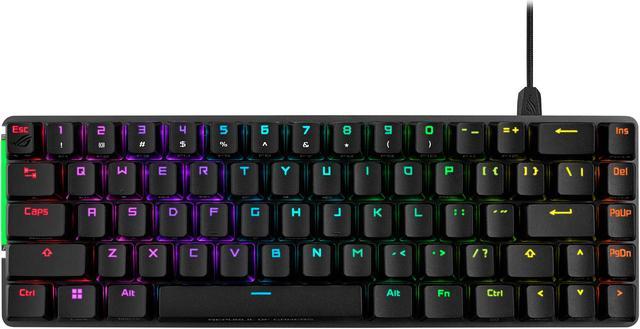
ASUS ROG Falchion Ace 65% RGB Compact Gaming Mechanical Keyboard, Lubed ROG NX Red Switches, PBT Keycaps, Wired, KVM, Black
Our top recommendation for this category
Price as of Oct 8, 2026 — see current price on Amazon.
The 65% form factor has quietly become the smart choice for anyone who wants a smaller keyboard but isn't willing to sacrifice the arrow keys. You keep the four navigation arrows (unlike 60% layouts that drop them entirely), you lose the numpad and function row nobody really uses mid-game, and what you get is a 68-key board that fits cleanly on almost any desk.
Over the last year or so, this space got genuinely competitive. ASUS has gone deep on the Falchion lineup, there's now a hall-effect version, a low-profile wireless model, and the standard wired Ace covering different budgets. Ducky keeps the One 3 SF relevant because the keycap quality and acoustics are hard to match at that price. And HyperX's Alloy Origins 65 has become the answer to "what's a good compact keyboard that doesn't cost much" that reviewers keep landing on for good reason. Here are the four worth buying.
| Keyboard | Switch Type | Wireless | Hot-Swap | Build | Price | |
|---|---|---|---|---|---|---|
| ROG Falchion Ace (Black) | NX Red (Linear) | No | No | Aluminum + PBT | $90 | Check Price |
| ROG Falchion RX Low Profile (White) | RX Red Optical | Yes (Tri-mode) | No | Polycarbonate | $177 | Check Price |
| Ducky One 3 SF | Cherry MX Brown | No | Yes | Plastic + PBT | $109 | Check Price |
| HyperX Alloy Origins 65 | HyperX Aqua (Tactile) | No | No | Aluminum + PBT | $80 | Check Price |
ASUS ROG Falchion Ace 65% (Black, NX Red)
ASUS ROG Falchion Ace 65% RGB Compact Gaming Mechanical Keyboard, Lubed ROG NX Red Switches, PBT Keycaps, Wired, KVM, Black
Pros
- Pre-lubed NX Red linear switches feel smooth out of the box
- Dual USB-C ports with KVM switching built in
- Sound-dampening foam layers cut resonance noticeably
- PBT keycaps ship with the keyboard, not ABS plastic
Cons
- No wireless option at all
- Non-hot-swappable, so you're committed to NX Red unless you desolder
Price as of Oct 8, 2026 — see current price on Amazon.
The Falchion Ace is ASUS's most polished attempt at a wired 65% keyboard, and they got a lot right. The pre-lubed NX Red linear switches ship smoother than most factory linears. There's a clear tactile difference between these and stock Gateron Reds or Cherry MX Reds right out of the box. If you've been putting off lubing a keyboard yourself, this one makes that a non-issue.
The dual USB-C port design is a genuinely useful feature that most reviews undersell. You can daisy-chain a second device through the keyboard without adding a USB hub to your setup. Gaming PC plus a laptop sharing one monitor and one keyboard, with a single cable running to each, works cleanly. It's a productivity feature on a gaming keyboard, which is an odd combination that actually makes sense.
The sound-dampening foam layers make a real difference. Typing on the Falchion Ace is quieter than on most other aluminum-framed 65% keyboards, despite the solid build. The PBT keycaps help too. They're thick enough to have a good thud rather than the hollow clatter you get from thin ABS. The only real limitation here is no hot-swap support, which means if you want to try different switches down the road, you're either living with NX Red or getting your soldering iron out.
ASUS ROG Falchion RX Low Profile 65% Wireless (White)
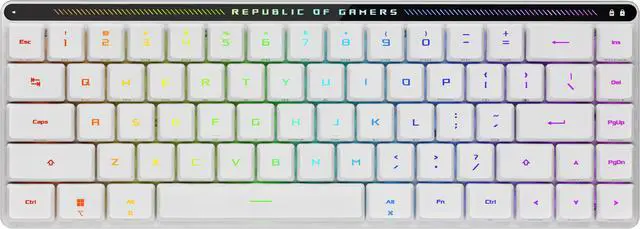
ASUS ROG Falchion RX Low Profile Wireless Gaming Keyboard, 65% Compact TKL, Tri-Mode Connectivity, ROG RX Red Optical Switches, Touch Panel, White
Pros
- Tri-mode wireless: 2.4 GHz SpeedNova, Bluetooth 5.0, and USB-C
- Rated for up to 450 hours of battery life on 2.4 GHz
- Low-profile switches at 3mm total travel versus 4mm standard
- Touch panel strip above the board for media controls
Cons
- Low-profile switches feel very different from standard height, takes adjustment
- ABS keycaps (not PBT) at this price point is a disappointment
- Polycarbonate case doesn't feel as premium as the wired Falchion Ace
Price as of Oct 8, 2026 — see current price on Amazon.
If your use case involves any amount of moving the keyboard around, or you just want a clean cable-free desktop, the Falchion RX is the most complete wireless 65% in this guide. Three connectivity modes on one board is the draw here, though at $177.32 it has crept up to become the most expensive keyboard in this guide. The 2.4 GHz SpeedNova connection reports at 1ms polling, Bluetooth handles the phone or tablet pairing, and USB-C is there when you want zero latency during a competitive session without the dongle setup.
ASUS rates the battery at up to 450 hours on 2.4 GHz, and running the RGB backlight will pull that figure down. Either way, charging is an occasional chore rather than a weekly one.
The ROG RX Red optical switches at 3mm travel are faster to bottom out than standard height switches. This takes some getting used to. If you're coming from a full-size keyboard or even the standard Falchion Ace, the first week of typing will feel a little shallow. After that adjustment, most people either love the faster actuation or wish they'd gotten the standard height version. The touch panel strip along the top replaces physical media buttons and works well once you learn the gesture patterns, though I'd still prefer physical controls.
One thing worth noting: ASUS includes a keyboard cover with the RX. It's a semi-rigid case that protects the board for transport. Small detail but genuinely useful if you take the keyboard to LAN events or between office and home.
Ducky One 3 SF 65% (Cherry MX Brown)
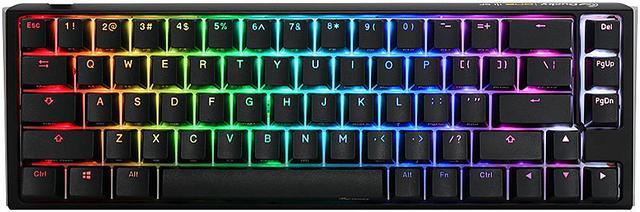
Ducky One 3 SF 65% Mechanical Gaming Keyboard, Cherry MX Brown, RGB, Black
Pros
- Hot-swap socket for MX-compatible switches without soldering
- PBT tripleshot keycaps have a dense, satisfying sound profile
- Quack Mechanics dampening cuts resonance better than you'd expect from a plastic case
- Cherry MX Brown tactile bump is consistent across all 68 keys
Cons
- Wired only, no wireless option at any price point from Ducky
- Onboard programming (no dedicated software) has a learning curve
- No USB hub or passthrough ports
Price as of Oct 8, 2026 — see current price on Amazon.
Ducky has been in the enthusiast keyboard space for over a decade and the One 3 SF shows it. The keycap quality on this board is legitimately one of the best things about it. The PBT tripleshot legends are crisp and the caps themselves have that slightly textured feel that stock ABS keycaps never get right. People spend $40+ on aftermarket keycap sets to get what ships standard here.
The hot-swap sockets are a meaningful practical feature. If you buy this keyboard with Cherry MX Browns and six months later decide you want to try Gateron Yellows or Boba U4Ts, you just pop the keys off, pull the switches, and drop in new ones. No desoldering, no heat, five minutes of your time. For anyone who's been burned by buying a keyboard and then deciding they hate the switches, this is the answer.
The Quack Mechanics sound treatment Ducky does on the One 3 SF involves foam padding inside the case, pre-lubed stabilizers, and screw-in stabilizer mods. The hollow ping that you get from most $100-range boards just isn't there. Cherry MX Brown switches have a subtle tactile bump around 2mm that's softer than clicky switches, which makes this a solid choice for anyone in a shared space who doesn't want to announce every keystroke.
The onboard programming works through key combinations and is annoying to learn until you've done it twice. After that it's fine. But if you need deep macro programming or per-key RGB customization beyond what the board's built-in modes offer, the lack of dedicated software will frustrate you.
HyperX Alloy Origins 65
HyperX Alloy Origins 65 - Mechanical Gaming Keyboard, Compact 65% Form Factor, Tactile Aqua Switch, Double Shot PBT Keycaps, RGB LED Backlit
Pros
- Full aluminum frame at under $80, which is nearly impossible to find elsewhere
- HyperX Aqua tactile switches are consistent and require no break-in
- Double-shot PBT keycaps ship standard
- Three typing angles adjustable without tools
Cons
- No wireless option
- NGENUITY software has had stability issues on some Windows 11 configurations
- Not hot-swappable
Price as of Oct 8, 2026 — see current price on Amazon.
The HyperX Alloy Origins 65 is the answer to "what's the best compact keyboard under $80 that doesn't feel cheap." The full aluminum frame at this price is the headline. Most keyboards at $80 or less use plastic housings. The Alloy Origins 65 does not, and the difference is immediately obvious when you pick it up. There's no flex, no creak, and the typing surface stays stable even if you type hard.
HyperX Aqua tactile switches have a bump at about 1.8mm of actuation and don't have an audible click. They're lighter than Cherry MX Browns (about 45g versus 55g actuation force) which makes them good for longer typing sessions. They suit anyone who wants tactile feedback but shares a space with others.
Look, this keyboard doesn't do everything. There's no wireless, the NGENUITY software is inconsistent (though you can program it and then uninstall the software, the settings stay on the board), and you can't swap switches. But at $79.99 with a metal frame, PBT keycaps, and solid tactile switches, it is still the cheapest way into a 65% board that doesn't feel cheap. Worth knowing before you buy: the black Falchion Ace has dropped to $90.34, only about $10 more, and it adds pre-lubed switches and the dual USB-C KVM. If that $10 is not the deciding factor for you, spend it.
What to Look for in a 65% Keyboard
Form factor: why 65% over 60% or 75%
The core decision is about arrow keys. A 60% keyboard (61 keys) removes them to get smaller. Most people who type a lot, write code, or use spreadsheets find life without arrow keys annoying within a week. The 65% form factor adds those four keys back while keeping everything else compact, which is why it's the most popular small keyboard size for people who actually use their keyboards for work.
The 75% form factor (like the Keychron Q3 or Corsair K65 Plus) adds a function row back. If you need F1-F12 without a fn-key combination, 75% makes more sense. If you're fine hitting fn+1 for F1, 65% gives you a smaller footprint.
Switch types explained
Linear switches (like NX Red) move straight down with no bump. They're preferred by gamers because there's no tactile resistance to slow down rapid keystrokes. Tactile switches (NX Brown, Cherry MX Brown, HyperX Aqua) have a small bump around the actuation point that gives typing feedback without audible click. Clicky switches add an audible snap.
For shared spaces or if you work from home with calls: tactile or linear. Clicky switches will bother people on your video calls.
For competitive gaming specifically: linear or hall effect. Hall effect switches (magnetic, adjustable actuation) are the highest-performance option but add cost. The ROG Falchion Ace HFX or GMMK 3 HE cover that angle; the boards in this guide use traditional switches.
Wired versus wireless
Wired keyboards have zero input latency. Wireless keyboards at 2.4 GHz have 1ms polling rates that are functionally identical to wired for any normal use case, including competitive gaming. The practical difference comes down to battery management and desk cable management.
If your desk is clean and cables don't bother you, wired is simpler. If you move the keyboard around, share between devices, or just hate cables, wireless 2.4 GHz is fine for everything.
Build materials: aluminum versus plastic
Aluminum frames are heavier and feel more premium. They don't flex under heavy typing, which some people prefer. They also don't absorb sound as well, which means you sometimes get more acoustics (good or bad, depending on preference and how the foam dampening is done).
Plastic cases are lighter and can actually sound better if the manufacturer does the internal dampening right. Ducky's One 3 SF is a good example: plastic body, better acoustics than many aluminum boards.
For pure feel and prestige: aluminum. For acoustics and weight: premium plastic can beat cheap aluminum.
Frequently asked questions
- What is a 65% keyboard exactly?
- A 65% keyboard has 68 keys: the full alphabetic and numeric rows, arrow keys, and a few navigation keys (Delete, Page Up, Page Down, End), but no function row (F1-F12), no numpad, and no dedicated home/insert cluster. The '65%' refers to roughly 65% of the keys on a full 104-key keyboard.
- Can you still use function keys on a 65% keyboard?
- Yes, through a function layer. On most 65% keyboards, Fn+1 triggers F1, Fn+2 triggers F2, and so on. You can also usually remap this or create dedicated macros. It becomes muscle memory quickly, though if you use function keys constantly (like in development IDEs), a 75% with a dedicated function row might suit you better.
- Are 65% keyboards good for gaming?
- Yes, they're popular for competitive gaming specifically because the smaller footprint allows more mouse movement space. The arrow keys most 65% boards keep are useful for non-WASD navigation. Most competitive FPS players use 60-75% keyboards. The ROG Falchion Ace or a hall-effect board in this size is a common choice for esports players.
- Is the ASUS ROG Falchion Ace worth the price versus cheaper options?
- Yes. The black NX Red version is $90.34, roughly $10 above the HyperX Alloy Origins 65, and at that gap it is an easy yes: you get pre-lubed switches that sound noticeably better stock, dual USB-C KVM switching, and sound-dampening foam layers that make the keyboard quieter.
- What is the difference between the ROG Falchion Ace and the ROG Falchion RX?
- The Falchion Ace is wired, uses standard height mechanical switches (NX Red or NX Brown), and has an aluminum frame. The Falchion RX Low Profile is wireless (tri-mode), uses low-profile optical switches (3mm travel instead of 4mm), and has a polycarbonate body. The RX is thinner and lighter. The Ace feels more like a traditional mechanical keyboard. Prices have separated them: the RX is $177.32 while the black Ace is $90.34, so wireless is now the expensive option.
- Does the Ducky One 3 SF work without software?
- Yes. The Ducky One 3 SF has no dedicated PC software, all customization is done through onboard programming (key combinations you learn once and then forget). This also means all your settings stay on the keyboard when you move between computers. For people who don't want software running in the background, this is an advantage. The tradeoff is that the initial programming learning curve is steeper than a software-based approach.
Bottom Line
For most people, the ASUS ROG Falchion Ace Black NX Red is the best overall 65% keyboard right now, and at $90.34 it is also close to the cheapest board here: it ships with pre-lubed switches, sounds far better than the price suggests, and the KVM dual USB-C setup is useful if you run more than one device. If wireless is your priority, the Falchion RX Low Profile covers that with a battery life you'll basically never think about, though at $177.32 you are paying a real premium for the freedom. The Ducky One 3 SF at $109 is the pick if hot-swap matters to you or you want a classic typing-focused 65% without gaming aesthetic. And if budget is the main constraint, the HyperX Alloy Origins 65 at $79.99 is still the cheapest board here, though the black Falchion Ace is only about $10 more.
How We Pick
We pick products by combining spec-level research, price checks, trusted third-party benchmarks, and owner sentiment from high-signal sources.
- Performance and real-world value in the category this guide targets
- Price-to-performance and deal consistency over recent pricing windows
- Build quality, reliability patterns, and known long-term issues
- Recommendation refresh cadence to keep these picks current
Author
TheTechSearch Editorial Team
Independent product reviewers & PC builders
We compare real-world specs, reviews and owner reports, price trends, and user feedback to recommend gear that actually makes sense to buy.