Best TKL Gaming Keyboards 2026
The top tenkeyless gaming keyboards of 2026, from hall effect rapid trigger monsters to budget wireless picks that punch way above their price. Expert picks,...
As an Amazon Associate we earn from qualifying purchases made through our links — this doesn't affect our picks.
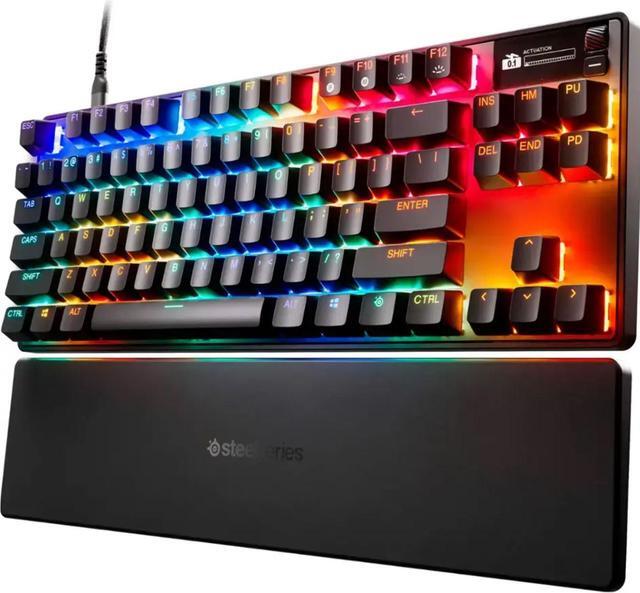
SteelSeries Apex Pro TKL Gen 3
Our top recommendation for this category
Price as of Jul 28, 2026 — see current price on Amazon.
The tenkeyless form factor has become the default for serious PC gamers. Just narrow enough to let you push your mouse further left, but keeping the full function row and arrow keys that 60% boards take away. And over the last 18 months, TKL keyboards specifically got interesting again, because hall effect switches and rapid trigger technology finally landed in the mainstream price range. Keyboards that would have cost $200+ two years ago are now under $150, and the feature gap between "budget" and "flagship" closed faster than anyone expected.
Below are the five worth buying right now, covering everything from the uncompromising competition pick to a wireless all-rounder under $90 that punches well above its price.
| Keyboard | Switch Type | Polling Rate | Wireless | Rapid Trigger | Price | |
|---|---|---|---|---|---|---|
| SteelSeries Apex Pro TKL Gen 3 | OmniPoint 3.0 HE | 8000 Hz | No | Yes | $175 | Check Price |
| Logitech G Pro X TKL Rapid | Hall Effect Magnetic | 1000 Hz | No | Yes | $150 | Check Price |
| Keychron Q3 Max | Gateron Mechanical | 1000 Hz | Yes (2.4GHz + BT) | No | $190 | Check Price |
| Corsair K70 Pro TKL | MGX Hyperdrive HE | 8000 Hz | No | Yes | $130 | Check Price |
| Keychron V3 Max | Gateron Mechanical | 1000 Hz | Yes (2.4GHz + BT) | No | $90 | Check Price |
SteelSeries Apex Pro TKL Gen 3
SteelSeries Apex Pro TKL Gen 3
Pros
- OmniPoint 3.0 switches adjustable from 0.1mm to 4.0mm actuation
- 8000 Hz polling with rapid trigger and SOCD support
- OLED smart display for per-profile settings at a glance
- QSE auto-presets dial in gaming modes instantly
Cons
- Wired only (no wireless option at this price)
- ABS keycaps feel plasticky compared to competition
- OLED screen adds cost you might not need
Price as of Jul 28, 2026 — see current price on Amazon.
The Gen 3 is a meaningful upgrade from the already-excellent Gen 2. SteelSeries moved from their older OmniPoint sensors to OmniPoint 3.0 magnetic switches, and the difference in consistency is noticeable: the per-key actuation feels tighter, and the 8000 Hz polling actually matters here because the keyboard reports input fast enough that standard USB polling becomes the bottleneck.
Rapid Trigger works per-key now, down to 0.1mm reset distance. That sounds like a spec sheet bullet point, but it translates to stutter-stepping and counter-strafing that feels genuinely different to play on. Valorant and CS2 players who've switched to the Gen 3 tend not to switch back.
The OLED display on the top right shows your current profile name, DPI if you have a compatible SteelSeries mouse connected, and Discord notification status. It's a nice touch that helps the $175 price feel justified. What I'd actually fix: swap the ABS keycaps for PBT at this price point. That's a $30 aftermarket fix but shouldn't be necessary on a $175 flagship.
Logitech G Pro X TKL Rapid
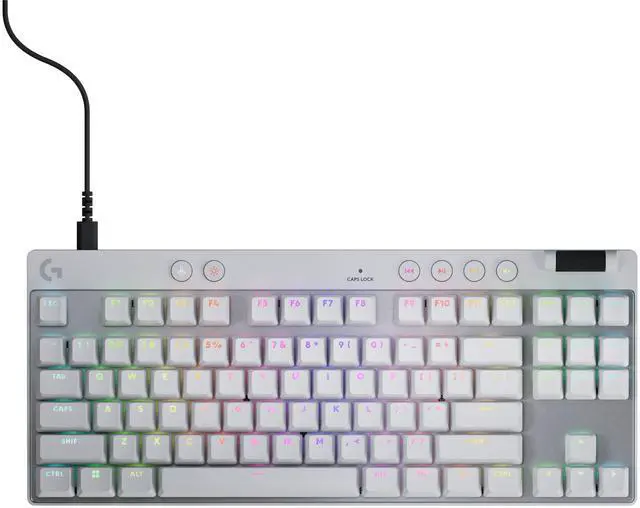
Logitech G Pro X TKL Rapid
Pros
- Hall effect magnetic switches with adjustable actuation 0.2mm to 4.0mm
- Volume roller and dedicated media buttons (rare on any TKL)
- Clean no-nonsense build, no OLED gimmicks
- Detachable USB-C cable
Cons
- 1000 Hz polling (not 8000 Hz like Apex Pro)
- Software requires G HUB which has a rough reputation
- No wireless option
Price as of Jul 28, 2026 — see current price on Amazon.
Logitech's entry into the hall effect space is the G Pro X TKL Rapid, and they got the basics very right. The switches feel slightly different from SteelSeries' OmniPoint, a touch more linear and less springy at the bottom of travel, which some players prefer. Actuation adjusts from 0.2mm to 4.0mm, rapid trigger works down to 0.1mm reset, and the whole thing runs at 1000 Hz polling.
The polling rate comparison with the Apex Pro at 8000 Hz is technically real, but functionally at 1000 Hz you're reporting every 1ms which is already overkill for any monitor below 500 Hz. Unless you're playing at 500+ FPS consistently, this won't matter.
The standout is the dedicated media buttons and volume roller on the top right. Most TKL boards skip these to save space. Logitech kept them and they're genuinely useful: you don't have to fn-key your way to muting Discord anymore. The build quality is solid aluminum frame with a low-profile design that doesn't feel as premium as the Q3 Max below but holds up fine under daily use. Good option if you want hall effect rapid trigger without paying for features you don't care about.
Keychron Q3 Max
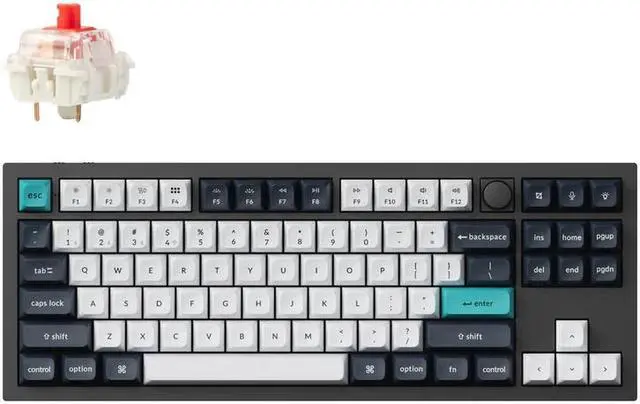
Keychron Q3 Max
Pros
- Full aluminum CNC body with gasket mount, typing feel is exceptional
- Tri-mode wireless: 2.4 GHz, Bluetooth 5.1, and USB-C
- QMK/VIA fully programmable with Keychron Launcher web app
- Hot-swappable 5-pin north-facing sockets for switch rolling
Cons
- No rapid trigger (traditional mechanical switches only)
- Knob version adds cost if you want the rotary encoder
- Heavier than competitors at 1.5kg
Price as of Jul 28, 2026 — see current price on Amazon.
The Q3 Max is the keyboard I'd buy if I was setting up a permanent workstation and wanted something I'd use for the next five years without thinking about it. It's not a gaming-first board: no hall effect switches, no rapid trigger, no 8000 Hz polling. What it is: a seriously well-built aluminum keyboard with gasket mount dampening that makes every switch sound and feel better than it should.
The wireless implementation is genuinely useful. 2.4 GHz connects via the included USB dongle for low-latency gaming, and Bluetooth 5.1 handles up to three additional paired devices. Swap between your desktop, laptop, and iPad without unplugging anything.
Gateron Jupiter switches come in red, brown, and banana variants. The banana switches (a tactile clicky option) are the most interesting: they sound great and have a distinct feedback point that works well for typing. If you're a writer who also games, the Q3 Max is probably your keyboard. If you're a competitive shooter player who wants every millisecond advantage, look at the Apex Pro TKL Gen 3 instead.
Corsair K70 Pro TKL
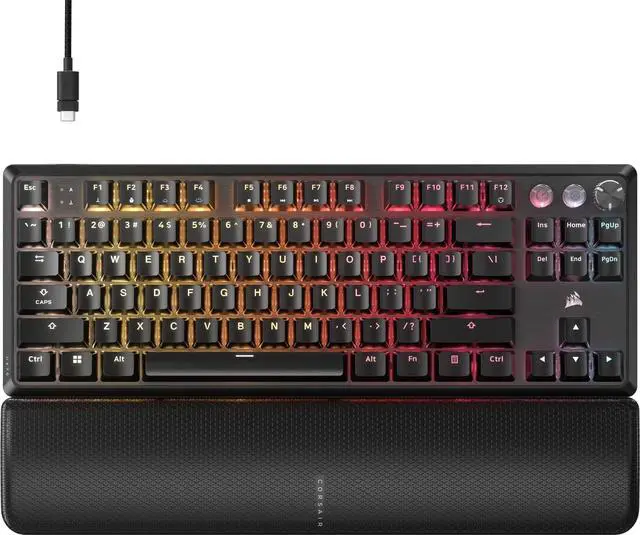
Corsair K70 Pro TKL
Pros
- MGX Hyperdrive hall effect switches with 0.4mm to 3.6mm per-key actuation
- 8000 Hz polling and rapid trigger at a lower price than competitors
- Pre-lubed from the factory, sounds good out of the box
- Simultaneous SOCD support included
Cons
- ABS double-shot keycaps (expected at this price)
- iCUE software is heavy and runs at startup by default
- No wireless option
Price as of Jul 28, 2026 — see current price on Amazon.
The Corsair K70 Pro TKL punches well above what $130 used to buy you. A year ago, hall effect switches with rapid trigger at this price would have been a budget compromise. Now Corsair is shipping MGX Hyperdrive switches that adjust per-key from 0.4mm, run at 8000 Hz, and support SOCD, meaning simultaneous opposite cardinal direction inputs for techniques like counter-strafing and wavedashing don't cancel each other out incorrectly.
Pre-lubed from the factory is a nice touch. Most budget keyboard buyers aren't going to pop open their switches and lube them manually, but Corsair did it and the difference in sound dampening and smoothness is real.
The one genuine complaint is iCUE. The software works and it's feature-rich, but it runs heavy and defaults to a startup background process. Changing the iCUE startup behavior right away fixes most of that. Once that's done, it's set and forget.
At $130, this is the hall effect rapid trigger pick if you don't want to spend $175 on the Apex Pro.
Keychron V3 Max
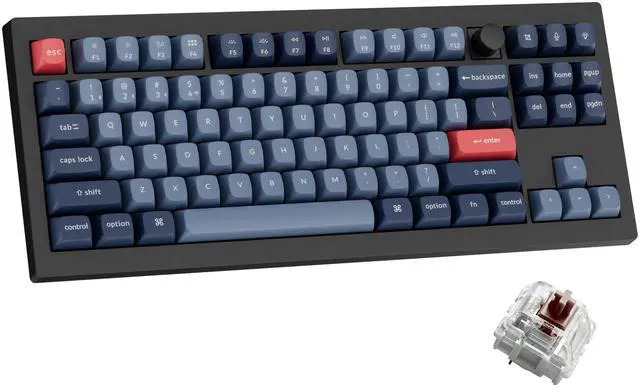
Keychron V3 Max
Pros
- Tri-mode wireless under $90 is genuinely rare in TKL
- QMK/VIA programmable with Keychron Launcher, full key remapping
- Gasket-mounted for a budget board, typing sound better than expected
- Hot-swappable 5-pin sockets
Cons
- Polycarbonate body rather than aluminum of the Q3 Max
- No rapid trigger or hall effect switches
- Sound profile is slightly hollow until foam modded
Price as of Jul 28, 2026 — see current price on Amazon.
If you've been priced out of wireless TKL keyboards, the V3 Max is the one to look at. Under $90 for 2.4 GHz and Bluetooth tri-mode wireless, gasket mount, QMK support, and hot-swap sockets is a combination that flat-out didn't exist two years ago at this price. Keychron clearly moved manufacturing costs down while keeping the features that matter.
The polycarbonate body versus aluminum is the obvious cost trade-off: it's noticeably lighter and has more flex, which some people actually prefer for long typing sessions. The default Gateron switches (red, brown, or banana depending on the variant you pick) are fine out of the box. I'd recommend brown if you're typing and gaming; banana if you like a more pronounced tactile bump and don't share office walls with anyone.
Something to check before buying: Keychron's V-series uses south-facing LEDs, which means Cherry-profile keycaps with windows will shine through properly. If you're planning to swap keycaps eventually, confirm compatibility. The factory PBT keycaps are actually decent for a budget board and you may not need to change them at all.
How to Choose a TKL Keyboard
TKL vs Other Form Factors
A tenkeyless board removes the numpad and that's it. You keep the full function row (F1 through F12), the navigation cluster (Home, End, Page Up/Down), and arrow keys. That's the right call for most gamers because the numpad positions your mouse arm further right, adding strain during long sessions.
The main competition is the 75% layout, which is similar but compresses the nav cluster into a single column. If you never use Home/End/PgUp/PgDn during gaming, a 75% saves additional desk space. But TKL is the safer default: it's comfortable for both gaming and productivity work, and you won't find yourself fn-key hunting when a deadline hits.
Hall Effect vs Traditional Mechanical Switches
Traditional mechanical switches (Cherry MX, Gateron, Kailh) have a physical contact point that actuates the keypress. Hall effect switches (the technology behind OmniPoint, MGX Hyperdrive, and similar branded names) use a magnet and sensor instead. No physical contact means no bounce debounce delay and zero wear over time.
More importantly, hall effect switches let you set the exact actuation point per-key. Set WASD to actuate at 0.2mm (basically a light touch) and other keys to 2.0mm to avoid accidental presses. And rapid trigger, the ability to reset a keypress immediately when you release instead of waiting for the switch to physically return past the actuation point, only works properly with hall effect sensors.
For competitive shooters, hall effect with rapid trigger is a meaningful advantage. For typing and general gaming, traditional switches are completely fine and often sound better.
Rapid Trigger Explained
Standard mechanical switches actuate at a fixed point (say, 2.0mm down) and reset when the key comes back up past that same point. There's inherent latency in that physical return. Rapid trigger eliminates it: the key resets the instant you stop pressing down, regardless of where in the travel range you are.
In practice, you can re-press WASD faster without waiting for the key to physically return. In CS2 or Valorant, this lets you counter-strafe more consistently because the stop-and-go inputs land faster. It's a real advantage at high skill levels. At casual play, you probably won't notice it. But you won't be worse off for having it either.
Wired vs Wireless for Gaming
For competitive gaming, wired is still the safe choice. 2.4 GHz wireless from good boards like the Q3 Max or V3 Max is latency-equivalent to wired for most purposes, but there's always the variable of RF interference, battery level effects on polling, and the odd firmware edge case. None of the current hall effect rapid trigger TKL boards offer wireless anyway, which tells you where the feature priority sits.
If you're gaming casually or doing creative work, wireless TKL is a genuine quality-of-life upgrade. No cable drag, easy to move between setups, and modern batteries last long enough that you're charging weekly rather than daily.
What Polling Rate Actually Matters
8000 Hz means the keyboard reports its state to your PC 8000 times per second, or every 0.125ms. 1000 Hz reports every 1ms. On a 240 Hz monitor with a GPU outputting around 300+ FPS, the difference between 1000 Hz and 8000 Hz is in the sub-millisecond range. Most players won't feel it directly.
Where 8000 Hz starts to matter: very high FPS setups (400+ FPS competitive titles), combined with hall effect rapid trigger where you're resetting keys at sub-millisecond intervals. If that's you, the Apex Pro TKL Gen 3 and Corsair K70 Pro TKL both run at 8000 Hz and are the right picks.
Frequently asked questions
- What does TKL mean on a keyboard?
- TKL stands for tenkeyless, meaning the keyboard removes the number pad (numpad) from the right side. You keep everything else: the function row, the navigation keys (Home, End, Page Up, Page Down, Insert, Delete), and arrow keys. An 87-key TKL has the same typing area as a full-size keyboard with the rightmost section removed.
- Is hall effect better than mechanical for gaming?
- For competitive gaming, hall effect switches offer advantages traditional mechanical switches can't match: adjustable actuation per-key, zero physical contact wear, and support for rapid trigger technology. For typing and casual gaming, high-quality traditional mechanical switches (Gateron, Kailh, Cherry) are completely viable and often have a more satisfying sound and tactile profile. The Keychron Q3 Max and V3 Max in this list use traditional mechanical switches and they're excellent daily drivers.
- Do I need rapid trigger for gaming?
- Not unless you play movement-heavy competitive shooters like CS2 or Valorant at a high skill level. Rapid trigger allows keys to reset the instant you release them rather than waiting for the switch to physically return past the actuation point, which enables faster counter-strafing. For most games (RPGs, strategy, MOBAs, even most FPS at casual skill levels), rapid trigger is a nice-to-have, not a necessity.
- What is the difference between TKL and 75 percent keyboards?
- Both remove the numpad, but a 75 percent layout also compresses or removes the navigation cluster (Home, End, Page Up, Page Down) into a small column on the right side of the arrow keys, and the function row sits tighter. TKL is wider but keeps every key in its standard position. If you use Home/End/Page Up/Down regularly during work or gaming, TKL is easier to live with. If those keys are irrelevant to your workflow, a 75 percent saves additional desk space.
- Are TKL keyboards good for typing and programming?
- Yes. TKL is one of the most balanced form factors for combined gaming and productivity use. You lose only the numpad. The full function row, all navigation keys, and arrow keys remain in standard positions, which matters for coding shortcuts (especially F-keys and Home/End in IDEs). The hall effect picks in this list like the Corsair K70 Pro TKL work fine for both; the Keychron Q3 Max and V3 Max are probably the better choice if typing feel and programming use are your primary concern.
- What polling rate do I need on a gaming keyboard?
- 1000 Hz (1ms response) is sufficient for the vast majority of gaming setups. At 240 Hz monitors with 300 FPS, 1000 Hz polling introduces no perceptible input lag. 8000 Hz starts to matter at extremely high FPS setups running 500+ frames per second in competitive titles, especially when combined with hall effect rapid trigger. The Apex Pro TKL Gen 3 and Corsair K70 Pro TKL both offer 8000 Hz; the Logitech G Pro X TKL Rapid runs at 1000 Hz and is still a top competitive pick.
Bottom Line
For most competitive gamers the SteelSeries Apex Pro TKL Gen 3 is the right answer: the OmniPoint 3.0 switches, 8000 Hz polling, and OLED display make it the most complete hall effect TKL available right now. If you want to save $45 without losing hall effect and rapid trigger, the Corsair K70 Pro TKL at $130 is genuinely good value. The Logitech G Pro X TKL Rapid sits in the middle and adds media controls that neither competitor includes. And if wireless matters more than rapid trigger, the Keychron Q3 Max is the premium pick while the V3 Max proves you can get wireless TKL under $90 without meaningful compromises.
How We Pick
We pick products by combining spec-level research, price checks, trusted third-party benchmarks, and owner sentiment from high-signal sources.
- Performance and real-world value in the category this guide targets
- Price-to-performance and deal consistency over recent pricing windows
- Build quality, reliability patterns, and known long-term issues
- Recommendation refresh cadence to keep these picks current
Author
TheTechSearch Editorial Team
Independent product reviewers & PC builders
We compare real-world specs, reviews and owner reports, price trends, and user feedback to recommend gear that actually makes sense to buy.