Best Curved Gaming Monitors 2026
Three verified top picks for curved 1440p gaming — from $170 budget to 300Hz speed machines under $300. Expert picks, pros and cons, and side-by-side compari...
As an Amazon Associate we earn from qualifying purchases made through our links — this doesn't affect our picks.
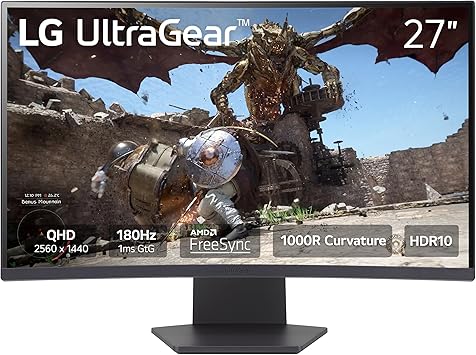
LG 27GS60QC-B UltraGear 27-inch Curved Gaming Monitor QHD 180Hz
Our top recommendation for this category
Price as of Sep 8, 2026 — see current price on Amazon.
Curved gaming monitors have gotten genuinely good in 2026. The old criticisms (poor off-axis colors, smearing in dark scenes) mostly applied to first-gen VA panels from 2019. The current crop of 27-inch 1440p curved monitors hits 165Hz to 300Hz, response times are tighter, and you can land a solid 180Hz 1440p curve for under $175.
If you're still deciding between curved and flat, there's a full breakdown here. Short version: curved works best for single-monitor desktop setups in the 27-inch range. Gaming? It's hard to go back.
| Monitor | Resolution | Refresh | Panel | Curvature | Price | |
|---|---|---|---|---|---|---|
| LG UltraGear 27GS60QC-B | 2560x1440 | 180Hz | VA | 1000R | $170 | Check Price |
| AOC CQ27G4ZH | 2560x1440 | 300Hz | VA | 1500R | $200 | Check Price |
| Samsung 27" Odyssey G5 | 2560x1440 | 165Hz | VA | 1000R | $280 | Check Price |
LG UltraGear 27GS60QC-B: Best Overall Value
At $169.99, the 27GS60QC-B is where most people should land. LG's UltraGear panel combines 180Hz refresh with 1ms GtG response time, 1000R curvature, and AMD FreeSync Premium in a package that undercuts most of the competition. The 1000R radius wraps your peripheral vision at normal arm-length desk distance. You notice it immediately going back to flat.
The Amazon listing also confirms what LG quietly added to this model: DAS mode (Dynamic Action Sync) and a crosshair/FPS counter overlay. Those are genuinely useful additions at this price. What you're not getting is USB-C or a USB hub, which are fair tradeoffs for $170.
LG's UltraGear VA panels have a long track record going back to the 27GP850 era. Their color calibration consistency is the best in this tier, significantly better than what you'd expect from budget VA. The 27GS60QC-B keeps that tradition.
LG 27GS60QC-B UltraGear 27-inch Curved Gaming Monitor QHD 180Hz
Pros
- Best price-to-performance on this list
- 1000R curvature, full peripheral wrap at desk distance
- 180Hz with 1ms GtG, no ghosting compromise
- DAS mode and built-in crosshair/FPS counter
Cons
- No USB hub or USB-C
- HDR10 certification but limited peak brightness
- 1000R can feel aggressive during spreadsheet work
Price as of Sep 8, 2026 — see current price on Amazon.
AOC CQ27G4ZH: 300Hz Curved 1440p
300Hz at 2560x1440 on a curved panel for $199 is genuinely remarkable. The CQ27G4ZH lists 0.3ms response time and ships with HDMI 2.1, which means console gamers using PS5 or Xbox Series X get 4K/120Hz pass-through without needing an adapter. For PC gamers, the 300Hz headroom means frame rates that were once exclusive to flat IPS panels are now available on curved VA.
The honest tradeoff: VA at 300Hz still trails a fast IPS in ultra-dark scenes. Ghosting is minimal in normal content, but in a very dark game running at max refresh you'll spot some residual smearing that a TN or IPS panel wouldn't show. Worth it? For most games, yes. If you play exclusively dark-atmosphere titles at max refresh, consider a flat IPS.
The three-year zero-bright-dot warranty that AOC includes here is worth calling out. Most budget monitor warranties don't cover bright pixel defects; AOC does on this model.

AOC CQ27G4ZH 27-inch Curved QHD 300Hz VA Gaming Monitor
Pros
- 300Hz at 1440p, standout refresh rate in the curved category
- HDMI 2.1 for 4K/120 console pass-through
- 3-year zero-bright-dot warranty
- 0.3ms response time, competitive with flat IPS panels
Cons
- VA smearing visible in extreme dark scenes at 300Hz
- Newer model, fewer long-term reliability reviews
- 1500R less aggressive immersion than 1000R
Price as of Sep 8, 2026 — see current price on Amazon.
Samsung 27" Odyssey G5: Deepest Contrast, Strongest Brand
The Odyssey G5 is the premium pick at $279.99: pricier than the LG and AOC, with a lower refresh rate (165Hz) and the same 1000R curvature. What you're paying for is Samsung's VA panel and brand support. Samsung's Odyssey-tier VA historically measures 3000:1+ contrast ratio, which produces noticeably richer blacks than what either the LG or AOC delivers. If you watch movies, play story-driven games, or want the most cinematic look, the G5's contrast depth is legitimately different.
The FreeSync Premium implementation on Samsung panels also tends to have wider variable refresh range and fewer stutter artifacts than third-party monitors at the same spec. And 165Hz is genuinely plenty for most setups: even a recent RTX 5070 will dip below 165fps in demanding 1440p titles. Samsung's reputation for honoring RMA claims also counts for something.

Samsung 27-inch Odyssey G5 QHD 165Hz 1ms Curved Gaming Monitor
Pros
- Samsung VA panel, best contrast on this list, 3000:1+
- 1000R curvature, maximum immersion at desk distance
- AMD FreeSync Premium with HDR10
- Samsung's warranty and RMA reliability
Cons
- 165Hz, lowest refresh on this list
- Most expensive of the three at $280
- No height adjustment, tilt only
Price as of Sep 8, 2026 — see current price on Amazon.
Curved Gaming Monitor Buying Guide
Which Curvature Radius Is Right for You?
1000R is the most aggressive, what Samsung and LG use on these models. At 60-70cm from your face (typical desk setup), it wraps the display edges into your peripheral vision. That's the intended effect. 1500R (what AOC uses here) is more subtle. You see the curve clearly, but the edges don't quite hit your periphery. 1800R is barely noticeable.
For gaming-only use, 1000R delivers the most immersive experience. For a monitor you'll also use for spreadsheets, code, or any work with straight horizontal reference lines, 1000R at close distance can feel like the corners are slightly bowed. People adapt to it, but not everyone loves it.
VA Panels: What the Contrast Advantage Actually Means
All three monitors on this list use VA (Vertical Alignment) panels, not IPS. The trade is straightforward: VA gives you 3x the contrast ratio of IPS (typically 3000:1 vs 1000:1), making blacks genuinely dark rather than dark-gray. Dark areas in games look richer. Loading screens don't wash out. Cinematics feel more like watching a TV.
The downside VA carries is pixel response consistency. At the outer edges of the refresh-rate spec, a VA pixel moving from very dark to slightly lighter can lag behind the refresh cycle, causing a brief smear. In 2026 VA panels, this is largely contained to extreme scenarios (very dark games, max refresh). It's real, but it's improved dramatically since the 2020-2022 era.
165Hz vs 180Hz vs 300Hz: What to Match Your GPU
- 165Hz: Suits RTX 4060/5060, RX 7700 XT, mid-range rigs. Most games at 1440p medium-high settings land 100-165fps.
- 180Hz: The sweet spot for RTX 4070/5070 builds. Adds meaningful headroom for faster-paced games without demanding excessive GPU output.
- 300Hz: For RTX 5080/5090 or competitive shooters (CS2, Valorant) where you're running low settings to maximize frames. If your GPU averages 180fps at 1440p in your main game, a 300Hz monitor's extra headroom serves little purpose.
Match your monitor's refresh rate to what your GPU actually delivers, not what it can hypothetically max out in a benchmark.
Pricing Trends and When to Buy
Curved monitor pricing has been trending down. The LG 27GS60QC-B at $169.99 would have cost $240+ eighteen months ago. Amazon pricing fluctuates, and these VA panels often drop another $10-25 during major sales events (October Prime Day, Black Friday). If the price is within $20 of the verified prices here, it's a good time to buy. If you see a significant increase, wait a week. The normal price usually comes back.
Frequently asked questions
- Are curved monitors better for gaming?
- For single-monitor setups at 27 inches, many players find curved monitors more immersive. The 1000R radius wraps the display edges into your peripheral vision, reducing eye movement strain at normal desk distances. It doesn't improve performance (your ping and frame rate don't change), but the viewing experience feels less fatiguing over long sessions.
- Can you use a curved monitor for work?
- Yes, with caveats. Aggressive 1000R curves can make perfectly straight horizontal lines look subtly bowed at the corners. Most people adapt to it within a few days. If your work involves heavy spreadsheet, CAD, or code editing where straight lines are reference points, test a 1000R monitor in person before committing. A 1500R or 1800R curve avoids this issue.
- Is 1440p worth it on a curved gaming monitor?
- At 27 inches, 1440p is meaningfully sharper than 1080p at typical desk distance. You can see individual pixels on a 1080p 27-inch if you look. If your GPU can sustain 100fps+ at 1440p in your primary games (RTX 4070 and above handles most games there), the upgrade in sharpness is genuine.
- Do VA panels smear on curved monitors?
- Modern 2024-2026 VA panels are significantly better than older units. Noticeable smearing is mostly confined to extreme dark-to-slightly-lighter transitions at maximum refresh rates. In normal gameplay (even fast shooters) the smearing that plagued 2019-2022 VA panels is largely resolved. The AOC at 300Hz pushes the boundary, but in practice only affects users running very dark games at max refresh.
- Does the Samsung Odyssey G5 have a height-adjustable stand?
- No. The standard G5 stand only offers tilt adjustment, no height or swivel. If ergonomic adjustability matters, budget $20-30 for a VESA monitor arm. All three monitors on this list are 100x100mm VESA compatible.
Bottom Line
The LG UltraGear 27GS60QC-B is the call for most buyers at $169.99: 180Hz and a 1000R curve. If you play fast-twitch shooters and your GPU keeps up, spend the extra $30 for the AOC CQ27G4ZH's 300Hz. The Samsung G5 at $280 makes sense only if you prioritize pure contrast depth and Samsung's warranty track record over every other spec on the list.
How We Pick
We pick products by combining spec-level research, price checks, trusted third-party benchmarks, and owner sentiment from high-signal sources.
- Performance and real-world value in the category this guide targets
- Price-to-performance and deal consistency over recent pricing windows
- Build quality, reliability patterns, and known long-term issues
- Recommendation refresh cadence to keep these picks current
Author
TheTechSearch Editorial Team
Independent product reviewers & PC builders
We compare real-world specs, reviews and owner reports, price trends, and user feedback to recommend gear that actually makes sense to buy.