Best 1440p 360Hz Gaming Monitors 2026
The fastest 1440p gaming monitors reviewed: QD-OLED vs IPS at 360Hz, top picks from Alienware, ASUS, and MSI, and who actually needs this tier. Expert picks,...
As an Amazon Associate we earn from qualifying purchases made through our links — this doesn't affect our picks.
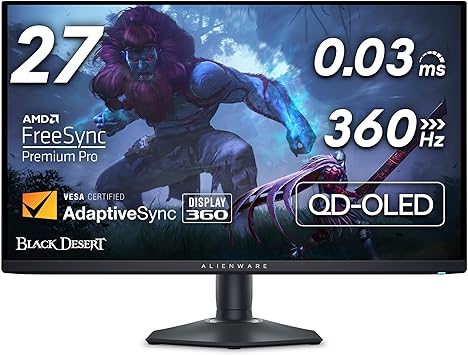
Alienware AW2725DF QD-OLED Gaming Monitor
Our top recommendation for this category
Price as of Sep 10, 2026 — see current price on Amazon.
1440p at 360Hz is no longer an enthusiast curiosity. In 2026 it's the monitor you buy when you want QHD sharpness without giving up the frame rate advantage that competitive gaming demands.
The catch is real: you need a GPU that can sustain 300+ fps in your primary titles for 360Hz to mean anything. An RTX 5070 or RX 9070 XT can do it in esports titles. A 5080 pushes it in everything. If you're sitting on a 4060 Ti, the 240Hz 1440p tier is probably the smarter buy. But if your hardware is there, the 360Hz jump from 240Hz is visible: particularly in fast-twitch FPS games where the blur reduction is the whole point.
Here are the picks in this tier right now, and why each one earns its spot.
| Monitor | Panel | Price | Best For | |
|---|---|---|---|---|
| Alienware AW2725DF | QD-OLED 360Hz | Check price | Editor's Choice | Check Price |
| MSI MPG 271QRX | QD-OLED 360Hz | Check price | Best Value | Check Price |
| ASUS XG27ACDNG | QD-OLED 360Hz | Check price | Content + Gaming | Check Price |
| ASUS XG27AQNGV | IPS G-SYNC Pulsar | Check price | Competitive IPS | Check Price |
Alienware AW2725DF: Editor's Choice
Alienware AW2725DF QD-OLED Gaming Monitor
Pros
- QD-OLED with genuine infinite contrast and per-pixel black
- 0.03ms GtG response time spec, the class standard for QD-OLED
- AMD FreeSync Premium Pro, also G-SYNC Compatible
- Excellent stand: height, tilt, swivel, pivot all adjustable
- USB-C + two DisplayPort 1.4 inputs
Cons
- 26.7" actual panel (not a full 27"), minor but worth noting
- QD-OLED burn-in risk requires pixel refresh habits
Price as of Sep 10, 2026 — see current price on Amazon.
Dell's Alienware division shipped the AW2725DF as the world's first QD-OLED at 360Hz, and it still sits at the top of this category going into late 2026. What makes it stand out is the combination: QD-OLED gives you essentially infinite contrast and per-pixel black levels that no IPS monitor can touch, while 360Hz and a 0.03ms GtG spec put its motion clarity at the top of the class.
The panel inside is Samsung's third-generation QD-OLED, a newer generation than the second-gen panels in older OLED monitors.
The stand is complete: full height, tilt, swivel, and pivot adjustment, which you don't always get at this price. One catch: the panel is 26.7", not 27". Spec sheets will say 27", but the actual diagonal is fractionally smaller.
MSI MPG 271QRX QD-OLED: Best Value

MSI MPG 271QRX QD-OLED Gaming Monitor
Pros
- QD-OLED panel matched to the Alienware at a lower street price
- USB-C 90W PD, charges a laptop while gaming
- True Black HDR 400 certified
- Solid OLED Care 2.0 for burn-in prevention
Cons
- Less name recognition than Alienware or ASUS
- App-based monitoring requires MSI software
Price as of Sep 10, 2026 — see current price on Amazon.
MSI's MPG 271QRX uses the same QD-OLED panel generation as the Alienware, usually costs a little less, and adds USB-C 90W Power Delivery. That last part matters if you want to hook up a laptop to the same monitor and charge it simultaneously. The Alienware doesn't do this.
The MPG series is easy to overlook because MSI doesn't carry the cachet of Alienware or ASUS ROG in monitor circles, but the hardware is competitive. RTINGS's calibration data on the panel shows virtually identical color accuracy and response times to the AW2725DF. If your local retailer has the MPG in stock and the Alienware is out of stock, the MSI is the move.
ASUS ROG Strix XG27ACDNG: Best for Creatives Who Game

ASUS ROG Strix XG27ACDNG QD-OLED Gaming Monitor
Pros
- 99% DCI-P3 coverage, color-accurate enough for light photo/video work
- OLED Care+ feature set is the most comprehensive on the market
- AI Gaming features for adaptive sharpening and noise reduction
- 3-year warranty is class-leading
Cons
- Costs a real premium over the Alienware and MSI
- The AI features add software overhead some competitive gamers don't want
Price as of Sep 10, 2026 — see current price on Amazon.
ASUS's take on QD-OLED at 360Hz is harder to justify purely on panel specs. The underlying QD-OLED tech is the same generation as the Alienware. What you're paying for is the ecosystem: ASUS's OLED Care+ is the most feature-rich burn-in prevention system on any consumer monitor (pixel shift, pixel refresh, pixel cleaning, and a uniform refresh mode), plus DisplayWidget software that's useful for gamers who switch between profiles.
The 99% DCI-P3 coverage also makes this a legitimately decent monitor for photo editing or light video work alongside gaming: not a replacement for a calibrated pro display, but usable for color-sensitive creative work. If your workflow mixes gaming and creative, this is the one.
ASUS ROG Strix Pulsar XG27AQNGV: Best IPS for G-SYNC Enthusiasts

ASUS ROG Strix Pulsar XG27AQNGV 360Hz Monitor
Pros
- G-SYNC Pulsar is NVIDIA's newest latency tech, pairs with Reflex Analyzer
- 90% DCI-P3 gamut is solid for an IPS panel at this price
- Ambient Adaptive Technology adjusts backlight to room lighting
- Dual-mode refresh rate (360Hz competitive / 120Hz power saving)
- No burn-in risk, pure IPS panel
Cons
- IPS contrast can't touch the QD-OLED panels in this roundup
- G-SYNC Pulsar feature set only matters if you're on RTX 5000 series
Price as of Sep 10, 2026 — see current price on Amazon.
The XG27AQNGV is ASUS's latest IPS-based 360Hz option, featuring NVIDIA's new G-SYNC Pulsar technology. In practice, G-SYNC Pulsar pairs with Reflex Latency Analyzer to deliver system latency readings and automatic optimization: gimmicky to some, useful to others. If you play ranked Valorant or CS2 competitively and you care about sub-1ms system latency, this is the monitor to pair with an RTX 5060 Ti or above.
The dual-mode refresh is a nice practical touch: run 360Hz during gameplay and drop to 120Hz during browsing, which meaningfully cuts GPU load during idle sessions. And unlike the QD-OLED picks here, zero burn-in risk. Leave it on a static desktop for 10 hours a day without a second thought.
It costs a little less than the Alienware and the MSI while giving you the full G-SYNC hardware experience. It is the pick if you specifically want IPS durability or are deep in the NVIDIA Reflex ecosystem.
Who Should Buy 1440p 360Hz?
The honest version: you're the target buyer if at least two of these are true.
You play competitive FPS games seriously (Valorant, Apex Legends, CSGO, Overwatch 2). You're running a GPU from the RTX 5000 or RX 9000 series. You've already used a 240Hz 1440p monitor and felt like you wanted more. And you're not going to 4K because frame rate matters more to you than pixel density.
If you're mainly playing single-player RPGs, strategy games, or anything where you're not running 300+ fps, this tier is money you don't need to spend. The 240Hz QD-OLED tier is arguably the better value for mixed-use gaming.
Buying Guide
QD-OLED vs Fast IPS at 360Hz: QD-OLED wins on contrast, color, and HDR by a wide margin. Fast IPS wins if you want backlight strobing (ULMB2), work in bright rooms, or worry about burn-in. Both do 360Hz equally well.
GPU requirements: A sustained 300fps average in your primary game is the target. An RTX 5060 Ti can hit that in esports titles at 1440p with DLSS Frame Generation. Without that, you're spinning up to 360Hz and only seeing 180 actual frames, not worth it.
G-SYNC vs FreeSync: Every QD-OLED option here is FreeSync Premium Pro and G-SYNC Compatible. If you want full G-SYNC hardware with the Reflex Latency Analyzer, get the XG27AQNGV. For most gamers, "G-SYNC Compatible" FreeSync works fine.
Don't chase 1440p 360Hz for console gaming: PS5 Pro and Xbox Series X max out at 1440p 120Hz. This tier only makes sense for PC.
Frequently asked questions
- Is there a visible difference between 240Hz and 360Hz at 1440p?
- Yes, but only if you're producing frames to match. With a GPU regularly exceeding 300fps in your game, the jump from 240Hz is visible as reduced motion blur and smoother cursor/crosshair movement. Below that frame rate, you're not seeing 360Hz. You're seeing however many frames your GPU is rendering.
- Which is better at 1440p 360Hz, QD-OLED or IPS?
- QD-OLED wins on everything involving color and contrast. IPS wins on backlight strobing compatibility, bright-room usability, and zero burn-in risk. For the majority of competitive gamers, QD-OLED is the better buy in 2026 unless burn-in specifically concerns you.
- Do these monitors work with PS5 or Xbox?
- They'll connect and work as 1440p 120Hz monitors, but you won't get 360Hz on consoles. The PS5 Pro maxes out at 1440p 120Hz. These are purpose-built for high-fps PC gaming.
- Is QD-OLED burn-in actually a concern in 2026?
- It's less of a concern than first-gen OLED, but it's not zero. Leaving a static HUD or desktop wallpaper for many hours daily over years can create permanent image retention. Every monitor here has pixel refresh and shift features to mitigate it. If you game 4+ hours daily and never use the monitor for anything else, the risk is low. If you leave it on a static desktop for 12 hours a day, use a screensaver.
- Does 360Hz at 1440p need a special cable?
- DisplayPort 1.4 runs 1440p at 360Hz only with DSC (Display Stream Compression), which these monitors support, because the uncompressed 8-bit signal needs more than DP 1.4's roughly 25.9 Gbps of usable bandwidth. DisplayPort 2.1 UHBR runs it without compression. HDMI 2.1 also works on monitors that include it. Use the cable that came in the box, or a certified DP 1.4 or DP 2.1 cable rather than a cheap unrated one.
- What's the difference between G-SYNC and G-SYNC Compatible at 360Hz?
- G-SYNC with a hardware module (in the XG27AQNGV here) provides guaranteed VRR at all frame rates and includes Reflex Latency Analyzer hardware. G-SYNC Compatible (the QD-OLED monitors) means NVIDIA certified the FreeSync implementation works well with RTX cards. In practice, most gamers can't tell the difference during gameplay. Full G-SYNC matters most for the Reflex ecosystem and very low framerate VRR stability.
Bottom Line
The Alienware AW2725DF is the pick for this tier. Its panel is reference-class for competitive gaming, and the stand and connectivity are complete. The MSI MPG 271QRX is the nearly-identical alternative when the Alienware is out of stock.
If you want IPS without burn-in risk and care about the NVIDIA Reflex ecosystem, the ASUS XG27AQNGV is the IPS pick. And if your use case mixes gaming with content creation, the ASUS ROG Strix XG27ACDNG earns its place with the best panel software and warranty in the category.
How We Pick
We pick products by combining spec-level research, price checks, trusted third-party benchmarks, and owner sentiment from high-signal sources.
- Performance and real-world value in the category this guide targets
- Price-to-performance and deal consistency over recent pricing windows
- Build quality, reliability patterns, and known long-term issues
- Recommendation refresh cadence to keep these picks current
Author
TheTechSearch Editorial Team
Independent product reviewers & PC builders
We compare real-world specs, reviews and owner reports, price trends, and user feedback to recommend gear that actually makes sense to buy.