Best Gaming Laptops Under $800 2026
Five gaming laptops under $800 that can actually handle modern games, including RTX 4050 options that used to cost $1,000 just a year ago. Expert picks, pros...
As an Amazon Associate we earn from qualifying purchases made through our links — this doesn't affect our picks.
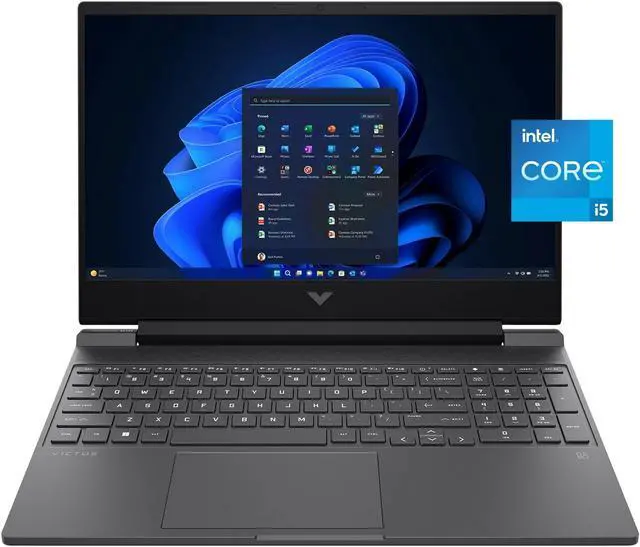
HP Victus 15 Gaming Laptop (Intel Core i5-13420H, RTX 4050)
Our top recommendation for this category
Price as of Aug 21, 2026 — see current price on Amazon.
The under-$800 gaming laptop category got quietly excellent over the past year. What used to buy you an RTX 3050 and a 60Hz display now gets you an RTX 4050 with 165Hz at the same price point. If you haven't looked at this segment recently, the options are genuinely better than you'd expect.
I'm looking specifically at machines that can run modern games at 1080p with playable frame rates, not just technically play them on minimum settings. Every laptop here handles that job. What separates them is cooling, battery life, build quality, and which GPU tier you land on.
Quick Picks
| Laptop | GPU | CPU | Price | Best For | |
|---|---|---|---|---|---|
| HP Victus 15 | RTX 4050 6GB | Core i5-13420H | ~$700 | Best overall value | Check Price |
| Acer Nitro V 15 | RTX 4050 6GB | Core i5-13420H | ~$750 | Best 165Hz display | Check Price |
| ASUS TUF Gaming A15 | RTX 3050 4GB | Ryzen 5 7535HS | ~$650 | Best AMD option | Check Price |
| Lenovo LOQ 15 | RTX 3050 4GB | Core i5-13420H | ~$750 | Best storage / 1TB | Check Price |
| MSI Thin GF63 | RTX 2050 4GB | Core i5-12450H | ~$700 | Most portable | Check Price |
HP Victus 15
HP Victus 15 Gaming Laptop (Intel Core i5-13420H, RTX 4050)
Pros
- RTX 4050 at around $700 is exceptional value
- 16GB DDR4 RAM out of the box
- 144Hz IPS display with solid color accuracy
- Wi-Fi 6 and Thunderbolt 4 support
Cons
- Thermals run warm under sustained load
- Average battery life around 5-6 hours
- Build is plastic, not particularly premium-feeling
Price as of Aug 21, 2026 — see current price on Amazon.
The HP Victus 15 is the one I keep recommending when someone gives me the under-$800 laptop constraint. An RTX 4050 for around $700 would have been remarkable a year ago, and the rest of the package is solid enough that it doesn't feel like something was cut to hit that price.
The Core i5-13420H handles gaming well. It's not the fastest 13th-gen Intel chip, but paired with the RTX 4050 it doesn't bottleneck games. Expect 1080p performance around 60-90fps in demanding titles like Cyberpunk 2077 on High settings with DLSS Quality, and north of 100fps in games like Valorant, CS2, and Apex Legends where the frame rate matters.
The 144Hz display is better than you'd expect at this price. HP uses IPS panels here rather than the TN panels that cheaper gaming laptops sometimes ship with, so colors are decent for both gaming and content consumption. Viewing angles are fine.
Where the Victus shows its budget: thermals. Under sustained GPU load, the chassis runs warm and the fans get loud. This is pretty normal for gaming laptops under $800 and manageable if you're using headphones. But if you want a quiet laptop for coffee shop gaming sessions, this isn't it.
Acer Nitro V 15
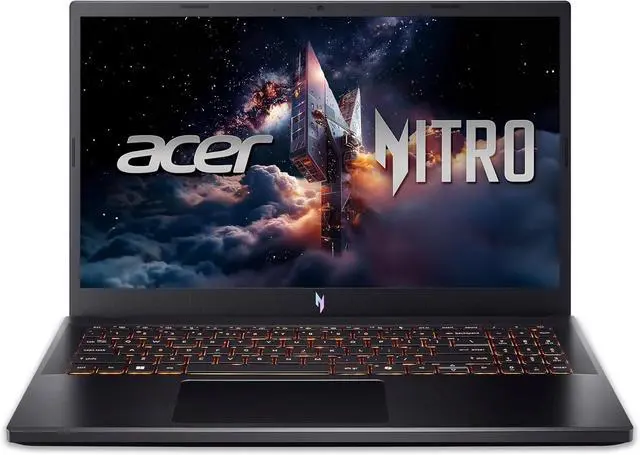
Acer Nitro V Gaming Laptop 15.6 (Intel Core i5-13420H, RTX 4050)
Pros
- 165Hz display is noticeably smoother than 144Hz competition
- RTX 4050 with DDR5 memory is a solid pairing
- Acer CoolBoost fan control helps with sustained gaming
- Four-zone keyboard with good key travel
Cons
- 8GB RAM is on the low side and may need upgrading
- USB-C doesn't support DisplayPort out
- Slightly heavier than the MSI Thin GF63
Price as of Aug 21, 2026 — see current price on Amazon.
The Acer Nitro V is worth the extra $50 over the HP Victus specifically because of the display. A 165Hz IPS panel versus 144Hz sounds like marketing noise until you're playing a smooth shooter and suddenly everything feels a little tighter. The difference is noticeable, not transformative.
Same Core i5-13420H and RTX 4050 pairing as the HP. Performance is in the same ballpark, give or take a few percent depending on thermal headroom. Acer's CoolBoost feature lets you manually crank the fans to maximum when you want sustained performance without thermal throttling, which is actually useful during extended gaming sessions.
The main warning: 8GB of RAM is the weak link here. Modern gaming wants 16GB. The good news is the Nitro V's RAM is upgradeable (two SO-DIMM slots), so spending an extra $30-40 on an 8GB stick later gets you to 16GB. Factor that into the total cost if upgradeability matters to you.
ASUS TUF Gaming A15
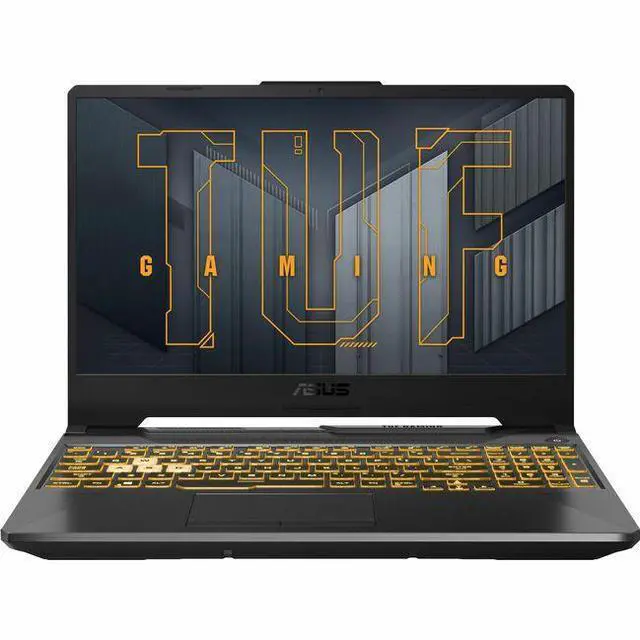
ASUS TUF Gaming A15 Laptop (Ryzen 5 7535HS, RTX 3050)
Pros
- Cheapest option here at around $650
- 16GB DDR5 RAM included (better than the Nitro V's 8GB)
- AMD Ryzen 5 7535HS handles CPU-heavy tasks well
- TUF build quality is genuinely durable
Cons
- RTX 3050 is the weakest GPU in this lineup
- 144Hz display is fine but not exceptional
- Thermals throttle more under combined CPU+GPU load
Price as of Aug 21, 2026 — see current price on Amazon.
The ASUS TUF A15 is the one you buy if you want the lowest price or you specifically prefer AMD. At around $650, it's the cheapest laptop here by a meaningful margin, and it ships with 16GB of DDR5 RAM, which is actually more than the Acer Nitro V.
The Ryzen 5 7535HS is a competent chip for gaming. It handles CPU tasks like streaming or game loading faster than Intel's i5-13420H in some workloads, and runs cooler under CPU-only load. The limitation is the RTX 3050. This is the oldest GPU architecture in this roundup, and it shows in ray tracing and DLSS 3 support. The RTX 3050 doesn't support DLSS 3 Frame Generation, which means you can't use some of the newer upscaling tricks that make demanding games more playable.
For the games most people play under $800, it's fine: Valorant, Fortnite, CS2, Minecraft, older titles. Where it struggles is anything released in 2024 or later that was designed with higher-end hardware in mind. You'll be playing those on Medium settings rather than High.
ASUS TUF laptops are also known for durability. The chassis is MIL-STD 810H certified, which means it's been tested for drops, vibration, and temperature extremes. For a laptop that's going to be moved around a lot, that matters.
Lenovo LOQ 15
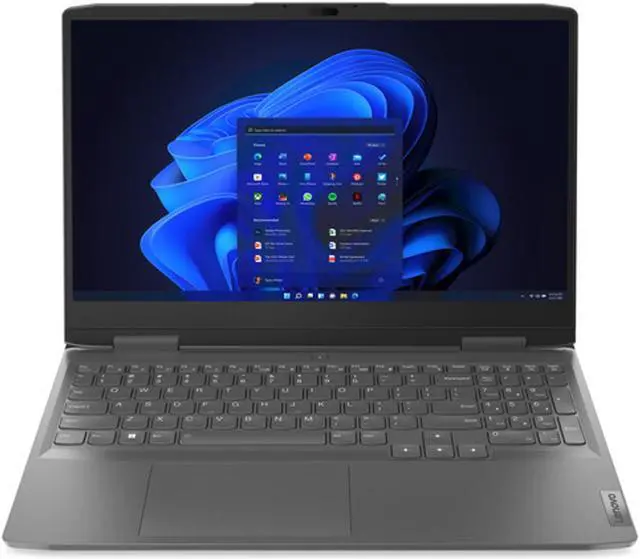
Lenovo LOQ 15 Gaming Laptop (Intel Core i5-13420H, RTX 3050)
Pros
- 1TB NVMe SSD is double what others offer at this price
- Solid 144Hz IPS display with decent coverage
- Vapor chamber cooling keeps thermals in check
- Lenovo build quality is reliable
Cons
- Only 8GB of RAM, same issue as the Nitro V
- RTX 3050 is showing its age for newer games
- LOQ software is bloated on first boot
Price as of Aug 21, 2026 — see current price on Amazon.
The Lenovo LOQ 15 makes its case on storage. Every other laptop at this price comes with 512GB of NVMe storage, which fills up fast when modern game installs run 50-100GB each. The LOQ ships with 1TB, which is enough room to keep a proper game library without constantly shuffling files.
Lenovo's vapor chamber cooling is also notably better than the basic heat pipe designs in the HP and Acer. Under a long gaming session, the LOQ stays cooler and runs quieter than most laptops in this category. It's not completely quiet, but it's noticeably better than average.
The RTX 3050 is the same limitation as the ASUS TUF A15. You're giving up the performance headroom of the RTX 4050 for extra storage and better thermals. If you're playing games from the last 3-4 years and aren't planning to play every 2025-2026 AAA title on High, the RTX 3050 is workable. If you want a laptop that'll handle newer releases without frustration, spend the extra $50-100 for an RTX 4050 option.
MSI Thin GF63
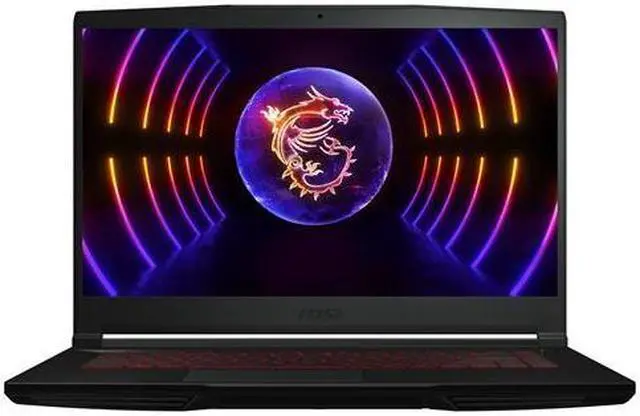
MSI Thin GF63 Gaming Laptop (Intel Core i5-12450H, RTX 2050)
Pros
- Thinnest and lightest gaming laptop in this list
- 144Hz IPS display with good brightness
- Runs cooler than expected for a thin chassis
- Good keyboard feel for the price
Cons
- RTX 2050 is the oldest GPU here, weakest for demanding games
- 12th-gen Intel is now two generations behind
- 8GB DDR4, slowest RAM configuration in the lineup
Price as of Aug 21, 2026 — see current price on Amazon.
The MSI Thin GF63 has a specific audience: people who want a gaming laptop that doesn't look or feel like one. The GF63 is thinner than any other machine in this roundup, doesn't have aggressive venting on the lid, and won't draw stares in a coffee shop. It's a gaming laptop for people who don't want their laptop to scream "gaming laptop."
The tradeoff is performance. The RTX 2050 is the weakest GPU in this lineup by a clear margin, and the 12th-gen Intel i5-12450H is a step behind 13th-gen options. In real-world gaming this means you're on Medium settings more often than High, and frame rates in demanding titles are lower than the RTX 4050 competitors.
But for esports titles (Valorant, Rocket League, CS2, League of Legends) it's perfectly fine. These games don't need an RTX 4050 to hit 144fps. If your game library is mostly competitive games with lower system requirements, the GF63's portability and clean look might be worth the performance trade.
What to Look for in a Budget Gaming Laptop
GPU Tier Matters More Than CPU
At the under-$800 price point, the GPU determines how long this laptop can handle new games at acceptable settings. An RTX 4050 handles 2025 titles on Medium-High at 1080p with DLSS. An RTX 3050 works on older titles but struggles with newer AAA games without dropping to Low-Medium. An RTX 2050 is best suited for esports and indie games.
The CPU (Intel i5-13420H or AMD Ryzen 5 7535HS) isn't the constraint here. Both handle gaming fine. The GPU is where you'll feel the budget compression.
RAM Capacity and Speed
16GB of RAM is now the minimum I'd recommend for a new gaming laptop. 8GB causes stuttering in some modern games (especially titles that require the RAM to act as VRAM overflow). The HP Victus 15 and ASUS TUF A15 both ship with 16GB, which is a real advantage. The Acer Nitro V and Lenovo LOQ ship with 8GB but have upgradeable slots.
DDR5 versus DDR4 matters less for gaming than for productivity, but DDR5 has better bandwidth which helps when the GPU is sharing system RAM.
Display Quality at 1080p
All five laptops here use 1080p IPS displays with 144Hz or 165Hz refresh rates. The refresh rate matters for competitive gaming. A 60Hz display on a gaming laptop is a dealbreaker in 2026. Beyond that, look for IPS over TN (better colors and viewing angles) and check if reviews mention high backlight bleed or poor brightness in tested units.
Cooling and Thermal Management
Gaming laptops under $800 are thin to keep costs down, which means thermals are always a consideration. Under sustained load, expect fans to spin up loud and chassis temperatures to rise. This is normal. What you want to avoid is sustained thermal throttling, where the GPU or CPU downclock themselves because they can't cool fast enough. The Lenovo LOQ 15 with vapor chamber cooling has the best thermals here. The HP Victus is the warmest.
Battery Life Reality Check
These are not MacBooks. Budget gaming laptops typically get 4-6 hours of battery on light tasks and 1.5-2 hours under gaming load. Plan to keep the charger nearby for any gaming session. The MSI Thin GF63 and ASUS TUF A15 tend to run slightly more efficiently on AMD and conservative GPU TDPs, but the difference is marginal.
Frequently asked questions
- Can you actually play current games on a laptop under $800?
- Yes, with the right expectations. An RTX 4050 laptop handles 2024-2025 titles at 1080p Medium to High settings with DLSS Quality enabled. Most games run 60+ fps that way. Competitive games (CS2, Valorant, Apex Legends) run at well over 100fps on High settings. Where you'll feel the budget: ray tracing is limited, 4K is not realistic, and ultra settings in demanding titles aren't sustainable.
- Is 8GB RAM enough for gaming on a laptop in 2026?
- It's marginal. Some games run fine on 8GB but titles like Hogwarts Legacy, Spider-Man, and newer open-world games recommend 16GB. On laptops, RAM is shared with some GPU operations, so 8GB gets tight. If you buy an 8GB laptop, check whether the slots are upgradeable (most are) and budget $30-40 for an extra 8GB stick.
- Should I get an RTX 4050 or RTX 3050 gaming laptop?
- RTX 4050 if you plan to play games released in 2024-2026. It handles demanding titles much better and supports DLSS 3 with its newer rendering features. RTX 3050 is fine for older games, esports titles, and lighter games like indie releases. If your game library is primarily older titles or competitive games, RTX 3050 saves you money. For a laptop you want to stay relevant for 2-3 years, RTX 4050 is the smarter buy.
- What's the difference between Intel and AMD gaming laptops at this price?
- Practically speaking, both Intel Core i5-13420H and AMD Ryzen 5 7535HS perform similarly in gaming. AMD has a slight edge in CPU-intensive work and can run cooler under CPU load. Intel has better single-core performance in some gaming titles. The GPU matters far more than the CPU at this price point. Don't let Intel vs. AMD preference drive the decision when the GPU tier is what actually separates these machines.
- How long will a gaming laptop under $800 last?
- Realistically 3-4 years before you start feeling the performance ceiling in new games. The RTX 4050 laptops will handle games released through 2027-2028 at playable settings with upscaling. The RTX 3050 and 2050 machines are already showing their age with 2025 titles and will feel outdated faster. Physically, with normal care, gaming laptops at this price point last 4-5 years before anything hardware-critical fails.
- Can I upgrade a gaming laptop under $800?
- RAM and storage are typically upgradeable. Most of these laptops have two SO-DIMM slots and an M.2 SSD slot that accepts standard NVMe drives. The GPU and CPU are soldered to the motherboard and cannot be replaced. So plan your GPU tier carefully at purchase time, but don't worry about RAM or storage if the base configuration is light.
Bottom Line
For $700 or less, the HP Victus 15 with RTX 4050 is the strongest overall value in this category right now. You get the newer GPU architecture, 16GB of RAM, a solid 144Hz display, and the specs to handle modern gaming for a few years. If you want the best display, the Acer Nitro V's 165Hz panel and DDR5 memory make it worth the extra $50, though you'll want to upgrade the RAM later.
The ASUS TUF A15 makes sense if you specifically want AMD and want the cheapest path in, or if you like ASUS's durability reputation. The Lenovo LOQ 15 is the call if storage is your constraint. And the MSI Thin GF63 is for the gamer who needs their laptop to look like a regular laptop at work.
What I'd avoid: any gaming laptop at this price with a 60Hz display, 4GB of VRAM, or TN panel. Those specs exist in this price range and they're a bad deal. All five options here clear those bars.
How We Test
We score products by combining spec-level research, pricing history, trusted third-party benchmarks, and owner sentiment from high-signal sources.
- Performance and real-world value in the category this guide targets
- Price-to-performance and deal consistency over recent pricing windows
- Build quality, reliability patterns, and known long-term issues
- Recommendation refresh cadence to keep these picks current
Author
TheTechSearch Editorial Team
Independent product reviewers & PC builders
We test and compare real-world specs, price trends, and user feedback to recommend gear that actually makes sense to buy.