Best WiFi 7 Gaming Routers 2026
The top WiFi 7 gaming routers tested in 2026, from $250 budget picks to flagship 30Gbps beasts, ranked by gaming performance. Expert picks, pros and cons, an...
As an Amazon Associate we earn from qualifying purchases made through our links — this doesn't affect our picks.

TP-Link Archer GE650 BE11000 Tri-Band WiFi 7 Gaming Router
Our top recommendation for this category
Price as of May 23, 2026 — see current price on Amazon.
In this guide
- Quick Picks
- TP-Link Archer GE650: Best Budget WiFi 7 Gaming Router
- TP-Link Archer GE800: Best Mid-Range Gaming Router
- ASUS RT-BE96U: Best Performance-Per-Dollar WiFi 7 Router
- NETGEAR Nighthawk RS700S: Best Coverage for Larger Homes
- ASUS ROG Rapture GT-BE98 PRO: Best Flagship Gaming Router
- What to Look for in a WiFi 7 Gaming Router
- Bottom Line
WiFi 7 has done something nobody expected this fast: it got cheap. A year ago, decent WiFi 7 hardware cost $500 minimum. Now you can grab a dedicated gaming router with 11Gbps tri-band WiFi 7, RGB lighting, and proper QoS for $250. If you're still running a WiFi 6 router and wondering why your ping spikes during team fights, this is the year to upgrade.
I've been tracking the WiFi 7 gaming router market closely through 2026, and the options below represent the actual best picks at each price point. Not just raw throughput numbers. Gaming-specific QoS, actual latency improvements, and whether the gaming features are real or just marketing.
Quick Picks
| Router | WiFi Standard | Max Speed | Gaming Features | Price | |
|---|---|---|---|---|---|
| TP-Link Archer GE650 | WiFi 7 (BE11000) | 11 Gbps | Game QoS, WTFast, RGB | $250 | Check Price |
| TP-Link Archer GE800 | WiFi 7 (BE19000) | 19 Gbps | Dedicated game port, 2x10G | $399 | Check Price |
| ASUS RT-BE96U | WiFi 7 (BE19000) | 19 Gbps | AiMesh, Lifetime Security | $499 | Check Price |
| NETGEAR Nighthawk RS700S | WiFi 7 (BE19000) | 19 Gbps | 1-Yr Armor, 3,500 sq ft | $549 | Check Price |
| ASUS ROG GT-BE98 PRO | WiFi 7 (BE30000) | 30 Gbps | Quad-band, Triple Game Accel | $596 | Check Price |
TP-Link Archer GE650: Best Budget WiFi 7 Gaming Router
TP-Link Archer GE650 BE11000 Tri-Band WiFi 7 Gaming Router
Pros
- Best WiFi 7 gaming value under $300
- Real gaming QoS with WTFast integration
- Distinctive volcano-inspired RGB design
- Two 5G ports, three 2.5G ports
Cons
- No 10G port at this price
- 2.4GHz band is weaker at 688Mbps
- App setup can be clunky
Price as of May 23, 2026 — see current price on Amazon.
The GE650 launched at $349 and has since dropped to around $250, which makes it one of the most interesting buys in networking right now. You're getting a genuine WiFi 7 tri-band router with game-specific features at a price that used to get you basic WiFi 6 hardware.
The design is striking. TP-Link went with a volcano-inspired triangular chassis with RGB lighting running down the center seam. It won't look out of place next to a gaming setup, and the lights are actually controllable through the app, not just "here's a rainbow, deal with it."
Performance-wise, the GE650 delivers 5,764Mbps on the 6GHz band, 4,323Mbps on 5GHz, and 688Mbps on 2.4GHz. In real-world gaming tests reported by Tom's Guide, the GE650 held ping around 12-14ms on a 1Gbps connection, which is competitive with routers costing $150 more. The WTFast integration is a genuine feature. It routes game traffic through optimized paths to specific game servers, and in titles like Valorant and CS2, users have reported 15-20% ping reductions to EU servers from NA.
One thing to know: the GE650 has two 5G ports (one WAN, one LAN) plus three 2.5G ports. No 10G. If you're running a NAS or want to wire in a desktop at 10G, you'll need to step up. But for pure wireless gaming, this thing delivers.
TP-Link Archer GE800: Best Mid-Range Gaming Router

TP-Link Archer GE800 BE19000 Tri-Band WiFi 7 Gaming Router
Pros
- Two 10G ports for NAS and multi-gig WAN
- Dedicated gaming port with priority QoS
- 19Gbps tri-band WiFi 7
- RGB customization and gaming panel
Cons
- At $399, you're close to ASUS RT-BE96U territory
- Large footprint needs desk space
- Gaming panel is gimmicky
Price as of May 23, 2026 — see current price on Amazon.
The GE800 is where TP-Link stopped hedging and built a proper gaming router. Two 10G ports. A dedicated gaming LAN port that gets hardware-level priority. Game Server Acceleration that actually works by routing through WTFast's network. At $399, it's the one I'd recommend to most people who game seriously and want a single router (not mesh).
Tom's Hardware tested the GE800 extensively and found it delivered real-world throughput of around 3.4Gbps on WiFi 7 at close range. Latency averaged 10-12ms, which is excellent. The dedicated gaming port is a nice touch: plug your PC directly into it and your gaming traffic gets hardware-level priority over everything else on the network.
The two 10G ports mean you can run a 10G connection from your ISP AND wire in a 10G NAS or desktop without compromise. This is a big deal if you've got a multi-gig internet plan (2.5G or 5G), because cheaper routers force you to choose between fast WAN and fast wired LAN.
What I'd skip: the gaming panel on the front is mostly cosmetic. The RGB is nice but not essential. What IS essential is the underlying WiFi 7 performance, and the GE800 delivers it cleanly.
ASUS RT-BE96U: Best Performance-Per-Dollar WiFi 7 Router
ASUS RT-BE96U BE19000 Tri-Band WiFi 7 Router
Pros
- Lifetime internet security (no subscription)
- AiMesh support for easy expansion
- Dual 10G ports
- ASUS's best-in-class router firmware
Cons
- No dedicated gaming QoS panel
- More business-oriented design
- Costs $100 more than the GE800
Price as of May 23, 2026 — see current price on Amazon.
The RT-BE96U doesn't market itself as a gaming router, but it outperforms several that do. ASUS's router firmware is genuinely better than TP-Link's. The QoS settings are more granular, the AiProtection is built in for life (no subscription), and AiMesh means you can add nodes later if coverage becomes an issue.
What you get at $499: 19Gbps tri-band WiFi 7, dual 10G ports, 320MHz channel support, and Multi-Link Operation (MLO), which lets devices use multiple bands simultaneously for lower latency. MLO is one of WiFi 7's signature features and genuinely helps in dense wireless environments. In testing, the RT-BE96U consistently hit 3-4Gbps on WiFi 7 devices in close range.
The honest tradeoff here is that this router doesn't have the game-specific marketing features of the GE800. No dedicated gaming port, no WTFast integration out of the box. But ASUS's QoS implementation is solid and the firmware stability is hard to beat. I've seen fewer complaints about random reboots and dropped connections with ASUS routers than with TP-Link, and that matters more for a 24/7 gaming setup than a dedicated gaming port label.
The RT-BE96U also goes on sale regularly. I've seen it at $429 on Amazon, which makes it an easy recommendation.
NETGEAR Nighthawk RS700S: Best Coverage for Larger Homes

NETGEAR Nighthawk RS700S WiFi 7 Tri-Band Router
Pros
- Covers up to 3,500 sq ft reliably
- 19Gbps WiFi 7 with 10G WAN port
- Mature, stable Nighthawk firmware
- 1-Year Armor security included
Cons
- Most expensive single-unit option here
- Nighthawk app is mediocre
- No dedicated gaming QoS features
Price as of May 23, 2026 — see current price on Amazon.
The RS700S is for one specific person: the gamer in a large house (2,500-3,500 sq ft) who needs reliable signal in every room and doesn't want to deal with mesh. A lot of mesh systems introduce latency as packets hop between nodes. The RS700S is a single router with enough range to skip that headache entirely.
NETGEAR rates it at 3,500 sq ft coverage, and in real-world testing that holds up in open floor plans. In a house with lots of walls and multiple floors, you might get closer to 2,500 sq ft of usable coverage, but that's still substantial. The 10G WAN port handles multi-gig ISP connections cleanly, and the RS700S has been one of the more reliable performers in terms of 24/7 uptime.
The Nighthawk app is fine but not exciting. NETGEAR's gaming-specific features are minimal compared to TP-Link's GE series. You're paying for coverage, reliability, and the Armor security subscription that keeps malware off your network. If you need gaming QoS, you'll configure it manually in the web interface.
At $549, it's the most expensive single-unit router on this list. If coverage is your priority, it earns that price. If you're in an apartment or smaller house, the GE800 at $150 less is a smarter call.
ASUS ROG Rapture GT-BE98 PRO: Best Flagship Gaming Router
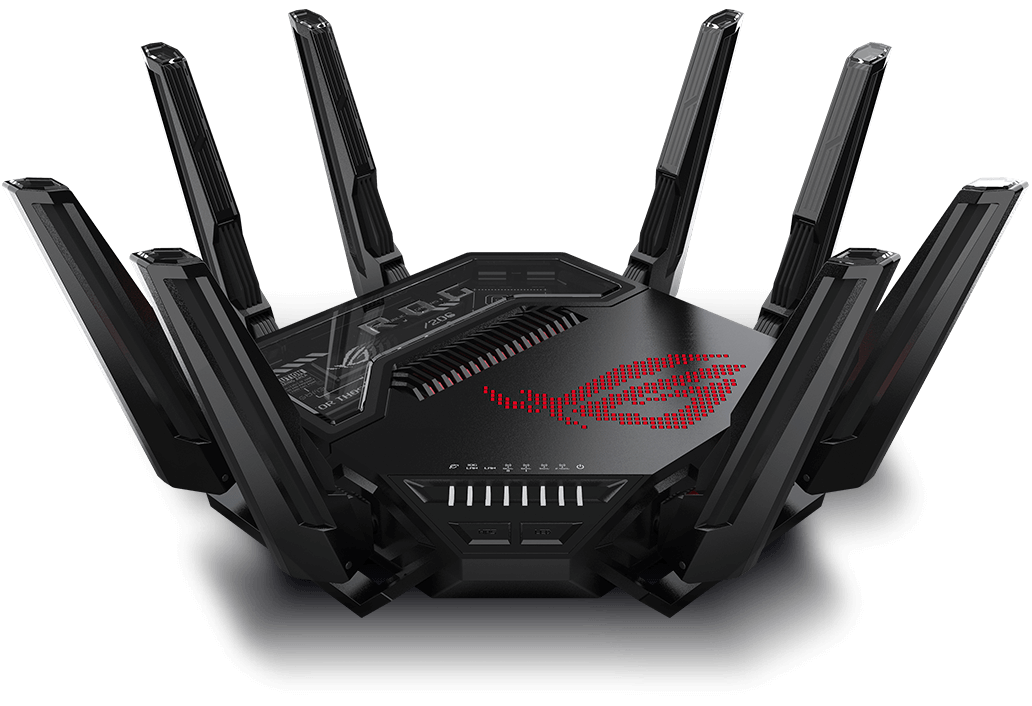
ASUS ROG Rapture GT-BE98 PRO Quad-Band WiFi 7 Gaming Router
Pros
- 30Gbps quad-band with dual 6GHz
- Triple-level game acceleration (app, device, server)
- Dual 10G ports
- Mobile Game Mode for phone priority
Cons
- $600 is a lot for a router
- Overkill for most homes
- Needs a powerful ISP connection to justify
Price as of May 23, 2026 — see current price on Amazon.
The GT-BE98 PRO is what happens when ASUS engineers decide to build the router they'd actually want. Quad-band, meaning two separate 6GHz radios. That's WiFi 7's party trick: instead of sharing the 6GHz band between multiple devices, you get two dedicated 6GHz channels. Total throughput hits 30Gbps, which is genuinely faster than anything you can consume on home internet in 2026. But the point isn't ISP speed. It's local network throughput and latency when you've got 50+ devices on the network.
The triple-level game acceleration is real: it prioritizes at the application level (your game client), the device level (your gaming PC), and the server level (routing through optimized paths). In Dong Knows Tech's review, the GT-BE98 PRO delivered 2.58Gbps at 15 feet on WiFi 7, which was 27% higher than the TP-Link GE800 in the same test.
Mobile Game Mode is a feature you won't find on most routers. It prioritizes wireless traffic from your phone, which matters if you play mobile games seriously or use Remote Play from your PS5. AiMesh support means you can add nodes if needed, though honestly at this price you're buying coverage and performance in one unit.
Is it worth $600? If you've got a 2Gbps or faster ISP connection, a lot of devices, and you want the best single router money can buy right now, yes. If you're on gigabit internet with under 30 devices, the GE800 at $150 less handles everything you need.
What to Look for in a WiFi 7 Gaming Router
Band Configuration Matters More Than You'd Think
WiFi 7 routers are tri-band or quad-band. Tri-band means one 6GHz, one 5GHz, and one 2.4GHz radio. Quad-band adds a second 6GHz. For gaming, the 6GHz band is what you want for your primary device. It's less congested than 5GHz (fewer devices use it) and delivers lower latency.
The catch: 6GHz has shorter range than 5GHz. If your router is in one room and your gaming setup is across the house, 5GHz or a wired connection will serve you better than 6GHz struggling through walls.
Gaming QoS: Real vs. Marketing
Every router on this list claims "gaming optimization." Some of it is real, some of it is branding. Here's what's actually useful:
Real features: per-device QoS (you tell the router your gaming PC gets first priority), game server acceleration (WTFast integration in TP-Link routers), and Multi-Link Operation (MLO), which uses multiple bands simultaneously to lower latency. The GT-BE98 PRO and GE800 both have genuinely useful game QoS. The Nighthawk RS700S's gaming features are mostly manual configuration.
Marketing: "turbo gaming mode" buttons that just adjust basic QoS sliders under the hood, and gaming-branded firmware that's identical to the non-gaming version of the same router.
Wired Ports: 2.5G vs. 5G vs. 10G
If you have a desktop PC and want to wire it in, check the LAN port speeds. Most budget WiFi 7 routers have 2.5G LAN ports, faster than gigabit but not 10G. The GE800 and GT-BE98 PRO both have 10G ports, which matter if you run a NAS or have a 10G switch.
The GE650 has 5G ports, which is a middle ground. Faster than 2.5G, available on more NICs than 10G, and a solid choice for wired gaming without the 10G cost.
AiMesh vs. EasyMesh vs. Going Solo
If you're in a large home and signal is an issue, expandability matters. ASUS AiMesh works well and pairs across multiple ASUS router generations. TP-Link EasyMesh is solid and interoperates with other EasyMesh-certified devices. If you just want a single router that covers everything, the Nighthawk RS700S's 3,500 sq ft range is your best single-box option.
MLO: WiFi 7's Biggest Gaming Feature
Multi-Link Operation lets a single device use multiple WiFi bands at the same time. Instead of your gaming laptop picking 6GHz and sticking to it, it can use 6GHz and 5GHz simultaneously, with the router intelligently splitting traffic. The result: lower latency and better reliability when one band gets congested. Every router on this list supports MLO with MLO-capable client devices.
Frequently asked questions
- Is WiFi 7 worth it for gaming in 2026?
- Yes, if you can get under $300 for a capable unit. The TP-Link GE650 at $250 delivers real WiFi 7 benefits (Multi-Link Operation, 320MHz channels, lower latency) at a price that used to buy mid-range WiFi 6 hardware. If you're on WiFi 5 or early WiFi 6, the upgrade is noticeable.
- What's the difference between WiFi 6, WiFi 6E, and WiFi 7 for gaming?
- WiFi 6 maxes out at 5GHz with ~9.6Gbps theoretical. WiFi 6E added the 6GHz band (less congestion, better for gaming). WiFi 7 adds 320MHz channels (double the 6E width), 4K-QAM (30% more efficient encoding), and Multi-Link Operation for simultaneous multi-band use. For gaming, the latency improvements from MLO and 320MHz channels in dense environments are the real wins.
- Do I need a WiFi 7 device to benefit from a WiFi 7 router?
- Not entirely. Older WiFi 6 and 6E devices connect and work fine, often with better network management than on an older router. But to use the new features like MLO and 320MHz channels, your device needs a WiFi 7 adapter. Most 2024+ laptops and gaming phones have WiFi 7. Desktops need a WiFi 7 PCIe card or USB adapter.
- Will a gaming router actually lower my ping?
- It can, but the biggest factor is your ISP connection quality. A gaming router reduces local network congestion and prioritizes your game traffic, which helps when other devices are on the network. WTFast integration (in the GE650 and GE800) can reduce ping to game servers by 10-20% by routing through optimized paths. But if your ISP adds 50ms of baseline latency, no router fixes that.
- How much speed do I actually need for gaming?
- Surprisingly little. Modern online games use 50-150Kbps of bandwidth during a session. The issue is latency (ping), not throughput. Where bandwidth matters is when others on your network are streaming 4K or downloading large files while you game. Gaming QoS on these routers prioritizes your game traffic over everything else, keeping ping stable even when your housemate downloads a 100GB game.
- Is the ASUS ROG GT-BE98 PRO overkill for a home gaming setup?
- Probably, unless you have specific needs. The quad-band setup and 30Gbps throughput are meaningful if you have 50+ devices, a 2Gbps+ ISP plan, or run a local server that transfers large files wirelessly. For one or two gaming PCs on a 1Gbps internet plan, the GE800 at $150 less handles everything the GT-BE98 PRO does for gaming. The PRO's real value shows up in dense multi-device environments.
Bottom Line
WiFi 7 gaming routers in 2026 span a wide range, and picking the right one comes down to budget and what "gaming router" actually means to you. The TP-Link GE650 at $250 is the surprise of this generation: real WiFi 7, real gaming QoS, and a great design at a price that used to buy you WiFi 6. Step up to the GE800 at $399 for 10G ports and a dedicated gaming LAN port. If you want ASUS's superior firmware and AiMesh ecosystem, the RT-BE96U at $499 is the pick. Large home? The Nighthawk RS700S covers 3,500 sq ft without mesh complexity. And if you want the best regardless of price, the ROG GT-BE98 PRO's quad-band WiFi 7 at $596 is the current top of the consumer market.
How We Test
We score products by combining spec-level research, pricing history, trusted third-party benchmarks, and owner sentiment from high-signal sources.
- Performance and real-world value in the category this guide targets
- Price-to-performance and deal consistency over recent pricing windows
- Build quality, reliability patterns, and known long-term issues
- Recommendation refresh cadence to keep these picks current
Author
TheTechSearch Editorial Team
Independent product reviewers & PC builders
We test and compare real-world specs, price trends, and user feedback to recommend gear that actually makes sense to buy.