Best Mesh WiFi Systems 2026
The best mesh WiFi systems for every home in 2026. WiFi 7 and WiFi 6E mesh routers from Netgear, ASUS, TP-Link, eero, and Ubiquiti, compared on speed, covera...
As an Amazon Associate we earn from qualifying purchases made through our links — this doesn't affect our picks.
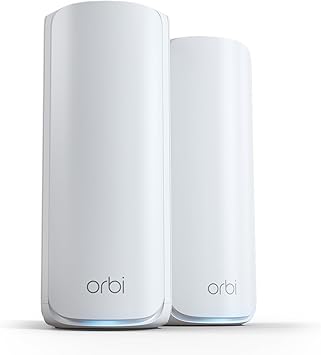
NETGEAR Orbi 770 Series WiFi 7 Mesh System (RBE772, 2-Pack)
Our top recommendation for this category
Price as of Feb 21, 2026 — see current price on Amazon.
Dead zones are a solvable problem. A mesh WiFi system replaces your single router with two or more nodes that blanket your home in a unified network, and your devices hop between nodes as you move around. In 2026, WiFi 7 has become the new standard for mesh systems, bringing wider channels, multi-link operation (MLO), and dramatically higher throughput for homes with gigabit or multi-gig internet.
After tracking every major mesh system release and comparing real-world performance data, these are the mesh WiFi systems worth buying in 2026.
Our top picks at a glance
| System | WiFi Standard | Coverage | Bands | Price (2-pack) | |
|---|---|---|---|---|---|
| NETGEAR Orbi 770 Series (RBE772) | WiFi 7 | 5,500 sq ft | Tri-band | $450 | Check Price |
| ASUS ZenWiFi BT10 | WiFi 7 | 5,500 sq ft | Tri-band | $530 | |
| TP-Link Deco BE63 | WiFi 7 | 7,600 sq ft (3-pack) | Tri-band | $400 (3-pack) | Check Price |
| eero Pro 7 | WiFi 7 | 4,000 sq ft | Tri-band | $450 | Check Price |
| NETGEAR Orbi 970 Series (RBE973S) | WiFi 7 | 10,000 sq ft | Quad-band | $2,000 (3-pack) | Check Price |
| TP-Link Deco BE23 | WiFi 7 | 6,500 sq ft (3-pack) | Dual-band | $250 (3-pack) | Check Price |
| eero Pro 6E | WiFi 6E | 6,000 sq ft (3-pack) | Tri-band | $400 (3-pack) |
Best overall: NETGEAR Orbi 770 Series
NETGEAR Orbi 770 Series WiFi 7 Mesh System (RBE772, 2-Pack)
Pros
- Strong WiFi 7 speeds with a dedicated backhaul band
- Covers up to 5,500 sq ft with the router plus one satellite
- Clean, intuitive Orbi app with advanced controls
- 2.5 Gig internet port on the router
- Rated for up to 100 connected devices
Cons
- Larger form factor than some competitors
- Netgear Armor subscription for advanced security costs extra
- No 10 Gig port at this tier, so multi-gig plans above 2.5 Gbps get capped
Price as of Feb 21, 2026 — see current price on Amazon.
The Netgear Orbi 770 hits the sweet spot that most households actually need: strong WiFi 7 performance, dead-simple setup, and enough coverage to blanket a large home without buying additional satellites. In real-world testing across multiple review sites, the Orbi 770 consistently delivers near the top in throughput at both short and long range, while maintaining rock-solid stability.
The tri-band design dedicates one band exclusively to backhaul communication between the router and satellite. This is critical, it means your devices get full bandwidth on the remaining bands without competing with inter-node traffic. The result is more consistent speeds, especially when streaming 4K on the second floor while someone else is gaming downstairs.
The router carries a 2.5 Gig internet port, which matters if you have a multi-gig plan or want a fast wired connection for a NAS or desktop. Setup through the Orbi app takes about 10 minutes and walks you through everything. Advanced users can dig into QoS, device prioritization, and guest networks.
At $449.99 for the 2-pack, the Orbi 770 gives you premium mesh performance without the premium price of the Orbi 970. Netgear rates this kit at 5,500 square feet, and in practice that covers a typical two-story home with room to spare. Bigger footprint? The RBE773 3-pack pushes the same system to 8,000 square feet, or you can bolt on an RBE770 satellite later.
Best value WiFi 7: TP-Link Deco BE63
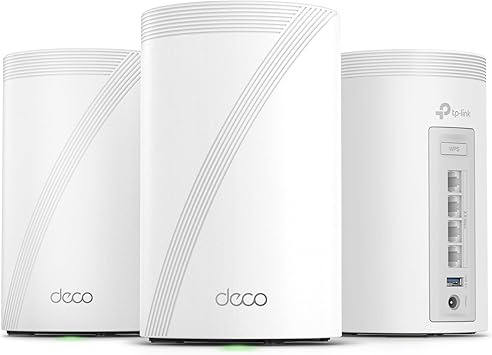
TP-Link Deco BE63 (3-Pack)
Pros
- 3-pack for under $400 covers up to 7,600 sq ft
- Tri-band WiFi 7 with strong real-world speeds
- Sleek vase-like design blends into any room
- Easy Deco app setup in under 10 minutes
- HomeShield security included (basic tier free)
Cons
- Advanced HomeShield features require subscription
- The four wired ports are 2.5G, so there is no 10G socket despite the BE10000 badge
- Slightly lower throughput than Orbi 770 at long range
Price as of Feb 21, 2026 — see current price on Amazon.
If you need to cover a large home and don't want to spend $800+ on a 3-pack system, the Deco BE63 is the answer. At $399.98 for three nodes, you're getting tri-band WiFi 7 coverage across up to 7,600 square feet, that's enough for most 3,000+ square foot homes with room to spare.
RTINGS.com named it their top pick for mesh WiFi in 2026, praising its combination of performance and value. The tri-band design includes a dedicated backhaul channel, and real-world speeds are competitive with systems costing twice as much. TP-Link's Deco app is one of the simplest mesh setup experiences available.
The design deserves a mention, the sleek vase-like form factor actually looks good sitting on a shelf, which matters when you need nodes in living spaces. Each unit has a small "7" on the front as a subtle nod to the WiFi standard, and they blend in far better than the bulky tower designs of some competitors.
The compromise is that TP-Link's advanced security features (HomeShield Pro) require a subscription, and only one unit in the 3-pack has a 2.5GbE port. For the price, those are very reasonable trade-offs.
Best for simplicity: eero Pro 7

eero Pro 7 (2-Pack)
Pros
- Incredibly simple setup and management via eero app
- Reliable WiFi 7 performance with zero-config mesh
- Thread border router for smart home devices
- TrueMesh technology optimizes routing in real-time
- Compact design fits anywhere
Cons
- eero Plus subscription ($9.99/mo) for advanced features
- Fewer advanced networking options than ASUS or Netgear
- Amazon/Alexa integration may concern privacy-focused users
- Only 2.5GbE, no 10GbE option
Price as of Feb 21, 2026 — see current price on Amazon.
PCMag and multiple reviewers named the eero Pro 7 their top overall pick for mesh WiFi in 2026, and it's easy to see why: it simply works. If you don't want to think about networking and just want reliable WiFi everywhere, eero has nailed the user experience better than anyone.
Setup takes five minutes through the eero app. You plug in the first unit, the app walks you through placement for the second, and you're done. No band steering decisions, no channel optimization, no QoS configuration, eero's TrueMesh algorithm handles all of that automatically and does a genuinely good job.
WiFi 7 performance is strong, with multiple sources confirming the eero Pro 7 delivers the most reliable speeds and seamless roaming of any system they tested. It may not win raw throughput benchmarks against the Orbi 770 or ASUS BT10, but for real-world usage, streaming, video calls, gaming, and dozens of smart home devices, it's rock solid.
The Thread border router functionality is a bonus for smart home enthusiasts, enabling direct communication with Thread-compatible devices without a separate hub. The tight Alexa integration is a plus or minus depending on your relationship with Amazon.
Best premium: NETGEAR Orbi 970 Series

NETGEAR Orbi 970 Series Quad-Band WiFi 7 Mesh System (RBE973S, 3-Pack)
Pros
- Quad-band WiFi 7 with a band reserved for backhaul
- Covers up to 10,000 sq ft, ideal for big houses and offices
- 10 Gig internet port for multi-gig plans and wired gear
- Up to 27 Gbps combined wireless speeds
- Rated for 200 devices without breaking a sweat
Cons
- $1,999.99 for a 3-pack is serious money
- Enormous physical size, each unit is substantial
- Netgear Armor subscription for security is extra
- Overkill for most households
Price as of Feb 21, 2026 — see current price on Amazon.
The Orbi 970 is the mesh system for homes where money isn't the constraint, space, device count, and internet speed are. Quad-band WiFi 7, a band held back purely for backhaul, and a 10 Gig internet port put this closer to enterprise gear than to anything else on this list.
The quad-band design means one entire band is reserved exclusively for backhaul, while three bands remain available for devices. With up to 27 Gbps combined wireless speeds and coverage for 10,000 square feet, the 3-pack handles large homes, multi-story buildings, and home offices with dozens of devices without congestion.
The 10 Gig port is the standout for power users. If you have a NAS, a home server, or multi-gig internet (increasingly common in 2026), it lets you actually use what you're paying for. Nothing else here comes close on wired speed.
At $1,999.99 for a 3-pack, this is wildly overkill for a typical 3-bedroom home. But for large homes, home offices, or anyone who's experienced the frustration of a network that can't keep up with dozens of 4K streams and video calls, the Orbi 970 is the nuclear option that actually works.
Best budget: TP-Link Deco BE23

TP-Link Deco BE23 (3-Pack)
Pros
- WiFi 7 mesh for $250, still the cheapest way in
- 3-pack covers up to 6,500 sq ft
- Wirecutter's top budget pick
- Simple Deco app setup
- Two 2.5G ports per node for wired backhaul
Cons
- Dual-band only, no dedicated backhaul channel
- BE3600 speeds top out well below tri-band systems
- Only two ports per node, and wired backhaul uses one
- HomeShield Pro requires subscription
Price as of Feb 21, 2026 — see current price on Amazon.
Wirecutter singled out the Deco BE23 for outperforming mesh systems costing hundreds more, and at $249.99 for a 3-pack, it's still the most accessible WiFi 7 mesh system on the market.
The catch is it's dual-band, no dedicated backhaul channel. This means the nodes share bandwidth between communicating with each other and serving your devices. For most homes with internet speeds under 500 Mbps and moderate device counts, this is a non-issue in practice. You'll get reliable coverage and perfectly usable speeds throughout a typical 2-3 bedroom home.
For anyone upgrading from an aging single router or a mediocre WiFi 5 mesh system, the Deco BE23 is a massive improvement for minimal investment. It's also an excellent choice for rental properties, guest houses, or as a starter mesh system for smaller spaces.
Buying guide: Choosing the right mesh WiFi system
WiFi 7 vs WiFi 6E, does it matter?
WiFi 7 brings three key improvements: 320 MHz channels (double WiFi 6E), Multi-Link Operation (MLO) for using multiple bands simultaneously, and 4096-QAM for higher data density. In practice, you'll only see major benefits if you have:
- Multi-gig internet (2 Gbps+)
- WiFi 7 client devices (still rare in early 2026)
- Many simultaneous high-bandwidth activities
For most homes with gigabit internet and WiFi 6 devices, WiFi 6E mesh systems still perform excellently. WiFi 7 is worth it for future-proofing, but don't feel pressure to upgrade immediately.
Tri-band vs dual-band
Tri-band systems have a dedicated backhaul channel for communication between nodes. This is the single most important performance feature in a mesh system, it means your devices get full bandwidth without competing with inter-node traffic. Budget dual-band systems share bandwidth between backhaul and client devices, which works fine for smaller homes but can bottleneck in larger spaces with many devices.
How many nodes do you need?
- Under 2,000 sq ft: A router + 1 satellite (2-pack) is usually sufficient
- 2,000-3,500 sq ft: 2-pack for open floor plans, 3-pack for multi-story or thick walls
- 3,500+ sq ft: 3-pack minimum, possibly 4 nodes for very large or complex layouts
- Outdoor coverage: Place a node near windows/doors for patio/yard coverage
Wired backhaul, the secret weapon
If you have Ethernet cables running through your walls, use them. Wired backhaul eliminates wireless interference between nodes and provides the most stable, fastest mesh performance possible. Most mesh systems support wired backhaul, plug satellites into your switch via Ethernet and the system auto-detects.
Subscription fees
Be aware of ongoing costs:
- Netgear Armor: $99/year for advanced security
- eero Plus: $9.99/month for security, ad blocking, and VPN
- TP-Link HomeShield Pro: $54.99/year for advanced features
- ASUS AiProtection Pro: Free, included with all ASUS routers
Port speeds matter
If you have multi-gig internet, check for 2.5GbE or 10GbE ports. A WiFi 7 mesh system bottlenecked by a Gigabit Ethernet WAN port can't deliver its full wireless potential.
Frequently asked questions
- Is mesh WiFi better than a single router?
- For any home larger than about 1,500 square feet or with multiple floors, yes. A single router creates a coverage bubble that degrades with distance and through walls. Mesh systems distribute that coverage across multiple points, eliminating dead zones and providing consistent speeds throughout your home.
- Can I mix WiFi 7 mesh with my existing WiFi 6 devices?
- Absolutely. WiFi 7 is backward compatible with all previous WiFi standards. Your WiFi 6, WiFi 5, and even WiFi 4 devices will connect and work normally. They won't get WiFi 7 speeds, but they'll benefit from better network management and coverage.
- How fast does my internet need to be for WiFi 7 mesh?
- WiFi 7 mesh systems work with any internet speed, but you'll only see WiFi 7-specific benefits with multi-gig internet (2+ Gbps). If you have standard gigabit internet (1 Gbps), a WiFi 6E mesh system will perform nearly identically in practice.
- Do mesh systems slow down my internet?
- A well-designed tri-band mesh system with dedicated backhaul adds minimal overhead, typically less than 5-10% speed loss compared to a direct wired connection. Dual-band systems without dedicated backhaul can lose 30-50% of throughput at the satellite nodes. This is why tri-band matters.
- How often should I replace my mesh WiFi system?
- WiFi standards change every 4-5 years, but mesh systems remain functional for much longer. If your current system covers your home and delivers the speeds you need, there's no reason to upgrade. Replace when your internet speed outgrows your router, you add significantly more devices, or coverage becomes unreliable.
Related guides
How We Pick
We pick products by combining spec-level research, price checks, trusted third-party benchmarks, and owner sentiment from high-signal sources.
- Performance and real-world value in the category this guide targets
- Price-to-performance and deal consistency over recent pricing windows
- Build quality, reliability patterns, and known long-term issues
- Recommendation refresh cadence to keep these picks current
Author
TheTechSearch Editorial Team
Independent product reviewers & PC builders
We compare real-world specs, reviews and owner reports, price trends, and user feedback to recommend gear that actually makes sense to buy.