Do I Need a Capture Card for Streaming in 2026?
Honest answer: most PC streamers don't need one. Here's exactly who does, when it matters, and the best options at every budget. Expert picks, pros and cons,...
As an Amazon Associate we earn from qualifying purchases made through our links — this doesn't affect our picks.
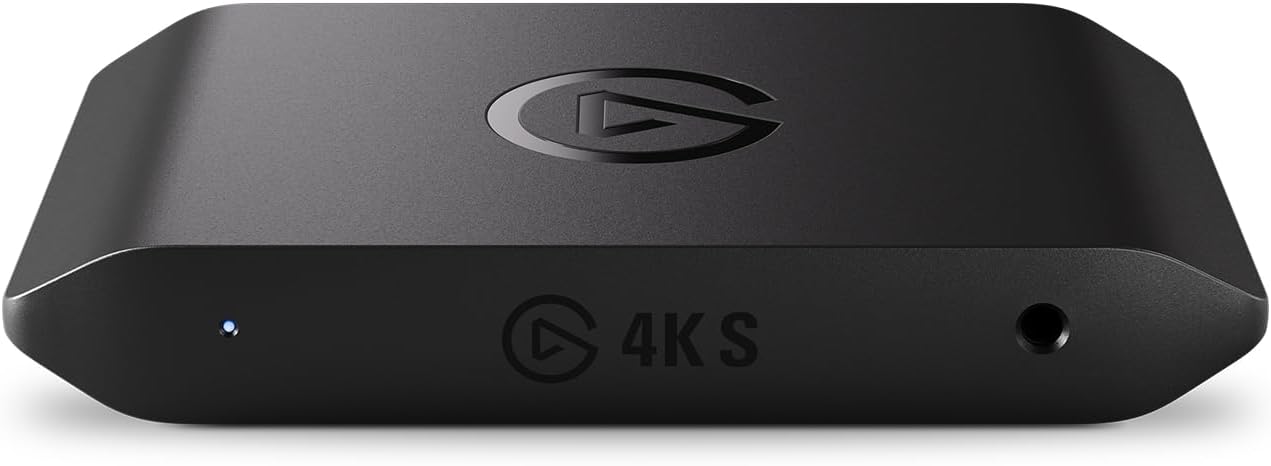
Elgato 4K S Capture Card
Our top recommendation for this category
Price as of Aug 31, 2026 — see current price on Amazon.
Short answer: if you're gaming on a PC, you almost certainly don't need one. But if you're on a console, running a dual-PC setup, or trying to pull 4K HDR footage from external sources, a capture card is the piece that makes the whole thing work. Let me break down the decision properly.
When You Don't Need a Capture Card
If your gaming PC has a modern GPU, you already have everything you need to stream. NVIDIA's NVENC encoder (available on any RTX card) and AMD's AV1 encoder (RX 7000 series and up) both produce streams that are frankly indistinguishable from dedicated hardware encoding at 1080p60. OBS Studio handles this automatically.
I've seen newcomers spend $150 on a capture card when their RTX 4070 was sitting right there ready to encode. That money would be better spent on a decent mic.
The situations where you can skip the capture card entirely:
- You play PC games and stream to Twitch, YouTube, or Kick
- You use OBS, Streamlabs, or any modern streaming software
- Your GPU is GTX 1660 or newer (even older cards handle 1080p streaming fine with x264 fast preset)
- You stream from a single PC
Software encoding via NVENC on an RTX 4070 will outperform what a $100 capture card does with the signal anyway. The capture card's job is to bring an external signal into your PC, not to make streaming smoother.
When You Actually Do Need One
This is where most guides go vague. They list "console streaming" as a reason and leave it there. Let me be specific.
Console gaming: The PS5's built-in streaming (Share button) caps at 1080p with limited bitrate and no ability to add overlays, alerts, or a webcam feed in a professional layout. Xbox Series X is better but still constrained. If you want full OBS control over your PS5 or Xbox stream, you need to route HDMI out through a capture card into your PC. Same story for Nintendo Switch 2.
Dual-PC streaming: This is a dedicated setup where one PC runs the game and a second PC handles all the encoding and streaming. The capture card sits in the streaming PC and receives the gaming signal via HDMI from the gaming PC. Dual-PC setups eliminate any encoding overhead on the gaming side, which matters for CPU-intensive games or for streamers pushing very high bitrates. It's overkill for most, but it exists for a reason.
Camera and external sources: If you're capturing DSLR or mirrorless camera footage, running a retro gaming channel off older consoles, or pulling signal from any HDMI source that isn't your PC, you need a capture card. The use cases are wider than just game streaming.
Professional content production: 4K HDR recording while simultaneously outputting clean 4K to your monitor requires a card with proper HDMI 2.1 passthrough. The Elgato 4K X does this; most cheap alternatives don't.
Capture Cards at a Glance
| Product | Price | Max Capture | Passthrough | Connection | |
|---|---|---|---|---|---|
| Elgato 4K S | $146.99 | 4K60 HDR10 | 1440p120 / 1080p240 | USB-C | Check Price |
| AVerMedia Live Gamer 4K GC553 | $229 | 4K30 / 1080p120 | 4K60 HDR | USB-C 3.1 | Check Price |
| Elgato 4K X | $249.99 | 1080p240 / 4K30 | 4K144 HDR10 | USB-C 3.2 | Check Price |
| Razer Ripsaw HD | $69 (unavailable) | 1080p60 | 4K | USB 3.0 | Check Price |
The Best for Most Streamers: Elgato 4K S
This is what I'd recommend to anyone asking about capture cards in 2026. It captures 4K60 with HDR10 support, passes through at 1440p120 or 1080p240 with near-zero latency, and connects via USB-C, which means it works cleanly with modern laptops and desktops alike. It's listed for PS5, Xbox Series X/S, and Switch 2.
The listing doesn't state a VRR figure or a 4K120 passthrough figure. If you game at 4K120 on an OLED while you capture, that's the 4K X's territory. The software (4K Capture Utility and native OBS integration) is the same Elgato stack that's been reliable for years.
At $146.99, it's the sweet spot: real features, 4K60 capture included, without overpaying for capability you probably won't use.
Elgato 4K S Capture Card
Pros
- 4K60 HDR10 capture, a full step up from older 1080p60 cards
- 1440p120 or 1080p240 passthrough for high-refresh monitors
- USB-C connection, works with modern PCs and Macs
- Analog audio input for chat or a mixer
Cons
- No 4K120 or 4K144 passthrough figure on the listing, so OLED 4K120 gamers want the 4K X
- VRR passthrough not stated on the listing
- 4K60 capture needs a reasonably modern CPU
Price as of Aug 31, 2026 — see current price on Amazon.
The 4K Workhorse: AVerMedia Live Gamer 4K GC553
AVerMedia's GC553 is the choice for streamers who want serious 4K capture capabilities without stepping into the Elgato 4K X's price territory. It captures at 4K30 and 1080p120, passes through 4K60 HDR, and uses a USB-C 3.1 connection that handles the data throughput at higher capture resolutions.
What I like about it is the flexibility. You can run 1080p120 capture for slow-motion replay content or drop to 4K30 for proper cinematic recording. It's also compatible with VirtualLink audio, which matters if you're mixing audio from an external mixer.
At $229, it's sitting between the 4K S and the Elgato 4K X in price, but the cheaper 4K S now captures 4K60 where the GC553 stops at 4K30, so the GC553's case rests on 1080p120 capture and AVerMedia's software.
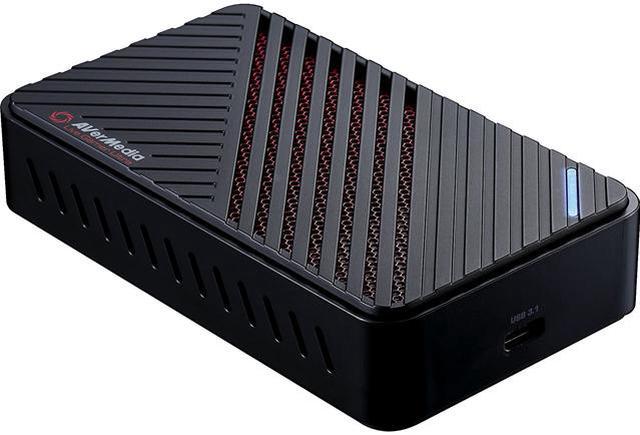
AVerMedia Live Gamer 4K GC553 USB Capture Card
Pros
- 4K60 HDR passthrough, 4K30 capture
- 1080p120 capture for smooth slow-motion content
- USB-C 3.1 handles the bandwidth without stuttering
- Multi-channel audio mixing support
Cons
- Pricier than the Elgato 4K S, which captures 4K60 where this stops at 4K30
- Software is functional but less polished than Elgato
- Overkill for anyone streaming at 1080p60
Price as of Aug 31, 2026 — see current price on Amazon.
The Professional Option: Elgato 4K X
If you're shooting content on a console or camera and you want the monitor to look absolutely perfect while you record, this is the card. HDMI 2.1 passthrough at 4K144 with VRR and HDR10 support means your gaming experience on the TV doesn't degrade at all while you record. You can also capture at 1080p240, which is genuinely useful for highlight reels and slow-motion analysis clips.
The USB-C 3.2 Gen 2 connection is necessary at these specs because the data throughput at 4K is significant. This card requires a strong host PC to max out its capabilities.
Honestly, most streamers won't need this. But if you're serious about content quality and you're already running a capable setup, the 4K X is the card you buy once and keep for years.
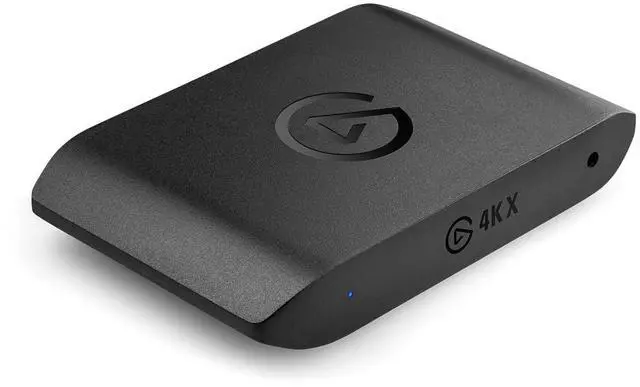
Elgato 4K X External Capture Card
Pros
- HDMI 2.1 passthrough at 4K144 with VRR and HDR10
- Up to 1080p240 capture for slow-motion content
- USB-C 3.2 Gen 2 handles full 4K throughput
- Future-proof for next-gen console content
Cons
- $249.99 is serious money for most streamers
- Requires USB 3.2 Gen 2 port on host PC
- Full capabilities need a strong CPU to process 4K capture in real time
Price as of Aug 31, 2026 — see current price on Amazon.
Budget Option: Razer Ripsaw HD
The Ripsaw HD was the easy entry point into console streaming for years: plug-and-play USB, 1080p60 capture, no drivers. It's been around since 2019 and did exactly what it promised. Stock is patchy, though, so if it's out when you click, the Elgato 4K S above costs more and has significantly better specs.
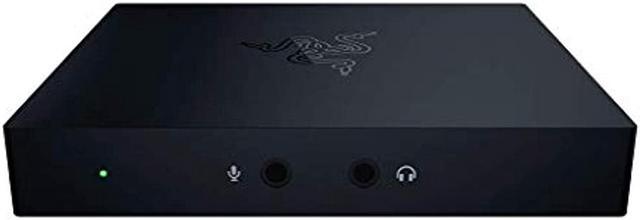
Razer Ripsaw HD Game Streaming Capture Card
Pros
- Plug-and-play, zero driver setup
- Clean 1080p60 capture
- Works on PC and Mac
- Cheapest entry into console streaming when available
Cons
- Stock is patchy, so check availability first
- 1080p capture cap (no 4K recording)
- Older USB 3.0 connector
Price as of Aug 31, 2026 — see current price on Amazon.
What to Look for When Buying
Capture Resolution vs Passthrough Resolution
These are two different things and they get confused constantly. Passthrough resolution is what your TV or monitor sees, which should always match your console's native output for the best gaming experience. Capture resolution is what gets recorded or streamed into OBS. You want 4K60 passthrough even if you're only capturing at 1080p60.
USB vs PCIe
External USB capture cards (all listed here) are the right choice for most setups. They work with laptops and desktops, don't require opening your PC, and perform well for 1080p and 4K30 capture. PCIe internal cards exist and offer lower latency for ultra-high-framerate capture, but they're specialized tools for production environments.
Software Compatibility
Every card listed here works natively with OBS Studio without buying extra software. AVerMedia includes RECentral, Elgato includes 4K Capture Utility. You don't need either if you're just using OBS, but they're there if you want simpler one-click recording.
Latency on Passthrough
Passthrough latency is how much delay there is between what's happening in the game and what you see on your monitor. On good cards, this is imperceptible. Elgato lists near-zero latency passthrough for both the 4K S and the 4K X. Budget cards vary, and competitive players will notice even small delays.
Frequently asked questions
- Can I stream from a PS5 without a capture card?
- Yes, the PS5 has built-in streaming to Twitch and YouTube via the Share button. But it's limited to 1080p, uses a fixed bitrate that can look blocky in fast scenes, and you can't use OBS overlays or alerts. A capture card gives you full control if that matters to you.
- Will a capture card make my stream look better?
- For PC streaming, no. Your GPU's encoder already does a better job than routing through a capture card. For console streaming, yes, because you can now use OBS settings like bitrate control, overlays, and multi-scene switching that the console's native streaming doesn't offer.
- Do I need a powerful PC to use a capture card?
- The capture card itself doesn't require much. OBS's encoding is where CPU and GPU load matters. For 1080p60 streaming, any PC from the last 4-5 years handles it fine. For 4K60 capture and processing, you want at least a modern mid-range CPU and an RTX 3070 or better for GPU encoding.
- Can a capture card work with Nintendo Switch 2?
- Yes. The Switch 2 outputs HDMI just like the original Switch, and any capture card that handles 1080p60 will work. The 4K S is the natural pairing because the Switch 2 outputs up to 4K60 in docked mode and the 4K S captures 4K60 directly.
- What is dual-PC streaming and do I need it?
- Dual-PC streaming means running your game on one PC and streaming software on a second PC, with a capture card in the second PC receiving the HDMI signal from the first. It completely separates game performance from streaming overhead. Most streamers don't need it, but if you're playing CPU-intensive games and noticing frame drops when OBS is running, it solves that problem permanently.
- Is 4K capture worth it for streaming?
- Mostly no, for live streaming. Twitch caps at 1080p, YouTube allows 4K streams but most viewers watch at lower resolutions, and 4K streaming requires enormous upload bandwidth. Where 4K capture matters is for recording, not live streaming. If you're recording YouTube videos or highlight reels in 4K and downscaling to 1080p for upload, the extra resolution makes a visible difference in final quality.
Bottom Line
Most PC gamers who want to stream need exactly zero capture cards. Your GPU handles it. If you're on a console, the Elgato 4K S at $146.99 is the right buy for the vast majority of setups. It captures 4K60, works with OBS immediately, and will last you years. Step up to the Elgato 4K X only if you specifically need 4K120-plus or 1080p240 capture, or to the AVerMedia GC553 if 1080p120 slow-motion capture is your thing. And if you're a PC gamer wondering whether you need one at all, you almost certainly don't.
How We Pick
We pick products by combining spec-level research, price checks, trusted third-party benchmarks, and owner sentiment from high-signal sources.
- Performance and real-world value in the category this guide targets
- Price-to-performance and deal consistency over recent pricing windows
- Build quality, reliability patterns, and known long-term issues
- Recommendation refresh cadence to keep these picks current
Author
TheTechSearch Editorial Team
Independent product reviewers & PC builders
We compare real-world specs, reviews and owner reports, price trends, and user feedback to recommend gear that actually makes sense to buy.