Is a Document Scanner Worth It in 2026?
When a dedicated document scanner beats your phone, when it's a waste of desk space, and the four scanners worth buying if the answer is yes. Expert picks, p...
As an Amazon Associate we earn from qualifying purchases made through our links — this doesn't affect our picks.

ScanSnap iX2500
Our top recommendation for this category
Price as of Oct 4, 2026 — see current price on Amazon.
Only if you scan in batches. A phone app handles a lease, a permission slip or the odd receipt perfectly well, and it's free. A document scanner earns its $200 to $400 when you have stacks: years of tax paperwork, medical bills, a filing cabinet you want gone, or receipts that pile up every week.
The difference isn't image quality anymore. It's time. A sheet-fed scanner swallows a stack of double-sided pages and turns it into one searchable PDF while you do something else. Your phone makes you photograph every page, one side at a time.
The Short Answer
| Your situation | Verdict | |---|---| | A few pages a month | Skip it, use your phone | | Self-employed, weekly receipts | Worth it | | Clearing out a filing cabinet | Worth it | | Lots of double-sided pages | Worth it | | You own a printer with a feeder | Try that first | | Scanning on the road | Get a portable model |
What Your Phone Already Does Well
Let's give the free option its due. The Notes and Files apps on an iPhone have a built-in document scanner. Google Drive on Android has one. Adobe Scan is free on both. They detect page edges, flatten the perspective, and most will run text recognition so the PDF is searchable.
For one to five pages, a phone is honestly faster than walking to a scanner. There's nothing to plug in and nothing to update.
The trouble starts at volume. Every page means framing the shot, waiting for focus, and tapping. Double-sided documents mean flipping and doing it again. Lighting changes from page to page, so a 30-page file can come out with uneven contrast. And it ties up your hands the whole time.
Where a Dedicated Scanner Wins
Batches
This is the whole case. The Epson WorkForce ES-C320W and Brother ADS-1800W both feed up to 20 sheets at once and scan both sides in a single pass at up to 30 pages per minute. The ScanSnap iX2500 takes 100 sheets and is rated at 45 pages per minute, double-sided.
Here's a rough comparison for 1,000 single-sided pages. At around 10 seconds per page with a phone (frame, focus, tap, next), that's close to three hours of hands-on work. A 30 ppm scanner needs roughly 35 minutes of feed time, and most of that you spend reloading the tray or doing something else. Double the page count for two-sided documents and the gap gets wider.
Consistency
A scanner lights every page the same way. Text recognition (OCR) is more accurate on an evenly lit, perfectly flat image, so searching your archive for "property tax 2023" actually finds it.
Workflow you stop thinking about
Scan-to-folder and scan-to-cloud profiles are where a scanner starts to feel like an appliance. The ADS-1800W sends scans straight to Google Drive, OneDrive or Dropbox from its 2.8-inch touchscreen, no computer needed. The iX2500's 5-inch touchscreen lets each person in a household pick their own profile and destination.
Mixed paper
Receipts, business cards and plastic ID cards jam or curl under a phone camera. Most of these scanners have a separate path or slot for cards and narrow receipts. The ADS-1800W has a dedicated card slot.
What a Scanner Won't Fix
It won't organize anything for you. A pile of untitled PDFs is just a filing cabinet on a hard drive. Before you buy, decide on a simple folder structure (by year, then by category works for most homes) and a naming habit.
It also won't make paper disappear. Some originals should stay in a fireproof box: birth certificates, property deeds, titles, wills, and anything with a raised seal. Scan them for convenience, keep the paper.
And it doesn't replace a flatbed. Sheet-fed scanners don't handle bound books, fragile documents or thick photo albums. If that's your project, a flatbed or a dedicated photo scanner is a better fit, which is why the Epson FastFoto FF-680W shows up in our document scanner roundup.
How Long You Actually Need to Keep Paperwork
The IRS guidance is a big reason people start scanning. According to the IRS page "How long should I keep records," the general rule is three years from filing. That stretches to six years if you leave out income worth more than 25% of the gross income on your return, and seven years if you claim a loss from worthless securities or bad debt. Employment tax records are four years. If you never filed, or filed a fraudulent return, there's no limit.
Seven years of receipts, statements and 1099s is a lot of paper. It's also exactly the kind of archive you want to be able to search, which is the scanner's best trick.
What It Really Costs
The sticker price is most of it. A good desktop scanner runs about $300 to $400, and a portable one about $200. There's no ink or toner.
The ongoing costs are small but real. Feed rollers are a wear part, and after enough pages they start to slip and double-feed. Brother, Epson and Ricoh all sell replacement roller kits, and swapping them takes a few minutes. Budget for one every few years if you scan heavily.
Then there's storage. A searchable PDF of a typical letter-size page at 300 dpi is small, so even tens of thousands of pages fit comfortably in a free or entry-level cloud plan. The bigger cost is backup discipline: keep at least one copy off the computer that does the scanning, whether that's a cloud folder or an external drive.
Put it against the alternative. Professional scanning services charge per page, and a one-time backlog of a few thousand pages can cost as much as the scanner itself. If you'll keep scanning afterward, buying wins.
Who Should Skip It
- Light users. If you scan fewer than 20 pages a month, your phone wins on cost and convenience.
- People with a good all-in-one printer. Plenty of inkjet and laser all-in-ones have an automatic document feeder. Check whether yours scans both sides in one pass. If it does, you already have most of what a $300 scanner offers.
- Anyone who won't build the habit. A scanner pays off when it lives on your desk and gets used weekly. If it's going back in the box after the first weekend, skip it.
The Four Document Scanners Worth Buying
| Scanner | Price | Speed | Feeder | Best for | |
|---|---|---|---|---|---|
| ScanSnap iX2500 | $399.99 | 45 ppm | 100 sheets | Big archives | Check Price |
| Brother ADS-1800W | $314.99 | 30 ppm | 20 sheets | Scan to cloud | Check Price |
| Epson WorkForce ES-C320W | $309.99 | 30 ppm | 20 sheets | Small desks | Check Price |
| Epson WorkForce ES-60W | $199.99 | 4 sec/page | Single sheet | Travel | Check Price |
ScanSnap iX2500: the one for clearing a filing cabinet
ScanSnap iX2500
Pros
- 45 ppm duplex with a 100-sheet feeder
- Large 5-inch touchscreen with per-user profiles
- Wi-Fi 6 and USB-C
- ScanSnap Cloud sends scans straight to cloud apps
Cons
- Most expensive pick here
- Big footprint for a small desk
Price as of Oct 4, 2026 — see current price on Amazon.
If you're digitizing years of paper, the iX2500 is the one that makes the job bearable. The 100-sheet feeder means you load a thick stack and walk away instead of babysitting 20 pages at a time. At 45 pages per minute and 90 images per minute duplex, it's the fastest scanner in this guide by a wide margin.
The 5-inch touchscreen is the other reason to spend more. Each person in the house can have their own profile that sends scans to their own folder or cloud account. Wi-Fi 6 and USB-C are both on board. At $399.99 on Amazon it matches Ricoh's own store price.
Brother ADS-1800W: the best scan-to-cloud box
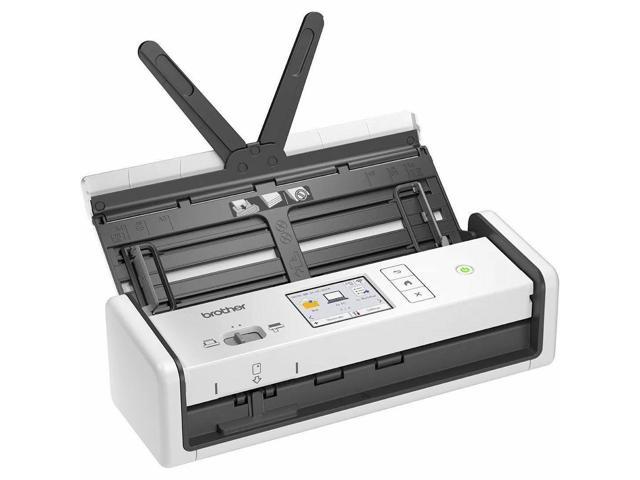
Brother ADS-1800W
Pros
- Scans to Google Drive, OneDrive and Dropbox from the screen
- 30 ppm single and double-sided
- Dedicated card slot for IDs and business cards
- Compact footprint
Cons
- 20-sheet feeder means more reloading
- One-year warranty
Price as of Oct 4, 2026 — see current price on Amazon.
The ADS-1800W is the pick for people who don't want a computer involved at all. Tap a destination on the 2.8-inch color touchscreen, feed the pages, and the PDF lands in Google Drive, OneDrive or Dropbox. It scans both sides at up to 30 pages per minute.
The separate card slot handles insurance cards and IDs without a carrier sheet, which is handy for medical paperwork. The trade-off is the 20-sheet feeder, so big projects mean more trips to the tray. At $314.99 it sits just under Brother's $324.99 list price.
Epson WorkForce ES-C320W: the small-desk pick
Epson WorkForce ES-C320W
Pros
- Compact duplex scanner with a 20-page feeder
- Wireless scanning to computer and phone
- Handles paper and plastic cards
- Below Epson's $329.99 list
Cons
- No touchscreen
- Smaller feeder than the ScanSnap
Price as of Oct 4, 2026 — see current price on Amazon.
The ES-C320W is the quiet workhorse. It's small enough to leave out on a crowded desk, scans both sides in one pass, and connects over Wi-Fi so you can scan to a laptop or phone without a cable.
There's no touchscreen, so you'll set up your profiles in Epson's software first. Once that's done, the buttons on the scanner are all you need. At $309.99 it's below Epson's $329.99 list. If you don't care about scanning straight to the cloud from the device, it's the better value than the Brother.
Epson WorkForce ES-60W: the portable one

Epson WorkForce ES-60W
Pros
- Battery powered with built-in Wi-Fi
- Weighs 0.66 lb
- Scans a page in about 4 seconds
- Includes OCR software for searchable PDFs
Cons
- Feeds one sheet at a time
- Not built for big batches
Price as of Oct 4, 2026 — see current price on Amazon.
The ES-60W is for people who scan away from a desk: contractors, accountants visiting clients, or anyone keeping receipts on the road. It weighs 0.66 pounds, runs on its own battery, and scans wirelessly to a computer, iPhone or Android phone.
It feeds one sheet at a time at about 4 seconds per page, so it's no batch machine. But compared with a phone, the output is flat, evenly lit and consistent every time. Epson lists it at $199.99, the same as the Amazon price.
How to Decide in Five Minutes
Count your pages
Go through one month of mail and paperwork. Under 20 pages, stick with your phone. Over 100, a scanner will pay for itself in time within a few months.
Check what you already own
Look at your printer. If it has an automatic document feeder that scans both sides in one pass, test it on a stack before buying anything.
Pick where scans go
If everything goes to the cloud, the Brother's on-device shortcuts are the simplest setup. If scans go to a computer, the Epson ES-C320W or ScanSnap fit better.
Be honest about the backlog
A one-time cleanout of a filing cabinet is the iX2500's job. Weekly receipts and statements are the ES-C320W's or ADS-1800W's.
Frequently asked questions
- Is a document scanner better than a phone scanning app?
- For a few pages, no. A phone app like the iPhone's Notes scanner, Google Drive or Adobe Scan is free and fast. For stacks of pages, yes. A sheet-fed scanner like the Brother ADS-1800W scans both sides of 20 sheets in one pass at up to 30 pages per minute, with even lighting that makes text recognition more accurate.
- How many pages a month justify buying a scanner?
- Around 100 pages a month or a one-time backlog of a few thousand pages is where a scanner clearly beats a phone on time. Under 20 pages a month, a phone app is the better choice.
- Can I throw away paper after scanning it?
- For most routine records like bank statements and receipts, many people keep scanned copies only, but check with your accountant first. Keep originals of birth certificates, deeds, vehicle titles, wills and anything with a raised seal. The IRS generally expects records to be kept for three years, longer in some situations.
- Do document scanners work with Mac?
- Yes. The ScanSnap iX2500, Brother ADS-1800W, Epson ES-C320W and Epson ES-60W all support Mac and Windows, and the wireless models can also scan to iPhone and Android apps.
- Can a document scanner scan photos?
- It can scan loose prints, but sheet-fed document scanners aren't designed for fragile or bound originals. For a big photo project, a dedicated photo scanner like the Epson FastFoto FF-680W is the better tool.
Bottom Line
A document scanner is worth it when paper arrives in stacks, not single sheets. If you're clearing a filing cabinet, the ScanSnap iX2500's 100-sheet feeder is the one to get. For weekly receipts and statements, the Epson WorkForce ES-C320W or Brother ADS-1800W cover it for about $310, and the ES-60W handles scanning on the go. If you only scan a few pages a month, keep using your phone. It's free and it's good enough.
How We Test
We score products by combining spec-level research, pricing history, trusted third-party benchmarks, and owner sentiment from high-signal sources.
- Performance and real-world value in the category this guide targets
- Price-to-performance and deal consistency over recent pricing windows
- Build quality, reliability patterns, and known long-term issues
- Recommendation refresh cadence to keep these picks current
Author
TheTechSearch Editorial Team
Independent product reviewers & PC builders
We test and compare real-world specs, price trends, and user feedback to recommend gear that actually makes sense to buy.