Is a 3D Printer Worth It in 2026?
Who actually gets value from a home 3D printer, what it costs to run, and which three machines make sense if the answer is yes. Expert picks, pros and cons,...
As an Amazon Associate we earn from qualifying purchases made through our links — this doesn't affect our picks.

Elegoo Centauri 2
Our top recommendation for this category
Price as of Oct 1, 2026 — see current price on Amazon.
Yes, if you have a steady list of things to print: replacement parts, organizers, tabletop terrain, prototypes for a small business. No, if you want one because they look cool and you'll figure out the uses later. That second printer ends up in a closet.
The good news is that the machines themselves stopped being the problem. A $279 printer today calibrates itself, levels its own bed and prints at speeds that needed a $1,000 machine a few years ago. So the question isn't "will it work?" anymore. It's "will you use it enough?"
The Short Answer
| Your situation | Verdict | |---|---| | You fix, mod or replace small parts often | Worth it | | You play tabletop games and buy terrain or minis | Worth it | | You run an Etsy shop or prototype products | Worth it | | You want to print a few gifts a year | Skip it, use a print service | | You expect it to pay for itself in a month | Skip it | | You hate troubleshooting of any kind | Wait, or buy only a fully enclosed model |
What Changed (and What Didn't)
Three years ago a cheap printer meant a bed-slinger with manual leveling, a lot of YouTube and a pile of spaghetti on the build plate. Today's entry-level machines are CoreXY designs with automatic calibration, and that's the single biggest reason the "worth it" math moved.
Engadget's 2026 look at the question makes the same point: modern units are much easier to calibrate and use than the printers of the 2010s, with auto bed leveling, multi-filament support and built-in cameras that catch failures.
What didn't change is the learning curve on everything around the machine. You still have to learn a slicer. You still have to keep filament dry. Nozzles still clog. A printer that calibrates itself won't tell you that your part needs supports, or that PETG wants a slower first layer.
Honestly, that's where most people quit. Not on hardware, on software and patience.
What It Really Costs
The sticker price is only the start. Here's the full picture for a typical hobbyist.
The printer. A good open-frame CoreXY machine runs about $279. Enclosed machines that handle tougher materials start around $400.
Filament. Engadget puts filament and resin at roughly $15 to $30 a pound. Most small household prints use a few dollars of plastic or less. A tabletop terrain habit can burn through a spool a month.
Failures. Your first month will waste filament. Plan on it. A failed eight-hour print costs you plastic and an evening.
Wear parts. Nozzles, build plates and PTFE tubes wear out. A replacement nozzle for the Creality K1C costs $10 to $25, per 3DTechValley's long-term review.
Your time. This is the one buyers forget. Modeling your own parts in Fusion, Onshape or Tinkercad is a skill, and it's the skill that makes a printer genuinely useful.
So does it "pay for itself"? Rarely in the strict sense. A $6 replacement clip doesn't offset $279 quickly. But a printer that replaces a $40 discontinued appliance part, a $60 set of drawer organizers and a $120 set of game terrain starts to look smart within a year.
Who Gets the Most Out of One
Fixers and tinkerers
The strongest case. Broken battery covers, knobs, brackets, wall mounts for a router, a custom stand for a handheld. Sites like Printables and Thingiverse already have models for thousands of common replacement parts, so you often don't need to design anything.
Tabletop gamers
Terrain is expensive and bulky to buy. Printed terrain is cheap and customizable. For tiny, highly detailed miniatures, though, a resin printer beats any filament machine, and resin brings fumes, gloves and wash stations into the house. That's a different decision.
Small sellers and prototypers
If you sell physical products, a printer turns a two-week prototype loop into an overnight one. Multicolor machines also open up products (keychains, signs, custom name tags) that single-color printers can't make without painting.
Parents and teachers
Kids get a lot out of designing something on a screen and holding it the next morning. An open-frame machine works, but an enclosure keeps small fingers away from a 350°C nozzle.
Who Should Skip It
If you can name only two or three things you'd print, use a service first. Engadget recommends exactly that: try a commercial printing service before buying a home unit. You upload a file, pick a material and get the part in the mail.
Also skip it if you have no ventilation plan. PLA is mild, but ABS and ASA release fumes and particles while printing. Those materials belong in an enclosed, filtered printer in a room you're not sleeping in.
Your First Month, Realistically
Expect the first week to be mostly calibration prints, test cubes and models downloaded from Printables. That's normal and it's useful. It teaches you what your printer does well before you ask it to make anything that matters.
The usual early problems are boring ones. A first layer that won't stick usually means a dirty build plate, so wash it with dish soap and water. Stringing between parts usually means wet filament or too-high temperature. Warped corners on a large flat part usually mean drafts, which is exactly what an enclosure fixes.
By week three or four, most people move from downloading models to tweaking them. That's the turning point. Once you can open a model, change a dimension and print it, the printer stops being a toy and starts being a tool.
If you never get there, that's fine too. Plenty of owners only print downloaded models and still get their money's worth. But be honest about which kind of owner you'll be before you pick a machine.
Open Frame or Enclosed?
This is the decision that actually splits the three picks below.
An open-frame printer like the Elegoo Centauri 2 is cheaper and easier to work on. It's ideal for PLA, PETG and TPU, which covers most household prints.
An enclosed printer like the Centauri Carbon 2 or Creality K1C holds heat around the part. That stops ABS and ASA from warping and cracking, and it's what you want for carbon-fiber nylon. Enclosures also cut noise and keep dust off the build plate.
If you're unsure, think about what you'll print in year two, not week one. Most people start with PLA and drift toward PETG and ASA once they print things that live outdoors or near heat.
The Three Printers Worth Buying
| Model | Frame | Build volume | Max nozzle | Colors | Price | |
|---|---|---|---|---|---|---|
| Elegoo Centauri 2 | Open | 256mm cube | 350°C | 1 | $279.00 | Check Price |
| Elegoo Centauri Carbon 2 Combo | Enclosed | 256mm cube | 350°C | 4 | $399.00 | Check Price |
| Creality K1C | Enclosed | 220 x 220 x 250mm | 300°C | 1 | $439.00 | Check Price |
Elegoo Centauri 2: the easiest way to find out
Elegoo Centauri 2
Pros
- CoreXY at up to 500mm/s with full auto calibration
- 256 x 256 x 256mm build volume, bigger than most beginner printers
- 350°C nozzle and 110°C bed handle PLA, PETG and TPU easily
Cons
- Open frame, so ABS and ASA are a struggle
- No built-in camera for remote monitoring
Price as of Oct 1, 2026 — see current price on Amazon.
If you're still asking whether a printer is worth it, this is the one to answer the question with. It's $279 on Amazon, the same as Elegoo's own store price, and it shares the Centauri line's CoreXY motion system and 256mm build cube with the enclosed Carbon 2.
What you give up is the enclosure, the camera and the chamber filtration. For PLA and PETG, that's a fair trade. And if you outgrow it, you've learned the slicer and the workflow on a machine that cost a lot less than the alternatives.
Elegoo Centauri Carbon 2 Combo: the one to grow into

Elegoo Centauri Carbon 2 Combo
Pros
- Four-color printing through the CANVAS system out of the box
- Enclosed die-cast frame with HEPA and activated carbon filtration
- Hardened steel nozzle to 350°C handles carbon-fiber filaments
- Under 45 dB rated noise and fully offline LAN or USB printing
Cons
- Single-nozzle color swaps waste filament on every change
- RFID spool detection only reads Elegoo-branded spools
Price as of Oct 1, 2026 — see current price on Amazon.
This is the best value on the page. At $399, it's $50 under Elegoo's $449 list and cheaper than the single-color K1C, yet it's enclosed, filtered and multicolor.
The CANVAS unit feeds four spools into one nozzle. That works, but every color change purges a little filament. 3DTechValley notes a purge-to-infill option that dumps transition waste into the part's infill instead of a separate tower, which helps. A print with dozens of color swaps per layer will still waste plastic. Nameplates and two-tone keychains are fine. Full-color figurines get expensive.
It also runs without a cloud account. Some people care about that a lot, especially in a shared house.
Creality K1C: compact and proven
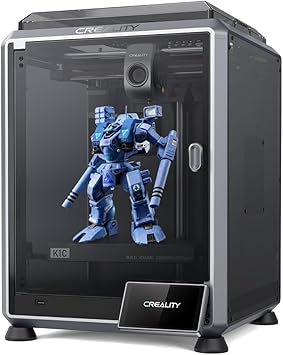
Creality K1C
Pros
- Enclosed CoreXY rated to 600mm/s with 20,000mm/s² acceleration
- Tri-metal nozzle built for abrasive carbon-fiber filaments
- AI camera for failure detection and remote monitoring
- Upgrade path to Creality's CFS multicolor system
Cons
- Smaller 220 x 220 x 250mm build volume than either Elegoo
- Amazon price sits above Creality's own store sale price
- Gets loud above 400mm/s
Price as of Oct 1, 2026 — see current price on Amazon.
The K1C has been around long enough that its quirks are well documented, which counts for something with a first printer. It's an enclosed CoreXY with an AI camera, and its tri-metal nozzle was designed for carbon-fiber nylon and PETG-CF.
But be straight about the price. At $439 on Amazon it costs more than the Centauri Carbon 2 Combo while offering one color and a smaller bed. Creality lists it at $559 and its own store has sold it for $369. 3DTechValley's long-term review also flags faint wavy artifacts at high speeds that firmware improved but didn't remove. Buy it if you want Creality's ecosystem or the CFS upgrade later. Otherwise the Elegoo is the better deal.
How to Decide in Five Minutes
Count your projects
Write down every object you'd print in the first three months. Under five? Use a print service and revisit next year. Over fifteen? Buy.
Pick your material ceiling
PLA and PETG only means open frame is fine. ABS, ASA or carbon-fiber blends means enclosed, no exceptions.
Decide on color now
Adding multicolor later costs more than buying a combo up front. If you'd ever print signs, labels or two-tone parts, the Carbon 2 Combo's extra $120 over the Centauri 2 is money well spent.
Plan the space
The Centauri 2 measures about 16 inches wide and deep and over 19 inches tall, per its Amazon listing. These machines need a sturdy table, airflow and an outlet. A garage shelf in summer heat or winter cold will cause adhesion problems.
Frequently asked questions
- Is a 3D printer worth it for a beginner?
- Yes, if you have specific things to print. Self-calibrating CoreXY printers like the $279 Elegoo Centauri 2 removed most of the setup pain. The learning curve now sits in slicer software and model design, not the machine.
- How much does 3D printing cost per print?
- Filament runs about $15 to $30 per pound according to Engadget, so most small household parts use a few dollars of material. Add failed prints, nozzles and build plates, and expect your first month to cost more than later ones.
- Does a 3D printer pay for itself?
- Rarely in a few weeks. It pays off over a year if you regularly replace parts, print organizers or make tabletop terrain that would otherwise cost $40 to $120 a set.
- Do I need an enclosed 3D printer?
- Only for ABS, ASA, nylon and carbon-fiber blends, which warp in open air and release fumes. For PLA, PETG and TPU an open-frame printer works fine and costs less.
- Is resin or filament better for a first printer?
- Filament for almost everyone. Resin gives finer detail on miniatures but needs gloves, isopropyl alcohol, a curing station and serious ventilation.
Bottom Line
A 3D printer is worth it when you already have a list of things to make. If that's you, start with the Elegoo Centauri 2 at $279, or spend $399 on the Centauri Carbon 2 Combo if you want an enclosure and four colors from day one. If you can't fill a list, upload one file to a print service first. That order costs nothing and answers the question for you. Already sure you want one? Our full best 3D printers guide covers more machines.
How We Test
We score products by combining spec-level research, pricing history, trusted third-party benchmarks, and owner sentiment from high-signal sources.
- Performance and real-world value in the category this guide targets
- Price-to-performance and deal consistency over recent pricing windows
- Build quality, reliability patterns, and known long-term issues
- Recommendation refresh cadence to keep these picks current
Author
TheTechSearch Editorial Team
Independent product reviewers & PC builders
We test and compare real-world specs, price trends, and user feedback to recommend gear that actually makes sense to buy.