Do You Need a Mechanical Keyboard for Gaming?
The honest answer to whether a mechanical keyboard is worth it for gaming, plus four picks across every budget from $35 to $100. Expert picks, pros and cons,...
As an Amazon Associate we earn from qualifying purchases made through our links — this doesn't affect our picks.
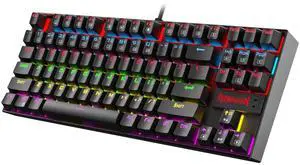
Redragon K552 KUMARA Mechanical Gaming Keyboard
Our top recommendation for this category
Price as of Aug 21, 2026 — see current price on Amazon.
In this guide
- The Real Question: Will You Notice the Difference?
- When a Membrane Keyboard Is Actually Fine
- If You're Going Mechanical: What to Actually Look For
- Quick Comparison: Best Mechanical Keyboards If You Decide to Buy
- Redragon K552 KUMARA
- Keychron C3 Pro
- HyperX Alloy Origins Core
- Logitech G413 SE
- What Makes a Mechanical Keyboard Good for Gaming
- Bottom Line
Short answer: no, you don't need one. Long answer: once you game on a mechanical keyboard for a few weeks, you'll probably wonder why you waited.
The difference between mechanical and membrane keyboards is real, but it's not the kind of thing that magically turns a bronze player into a grandmaster. What it does do is make every keystroke feel deliberate. And for games where you're pressing keys a thousand times per session, that adds up in ways that are hard to explain until you feel it.
The Real Question: Will You Notice the Difference?
If you're playing casual games a few hours per week, the honest answer is maybe not. A decent membrane keyboard from Logitech or Corsair handles gaming just fine. Membrane keyboards bottom out with a mushy feel and some flex, but for turn-based games, RPGs, or anything where raw input speed doesn't matter much, you're probably fine.
Where mechanical keyboards start earning their keep:
First-person shooters and competitive games. When you're strafing, crouch-peeking, or firing in quick bursts, having a consistent, tactile actuation point means your fingers know exactly where "registered" is without bottoming out every time. Over a long session this reduces fatigue too.
Heavy typing plus gaming. If you work from home or spend time at a computer writing, the mechanical keyboard pays for itself in comfort alone. Membrane keyboards don't hold up nearly as well to daily typing. Most mechanical keyboards last 50 million to 100 million keystrokes per key. Your average membrane board is rated for maybe 10 million.
Gamers who use every key. RTS players, MMO players, people who map a dozen abilities to their keyboard. The more keys you press per minute, the more the feel of each keystroke matters.
When a Membrane Keyboard Is Actually Fine
If you're gaming on an extremely tight budget and the cheapest mechanical option isn't possible, a membrane keyboard is not going to kill your game. The input lag difference between a decent membrane and a mechanical keyboard is essentially imperceptible in practice (we're talking sub-millisecond). The feel is different, the tactile feedback is different, but the raw timing advantage is overstated in most gaming discussions.
Kids starting out. Older machines. Secondary setups. Laptops that need a cheap external keyboard. All fine with membrane.
If You're Going Mechanical: What to Actually Look For
Switches first. This is the decision that actually matters. Linear switches (Red, Speed) are smooth with no bump and are popular for FPS games. Tactile switches (Brown, Clear) give you a bump when the key registers, useful for touch typists gaming. Clicky switches (Blue) are satisfying but loud enough that anyone on voice chat will want to mute you.
For most gamers, linear Red-style switches are the safest starting point. They're smooth, they're quiet enough for a headset, and they're forgiving if you're not sure what you want.
Layout second. Full-size keyboards have a numpad. TKL (tenkeyless) removes the numpad so you can move your mouse arm closer to center. Compact 75% and 65% layouts go further. For gaming specifically, TKL is a sweet spot: you keep the arrow keys and function row, lose the numpad, gain mouse space.
Build quality. Cheaper keyboards flex when you press hard. A keyboard with a metal backplate or solid plastic frame feels noticeably more stable. This doesn't affect performance but does affect longevity.
Quick Comparison: Best Mechanical Keyboards If You Decide to Buy
| Keyboard | Price | Layout | Switches | Best For | |
|---|---|---|---|---|---|
| Redragon K552 | ~$40 | TKL 87-key | Outemu Red | Cheapest real mechanical option | Check Price |
| Keychron C3 Pro | ~$35 | TKL or Full | Gateron Red/Brown/Blue | Hot-swap, QMK support | Check Price |
| HyperX Alloy Origins Core | ~$80 | TKL 80% | HyperX Red/Aqua/Blue | Gaming-focused, premium feel | Check Price |
| Logitech G413 SE | $70 | Full-size | Tactile mechanical | Comfortable all-rounder | Check Price |
Redragon K552 KUMARA
Redragon K552 KUMARA Mechanical Gaming Keyboard
Pros
- Cheapest way into real mechanical switches
- TKL layout saves mouse space
- Solid metal backplate for the price
Cons
- Outemu switches feel scratchy compared to Gateron or Cherry
- No hot-swap, limited RGB
Price as of Aug 21, 2026 — see current price on Amazon.
The K552 is where a lot of gamers start their mechanical keyboard journey. At around $40, it's the cheapest way to find out if you even like mechanical switches before spending more.
The Outemu Red switches it ships with are serviceable. They're not as smooth as Gateron Reds or Cherry MX Reds, but they're real mechanical switches with a real actuation point. The keyboard also has a metal backplate underneath the keycaps, which keeps it from flexing under pressure.
What it won't do: it won't blow you away with build quality, and the RGB is basic. But for under $40, it's a genuinely decent starter board. If you try it and decide mechanical isn't for you, you're only out $40. If you love it, you'll know exactly what to upgrade to next.
Keychron C3 Pro
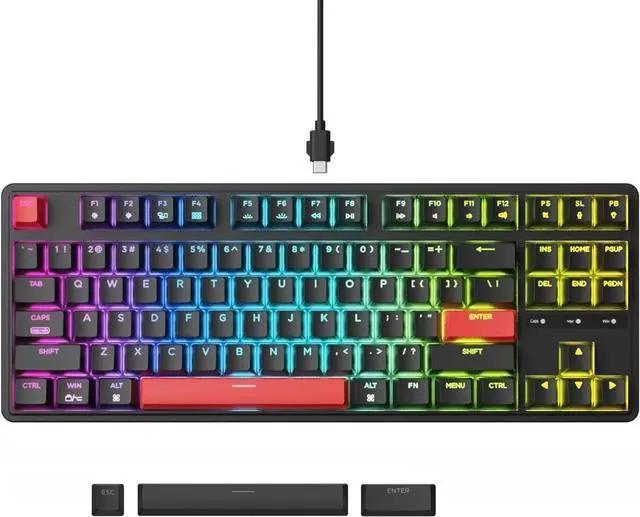
Keychron C3 Pro QMK Hot-Swappable Mechanical Keyboard
Pros
- Hot-swap sockets let you change switches without soldering
- QMK/VIA firmware for full remapping
- Gateron G Pro Red switches included
- Mac/Windows toggle switch
Cons
- No wireless version in this price range
- Shine-through keycaps aren't premium quality
Price as of Aug 21, 2026 — see current price on Amazon.
The C3 Pro is probably the smartest first mechanical keyboard you can buy, and it somehow costs less than the Redragon. The secret is that Keychron sells direct and passes the savings on. You get Gateron G Pro Red switches (noticeably smoother than Outemu), hot-swap sockets so you can swap switches without a soldering iron, and QMK/VIA firmware support so you can remap every key you want.
I've recommended this board to probably a dozen people who asked me where to start. None of them have complained.
The only thing worth knowing: it ships in full-size or TKL. For gaming, get the TKL (87-key) if you have any intention of using it on a desk with a mouse. The full-size is fine if you actually use the numpad.
HyperX Alloy Origins Core
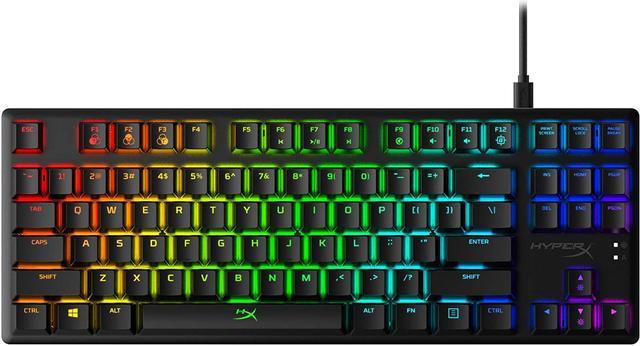
HyperX Alloy Origins Core TKL Mechanical Gaming Keyboard
Pros
- HyperX Red switches are genuinely fast and consistent
- Aircraft-grade aluminum frame feels solid
- TKL with 3 different tilt angles
- HyperX NGENUITY software is actually usable
Cons
- No hot-swap sockets at this price point
- USB-A only, no USB-C connection
Price as of Aug 21, 2026 — see current price on Amazon.
The Alloy Origins Core is where gaming keyboards get serious. HyperX designed their own linear switch for this board, the HyperX Red, and it's faster than Cherry MX Reds in both actuation force (45g vs 45g, effectively the same) and feel. The board itself is aluminum-framed, which is unusual at $80. Most keyboards at this price use plastic.
If you're playing competitive FPS and want a keyboard that's built for that purpose, the Alloy Origins Core is where I'd land. The TKL layout puts your mouse hand right where you want it, the switches are optimized for speed, and nothing about this board will fight you mid-game.
What you give up compared to the Keychron: no hot-swap, no QMK. It's a closed ecosystem. For pure gaming that's fine. For anyone who wants to tinker with firmware or eventually swap switches, look at the Keychron instead.
Logitech G413 SE
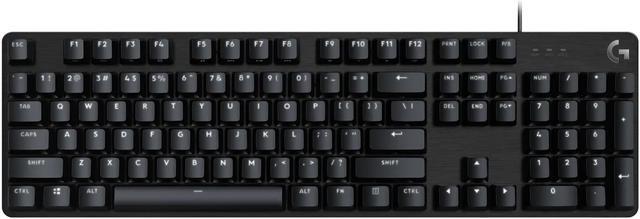
Logitech G413 SE Full-Size Mechanical Gaming Keyboard
Pros
- Tactile switches work well for both gaming and typing
- Full-size layout with numpad included
- Brushed aluminum top case, looks and feels premium
- Consistent Logitech build quality
Cons
- Full-size layout eats desk space if you use a large mouse pad
- No RGB, just single-color white backlight
Price as of Aug 21, 2026 — see current price on Amazon.
The G413 SE is the keyboard I'd recommend to someone who games but also types a lot. The tactile mechanical switches give you a bump when the key actuates, which makes touch-typing significantly more comfortable than linear switches over a long session. You'll notice it in about 20 minutes.
Logitech's build quality here is real. The brushed aluminum top case doesn't flex, the keycaps are PBT which means they won't develop shiny spots after a year of use, and the whole board feels like it costs more than $70. Honestly I expected this to feel cheaper when I first picked one up.
The downside is size. Full-size keyboards with a numpad take up real estate. If your desk space is tight or you push your mouse far to the right during gaming, a TKL like the Alloy Origins Core or Keychron is a better fit.
What Makes a Mechanical Keyboard Good for Gaming
Switch Type Matters More Than Brand
Gaming keyboard marketing loves to make you think one brand's switches are dramatically better than another's. In practice, the switch category (linear, tactile, clicky) matters far more than brand. Gateron Reds and Cherry MX Reds feel nearly identical. What matters is whether you want a bump or not.
For pure FPS gaming: linear switches. You'll bottom out quickly without thinking about it. For mixed gaming and typing: tactile switches. Brown or clear-style switches. For typing enthusiasts who also game: tactile, and consider trying heavier switches (65g+ actuation).
Clicky switches are great if you work alone. Not great if you're on voice calls or live with other people.
Anti-Ghosting and N-Key Rollover
These specs appear on every gaming keyboard box and are almost never a problem in 2026. Anti-ghosting means the keyboard can correctly register multiple simultaneous keypresses. N-key rollover means it can handle unlimited simultaneous presses. In real gaming scenarios, you're rarely pressing more than 4-5 keys at once. Any mechanical keyboard you buy will handle this fine. Don't let it be a deciding factor.
Polling Rate: 1000Hz Is Enough
High-end gaming keyboards advertise 4000Hz or 8000Hz polling rates. A 1000Hz keyboard sends its state to the computer 1000 times per second, which is already 1ms. The real-world gaming advantage of going from 1000Hz to 4000Hz is imperceptible to any human. Standard 1000Hz polling is fine.
Software and Firmware
Most gaming keyboards come with companion software for RGB and macro setup. Some of it is fine (HyperX NGENUITY, Logitech G HUB). Some of it is bloated. Keyboards with QMK/VIA support (like the Keychron) let you configure everything directly in firmware without installing any software, which is genuinely better if you care about that.
Frequently asked questions
- Does a mechanical keyboard actually improve gaming performance?
- For most gamers, the improvement is minimal in raw performance terms. The real benefits are feel and consistency. Mechanical keyboards have a defined actuation point, so your fingers learn exactly where 'registered' is. Over time this feels faster and more reliable, especially in competitive games. Input lag is negligible between mechanical and membrane at the same polling rate.
- What's the difference between mechanical and membrane keyboards?
- Membrane keyboards use a rubber dome under each key that collapses when pressed, which is why they feel mushy. Mechanical keyboards use individual switches per key with a spring mechanism, giving you a distinct actuation point and more consistent feel. Mechanical keyboards also last longer: 50-100 million keystrokes per key vs 5-10 million for membrane.
- Which switches should I get for FPS games?
- Linear red-style switches (Cherry MX Red, Gateron Red, HyperX Red) are the most popular for FPS because they're smooth, light (around 45g actuation force), and don't have a tactile bump that could slow rapid keypresses. Speed switches like Cherry MX Speed Silver actuate slightly earlier but the difference is marginal. Avoid clicky switches if you game with friends in the same room.
- Is TKL or full-size better for gaming?
- TKL (tenkeyless, no numpad) is generally preferred for gaming because it lets you move your mouse arm closer to center. With a full-size keyboard your right arm has to reach further out, which can cause fatigue during long sessions. That said, if you actually use the numpad for work or specific games, full-size makes sense.
- Can I use a mechanical keyboard on a laptop?
- Yes, any USB mechanical keyboard works with a laptop. USB-C keyboards work directly; USB-A keyboards use a dongle if your laptop only has USB-C. Many laptop gamers keep a mechanical keyboard at their desk and just use the built-in keyboard when portable.
- How much should I spend on my first mechanical keyboard?
- The Keychron C3 Pro at around $35 is the best starting point: real Gateron switches, hot-swap sockets, and QMK support at a price where you're not committed. If you already know you want something more premium, the HyperX Alloy Origins Core at $80 is a better long-term choice with an aluminum build and gaming-optimized switches.
Bottom Line
If you're a casual gamer who just wants to play games comfortably, any decent keyboard works. But if you're putting in real hours on competitive games, play genres where keyboard input matters, or just want something that feels good to use day after day, a mechanical keyboard is worth the jump. Start at $35 with the Keychron C3 Pro if you want to test the waters, or go straight to the HyperX Alloy Origins Core at $80 if you want something built specifically for gaming and know you'll stick with it.
The membrane vs. mechanical debate gets overblown in gaming circles. What's underrated is how much better everyday typing feels on a mechanical board, which ends up mattering more than any benchmark once you've been using one for a month.
How We Test
We score products by combining spec-level research, pricing history, trusted third-party benchmarks, and owner sentiment from high-signal sources.
- Performance and real-world value in the category this guide targets
- Price-to-performance and deal consistency over recent pricing windows
- Build quality, reliability patterns, and known long-term issues
- Recommendation refresh cadence to keep these picks current
Author
TheTechSearch Editorial Team
Independent product reviewers & PC builders
We test and compare real-world specs, price trends, and user feedback to recommend gear that actually makes sense to buy.