Do You Need a Sound Card for Gaming in 2026?
The honest answer: most gamers don't. But there are real situations where a USB DAC or external sound card makes a genuine difference. Here's how to know.
As an Amazon Associate we earn from qualifying purchases made through our links — this doesn't affect our picks.
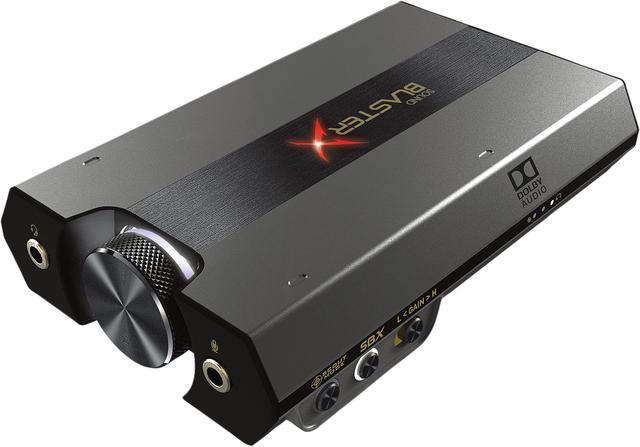
Creative Sound BlasterX G6
Our top recommendation for this category
Price as of Sep 3, 2026 — see current price on Amazon.
Short answer: probably not. Modern motherboards ship with onboard audio chips. The Realtek ALC1220, ALC4080, and similar. That are genuinely good for 95% of gamers. If you've got a $100 gaming headset plugged in via USB, you're already bypassing your motherboard's analog circuitry entirely. Adding a dedicated sound card isn't going to help you.
But there's a real 5% where it matters a lot. High-impedance headphones that need more power. Competitive players who want precise positional audio without coloration. Audiophiles running open-back cans who can actually hear the difference. And people with cheap motherboards where the onboard audio is genuinely noisy.
Here's how to figure out which camp you're in. And what to buy if you're in the 5%.
| Device | Type | Price | Best For | Impedance | |
|---|---|---|---|---|---|
| Creative Sound BlasterX G6 | USB DAC/Amp | $99 | Gaming + consoles | Up to 600Ω | Check Price |
| FiiO E10K (Olympus 2) Type-C | USB DAC/Amp | $69 | Budget upgrade | Up to 150Ω | Check Price |
| Schiit Fulla E | USB DAC/Amp | $109 | Audiophile + mic | Up to 150Ω | Check Price |
| Creative Sound BlasterX AE-5 Plus | Internal PCIe | $149 | Desktop power users | Up to 600Ω | Check Price |
When you actually need a sound card (or DAC/amp)
You own high-impedance headphones
This is the most common legitimate reason. Headphones like the Sennheiser HD 600 (300Ω) or Beyerdynamic DT 990 Pro (250Ω) need more current than a motherboard's 3.5mm jack can cleanly deliver. You'll get audio, but it'll be quiet and lacking dynamics. A dedicated headphone amplifier fixes this completely. And most external USB DACs include one.
If your headphones are under 80Ω (which covers almost every "gaming headset" on the market), your motherboard handles them fine. Skip the upgrade.
You hear electrical interference
That buzzing, whining, or static that changes pitch when you move your mouse? That's electromagnetic interference from your GPU or CPU leaking into your motherboard's analog audio section. Some boards handle this better than others. High-end motherboards like the ASUS ROG series often have shielding. Budget B650 boards? Hit or miss.
An external USB DAC eliminates this problem entirely because it handles all the digital-to-analog conversion outside your case, away from the noise.
You want gaming-specific surround processing
Virtual 7.1 surround sound for gaming is still a thing. The Creative Sound BlasterX G6 runs Creative's Super X-Fi head tracking technology and its own positional audio processing. For competitive FPS players who want the best possible footstep accuracy, this has real value. You don't get this from onboard audio.
You're on a console (PS5, Xbox, Switch)
Onboard audio doesn't exist on consoles in the same way it does on PC. An external USB DAC lets you connect audiophile headphones to a PlayStation or Xbox, get headphone amplification, and use virtual surround processing. The Creative G6 handles this specifically. It's one of the few gaming DACs designed for multi-platform use.
Who doesn't need one
If you're using a USB gaming headset, you already have a built-in DAC. Adding an external one does nothing because the headset bypasses your motherboard's audio section anyway.
If your headphones are under 80Ω, your phone could probably drive them. Your motherboard definitely can.
If you use a gaming headset through 3.5mm but it cost less than $80, you're unlikely to notice any improvement from an upgraded DAC. The headphone transducers are the limiting factor, not your audio path.
The best options if you do need one
Creative Sound BlasterX G6
Pros
- Works with PC, PS4/PS5, Xbox, and Nintendo Switch
- Drives headphones up to 600Ω cleanly
- Built-in virtual 7.1 surround with Scout Mode for competitive gaming
- USB-C connection, genuinely portable
Cons
- SBX surround can be heavy-handed if not tuned right
- Creative's software isn't everyone's favorite
- At $99, there are cheaper options if you don't need console support
Price as of Sep 3, 2026 — see current price on Amazon.
The G6 is the pick for most people actually upgrading. It handles multi-platform use (the only gaming DAC that works properly across PC, PS5, and Xbox without adapter gymnastics), drives demanding headphones cleanly, and includes Creative's Scout Mode virtual surround. Which does make footsteps more audible in CS2 and Valorant if you tune it right.
It's rated to drive headphones up to 600Ω, so 300Ω cans like the Sennheiser HD 600 sit well within its range. At $99, it's not cheap, but it does several jobs at once.
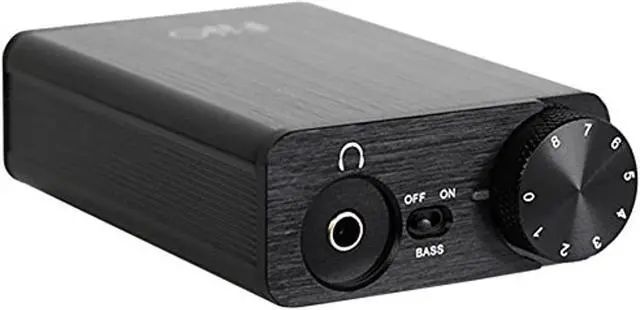
FiiO E10K (Olympus 2) Type-C
Pros
- USB-C connection, works on Mac and PC without drivers
- Clean, accurate sound with no gaming coloration
- Bass boost switch for headphones that need it
- Well under $75, huge value
Cons
- No gaming surround processing at all
- Console support is limited
- Can't drive very high-impedance headphones (150Ω max is the sweet spot)
Price as of Sep 3, 2026 — see current price on Amazon.
The FiiO E10K (Olympus 2) Type-C is what I'd recommend if you just need to fix interference or properly drive your 150Ω headphones without spending a lot. It's a clean, honest DAC/amp with no gimmicks. The USB-C connection works plug-and-play on Windows, Mac, and Linux. No software required.
It won't help you in competitive gaming the way the G6's processing does, but if your goal is just "make my good headphones sound like they should," this nails it.

Schiit Fulla E
Pros
- Built-in mic input for boom mics or external mics
- ESS ES9018 DAC chip - genuinely audiophile-grade signal chain
- Up to 300mW at 16Ω, real headphone amplification
- Optical input for TVs or consoles with optical out
Cons
- No gaming surround processing
- Schiit's warranty support is direct-only, not Amazon returns
- Design is understated - not gaming aesthetic
Price as of Sep 3, 2026 — see current price on Amazon.
The Schiit Fulla E is interesting because it's one of the few devices under $120 that includes a proper microphone input. If you're running an external boom mic (like an XLR-to-3.5mm), the Fulla E handles both your headphone output and mic input in one compact unit. The ESS ES9018 DAC inside is the same chip you'd find in equipment costing three times as much.
It's not a gaming device in the traditional sense. No surround processing, no RGB. But the audio quality is the best of these three options on a raw technical level.
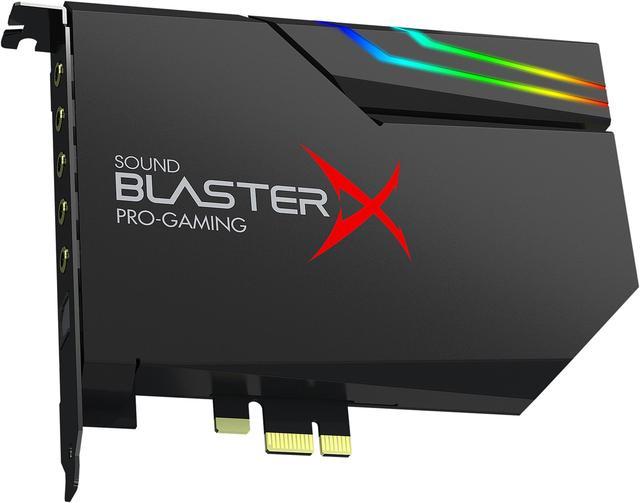
Creative Sound BlasterX AE-5 Plus
Pros
- Internal PCIe card - no USB required, cleaner power delivery
- 122dB SNR, the highest of any option here
- Bi-amp headphone output with dedicated amp per channel
- RGB strip included for case lighting
Cons
- Internal card means you need an available PCIe slot
- Doesn't work on consoles or laptops
- At $149, you're paying a premium for the internal installation
Price as of Sep 3, 2026 — see current price on Amazon.
The AE-5 Plus is for desktop PC gamers only. It's an internal PCIe sound card. You slot it into your motherboard like a GPU. And it has a 122dB signal-to-noise ratio, which is legitimately impressive. The bi-amp design runs a separate amplifier circuit for each channel, which reduces crosstalk.
And the reason most people pick an external USB DAC over an internal card in 2026 is convenience, not performance. The AE-5 Plus actually sounds better than the G6 in a direct comparison. But it only works in a desktop, can't be moved to a console, and costs $50 more. Know what you're buying it for.
Buying guide: what to actually look for
Impedance rating matters more than brand
Look for the headphone amp's output impedance spec. A lower output impedance (under 5Ω for general use) means better control over your headphones' response. The E10K is around 0.5Ω. Excellent. Match the amp's power output (mW at your headphone's impedance) to your headphone's sensitivity specs. A sensitive 32Ω headphone needs very little power; a 300Ω HD 600 needs real amplification.
USB DAC vs internal PCIe card
External USB DACs (the G6, E10K, Fulla E) work everywhere. PC, laptop, Mac, some consoles. They're also isolated from your computer's internal interference. Internal PCIe cards have better raw specs on paper but are desktop-only and require opening your case. Unless you specifically need the specs, go external.
Virtual surround: actually useful for gaming
Software 7.1 surround on a stereo headphone is controversial in audiophile circles. But for competitive gaming, it genuinely helps with positional audio. Hearing footsteps, shots, and enemy movement. Creative's Super X-Fi and DTS Headphone:X are the two best implementations. If you play CS2, Valorant, or any tactical shooter seriously, this is worth considering.
Don't need drivers? Get the FiiO
Windows and Mac recognize USB audio devices as generic audio interfaces without any software. The FiiO E10K (Olympus 2) Type-C and Fulla E work this way. The Creative G6 also works plug-and-play but unlocks extra features (surround, EQ) through the software. If you hate installing audio software, stick with FiiO or Schiit.
Frequently asked questions
- Will a sound card improve my gaming FPS?
- No. Audio processing has zero impact on frame rate in any modern game. If someone told you a sound card improves performance, they're wrong. It only affects audio quality.
- My USB headset sounds fine. Should I still upgrade?
- No. USB headsets have their own built-in DAC. Adding an external DAC/amp does nothing - the headset bypasses your motherboard's audio completely. Only 3.5mm headphones benefit from an external DAC.
- What about virtual surround sound? Is it worth it?
- For competitive FPS gaming, yes - it genuinely improves positional audio awareness. For music, movies, or single-player games where immersion matters more than precision, real binaural recordings or a quality stereo mix will often sound better than virtual surround.
- Can I use a gaming DAC with PS5 or Xbox Series X?
- The Creative Sound BlasterX G6 specifically supports PS5 and Xbox via USB. The FiiO E10K (Olympus 2) Type-C and Schiit Fulla E are USB Audio Class 2 devices that may work with PS5 but aren't officially supported and sometimes require a USB-A adapter.
- I have a $200 headset. Do I need an amp?
- Check the impedance. Most gaming headsets are 32Ω or less and designed to work without amplification. High-end open-back audiophile headphones (Sennheiser, Beyerdynamic, AKG) often need power - check the impedance spec and compare it to your motherboard's max output.
- Is there a difference between a 'sound card' and a 'DAC/amp'?
- Marketing difference mostly. An internal PCIe card is traditionally called a sound card. An external USB device is called a DAC/amp or USB audio interface. They do the same thing: convert digital audio to analog and amplify it for your headphones.
Bottom line
Most gamers with standard gaming headsets, USB headsets under $150, or headphones under 80Ω don't need to spend anything. Your onboard audio is fine.
The upgrade genuinely matters if you own audiophile headphones (300Ω Sennheisers, high-impedance Beyerdynamics), hear buzzing or static from your current setup, want competitive gaming surround processing, or play on both PC and console. In those cases, the Creative G6 is the best all-around pick, the FiiO E10K (Olympus 2) Type-C is the best value, and the Schiit Fulla E wins if you need a mic input.
How We Pick
We pick products by combining spec-level research, price checks, trusted third-party benchmarks, and owner sentiment from high-signal sources.
- Performance and real-world value in the category this guide targets
- Price-to-performance and deal consistency over recent pricing windows
- Build quality, reliability patterns, and known long-term issues
- Recommendation refresh cadence to keep these picks current
Author
TheTechSearch Editorial Team
Independent product reviewers & PC builders
We compare real-world specs, reviews and owner reports, price trends, and user feedback to recommend gear that actually makes sense to buy.