iPad Pro M4 vs Samsung Galaxy Tab S10 Ultra
iPad Pro M4 vs Galaxy Tab S10 Ultra compared on specs and reviews. Find out which premium tablet delivers better value in 2026. Expert picks, pros and cons,...
As an Amazon Associate we earn from qualifying purchases made through our links — this doesn't affect our picks.
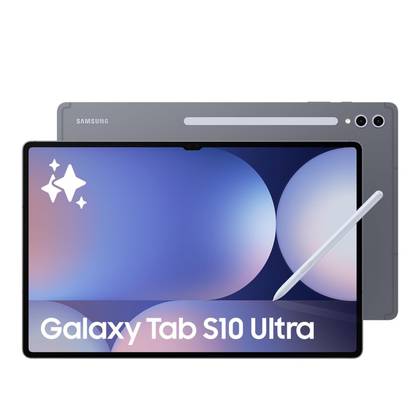
Samsung Galaxy Tab S10 Ultra
Our top recommendation for this category
Price as of Jan 22, 2026 — see current price on Amazon.
These two tablets represent the best each platform has to offer, and they take completely different approaches to the same problem. The iPad Pro M4 is thinner than a pencil and runs on a laptop-class chip. The Galaxy Tab S10 Ultra has a 14.6-inch screen that dwarfs most laptops. Both cost over $1,000 when you add accessories.
Here's where they actually differ.
Specs at a glance
| Spec | iPad Pro M4 (13-inch) | Galaxy Tab S10 Ultra |
|---|---|---|
| Display | 13" Ultra Retina XDR OLED | 14.6" Dynamic AMOLED 2X |
| Chip | Apple M4 | Snapdragon 8 Gen 3 for Galaxy |
| RAM | 16GB | 12GB-16GB |
| Storage | 256GB-2TB | 256GB-1TB |
| Stylus | Apple Pencil Pro ($129) | S Pen (included) |
| Weight | 682g | 718g |
| Starting Price | $1,099 | $1,200 |
Display
Both screens are OLED, both are gorgeous. But they're different sizes and that changes how you use them.
The iPad Pro's 13-inch Ultra Retina XDR panel is one of the best screens on any device. The tandem OLED technology pushes peak brightness to 1,600 nits for HDR content, and the anti-reflective coating (Apple calls it "nano-texture" on the upgrade) is built to cut glare in bright environments. Color accuracy is reference-grade, good enough to trust for photo editing.
Samsung's 14.6-inch screen is physically larger, and that extra 1.6 inches matters more than you'd expect. Split-screen multitasking with two full-size apps feels natural in a way that 13 inches doesn't quite manage. The Dynamic AMOLED 2X panel hits 120Hz and looks stunning, though peak brightness doesn't quite match Apple's implementation.
If you're doing creative work where color accuracy matters, the iPad Pro wins. If screen real estate for productivity is the priority, the Tab S10 Ultra's size advantage is real.
Performance
One practical note before the numbers. If you want the 13-inch M4 iPad Pro, Apple's own store is the place to buy, since it's hard to find on Amazon. The Galaxy Tab S10 Ultra is the easier one to put in a cart.
Samsung Galaxy Tab S10 Ultra
Pros
- 14.6-inch screen is unmatched for multitasking
- S Pen included, no extra purchase
- DeX mode is a genuine desktop replacement
- MicroSD expansion up to 1TB
- Samsung Notes with AI features
Cons
- $1,200 starting price
- Snapdragon 8 Gen 3 can't match M4 in sustained tasks
- 718g is heavy for a tablet
- Some Android apps still aren't optimized for tablets
Price as of Jan 22, 2026 — see current price on Amazon.
The Snapdragon 8 Gen 3 in the Tab S10 Ultra is fast for an Android tablet, but it can't keep up with the M4 in sustained workloads. Export a long 4K video, and the iPad finishes in half the time. For everyday tasks, browsing, note-taking, streaming, document editing, you won't notice a performance difference.
Where Samsung wins is software flexibility. DeX mode gives you a full desktop interface with resizable windows, a taskbar, and proper file management. Connect a keyboard and mouse and it genuinely feels like working on a computer. iPadOS Stage Manager tries to do this but remains more restrictive.
The M4 chip in the iPad Pro is, frankly, overkill. It's faster than most laptops. Video rendering in LumaFusion, 3D modeling in Nomad Sculpt and multitrack Logic Pro sessions are all well within its reach. The eight-core GPU handles graphically intensive tasks that would make the Tab S10 Ultra struggle.
But here's the frustration: iPadOS doesn't let you fully use that power. You can't run desktop applications. File management is still clunky. Stage Manager multitasking works but feels like Apple is holding back. The hardware is laptop-class; the software isn't.
Apple iPad Pro M4 (13-inch)
Pros
- M4 chip outperforms every other tablet by a wide margin
- Tandem OLED display with 1,600 nit HDR
- Thinnest Apple product ever, 5.1mm
- Thunderbolt/USB4 port
- Face ID works in any orientation
Cons
- Hard to find in stock on Amazon, so buy from Apple
- $1,099 before accessories
- iPadOS limits what the M4 chip can do
- 256GB base with no microSD
- Apple Pencil Pro is $129 extra
Price as of Jan 22, 2026 — see current price on Amazon.
Stylus experience
The S Pen comes in the box and magnetically attaches to the back of the tablet for charging. It's responsive, the latency is low, and Samsung Notes is a capable app. Pressure sensitivity and tilt detection work well for drawing and handwriting.
Apple Pencil Pro costs $129 extra but is the better stylus. Haptic feedback gives you a physical click when switching tools. The squeeze gesture for changing modes is intuitive. Hover detection previews your strokes before you touch the screen. And the Apple Pencil simply feels more precise, the gap between input and screen response is smaller.
If the cost of the stylus is a factor, Samsung wins by default. If writing feel matters most, Apple Pencil Pro is the gold standard.
Software and ecosystem
iPadOS has better tablet-optimized apps. Full stop. From Procreate to LumaFusion to GoodNotes, the best tablet apps are either iPad-exclusive or significantly better on iPad. The trade-off is that iPadOS itself is limiting, no real file system, restricted multitasking, and no sideloading without jumping through hoops.
Android on the Tab S10 Ultra gives you more freedom. Install any APK, use a proper file manager, run apps in floating windows, connect to external displays with desktop-mode output. Samsung's One UI adds features that stock Android doesn't have, and Galaxy AI in Samsung Notes can summarize, translate, and organize your handwritten notes automatically.
The app gap is closing but hasn't closed. Some Android apps still look like blown-up phone apps on a 14.6-inch screen. Instagram, Snapchat, and several banking apps look rough. It's better than it was two years ago, but it's still behind iPadOS.
Battery and charging
Both tablets last about 10-12 hours in mixed use. The iPad Pro is slightly more efficient thanks to the M4 chip's power optimization, but we're talking 30-60 minutes difference in a full day.
The Tab S10 Ultra charges faster. Samsung's 45W charging gets you to 50% in about 30 minutes. The iPad Pro tops out at around 30W with a USB-C PD charger, taking closer to 40 minutes for the same charge.
Accessories and total cost
This is where things get eye-opening:
iPad Pro total: $1,099 (tablet) + $129 (Pencil Pro) + $349 (Magic Keyboard) = $1,577
Tab S10 Ultra total: $1,200 (tablet with S Pen) + $350 (Book Cover Keyboard) = $1,550
Nearly identical total cost, but Samsung includes the stylus. The Magic Keyboard is a better keyboard than Samsung's Book Cover, though, the trackpad and typing feel are superior. Those iPad figures are Apple's list prices.
Who should buy which
Get the iPad Pro M4 if: (and you can find one, see the availability note above)
- You do creative work (art, video editing, music production)
- App quality matters more than flexibility
- You want the best stylus experience (and don't mind paying for it)
- You're already in the Apple ecosystem
Get the Galaxy Tab S10 Ultra if:
- Screen size is a priority
- You want a tablet that works more like a laptop (DeX mode)
- You prefer Android's flexibility and file management
- The included S Pen matters to your budget
Neither of these is a bad choice. They're both excellent tablets held back slightly by their operating systems in different ways. The iPad Pro has better hardware and apps but limiting software. The Tab S10 Ultra has more capable software but weaker app optimization.
For drawing and note-taking, the iPad Pro is the pick, because the Pencil Pro is unmatched there. As a laptop replacement, Samsung's DeX mode tips it the other way.
That's the pick on merit. The easier one to buy is the Galaxy Tab S10 Ultra, because the 13-inch M4 iPad Pro is hard to find on Amazon. If you want the iPad, buy it from Apple directly rather than paying a reseller markup.
As an Amazon Associate, we earn from qualifying purchases. This doesn't affect our recommendations or editorial independence.
Related guides
Frequently asked questions
- Which is better for creative professionals, iPad Pro or Galaxy Tab S10?
- The iPad Pro with Apple Pencil Pro is the industry standard for digital artists, illustrators, and designers. The Pencil Pro's hover detection and ProCreate app ecosystem have no direct Android equivalent. The Galaxy Tab S10 Ultra with S Pen is a capable creative tool, especially with Samsung Notes and supported apps, but the iPad Pro's app depth for creative workflows is significantly broader.
- Which tablet is better for students?
- The iPad Air is typically the better student recommendation due to the stronger academic app ecosystem and Apple Pencil compatibility at a lower price than the iPad Pro. For Galaxy Tab, the S10 FE offers similar value. The Galaxy Tab S10 series offers more flexible file management and native USB-C storage, which some students prefer. The choice often comes down to whether the student is in an iPhone or Android ecosystem.
- Does the Galaxy Tab S10 have better multitasking than iPad Pro?
- Samsung DeX on the Galaxy Tab S10 Ultra turns the tablet into a near-desktop experience with windowed apps, an external monitor mode, and a mouse and keyboard workflow that is more flexible than iPad's Stage Manager. For power users who want desktop-like multitasking, the Galaxy Tab's DeX mode is arguably more capable. iPad Pro's Stage Manager is more polished but more limited in window count and arrangement.
- Which tablet has better display quality?
- The iPad Pro 11-inch and 13-inch use an Ultra Retina XDR OLED tandem display starting in 2024, delivering exceptional brightness (1600 nits peak), wide color, and ProMotion 120Hz. The Galaxy Tab S10 Ultra uses Dynamic AMOLED 2X at 120Hz with excellent color but lower peak brightness. In direct comparison, the iPad Pro's display is considered best-in-class. The Galaxy Tab S10 is excellent but a step behind the iPad Pro in pure display performance.
- Which is better for gaming?
- iPad Pro has the advantage for game library depth and exclusive titles. Apple Arcade provides hundreds of premium games with no ads. High-end mobile games like Genshin Impact and PUBG Mobile are often optimized for iOS first. The A17 Pro chip in iPad Pro delivers console-adjacent gaming performance. The Galaxy Tab S10 is capable for Android gaming, but Android's tablet gaming library is thinner and fewer games are optimized for the larger screen.
How We Pick
We pick products by combining spec-level research, price checks, trusted third-party benchmarks, and owner sentiment from high-signal sources.
- Performance and real-world value in the category this guide targets
- Price-to-performance and deal consistency over recent pricing windows
- Build quality, reliability patterns, and known long-term issues
- Recommendation refresh cadence to keep these picks current
Author
TheTechSearch Editorial Team
Independent product reviewers & PC builders
We compare real-world specs, reviews and owner reports, price trends, and user feedback to recommend gear that actually makes sense to buy.