Steam Deck vs ROG Ally vs Legion Go
Steam Deck OLED, ROG Ally X and Legion Go compared on specs, OS and price, plus which of the three you can actually buy right now. Expert picks, pros and con...
As an Amazon Associate we earn from qualifying purchases made through our links — this doesn't affect our picks.
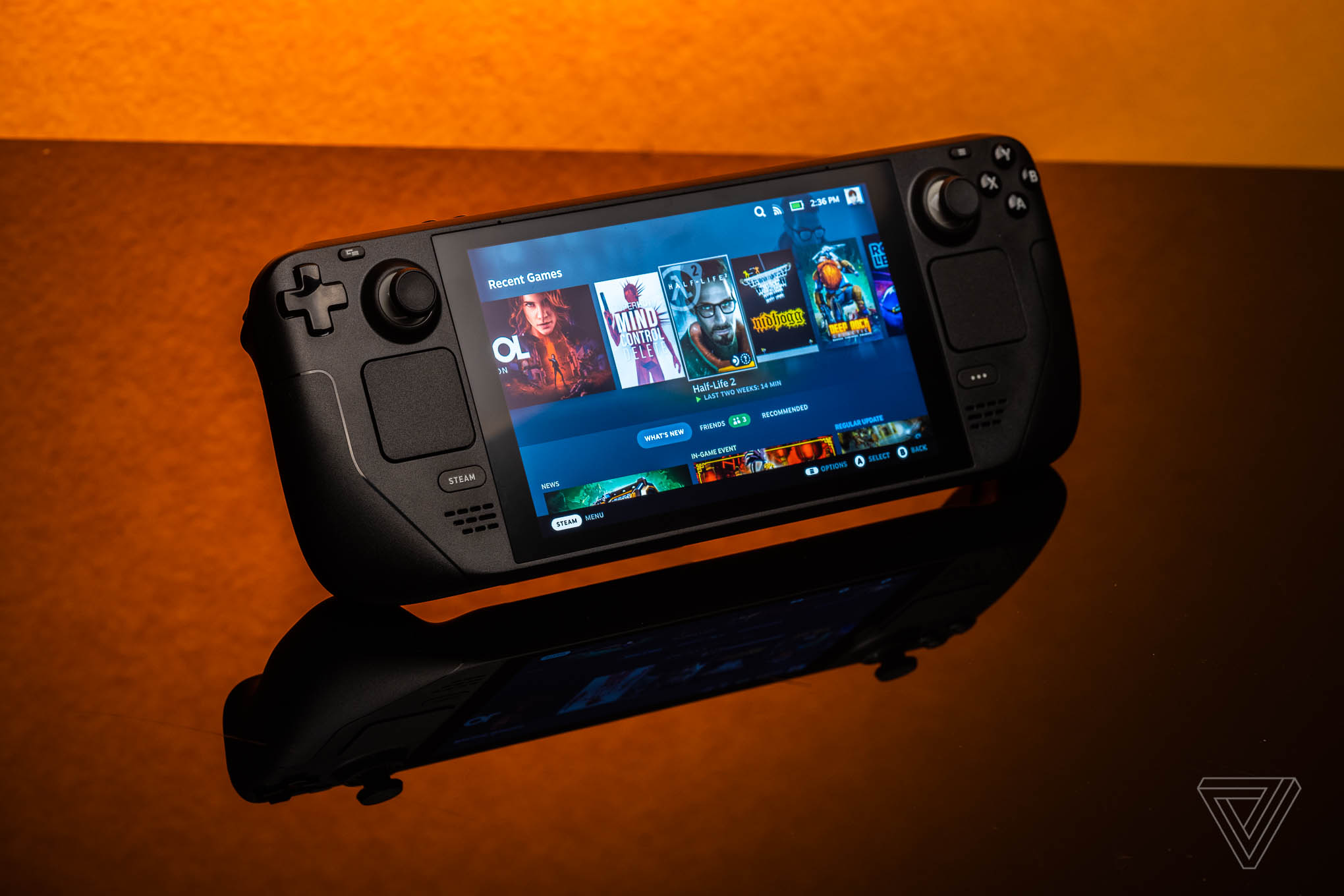
Valve Steam Deck OLED 512GB
Our top recommendation for this category
Price as of Feb 13, 2026 — see current price on Amazon.
Gaming handhelds have gone from "neat toy" to genuine gaming platform in two years. The Steam Deck proved the concept, and ASUS and Lenovo answered with Windows-based alternatives. All three are still worth comparing on the merits. Only one of them, though, is something you can put in a cart on Amazon today.
That last point matters enough to put up front: the ROG Ally X and the original Lenovo Legion Go aren't sold new on Amazon right now. The comparison below still tells you which design won on which axis, but the only buy button on this page is the Steam Deck's.
Availability right now
The 2026 memory and storage price spike reshaped this whole category. Valve raised Steam Deck pricing in May 2026, and Lenovo's original Legion Go moved from a $699.99 launch price to roughly $999 at major retailers. ASUS still lists the ROG Ally X at $799.99, but the Amazon listings for it are showing "Currently unavailable" rather than a price.
| Feature | Steam Deck OLED | ROG Ally X | Legion Go |
|---|---|---|---|
| Display | 7.4" OLED 90Hz | 7" IPS 120Hz | 8.8" IPS 144Hz |
| Chip | AMD Custom APU | AMD Z1 Extreme | AMD Z1 Extreme |
| RAM | 16GB LPDDR5 | 24GB LPDDR5X | 16GB LPDDR5X |
| Storage | 512GB/1TB NVMe | 1TB NVMe | 512GB/1TB NVMe |
| Battery | 50Wh | 80Wh | 49.2Wh |
| OS | SteamOS (Linux) | Windows 11 | Windows 11 |
| Weight | 669g | 678g | 854g |
| Sold new on Amazon | Yes | No | No |
Steam Deck OLED
Valve Steam Deck OLED 512GB
Pros
- OLED display with HDR, deep blacks and vivid color
- SteamOS is purpose-built for handheld gaming
- Suspend and resume is the smoothest of the three
- ProtonDB community compatibility data is excellent
- The only one of these three sold new on Amazon
Cons
- Weaker hardware than the Z1 Extreme competitors
- Some Windows games do not run under Proton
- No native Game Pass
- Valve sells it direct for $789, so Amazon carries an $80 premium
Price as of Feb 13, 2026 — see current price on Amazon.
Check Valve's own store before you buy this one. Valve lists the 512GB OLED at $789 direct, and the Amazon listing above is $869, so the convenience of Prime shipping costs about $80 here. That is a real gap and you should know about it.
The OLED display is what sets the Deck apart. HDR in supported titles, black levels the IPS competitors cannot match, and colors that hold up next to a good phone screen. Going from the Deck's OLED to the Ally's IPS panel reads as a downgrade to most reviewers who have put them side by side.
SteamOS is the other half of the argument. It was designed from the ground up for a handheld. Suspend and resume works cleanly, the UI makes sense under thumbstick navigation, and power management is tuned for the hardware rather than bolted on. Windows on a handheld still does not feel like that.
The hardware is genuinely weaker than the Z1 Extreme in the other two. Most Steam Deck games land at 30 to 60fps at the native 800p, which stays sharp on a 7.4-inch panel. You are not running everything at max settings. The optimized OS and the lower native resolution cover a lot of that gap.
ASUS ROG Ally X
Buy it from ASUS. The Ally X isn't sold new on Amazon right now, but ASUS still sells it at a $799.99 list price through its own channels, so the device has not been discontinued.
On the merits it remains the performance leader of the three. The Z1 Extreme paired with 24GB of RAM runs demanding titles at higher settings than the Steam Deck manages, and the 80Wh battery is the largest in any mainstream gaming handheld, roughly double the original Ally's 40Wh.
Windows 11 is both the Ally's biggest advantage and its biggest frustration. Any launcher works, Steam, Epic, Game Pass, Battle.net, emulators. But Windows was not designed for thumbstick navigation, and update prompts and desktop-mode intrusions break the handheld illusion regularly.
Lenovo Legion Go
Buy it from Lenovo. The original Legion Go isn't sold new on Amazon right now. Lenovo's own pricing on the original 512GB model moved to roughly $999 after the 2026 memory crunch, well above its $699.99 launch price.
The Legion Go took a different approach with a bigger screen and detachable controllers for tabletop play. Its 8.8-inch 1600p 144Hz display is the strongest panel spec on this list, and one controller switches to FPS mode and works as an air mouse. It is a creative design.
The trade-off is weight and battery. At 854g with the controllers attached it is the heaviest of the three by a wide margin, and its 49.2Wh battery gives the shortest runtime here.
Game compatibility
Steam Deck: roughly 80% of the Steam library runs via Proton, with more titles verified weekly. Non-Steam games need workarounds. No native Game Pass.
ROG Ally X / Legion Go: anything that runs on Windows runs here. Steam, Epic, Game Pass, GOG, emulators, no compatibility concerns. The catch is dealing with Windows.
If Xbox Game Pass is important to you, that is a point for Windows. If you mostly play Steam games, SteamOS is the better experience.
Build quality and comfort
Reviewers consistently rate the Steam Deck best in hand. Its ergonomic grip, balanced weight distribution and trackpads, which are unique to the Deck, suit long sessions. ASUS lands close behind with the Ally X, which is similar but slightly less ergonomic. Weight is where the Legion Go loses, at 854g it is the least comfortable of the three to hold for long stretches.
What to buy
Short version: buy the Steam Deck OLED, because right now it is the only one of these three you can buy from Amazon.
Steam Deck OLED, $869 on Amazon or $789 direct from Valve. The OLED panel and SteamOS polish make it the easiest recommendation even when the other two are in stock. Buy direct from Valve if you would rather keep the $80.
ROG Ally X. If you want maximum performance, full Windows and the longest battery, this is still the design to want. You will have to source it somewhere other than Amazon at the moment, and ASUS lists it at $799.99.
Legion Go. If tabletop mode and the 8.8-inch screen appeal to you, the original Legion Go is worth hunting down, but at roughly $999 and with no new Amazon stock it is a hard sell against a $789 Steam Deck.
We would rather tell you two of these three are not purchasable today than point you at a dead listing.
As an Amazon Associate, we earn from qualifying purchases. This doesn't affect our recommendations or editorial independence.
Related guides
- PS5 Pro vs Xbox Series X: Which Console Should You Buy?
- Best 4K Monitors in 2026
- Best 4K TVs Under $1000 in 2026
Frequently asked questions
- Which handheld gaming PC is best for beginners?
- The Steam Deck OLED is the easiest starting point. SteamOS is purpose-built for handheld gaming with a clean library interface, automatic game compatibility via Proton, and a large community for troubleshooting. The ROG Ally and Legion Go run Windows 11, which is powerful but requires more setup and maintenance. For someone who just wants to pick up and play without configuring Windows, the Steam Deck wins.
- Why can't I buy the ROG Ally X or Legion Go on Amazon right now?
- Both devices still exist and both manufacturers still sell them, but neither is sold new on Amazon right now. The 2026 memory and storage price spike disrupted supply across the whole handheld category. Check the manufacturer stores directly, where ASUS lists the Ally X at $799.99 and Lenovo's original Legion Go has moved to roughly $999.
- Can handheld gaming PCs play all PC games?
- Yes, with varying performance. Most modern games run on all three handhelds, but demanding titles may need settings reduced to 720p or 1080p with medium or low settings to maintain 30 to 60fps. The Steam Deck has a compatibility rating system showing which games run great, okay, or poorly. The ROG Ally and Legion Go run full Windows, so any Windows PC game is installable, though optimizing settings for handheld play takes more effort.
- Which has the best display, Steam Deck OLED, ROG Ally, or Legion Go?
- The Steam Deck OLED has the best display of the three. Its 7.4-inch OLED panel delivers true blacks, vibrant colors, and 90Hz refresh rate at 1280x800 native resolution. The ROG Ally has a 1080p 120Hz IPS display that is sharper but lacks OLED contrast. The Legion Go has the largest display at 8.8 inches and 1600p resolution, which looks great but demands more GPU power to run natively. For display quality, Steam Deck OLED leads. For resolution, Legion Go.
- Is the Steam Deck OLED cheaper direct from Valve?
- Yes. Valve lists the 512GB Steam Deck OLED at $789 on its own store following the May 2026 price adjustment, while the Amazon listing sits at $869. That is an $80 difference for the same hardware. Buy from whichever you prefer, but check both before you order, because handheld pricing has moved repeatedly through 2026.
- Which handheld gaming PC has the best battery life?
- The Steam Deck OLED and ROG Ally X lead battery life. The Steam Deck OLED gets 4 to 8 hours for lighter games and 2 to 3 hours for demanding titles thanks to its efficient AMD APU and power-optimized SteamOS. The ROG Ally X with its 80Wh battery delivers similar totals on Windows. The standard ROG Ally (40Wh) and Legion Go get 1.5 to 2.5 hours for demanding games. TDP limits and game selection dramatically affect all handheld gaming battery life.
How We Pick
We pick products by combining spec-level research, price checks, trusted third-party benchmarks, and owner sentiment from high-signal sources.
- Performance and real-world value in the category this guide targets
- Price-to-performance and deal consistency over recent pricing windows
- Build quality, reliability patterns, and known long-term issues
- Recommendation refresh cadence to keep these picks current
Author
TheTechSearch Editorial Team
Independent product reviewers & PC builders
We compare real-world specs, reviews and owner reports, price trends, and user feedback to recommend gear that actually makes sense to buy.