Is a Wireless Gaming Mouse Worth It in 2026?
Yes, for most people in 2026. Here's how to decide if a wireless gaming mouse is right for your setup and budget. Expert picks, pros and cons, and side-by-si...
As an Amazon Associate we earn from qualifying purchases made through our links — this doesn't affect our picks.

Logitech G305 LIGHTSPEED Wireless Gaming Mouse
Our top recommendation for this category
Price as of Sep 6, 2026 — see current price on Amazon.
Short answer: yes, wireless gaming mice are worth it for most people in 2026. The technology gap between wired and wireless closed years ago, and at this point you're paying a premium for cable-free convenience, not accepting a performance penalty.
But there are real exceptions. If you play ultra-competitive games where placebo effects matter as much as real ones, or your budget is under $40, the calculation looks different. Let me break it down honestly.
The Case For Wireless (It's Pretty Strong)
A few years ago, the hesitation made sense. Early wireless mice had noticeable latency, unpredictable polling, and batteries that died mid-session. None of that is true anymore.
Modern 2.4GHz wireless protocols (Logitech's LIGHTSPEED, Razer's HyperSpeed, SteelSeries' QuantumWireless) deliver latency that's indistinguishable from USB in blind testing. We're talking sub-1ms round-trip at 1000Hz polling. The pros have noticed too: a significant chunk of the CS2 and Valorant professional scene plays on wireless, and they're not taking that risk without a good reason.
Battery life is the other thing that improved dramatically. The Aerox 3 Wireless does 200 hours on a single charge. The Razer DeathAdder V3 HyperSpeed claims 100 hours. Even the budget Logitech G305 runs about 250 hours on one AA battery. You're charging these things once a month, not babysitting them.
And cable drag. It's subtle but real. A stiff USB cable creates resistance that changes how the mouse feels mid-flick. Top players have been using bungees and paracord mods for years specifically to eliminate this. Wireless just... solves it.
| Mouse | Weight | Battery | Polling | Price | |
|---|---|---|---|---|---|
| Logitech G305 | 99g | 250 hrs (AA) | 1000Hz | $39.99 | Check Price |
| Razer DeathAdder V3 HyperSpeed | 55g | 100 hrs | 1000Hz | $79.99 | Check Price |
| SteelSeries Aerox 3 Wireless | 68g | 200 hrs | 500Hz | $99.99 | Check Price |
| Logitech G Pro X Superlight 2 | 60g | 95 hrs | 2000Hz | $154.00 | Check Price |
When Wireless Makes Sense
You'll feel the difference if you game three or more hours a day. The ergonomic benefit of zero cable drag adds up. Desk cable management is the other obvious win. If you care about a clean setup, one less wire matters.
Wireless also makes sense if you travel with your gear. Swapping between a gaming desk and a laptop bag is genuinely more convenient without a cable to manage.
And if you're buying new anyway? There's no good reason to choose wired over wireless at the $60+ price point anymore. The premium is narrow (usually $20 to $40), and the tradeoffs have essentially disappeared.
When to Stick With Wired
Budget under $40: wired mice at this price point are frankly better than wireless ones. The G305 at $40 is genuinely good, but wired options like the Logitech G203 at $25 give you a proven sensor without the battery dependency.
Ultra-competitive play with a mental focus on gear: if you're the kind of player who notices everything and will be distracted by the thought that your wireless connection might drop at the wrong moment (even if it statistically won't) wired is the right call. Hardware placebo effects are real, and a mouse you trust completely beats a technically superior one you're second-guessing.
You're replacing something that works fine: don't buy a new mouse because wireless exists. If your current mouse feels good and tracks accurately, spend that money elsewhere.
The Recommended Wireless Mice
These four cover the market from budget to best-in-class. I'd buy any of them.
Logitech G305 LIGHTSPEED Wireless Gaming Mouse
Pros
- 250-hour battery on one AA
- LIGHTSPEED wireless at 1000Hz
- Genuinely lightweight at 99g
- Proven HERO 12K sensor
Cons
- 99g is heavier than ultralight competition
- No USB-C charging (AA battery)
- No RGB lighting
Price as of Sep 6, 2026 — see current price on Amazon.
The G305 is the answer when someone asks for a cheap wireless mouse recommendation. At $40 it's not competing with budget wired mice on specs. It's competing on value. 250 hours on a single AA battery means you're almost never thinking about power. The HERO 12K sensor is the same family used in Logitech's flagship mice, and the LIGHTSPEED protocol keeps latency tight at 1000Hz polling.
It's heavier than today's ultralight mice, and the AA battery setup is old-school. But for casual to mid-serious gamers, it's hard to argue with a $40 wireless mouse that just works.
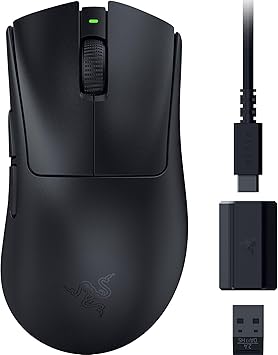
Razer DeathAdder V3 HyperSpeed Wireless Gaming Mouse
Pros
- 55g ultralight build
- 100-hour battery life
- Advanced 26K optical sensor
- USB-C charging
- 8 programmable buttons
Cons
- Right-handed only ergonomic shape
- 500Hz polling (not 1000Hz/8000Hz)
- HyperSpeed wireless (no multi-device pairing)
Price as of Sep 6, 2026 — see current price on Amazon.
This is the wireless mouse I'd hand to someone with an $80 budget without hesitation. Fifty-five grams is legitimately ultralight. The 26K DPI sensor tracks clean at high speeds, the 100-hour battery is USB-C rechargeable, and the ergonomic right-handed shape fits most hand sizes well.
The polling rate is 500Hz, not 1000Hz. In practice that's a non-issue for 95% of players. But if you're the kind of person who would notice it, the Aerox 3 or Superlight 2 are the upgrade paths.

SteelSeries Aerox 3 Wireless Gaming Mouse
Pros
- 68g ultralight with honeycomb shell
- 200-hour battery life (longest in class)
- IP54 water resistance
- TrueMove Air optical sensor
Cons
- Honeycomb design shows dust easily
- No RGB (by design, for weight)
- Slightly outdated sensor vs newer mice
Price as of Sep 6, 2026 — see current price on Amazon.
The Aerox 3 Wireless is SteelSeries' answer to ultralight wireless, and 200 hours of battery life is genuinely class-leading. The honeycomb shell sheds weight without going full racing-seat aesthetic. It's more subtle than some competitors. IP54 water resistance is a nice touch for people who drink at their desk.
The TrueMove Air sensor is solid but not the newest tech. The Razer DeathAdder V3 HyperSpeed has a more modern sensor at the same price range. But the Aerox 3's battery life and the SteelSeries GG software make it a compelling pick for people in that ecosystem.

Logitech G PRO X Superlight 2 Wireless Gaming Mouse
Pros
- 60g symmetrical design
- HERO 2 sensor with 44,000 DPI max
- 2000Hz polling
- PowerPlay wireless charging compatible
- Pro-tournament tested
Cons
- $154 is a significant premium
- Symmetrical shape isn't for everyone
- USB-C port only (no Bluetooth)
Price as of Sep 6, 2026 — see current price on Amazon.
The Superlight 2 is what the professional scene converged on, and the reasons are obvious: 60g symmetrical build, 2000Hz polling, and a sensor that's been tested in tournament conditions extensively. If you're building a serious competitive setup and the price doesn't make you wince, this is the one.
The 2000Hz polling is genuinely meaningful at high sensitivities where input timing matters. PowerPlay compatibility means you can charge it wirelessly through your mousepad while gaming: no interruptions, ever. It's expensive, but not in the way that makes you feel ripped off.
Do You Really Notice the Difference?
Honestly? Most people notice cable drag more than they expected to, and latency less than they feared. The transition from wired to wireless feels like removing a subtle friction. It doesn't transform your game, but it's one less variable in the way.
The folks who report the biggest quality-of-life difference are usually the ones who had older wired mice (pre-2020 era) and went straight to a modern wireless. If you're coming from an already-excellent wired mouse, the difference in gameplay is near zero. The difference in desk experience is not.
Buying Guide: What to Look For
Wireless protocol matters. 2.4GHz (LIGHTSPEED, HyperSpeed, QuantumWireless) is what you want for gaming, not Bluetooth. Bluetooth is for office mice. 2.4GHz dongles are faster, more stable, and built for millisecond timing.
Battery type affects convenience. Rechargeable (USB-C) is more convenient for most people. AA-battery mice like the G305 never need charging, but you need to keep batteries around. Neither is wrong, know your preference.
Weight for your grip style. Palm grip players can handle more weight. Claw and fingertip grip players notice heavier mice more and typically prefer sub-80g builds.
Polling rate. 1000Hz is more than enough for most gaming. 8000Hz polling (available on some higher-end mice) is hardware flex territory for almost everyone. 500Hz (Aerox 3) is fine for anything below Grandmaster rank.
Frequently asked questions
- Will a wireless mouse give me more lag than wired?
- No, not with a 2.4GHz wireless gaming mouse from a major manufacturer. Sub-1ms latency at 1000Hz polling is indistinguishable from USB in controlled testing and real gameplay. Bluetooth mice are a different story. Those do have measurable latency and aren't suitable for gaming.
- What if my battery dies mid-game?
- Modern wireless gaming mice last 70 to 250 hours per charge. If you charge weekly (which takes a few minutes), you won't run out mid-session. Mice like the Superlight 2 also support hot-swapping, plug in USB-C while you play and it charges.
- Is wireless gaming mouse good for FPS games?
- Yes. A significant portion of the Counter-Strike 2 and Valorant pro scene now plays on wireless mice. The latency concern that existed five years ago is gone with 2.4GHz protocols running at 1000Hz+. The DeathAdder V3 HyperSpeed and Superlight 2 are both used at the competitive level.
- How much more does a wireless gaming mouse cost?
- Typically $20 to $40 more than the equivalent wired model. The Logitech G305 wireless is $40 vs the wired G203 at $25. The Superlight 2 wireless is $154 vs the GPX wired at around $90. The premium narrows as you go up-market.
- Can I use a wireless gaming mouse for console gaming?
- On PC-connected consoles (like using a PS5 with keyboard/mouse support for specific games), yes. The USB dongle plugs into any USB-A port. Native console support varies by game. Most competitive console titles don't allow mouse input by default.
Bottom Line
Wireless gaming mice are worth it in 2026. The technology works, the prices are reasonable, and the quality-of-life benefit, especially if you care about desk cleanliness or play for extended sessions, is real. Start with the Razer DeathAdder V3 HyperSpeed at $80 if you want great bang-for-buck wireless. Go with the Logitech G305 if budget is the priority. Step up to the Superlight 2 if you want the best.
The only hard case for wired is a sub-$40 budget or a competitive mindset where you need zero psychological variables. Everyone else: go wireless.
How We Pick
We pick products by combining spec-level research, price checks, trusted third-party benchmarks, and owner sentiment from high-signal sources.
- Performance and real-world value in the category this guide targets
- Price-to-performance and deal consistency over recent pricing windows
- Build quality, reliability patterns, and known long-term issues
- Recommendation refresh cadence to keep these picks current
Author
TheTechSearch Editorial Team
Independent product reviewers & PC builders
We compare real-world specs, reviews and owner reports, price trends, and user feedback to recommend gear that actually makes sense to buy.