Best 3D Printers 2026
The best 3D printers in 2026, from beginner-friendly Bambu Lab machines to advanced Creality options, with researched picks for every budget. Expert picks, p...
As an Amazon Associate we earn from qualifying purchases made through our links — this doesn't affect our picks.

ELEGOO Centauri 2
Our top recommendation for this category
Price as of Jul 14, 2026 — see current price on Amazon.
In this guide
- Quick Picks
- ELEGOO Centauri 2: Best Budget 3D Printer
- Bambu Lab A1 Mini: Best Beginner 3D Printer
- Bambu Lab A1 Mini Combo: Best Multi-Color Under $500
- Creality K1C: Best for Tinkerers and Carbon Fiber Printing
- Bambu Lab P1S: Best Enclosed 3D Printer
- What to Look for When Buying a 3D Printer
- Frequently Asked Questions
- Bottom Line
Three years ago, getting a 3D printer to actually work took a weekend of calibration, a YouTube PhD, and a tolerance for failure. That's mostly over now. Bambu Lab showed up and basically forced the entire industry to catch up, and in 2026 even the cheapest printers on this list can produce excellent results straight out of the box.
The market has split cleanly into two camps: Bambu Lab ecosystem printers (fast, automatic, closed-ish firmware) and everything else (more open, usually cheaper, steeper learning curve). This guide covers both sides honestly, so you can pick what actually fits your workflow.
Quick Picks
| Model | Price | Build Volume | Speed | Best For | |
|---|---|---|---|---|---|
| ELEGOO Centauri 2 | $279 | 256x256x256mm | 500mm/s | Big prints on a budget | Check Price |
| Bambu Lab A1 Mini | $299 | 180x180x180mm | 500mm/s | Beginners who want plug-and-play | Check Price |
| Bambu Lab A1 Mini Combo | $449 | 180x180x180mm | 500mm/s | Multi-color on a budget | Check Price |
| Creality K1C | $439 | 220x220x250mm | 600mm/s | Tinkerers, carbon fiber | Check Price |
| Bambu Lab P1S | $699 | 256x256x256mm | 500mm/s | Enclosed, engineering filaments | Check Price |
ELEGOO Centauri 2: Best Budget 3D Printer
ELEGOO Centauri 2
Pros
- CoreXY motion at up to 500mm/s with 20,000mm/s² acceleration
- Full auto calibration, auto Z offset and vibration compensation
- 256x256x256mm build volume, the same cube as the P1S
- 350°C nozzle and 110°C bed cover PLA, PETG and TPU
Cons
- Open frame, so ABS and ASA are a struggle
- No built-in camera for remote monitoring
- Four-color printing needs the pricier Centauri 2 Combo
Price as of Jul 14, 2026 — see current price on Amazon.
At $279, the Centauri 2 undercuts the A1 Mini by $20 and gives you a far bigger print area. Its 256mm build cube matches the P1S, a machine that costs $420 more. You're not trading print size for price here.
It's a CoreXY printer, the same motion layout Bambu uses on the P1S, rather than the bed-slinger design on the A1 Mini. ELEGOO rates it at 500mm/s with 20,000mm/s² acceleration and recommends about 300mm/s for everyday quality. That 350°C nozzle and 110°C bed handle PLA, PETG and TPU comfortably.
Setup is mostly automatic. ELEGOO's launch announcement lists automatic calibration, four-point auto leveling, auto Z offset, active vibration compensation and pressure advance calibration. Those used to be the tuning jobs that ate a new owner's first weekend.
What you give up is the enclosure and a camera. ABS and ASA will fight you on an open frame, and there's no way to watch a print remotely. Multi-color is possible within the family, but only if you buy the Centauri 2 Combo with ELEGOO's four-spool CANVAS unit. The standalone printer prints one color at a time.
Bambu Lab A1 Mini: Best Beginner 3D Printer
Bambu Lab A1 Mini
Pros
- Sets up in 20 minutes, genuinely
- Auto calibration handles everything
- Quiet operation under 48dB
- Bambu Studio slicer is excellent
Cons
- 180mm build volume is limiting
- No enclosure for ABS/ASA
- Ecosystem lock-in for AMS features
Price as of Jul 14, 2026 — see current price on Amazon.
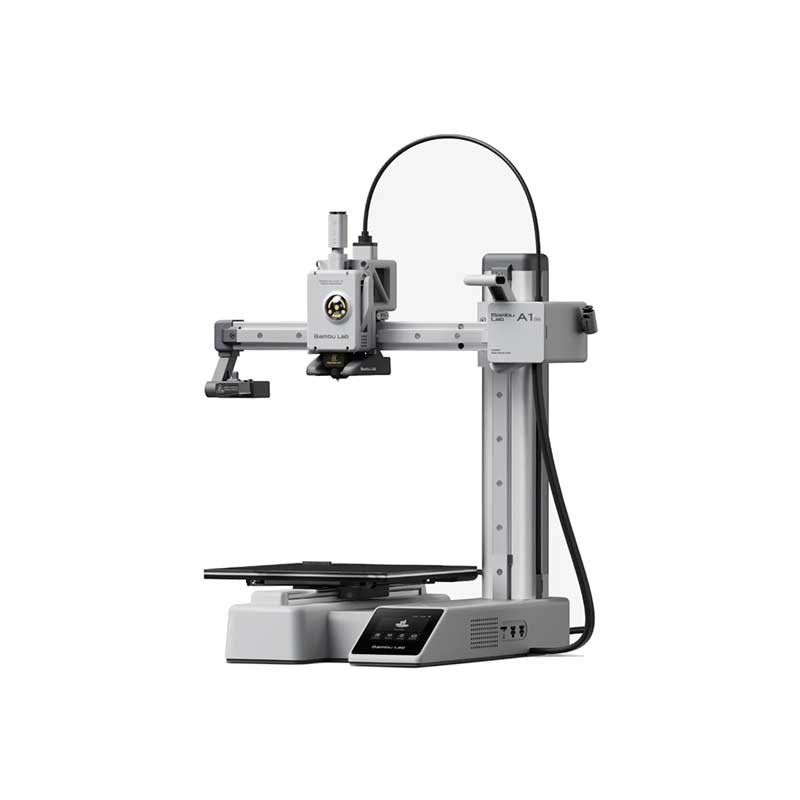
The A1 Mini is what happens when a printer company actually prioritizes the new user experience. You pull it out of the box, plug it in, run a 15-minute auto calibration sequence, and print. New owners with zero 3D printing experience regularly report a good print on their first attempt. That was not possible two years ago on any printer at this price.
The 180x180x180mm build volume is the honest limitation here. It's enough for most practical prints (phone stands, cable organizers, hooks, miniatures) but you'll run into walls quickly if you want to print cosplay armor panels or large functional parts. Know this going in.
Where Bambu Lab genuinely wins is the software stack. Bambu Studio is the best consumer slicer available right now. It handles supports, bed adhesion, and multi-part arrangements intelligently in a way that can take weeks to learn in PrusaSlicer. The auto flow rate compensation actively adjusts extrusion mid-print. These aren't marketing bullet points. They produce noticeably better prints than you'd get tweaking settings manually.
At $299, this is 40% cheaper than the old Prusa Mini+ and produces comparable or better results. For a first printer, it's hard to argue against.
Bambu Lab A1 Mini Combo: Best Multi-Color Under $500
Bambu Lab A1 Mini Combo
Pros
- AMS lite enables 4-color printing
- Same reliable A1 Mini base
- Multi-color Bambu PLA prints look stunning
- Great for gifts and decorative pieces
Cons
- AMS lite is fussier than AMS 2 Pro on P1S
- Filament waste during color changes adds up
- Build volume still limited to 180mm
Price as of Jul 14, 2026 — see current price on Amazon.
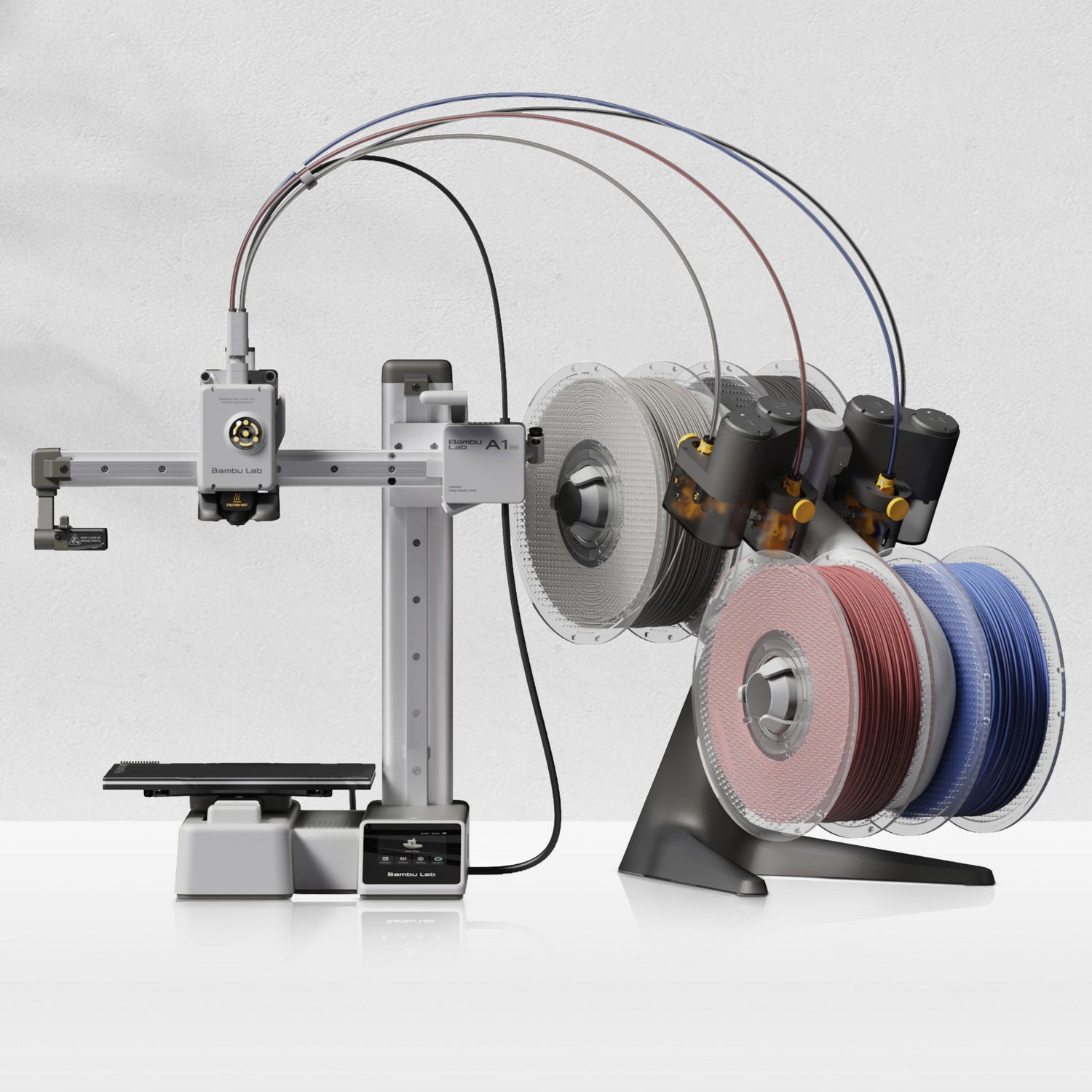
The Combo adds Bambu Lab's AMS lite system to the A1 Mini, which means you can load 4 spools of filament and print them in a single job. No pausing, no manual swaps. The printer handles purging and switching automatically between colors.
Multi-color printing on a $449 machine is genuinely surreal if you've never seen it. You load a multicolor model file (MakerWorld has thousands of them), hit print, and 3 hours later you've got a two-tone logo or a gradient vase with zero manual intervention. The AMS lite does create some filament waste during purge cycles, but it's manageable if you use the "purge into infill" option in Bambu Studio.
The AMS lite is the entry-level version of Bambu's material system. It handles PLA, PETG, and TPU reasonably well. Where it starts to struggle is with hygroscopic filaments (nylon, PA-CF) that need a dry environment during printing. The full AMS 2 Pro on the P1S Combo solves this with a sealed, temperature-controlled chamber. If you're printing functional engineering parts in demanding materials, step up. If you want to make cool multi-color stuff in PLA, the AMS lite is absolutely fine.
At $150 more than the standalone A1 Mini, the Combo is the obvious upgrade if multi-color is something you know you want. If you're not sure, start with the standalone and see if you hit that wall.
Creality K1C: Best for Tinkerers and Carbon Fiber Printing
Creality K1C
Pros
- 600mm/s top speed (fastest on this list)
- All-metal hotend prints carbon fiber filaments
- Klipper with AI camera monitoring
- Large, active community and mod ecosystem
Cons
- Firmware is less polished than Bambu Studio
- Amazon price sits above Creality's own store price
- No multi-color support
- Enclosed but smaller than P1S
Price as of Jul 14, 2026 — see current price on Amazon.
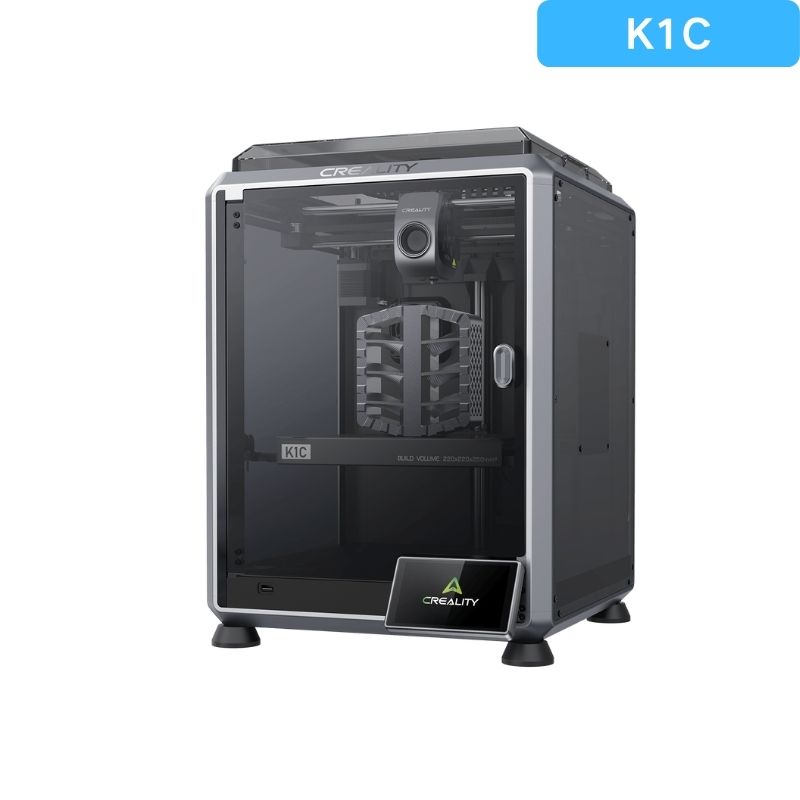
The K1C is Creality's answer to the Bambu ecosystem. It prints fast, handles demanding materials, and runs on Klipper firmware that the modding community has turned into something quite powerful over the last two years.
The standout spec is the all-metal hotend rated to 300 degrees Celsius. That's what makes carbon fiber and glass fiber composite filaments printable. PA-CF (carbon fiber nylon) is incredibly strong and lightweight but needs high temperatures and an all-metal contact zone. The K1C ships with this capability standard, where competitors often charge extra. If you're printing mechanical parts, functional brackets, or anything that needs to survive heat, this matters.
At 600mm/s maximum speed, it's the fastest printer on this list. In practice, 300-400mm/s at good quality is the sweet spot. Creality has continued pushing firmware updates through 2025 and 2026 that have steadily improved AI camera spaghetti detection (it pauses when a print fails catastrophically) and leveling accuracy.
Where Bambu Lab still wins on user experience: the firmware is just more polished. Creality's UI requires more deliberate setup to get the same results Bambu produces automatically. It's not hard, but there is a learning curve that the A1 Mini doesn't have. If you enjoy that process, the K1C is actually more satisfying to master. If you want results immediately, look at the Bambu options.
On price, Amazon has it at $439. That's under Creality's $559 list price but above what Creality's own store charges, and it puts the K1C within $10 of the A1 Mini Combo.
Bambu Lab P1S: Best Enclosed 3D Printer
Bambu Lab P1S
Pros
- Fully enclosed for ABS, ASA, PC printing
- HEPA and activated carbon filtration
- CoreXY motion system for precision
- Supports up to 16 colors with AMS (sold separately)
Cons
- $699 is a real investment
- AMS adds another $349 for multi-color
- Overkill for basic PLA printing
Price as of Jul 14, 2026 — see current price on Amazon.
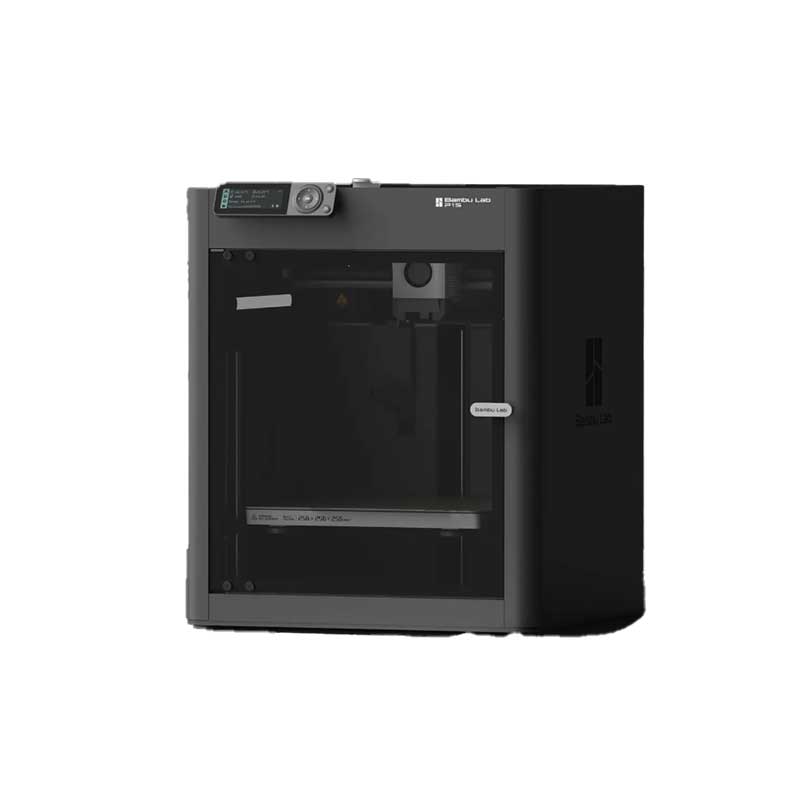
The P1S is where you end up when PLA isn't enough anymore. The enclosure isn't just for noise. It maintains a consistent internal temperature, which is what ABS and ASA filaments need to prevent warping and layer delamination. Open-frame printers struggle badly with temperature-sensitive materials. The P1S handles them reliably.
The HEPA plus activated carbon filtration is a genuine quality-of-life feature, especially if you're printing in an apartment or home office. ABS fumes are not pleasant. The P1S filters them well enough to run in a shared office environment.
At $699 it's currently on sale frequently, and it has dropped as low as $399 in past sales. At $399 it's arguably the best value on this entire list if you anticipate printing anything beyond PLA, PETG, and TPU. The CoreXY motion system produces very consistent prints with less resonance than the bed-slinger design on the A1 Mini, which matters for taller prints.
The P1S also supports Bambu Lab's full AMS 2 Pro system for 16-color multi-material printing. That's a separate $349+ purchase, but it makes the P1S the platform you grow into rather than out of. Small print farms run banks of P1S units for production work, which says plenty about its reliability.
What to Look for When Buying a 3D Printer
FDM vs Resin
This guide covers FDM (Fused Deposition Modeling) printers only, which melt plastic filament and build parts layer by layer. Resin printers use UV-cured liquid and produce much higher detail (great for miniatures) but require ventilation, post-processing equipment, and more careful material handling. For most first-time buyers, FDM is the right starting point.
Enclosure: Do You Need One?
For PLA, PETG, and TPU, you don't. These filaments print well at room temperature without enclosure. For ABS, ASA, and engineering filaments like PC or PA, an enclosure makes a real difference. The Bambu P1S and Creality K1C are enclosed. The A1 Mini and Centauri 2 are open-frame.
Build Volume
Bigger isn't always better. A 256x256x256mm build volume (P1S) sounds great until you realize 90% of prints fit easily in 180x180x180mm (A1 Mini). If you know you want to print large single pieces, pay for the volume. If you're printing practical household items, phone stands, and small functional parts, the A1 Mini's volume is genuinely fine.
Multi-Color vs Single Color
Bambu Lab's AMS and AMS lite are the most proven affordable multi-color systems. ELEGOO's answer is CANVAS, a four-spool unit sold with the Centauri 2 Combo, but the standalone Centauri 2 and the K1C on this list print one color at a time. If multi-color matters to you, buy a combo up front.
Community and Ecosystem
Bambu Lab has the largest, fastest-growing community right now. MakerWorld (their model-sharing platform) has hundreds of thousands of free models optimized for their printers. Creality's community is older and larger in aggregate but less cohesive. ELEGOO's community is smaller, and the Centauri 2 line is newer, so expect fewer mods and guides for now. Community matters because when something goes wrong (and eventually it will), you want people who've solved the same problem.
Frequently Asked Questions
Frequently asked questions
- Is 3D printing hard to learn in 2026?
- On a Bambu Lab machine or the ELEGOO Centauri 2, genuinely no. Both handle calibration automatically, so first prints on day one are realistic. On a more open machine like the Creality K1C there's a steeper curve, so expect a day or two of learning before you're reliably producing good prints.
- Which 3D printer is best for absolute beginners?
- The Bambu Lab A1 Mini at $299 is the safest pick. It sets up in 20 minutes, auto-calibrates before every print, and the Bambu Studio slicer handles most settings automatically. The ELEGOO Centauri 2 at $279 is also a strong pick, with full auto calibration and a much larger 256mm build cube, though its community and model library are smaller than Bambu's.
- Can 3D printers print in multiple colors?
- Yes, but only with specific hardware. The Bambu Lab AMS lite (included in the A1 Mini Combo at $449) supports 4-color printing. The Bambu AMS 2 Pro (sold separately for the P1S) supports up to 16 colors. ELEGOO sells the Centauri 2 as a Combo with its four-spool CANVAS system, but the standalone Centauri 2 and the Creality K1C print one color at a time.
- What filament should a beginner start with?
- PLA is the standard starting point. It prints at lower temperatures, rarely warps, and doesn't need an enclosure. Bambu Lab PLA Basic and Bambu PLA Matte are widely recommended and work perfectly in all Bambu printers. For the ELEGOO and Creality machines, Polymaker or Hatchbox PLA are reliable budget options around $18-22 per kilogram.
- Do I need to stay home while my 3D printer runs?
- Not really. Most modern printers have sensors that detect print failures and pause automatically. The Bambu printers include AI camera monitoring that watches for spaghetti (a failed print that unspools everywhere). For prints under 2 hours, most people just let them run. For overnight prints, make sure your first layer is solid before you sleep.
- How loud are 3D printers?
- The Bambu Lab A1 Mini is rated at under 48dB, which is quieter than a normal conversation. You can run it in a living room without it being annoying. The Creality K1C is louder, typically 50-60dB, which is fine in a dedicated workspace and noticeable in a bedroom.
Bottom Line
The 3D printer market in 2026 has a clear structure. Bambu Lab owns the easy end: the A1 Mini at $299 is the default recommendation for anyone who just wants to get printing without a learning curve, and the A1 Mini Combo at $449 adds multi-color capability that was a luxury feature a year ago. The P1S at $699 (often on sale) is where you land when you need an enclosure, engineering filaments, or a machine that will run reliably at scale.
ELEGOO's Centauri 2 at $279 is the best answer if you want CoreXY speed and a big build volume for less than an A1 Mini, as long as you print mostly PLA and PETG. The Creality K1C at $439 is for people who want to push boundaries with carbon fiber filaments and enjoy dialing things in.
Still not sure you need a printer at all? Start with Is a 3D Printer Worth It in 2026?, which covers running costs and who should skip one.
If I had to send one recommendation to someone buying their first printer: get the Bambu Lab A1 Mini and skip the learning curve. You can always go deeper into the ecosystem later.
How We Pick
We pick products by combining spec-level research, price checks, trusted third-party benchmarks, and owner sentiment from high-signal sources.
- Performance and real-world value in the category this guide targets
- Price-to-performance and deal consistency over recent pricing windows
- Build quality, reliability patterns, and known long-term issues
- Recommendation refresh cadence to keep these picks current
Author
TheTechSearch Editorial Team
Independent product reviewers & PC builders
We compare real-world specs, reviews and owner reports, price trends, and user feedback to recommend gear that actually makes sense to buy.