Best Gaming Handhelds 2026
Steam Deck, ROG Xbox Ally, Legion Go 2, and more — ranked for every type of gamer and budget. Expert picks, pros and cons, and side-by-side comparisons to he...
As an Amazon Associate we earn from qualifying purchases made through our links — this doesn't affect our picks.
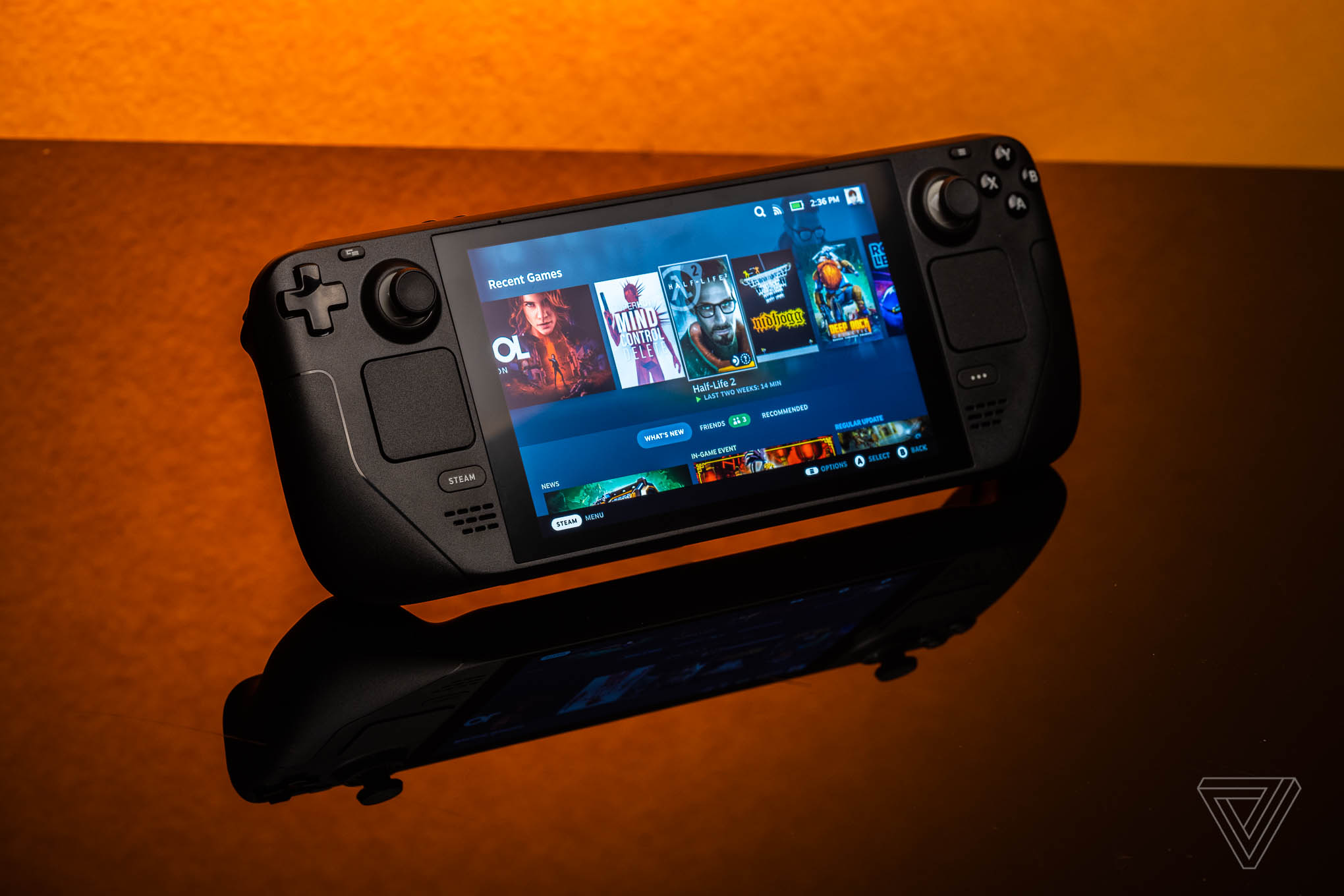
Valve Steam Deck OLED 512GB Handheld Gaming Console
Our top recommendation for this category
Price as of May 31, 2026 — see current price on Amazon.
Something clicked in 2026. Gaming handhelds stopped being a niche curiosity and became a real market with real choices. Five genuinely good options sitting between $499 and $1,099, each with a different answer to the same question: where do you actually want to play?
Quick answer if you're in a hurry: buy the Steam Deck OLED. It's still the most polished experience, runs almost everything in your Steam library, and won't die after 90 minutes. But the Windows handhelds have closed the gap in ways that actually matter now, and a few of them are worth your money depending on your situation.
| Handheld | OS | Display | CPU | Battery | Price | |
|---|---|---|---|---|---|---|
| Steam Deck OLED 512GB | SteamOS | 7.4-inch OLED 90Hz | AMD Custom APU (Zen 3+) | 4-8 hrs gaming | $549 | Check Price |
| Lenovo Legion Go S (SteamOS) | SteamOS | 8-inch IPS 120Hz | AMD Ryzen Z2 Go | 3-6 hrs gaming | $499 | Check Price |
| ROG Xbox Ally | Windows 11 | 7-inch IPS 120Hz 1080p | AMD Ryzen Z2 A | 2-5 hrs gaming | $599 | Check Price |
| MSI Claw 8 AI+ | Windows 11 | 8-inch IPS 120Hz VRR | Intel Core Ultra 7 258V | 3-5 hrs gaming | $899 | Check Price |
| Lenovo Legion Go 2 | Windows 11 | 8.8-inch OLED 144Hz | AMD Ryzen Z2 Extreme | 3-6 hrs gaming | $1,099 | Check Price |
Steam Deck OLED 512GB: Best Overall
Valve Steam Deck OLED 512GB Handheld Gaming Console
Pros
- OLED display with genuine HDR, not marketing HDR
- Best battery life of any gaming handheld here
- SteamOS wakes from sleep in under 2 seconds
- Over 18,000 verified or playable Steam titles
- Valve updates SteamOS consistently, even years in
Cons
- 800p resolution is soft on a TV via dock
- Slightly slower GPU than newer Windows chips
- 669g is heavier than it photographs
Price as of May 31, 2026 — see current price on Amazon.
A note on price before anything else: Valve's list price for the 512GB OLED is $549, and Amazon's listing sat at $869.99 in September 2026. Do not pay that. Buy it from Steam directly at list, or wait for the Amazon listing to come back down. Everything below assumes the $549 list price.
The Steam Deck OLED is one of those rare devices where the hardware gets out of the way of the games. Which is exactly the point.
The 7.4-inch OLED panel does HDR correctly. Contrast makes dark scenes actually dark, not washed-out gray-black like an IPS. Valve upgraded this panel to 90Hz from the original LCD's 60Hz, and while most games on the Steam Deck's APU won't consistently push past 60fps in demanding titles, menus and lighter games benefit from the higher refresh rate.
Battery life is the real argument for the Steam Deck over everything else on this list. Red Dead Redemption 2 at locked 30fps with FSR on balanced? About 4.5 hours. Stardew Valley or Hades? Closer to 7-8. Windows handhelds chew through their batteries 30-50% faster at comparable performance settings. That difference feels abstract until you're on a four-hour flight.
And SteamOS is why first-time handheld buyers should default here. Press power, it wakes from where you left off, press the Steam button, pick a game. No driver update notification at 11pm. No Windows defender scan throttling your CPU. Valve's Proton compatibility layer now covers over 18,000 verified or playable titles as of mid-2026, and the ProtonDB community database tells you exactly what works before you buy.
The knock on it is resolution. 1280x800 at 7.4 inches looks fine in your hands, often great. But hook it to a 4K TV via the dock and the softness is obvious. That's where the Windows options start making a case for themselves.
Lenovo Legion Go S (SteamOS, 1TB): Best Budget Pick

Lenovo Legion Go S Handheld Gaming Console, 16GB RAM 1TB SSD, Steam OS
Pros
- 8-inch screen is a full half-inch bigger than the Steam Deck
- SteamOS: same ease-of-use as Valve's device
- 1TB storage at launch, not a 512GB upsell
- $50 cheaper than the Steam Deck OLED for more screen
Cons
- Ryzen Z2 Go trails the Deck's APU in GPU-heavy workloads
- Chunkier grip, more tiring in long sessions
- Community smaller than Valve's ecosystem: fewer fixes, fewer tips
Price as of May 31, 2026 — see current price on Amazon.
A Lenovo device running Valve's operating system. Weird concept, but it works. And at $499 with 1TB of storage out of the box, it's $50 less than the Steam Deck OLED at half the storage capacity.
The 8-inch 1200p IPS display is sharper than the Steam Deck. Not debatable. You notice it the moment you put them side by side. Colors aren't as punchy without an OLED panel, but text is genuinely crisper and games at native resolution have more detail. If you read a lot of game text or play anything with small UI elements, the resolution bump is meaningful.
Now, the Ryzen Z2 Go chip. This is where it gets complicated, and I don't want to oversell it. In GPU-heavy workloads, Digital Foundry's testing (Dec 2025 analysis) showed the Z2 Go trailing the Steam Deck's custom AMD APU by roughly 10-15% in 3DMark Time Spy. At 30fps locked with FSR on balanced, the real-world handheld gaming config, that gap matters far less. But if you're trying to hit 60fps in Cyberpunk 2077 at medium settings, the Steam Deck actually edges it.
Where the Legion Go S earns its recommendation is simple: bigger screen, SteamOS simplicity, more storage, lower price. If you've been eyeing the Steam Deck but always thought the screen felt small, this is the answer. Look, it's not perfect, but $499 with 1TB and a proper 8-inch panel is genuinely good value.
ASUS ROG Xbox Ally: Best for Xbox Game Pass Users
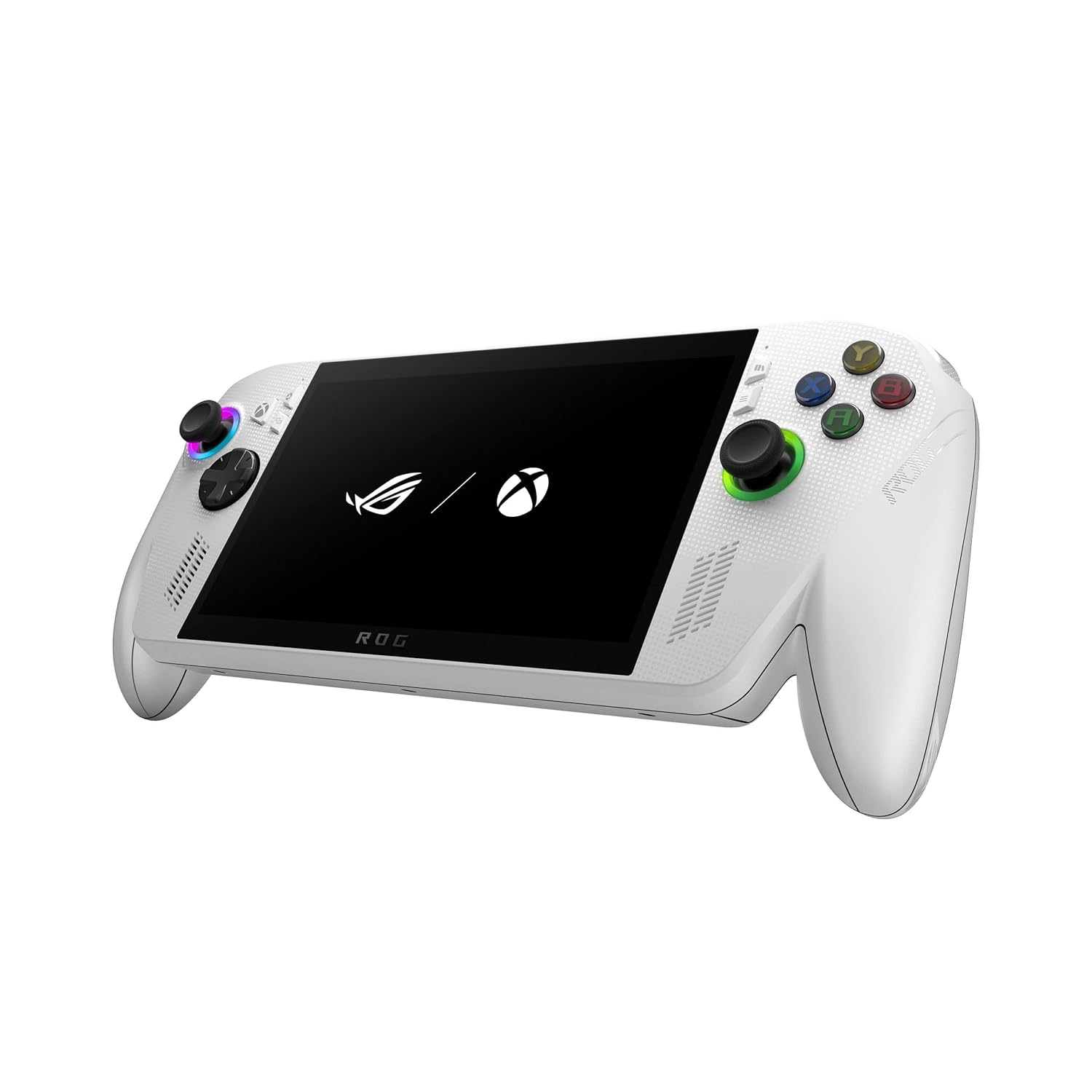
ASUS ROG Xbox Ally Gaming Handheld, 7-inch 1080p 120Hz, AMD Ryzen Z2 A, 16GB RAM, 512GB SSD
Pros
- 1080p at 120Hz is sharper than the Deck's 800p panel
- Xbox UI and Game Pass feel genuinely native, not bolted on
- Windows 11 means your whole PC library is available
- 3 months Game Pass Ultimate included in box
- 60Whr battery is respectable for a Windows handheld
Cons
- Windows 11 still needs occasional babysitting
- Ryzen Z2 A is notably behind the Z2 Extreme in the Ally X
- Battery drains 40% faster than the Steam Deck in comparable tests
Price as of May 31, 2026 — see current price on Amazon.
ASUS and Microsoft co-branding a gaming handheld is either inspired or strange depending on your perspective. What came out of it is the ROG Xbox Ally: a Windows handheld where Xbox isn't just an app you launch. It is the front-end experience. Physical Xbox button. Xbox UI as the default home screen. Game Pass integration that actually feels designed, not patched in.
The 7-inch IPS panel runs 1080p at 120Hz with FreeSync Premium. You gain resolution over the Steam Deck, you give up OLED contrast. On a 7-inch screen 12 inches from your face, 1080p is noticeably sharper in games with small details or fast-moving elements. FPS titles and text-heavy RPGs both benefit.
Performance is from the Ryzen Z2 A chip. It's capable but not elite. Most games at 1080p medium settings land in the 40-55fps range. Forza Horizon 5 runs well. Baldur's Gate 3 at medium is fine. Expecting 60fps locked in Cyberpunk at medium is ambitious; 45fps with frame generation is more realistic.
The actual pitch here is Game Pass. If you're paying $15/month for Game Pass Ultimate, this device makes that feel worthwhile in a way your Xbox One never did. Your library is right there, cloud gaming is a tap away, and you can toss the Ally in a bag and play on a flight without losing your progress when you switch back to the console at home.
Windows is still Windows, though. Occasional driver prompts. Update notifications at 10pm on a Friday. The ASUS ROG Armoury Crate SE overlay helps route around the worst of it, and it's improved substantially since the original ROG Ally Z1 in 2023. But it hasn't fully closed the gap with SteamOS's dedicated handheld experience.
MSI Claw 8 AI+: Best Windows Option Under $1,000

MSI Claw 8 AI+ PC Gaming Handheld, Intel Core Ultra 7 258V, 8-inch FHD 120Hz VRR, 32GB RAM, 1TB SSD
Pros
- Only handheld here with Thunderbolt 4: eGPU support is real
- VRR display eliminates screen tearing at variable frame rates
- 32GB LPDDR5X RAM leads this entire category
- Intel Arc 140V GPU has caught up significantly via driver updates
- 80Whr battery is the biggest in this roundup
Cons
- Intel Arc still has compatibility quirks in some DX11 and older OpenGL games
- At $899 you're $100 from the Legion Go 2's OLED display
- 675g is noticeable after an hour of handheld play
Price as of May 31, 2026 — see current price on Amazon.
MSI went a different direction than everyone else and chose Intel's Core Ultra 7 258V instead of AMD. Small hardware decision on paper. It cascades through the whole product.
Intel Arc's first-generation Claw was a mess: driver problems, poor game compatibility, disappointing performance for the price. The Claw 8 AI+ is genuinely a different device. MSI and Intel pushed driver updates aggressively through late 2025 and into 2026, and Arc 140V's DX12 performance has closed the gap with AMD substantially. Cyberpunk 2077 with raytracing on balanced settings runs around 35-40fps, which is honestly competitive with what the Z2 A gets at similar settings.
But the reason you'd pick the Claw 8 over everything else is Thunderbolt 4. Every AMD handheld here uses USB4, which is good, but not Thunderbolt 4. With TB4, you can dock this to a Razer Core X or similar eGPU enclosure and suddenly your handheld is running an RTX 4070 or better. That's a USB-C cable swap from portable gaming to desktop-level performance. If you work from home and want one device instead of a laptop and a gaming PC, that capability is actually compelling.
The 80Whr battery is the largest here. Despite Intel's Core Ultra 7 drawing more power than AMD's APUs, real-world gaming battery lands at 3-5 hours, similar to the competition. Mixed use (streaming, browsing, lighter games) stretches it toward 6-7.
The problem is $899 puts it within $100 of the Legion Go 2's stunning OLED display. If Thunderbolt 4 and Intel's ecosystem aren't on your requirements list, the value case falls apart. But if they are, and for some buyers they genuinely are, this is the only handheld that delivers it.
Lenovo Legion Go 2: Best Premium Handheld

Lenovo Legion Go 2 Gaming Handheld, AMD Ryzen Z2 Extreme, 8.8-inch OLED 144Hz, 32GB RAM, 1TB SSD
Pros
- 8.8-inch 144Hz OLED, the best screen on any handheld currently sold
- Detachable TrueStrike controllers, kickstand for tabletop mode
- Ryzen Z2 Extreme is the fastest AMD chip in any handheld
- VRR support from 30-144Hz eliminates tearing at any frame rate
- 74Whr battery handles Windows better than most
Cons
- $1,099 is a hard number to swallow for portable gaming
- Heaviest option here, 880g with controllers attached
- Windows 11 UX still needs Legion Space overlay to feel bearable
Price as of May 31, 2026 — see current price on Amazon.
Lenovo built the Legion Go 2 as a statement. An 8.8-inch 1920x1200 OLED panel running at 144Hz with VRR. Detachable TrueStrike controllers that click off magnetically so you can prop the screen with the kickstand and play tabletop-style. AMD's Ryzen Z2 Extreme: the fastest AMD APU you can get in a handheld right now.
The screen. That's the reason this exists. I'm not going to soften it: the Legion Go 2's display is the best panel on any gaming handheld currently on the market, full stop. 1000-nit peak brightness. 97% DCI-P3 color coverage. OLED contrast that makes competing IPS panels look washed out. Even Windows Central's Zachary Boddy, who reviewed it for their site, called it one of the best displays he had seen on any portable device.
Z2 Extreme performance is the real deal too. Tom's Hardware's benchmark suite showed the Z2 Extreme pulling 15-20% better GPU performance than the Z2 A in the ROG Xbox Ally, and 25-30% over the Z2 Go in the Legion Go S. In Cyberpunk 2077 at 1080p medium, the Legion Go 2 was consistently hitting 45-52fps where the Ally landed at 40-45fps. Real difference in demanding titles.
The detachable controllers are a genuinely useful feature, not just a spec-sheet item. Magnetically attached, they click on and off reliably. With them detached and the kickstand out, you have something that functions like a miniaturized TV gaming setup you can put on an airplane tray table.
What holds it back is the price and Windows. $1,099 for a portable device is a serious ask. And you're still navigating Windows 11 on a touchscreen without a keyboard, which means Lenovo's Legion Space overlay is basically required: it's good, but it's not SteamOS. If this budget works for you and you want the best, this is it without question. If you're spending sensibly, the Steam Deck OLED does roughly 80% of what the Go 2 does for $550 less.
Gaming Handheld Buying Guide
SteamOS vs Windows: The Decision That Actually Matters
More than specs. More than display size. The OS choice shapes your daily experience with these devices, and it's not close for most buyers.
SteamOS, running on both the Steam Deck and Legion Go S, is built for exactly this use case. Sleep/resume works. It boots in under 10 seconds. Games launch from a dedicated gaming interface without requiring you to navigate a desktop. Proton compatibility has gotten good enough that most Windows-only games run fine, including anti-cheat titles that were blocked a year ago.
Windows 11 on a handheld is a desktop OS that knows it doesn't quite fit. Updates happen at inconvenient times. Some games launch windowed and you have to fuss with them. Installing things that aren't games requires navigating a full desktop UI with an analog stick. ASUS and MSI have invested in overlay UIs (ROG Armoury Crate SE, MSI Center M) that route around the worst of it, and they're legitimately better than they were two years ago. Still not SteamOS, though.
Pick Windows if: you need titles outside the Steam ecosystem (EA App, Epic exclusives, Battle.net), you want native Xbox Game Pass integration, or you're planning to dock it to a monitor and use it as a PC replacement. Otherwise, SteamOS is the easier daily driver.
Display: Size vs Panel Technology
The Steam Deck's 7.4-inch 800p OLED looks better than its resolution suggests on paper. OLED's infinite contrast ratio masks pixel density limitations, and at handheld viewing distance, it genuinely looks great. But connect it to a TV and the softness shows.
The 8 and 8.8-inch Windows options render at 1080p or 1200p, which is a noticeable step up in sharpness, especially in text-heavy games, strategy titles, or anything with small UI elements. VRR (variable refresh rate) is worth prioritizing if you want smooth gaming at variable frame rates. The MSI Claw 8 and Legion Go 2 both support it; the others don't.
Battery Life: What the Numbers Actually Mean
Handhelds eat battery. Even the Steam Deck OLED's 4-8 hour range gets compressed fast in demanding games. My recommendation: treat 3 hours as the floor expectation, buy a 20,000mAh USB-C power bank (45W PD support, about $40 from Anker or Baseus), and the battery situation becomes much more manageable. None of these devices are gaming laptops.
Performance and What "Enough" Looks Like
For most people playing most games at 30-45fps targets with FSR or similar upscaling, the Steam Deck OLED and Legion Go S are sufficient. Locked 30fps with FSR on balanced in Elden Ring or Cyberpunk looks good and plays fine. If you're a competitive FPS player or you want native 60fps+ in modern AAA titles at the device's native resolution, you need the Z2 Extreme or Z2 A-class chips. The performance gap is real but contextual.
Storage and microSD
Buy more storage than you think you need. A modern game is 60-120GB. The 512GB configs fill up with 5-6 AAA titles. All five handhelds here accept microSD cards: a Samsung Pro Endurance 512GB runs around $55, and a 1TB SanDisk Extreme Pro is about $90. Both are fast enough (A2-rated) that game load times are barely affected. This is the most practical upgrade you can make after buying any of these.
Frequently asked questions
- Is the Steam Deck still worth buying in 2026?
- Yes, and it's still the best value in this category. The OLED upgrade in 2024 was meaningful: significantly better battery, a dramatically improved display, and Wi-Fi 6E. SteamOS keeps improving and Valve's Proton layer now covers over 18,000 titles. At $549, it's $50 to $550 cheaper than its Windows competitors for a superior software experience.
- What is the difference between the ROG Xbox Ally and the ROG Xbox Ally X?
- The standard ROG Xbox Ally uses the Ryzen Z2 A chip, 16GB RAM, and 512GB SSD for $599. The Ally X steps up to the Ryzen AI Z2 Extreme, 24GB RAM, a larger 80Whr battery, and 1TB SSD at $999. The X is about 20-25% faster in GPU benchmarks and has meaningfully better battery life. For most buyers, the standard Ally at $599 is the smarter value unless you specifically need that performance headroom.
- Can you play Xbox Game Pass games on the Steam Deck?
- Partially. Xbox cloud gaming streams through the Chromium-based browser on SteamOS, and many Game Pass titles stream fine with a decent internet connection. You cannot install Game Pass games natively on SteamOS. They require Windows or an Xbox console. If native Game Pass access is important to you, the ROG Xbox Ally is the obvious choice.
- Is Thunderbolt 4 actually useful on a gaming handheld?
- Depends on your use case. If you want to dock the handheld to an external GPU (like a Razer Core X with an RTX 4070 inside), Thunderbolt 4 is the only interface that supports it at full bandwidth. That can turn a handheld into a desktop-class gaming machine via a single USB-C cable. But the eGPU enclosure adds $300-$500 to your cost. If external GPU docking isn't in your plans, USB4 (what the AMD handhelds use) is fine for display output and fast data.
- What is the best gaming handheld for travel?
- Steam Deck OLED. Longest battery life in the category, SteamOS does not require internet to function or update, and the sleep/wake reliability is the best here: flip it open mid-flight and you're playing in under 3 seconds. The 7.4-inch footprint also fits in more bags than the 8.8-inch Legion Go 2.
- Do I need a microSD card for a gaming handheld?
- Almost certainly yes. Modern games run 60-120GB each. Even a 1TB config fills up with 8-10 titles. A 512GB Samsung Pro Endurance or SanDisk Extreme Pro microSD runs $50-$60 and is fast enough (A2-rated) that load times are almost identical to internal storage. It is the best value accessory purchase for any handheld.
Bottom Line
Gaming handhelds in 2026 are genuinely good across the board, which makes the decision harder than it used to be. For most people the Steam Deck OLED is still the right call: best battery, best software, massive library, $549. If you want more screen on the same SteamOS experience, the Legion Go S at $499 is actually cheaper and adds an inch. The ROG Xbox Ally earns its place for Game Pass subscribers who want that integration native rather than streamed. The MSI Claw 8 AI+ is for the buyer who specifically needs Thunderbolt 4 docking capability. And the Lenovo Legion Go 2 is for the person who wants the absolute best handheld on the market right now and will pay $1,099 to get it. That OLED display justifies the ask.
How We Pick
We pick products by combining spec-level research, price checks, trusted third-party benchmarks, and owner sentiment from high-signal sources.
- Performance and real-world value in the category this guide targets
- Price-to-performance and deal consistency over recent pricing windows
- Build quality, reliability patterns, and known long-term issues
- Recommendation refresh cadence to keep these picks current
Author
TheTechSearch Editorial Team
Independent product reviewers & PC builders
We compare real-world specs, reviews and owner reports, price trends, and user feedback to recommend gear that actually makes sense to buy.