Best Kids Tablets 2026
The Amazon Fire HD 8 Kids (2024) is the kids tablet for ages 3 to 7; the Galaxy Tab A11+ Kids Edition and the Apple iPad (A16) suit older kids. Expert picks,...
As an Amazon Associate we earn from qualifying purchases made through our links — this doesn't affect our picks.
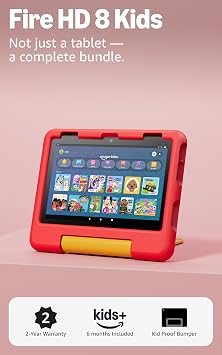
Amazon Fire HD 8 Kids (2024)
Children aged 3 to 7 and their first tablet
Price as of Nov 6, 2026 — see current price on Amazon.
The Amazon Fire HD 8 Kids (2024) is the kids tablet to buy for a child aged three to seven: a kid-proof case, a 2-year worry-free guarantee and parental controls a tired parent can set up in one sitting. If your child is older or needs Google Play for school apps, get the Samsung Galaxy Tab A11+ Kids Edition instead. For a family that already uses Apple devices, the iPad (A16) is the older-kid tablet that lasts longest.
- Best for ages 3 to 7: Amazon Fire HD 8 Kids (2024): an 8-inch HD screen, 32GB and a 13-hour rated battery inside a case built for drops.
- Best for Google Play and school apps: Samsung Galaxy Tab A11+ Kids Edition: an 11-inch 1920 x 1200 screen, 128GB, a protective case and a stylus in the box, per Samsung.
- Best for Apple families: Apple iPad 11-inch (A16): an 11-inch Liquid Retina screen, 128GB, Touch ID and Apple's Screen Time controls.
Prices as of November 6, 2026.
Three cards, on purpose. Of the kids tablet listings this page links to, these are the ones with a working buy button, and a short list you can order from beats a long one full of dead links.
Quick Picks
| Tablet | Ages | Screen | Storage | App Store | Best For | |
|---|---|---|---|---|---|---|
| Amazon Fire HD 8 Kids (2024) | 3-7 | 8in HD | 32GB | Amazon Appstore | Preschool to early grade school | Check Price |
| Samsung Galaxy Tab A11+ Kids Edition | Older kids | 11in 1920 x 1200 | 128GB | Google Play | School apps and a bigger screen | Check Price |
| Apple iPad 11-inch (A16) | Older kids | 11in Liquid Retina | 128GB | Apple App Store | Families already on Apple | Check Price |
Amazon Fire HD 8 Kids (2024): Best Overall
Amazon Fire HD 8 Kids (2024)
Best for: Children aged 3 to 7 and their first tabletPros
- Kid-proof case with the 2-year worry-free guarantee behind it
- Amazon Kids ad-free and exclusive content included for a starter period
- Parental controls run from the Amazon Parent Dashboard on a parent's phone
- 13-hour rated battery covers a long car trip
Cons
- Fire OS uses the Amazon Appstore, not Google Play
- 32GB fills up quickly with downloaded shows
Price as of Nov 6, 2026 — see current price on Amazon.
This is the tablet to hand a preschooler. Amazon's own listing describes it as built for ages three to seven, with a bright 8-inch HD screen, 32GB of storage, parental controls and a 13-hour battery. The case is the real product here: thick, grippy and shaped for small hands.
The guarantee is what makes it a safe buy. Amazon's Fire tablet warranty page lists the Fire Kids tablets under a two-year limited warranty it calls the Worry-Free Guarantee, and the product listings say a broken tablet gets replaced if you send it back. With a four-year-old, that matters more than any processor.
The trade is the screen. An 8-inch HD panel is fine for cartoons and picture books, and a seven-year-old who reads a lot will notice it is softer than a bigger, sharper tablet. For the target age, that rarely comes up.
Skip it if your child needs Google Classroom or another app that only lives on Google Play. Fire OS runs the Amazon Appstore, and some school apps are missing there.
Samsung Galaxy Tab A11+ Kids Edition: Best for Google Play

Samsung Galaxy Tab A11+ Kids Edition (128GB, Royal Blue)
Best for: Older kids who need Google Play and school appsPros
- Full Google Play store, so Google Classroom and most school apps install
- 11-inch 1920 x 1200 screen at up to 90Hz, per Samsung
- 128GB plus microSD up to 2TB
- Case, stylus and pen tether in the box; Samsung promises seven OS upgrades
Cons
- Costs several times what the Fire HD 8 Kids does
- No Fire-style worry-free replacement guarantee; parental controls need setting up first
Price as of Nov 6, 2026 — see current price on Amazon.
This is the pick for the child the Fire tablet does not fit. It runs Android with Google Play, so the school apps that are missing from the Amazon Appstore are a download away. The version linked here is the Amazon-exclusive Royal Blue model.
Samsung's spec page lists an 11-inch 1920 x 1200 display at up to 90Hz, 128GB of storage with microSD support up to 2TB, and up to 15 hours of battery. The box includes a protective case, a stylus with a tether and a sheet of stickers.
Two things to know before you order. Samsung's own page says the parental controls are not switched on out of the box, so plan ten minutes in Settings before handing it over. And there is no replacement promise like Amazon's: a cracked screen is a repair bill, so a protection plan is worth pricing in.
Skip it for a preschooler. The Fire HD 8 Kids does that job for far less money and with a better guarantee.
What Happened to the Bigger Fire Kids Tablets?
The 10-inch Fire HD 10 Kids and the Fire HD 8 Kids Pro are the obvious step-ups. Both are good tablets on paper. Amazon lists the versions linked from this guide as currently unavailable, and a card pointing at a listing nobody can buy helps no one.
If one of them shows a buy button when you shop, the same advice applies: the plain Kids model suits ages three to seven, and the Kids Pro suits roughly six to twelve. Check that the storage on the listing matches what you expect before you order, since the same name covers more than one configuration.
Apple iPad 11-inch (A16): Best for Apple Families

Apple iPad 11-inch (A16, 128GB, Wi-Fi, Pink)
Best for: Older kids in a family that already uses Apple devicesPros
- A16 chip is faster than any Fire Kids tablet
- Apple's Screen Time and Family Sharing controls run from a parent's iPhone
- App Store carries the school apps a Fire tablet misses
- 128GB, Touch ID and Wi-Fi 6, per Apple's listing
Cons
- No case or replacement guarantee in the box
- Costs the most of the three picks
Price as of Nov 6, 2026 — see current price on Amazon.
Plenty of families just hand a child an iPad, and for an older kid that is a sound call. Apple lists this model at $449 on its own store. It is faster than any Fire tablet, Apple's Screen Time controls are strong, and the App Store has every school app.
It is the third pick, not the first, because an iPad needs a third-party rugged case and a paid protection plan to match what a Fire Kids tablet includes in the box. For a child under seven who drops things, the Fire HD 8 Kids is the cheaper and safer starting point.
Skip it if your child's school runs on Google tools and nobody at home uses Apple devices. The Galaxy Tab A11+ Kids Edition comes with its case and installs Google Classroom directly.
How to Choose a Kids Tablet
Match the age, not the specs
Under seven, durability and a simple interface beat everything else. That is the Fire HD 8 Kids' whole job. From about six to twelve, a bigger screen, a real app store and school apps matter more, which is where the Galaxy Tab A11+ Kids Edition and the iPad fit.
Count the subscription
Amazon Kids+ is how a Fire Kids tablet fills up with ad-free books, videos and games. The tablet includes a starter period, and Amazon says it then renews at the applicable rate unless you cancel through the Parent Dashboard. Budget for it, or plan to cancel and manage the library yourself.
Check the guarantee
The worry-free guarantee is the Fire Kids line's biggest advantage. A standard tablet in a case does not cover a toddler throwing it at a tile floor. Factor a protection plan into the price of anything else you consider, the Samsung included.
Think about the app store
Fire tablets run Fire OS with the Amazon Appstore. Most popular kids' apps are there, but some school apps are not. If your district relies on Google tools, an Android tablet with Google Play is the safer choice.
Storage adds up
Downloaded shows are the main storage hog. A microSD card is a cheap fix for a 32GB tablet, so add one before a road trip.
Set These Up on Day One
The parental controls are only as good as the setup. A few minutes before you hand the tablet over saves arguments later.
Daily time limits. Amazon's help pages describe setting a total daily screen-time limit, or a limit per activity type, from the Parent Dashboard. Limits follow the child's profile across every Amazon Kids device in the house.
Bedtime. Under "Set Daily Goals & Time Limits," pick a "Turn off by" time and the tablet stops working at night.
Learn First. Set reading and educational goals for the day, and choose whether games and videos stay locked until your child meets them. It is one of the most useful features in the category.
Age filters and purchases. Set the content age range to match your child, not the default. Then require a PIN for purchases, because kids' games are full of them.
Check the activity report after the first week. It shows which apps and books actually get used, which tells you whether the subscription is earning its keep.
Frequently asked questions
- What is the best tablet for a 5-year-old?
- The Amazon Fire HD 8 Kids (2024). It is built for ages three to seven, comes in a kid-proof case and carries Amazon's 2-year worry-free guarantee, so a drop is a replacement rather than a loss.
- Do kids tablets need Amazon Kids+?
- No, but it is how most families fill a Fire Kids tablet with ad-free content. The tablet includes a starter period, then the subscription renews at Amazon's current rate unless you cancel it in the Parent Dashboard.
- Can a Fire Kids tablet use Google Play?
- No. Amazon Fire tablets use the Amazon Appstore, not Google Play. If your child needs a Google-only school app, pick the Samsung Galaxy Tab A11+ Kids Edition or an iPad instead.
- Is an iPad better than a kids tablet?
- For older children who need school apps, often yes. For children under seven, a Fire Kids tablet is usually the better buy, because the case and the replacement guarantee come in the box while an iPad needs both added.
Bottom Line
Buy the Amazon Fire HD 8 Kids (2024) for a child aged three to seven. It has the case, the guarantee and the parental controls that matter at that age. For an older child who needs Google Play, the Samsung Galaxy Tab A11+ Kids Edition is the one to get. Shopping for a teenager instead? See our best tablets for students and best Android tablets guides.
How We Pick
We pick products by combining spec-level research, price checks, trusted third-party benchmarks, and owner sentiment from high-signal sources.
- Performance and real-world value in the category this guide targets
- Price-to-performance and deal consistency over recent pricing windows
- Build quality, reliability patterns, and known long-term issues
- Recommendation refresh cadence to keep these picks current
Author
TheTechSearch Editorial Team
Independent product reviewers & PC builders
We compare real-world specs, reviews and owner reports, price trends, and user feedback to recommend gear that actually makes sense to buy.