Best OLED Gaming Laptops 2026
The best OLED gaming laptops for 2026, from 14-inch ultraportables to a 240Hz 16-inch pick, ranked on display, GPU and portability. Expert picks, pros and co...
As an Amazon Associate we earn from qualifying purchases made through our links — this doesn't affect our picks.
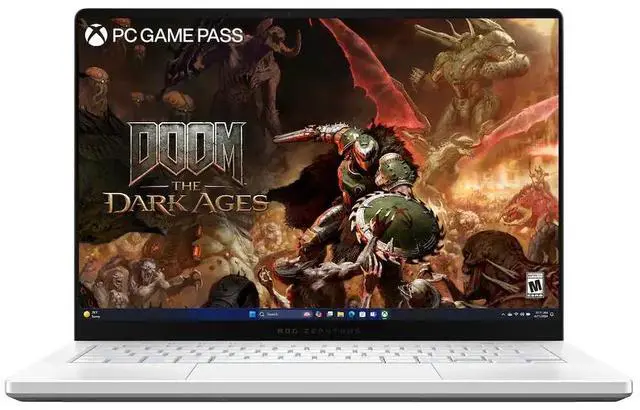
ASUS ROG Zephyrus G14 Gaming Laptop 3K OLED RTX 5060
Our top recommendation for this category
Price as of Jun 9, 2026 — see current price on Amazon.
OLED displays reached the gaming laptop mainstream in 2026, and the gap versus even a good IPS panel is a spec-sheet fact, not a matter of taste. Blacks are actually black. Colors pop. And the 0.2ms response time is a fraction of the roughly 1ms a fast IPS panel manages.
This guide ranks the current crop of OLED gaming laptops by use case. Whether you want the lightest carry-anywhere machine or a bigger 16-inch screen, there's a pick here for you.
| Laptop | GPU | Display | Weight | Price | |
|---|---|---|---|---|---|
| ASUS ROG Zephyrus G14 | RTX 5060 | 14-inch 3K OLED 120Hz | 3.64 lbs | Check price | Check Price |
| Razer Blade 14 | RTX 5070 | 14-inch 3K OLED 120Hz | 3.59 lbs | Check price | Check Price |
| MSI Stealth A16 AI+ | RTX 5070 Ti | 16-inch QHD+ OLED 240Hz | 4.85 lbs | Check price | Check Price |
| Lenovo Legion 5i | RTX 5070 | 15.3-inch OLED 165Hz | 5.5 lbs | Check price | Check Price |
ASUS ROG Zephyrus G14 2026 (Best Overall)
The G14 earns Best Overall on its display and its size, not its GPU. This configuration pairs a 3K OLED Nebula panel at 120Hz with an NVIDIA RTX 5060 and an AMD Ryzen 9 270, in a 14-inch body that weighs 3.64 lbs. The RTX 5060 is the lowest GPU tier in this guide, so buyers who care most about frame rates should look at the Blade 14 or the MSI instead.
The display is the star. At 2880 x 1800 resolution with 100% DCI-P3 coverage, it suits content work as well as gaming. The 0.2ms response time spec puts it in the same class as every other OLED here for fast-paced shooters.
The weak spot is the port selection. Two USB-A ports and one USB-C is thin for a machine at this level. You'll want a hub if you work from this thing.
ASUS ROG Zephyrus G14 Gaming Laptop 3K OLED RTX 5060
Pros
- Stunning 3K OLED Nebula panel
- Exceptional portability at 3.64 lbs
- AMD Ryzen 9 270 with 16GB LPDDR5X and a 2TB SSD
- Class-leading build quality
Cons
- Limited port selection
- RTX 5060 is the lowest GPU tier in this guide
- 16GB of RAM is the least of the four picks
Price as of Jun 9, 2026 — see current price on Amazon.
Razer Blade 14 (Best Premium Ultraportable)
The Blade 14 is the 14-inch pick for buyers who want more GPU than the G14 and care about aesthetics and build feel. Razer's CNC-machined aluminum chassis is 0.62 inches thin and weighs 3.59 lbs, slightly lighter than the G14.
Inside are an AMD Ryzen AI 9 365 and an RTX 5070, a full GPU tier above the G14's RTX 5060, driving the same class of 3K 120Hz OLED panel. Razer cools it with a vapor chamber, and its Synapse software exposes fan-curve control.
The trade-off is the price of the Razer badge. And if you want RGB, Razer's per-key Chroma lighting is a selling point of its own. That matters to some people.
Razer Blade 14 Gaming Laptop RTX 5070 3K 120Hz OLED
Pros
- Best build quality in the category
- RTX 5070 in a 3.59 lb, 0.62-inch chassis
- Vapor chamber cooling
- Per-key Chroma RGB is beautiful
Cons
- Premium price for GPU tier
- Limited upgrade options internally
Price as of Jun 9, 2026 — see current price on Amazon.
MSI Stealth A16 AI+ (Best 16-inch OLED)
If you want more screen real estate without going full "gaming rig" aesthetic, the MSI Stealth A16 AI+ is the answer. It's slim, relatively light at under 5 lbs for a 16-inch laptop, and the 16-inch QHD+ OLED panel at 240Hz is the fastest refresh rate in this guide.
The display runs at 2560 x 1600, a 16:10 shape that gives more vertical pixels than a standard 16:9 screen. With an RTX 5070 Ti, the strongest GPU here, plus an AMD Ryzen AI 9 HX 370 and 32GB of DDR5, this machine is the one to pick for video editing and other heavy creative work.
MSI also gives it a per-key RGB keyboard, which suits buyers who want gaming lighting in a laptop that doesn't look like a gaming rig.
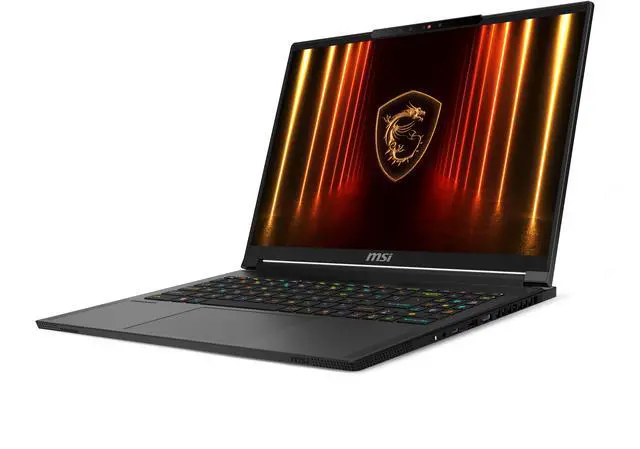
MSI Stealth A16 AI+ 240Hz QHD+ OLED RTX 5070 Ti Laptop
Pros
- Gorgeous 240Hz 16-inch OLED panel
- Slim and light for a 16-inch machine
- RTX 5070 Ti is serious performance
- Per-key RGB keyboard
Cons
- Heavier than the 14-inch picks at 4.85 lbs
- A 16-inch footprint needs a bigger bag
Price as of Jun 9, 2026 — see current price on Amazon.
Lenovo Legion 5i OLED (Best Value)
The Lenovo Legion 5i is the pick that makes sense for most buyers on a budget. You're getting a 15.3-inch OLED panel at 165Hz, an RTX 5070 GPU, and a Core Ultra 7 251HX in Lenovo's proven Legion chassis.
The plain truth: the 165Hz refresh rate versus the 240Hz on the MSI is a real difference if you're playing competitive games at high frame rates. But for most gamers doing AAA titles at 1440p, 165Hz is plenty. The OLED technology itself still beats any IPS alternative on contrast at this tier.
Where the Legion 5i earns its value badge is the GPU it carries for the class: the same RTX 5070 as the Razer Blade 14, in a bigger chassis with 32GB of memory. The port selection is also better than the Razer or ASUS: two USB-A, one USB-C, HDMI 2.1, and an SD card slot.
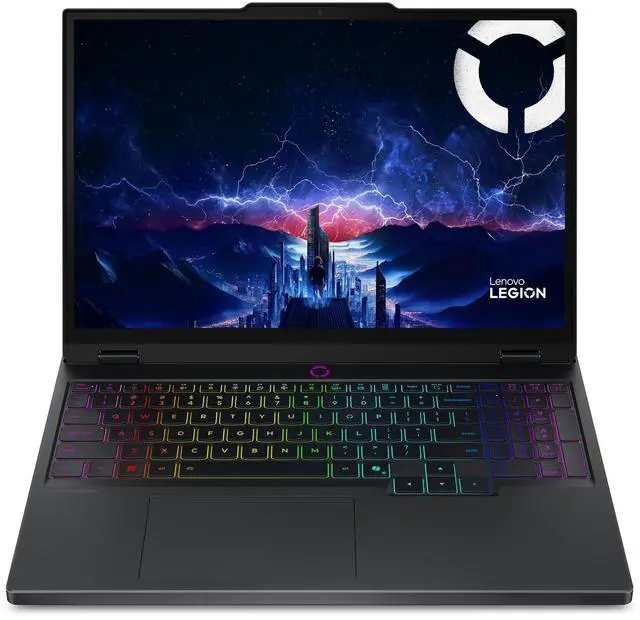
Lenovo Legion 5i Gaming Laptop RTX 5070 15.3-inch OLED
Pros
- Best price-to-performance at this tier
- 15.3-inch OLED at 165Hz
- Solid port selection
- 32GB of memory
Cons
- 165Hz vs 240Hz on pricier alternatives
- Heavier at 5.5 lbs
Price as of Jun 9, 2026 — see current price on Amazon.
OLED vs IPS: Is It Actually Worth It?
This is the most common question in this category. The short answer is usually yes, but it depends on how you use your laptop.
For gaming, OLED wins on contrast and response time. IPS panels have a backlight that can't fully turn off, so "black" is actually a very dark gray. In a dark room playing a horror game or a space sim, that difference shows. OLED pixels switch off completely, which makes HDR content stunning and shadow detail in games actually useful.
For productivity and web browsing, the difference is less dramatic. IPS panels are typically brighter in sustained HDR use and don't have any burn-in risk. Modern OLED panels from ASUS and MSI include pixel-shift algorithms and automatic brightness limiting to reduce burn-in risk. But if you're leaving static content on screen for hours every day, it's still something to think about.
The response time advantage is real. Every OLED panel in this guide does 0.2ms, where a fast IPS is around 1ms. Practically speaking, most games won't show a difference, but for competitive play at high frame rates, OLED's advantage compounds with high refresh rates.
The verdict: for a premium gaming laptop in 2026, OLED is the obvious choice. IPS at that level is leaving real quality on the table.
Buying Guide: How to Choose Your OLED Gaming Laptop
Pick the Right Screen Size
Fourteen-inch laptops like the G14 and Blade 14 are genuinely portable. You'll carry them without thinking twice. The trade-off is a smaller display and less room in the chassis for cooling.
Sixteen-inch machines like the MSI Stealth give you more pixels and a larger keyboard deck. The trade-off is weight: the MSI is 4.85 lbs against 3.64 lbs for the G14.
Understand Refresh Rate Tiers
The 120Hz OLED panels on the 14-inch laptops are smooth for gaming but won't satisfy competitive players who push triple digits in FPS games. Stepping up, the 165Hz Legion 5i hits a good middle ground. At 240Hz, the MSI sits at the current ceiling for mobile OLED.
For most gamers, 165Hz is plenty. If you're a competitive player who runs games at consistently above 165 fps, step up to 240Hz.
GPU Tiers Explained
The RTX 5060 (ASUS G14) is the entry tier in this guide. It is the trade the G14 makes for its size and weight.
The RTX 5070 (Lenovo, Razer) is the 1440p middle of this lineup, one tier above the 5060.
The RTX 5070 Ti (MSI Stealth) is the top tier here. It pulls further ahead in 4K workloads and ray tracing, and gives more headroom as games get more demanding.
Battery Life Reality Check
OLED laptops consume more power than their IPS counterparts when the screen is bright, though modern panels with OLED efficiency modes have narrowed the gap. None of these is a laptop for gaming unplugged: the GPUs run at reduced TGP off-power regardless.
Frequently asked questions
- Do OLED gaming laptops have burn-in problems?
- Burn-in is a reduced risk on modern panels, not a solved one. OLED panels from ASUS, MSI, and Razer include pixel-shift, ASBL (auto screen brightness limiter), and screensaver protocols that reduce burn-in risk compared to older panels. Static HUD elements in games played for thousands of hours without any mitigation could cause issues, but the built-in protection is designed to handle this.
- Is a 14-inch OLED enough for gaming, or is 16-inch the better size?
- For most people, 14-inch is fine. The 3K resolution on the G14 and Blade 14 means the pixel density is high enough that games look sharp even at smaller physical size. If you primarily game at a desk and value portability less, 16-inch gives you more comfortable viewing. If you travel or game in different locations, 14-inch is the better call.
- How does RTX 5070 Ti perform vs RTX 5070 in these laptops?
- The RTX 5070 Ti in the MSI is the faster GPU, one tier above the RTX 5070 in the Lenovo and Razer. The gap matters most at 4K and with ray tracing on. If you game at 1440p, the 5070 is the better value; if you want 4K or maximum ray tracing, the 5070 Ti is worth the premium. The G14 in this guide carries an RTX 5060, one tier below both.
- Can these laptops replace a desktop for work and gaming?
- The 16-inch MSI Stealth A16 is a genuine desktop replacement when plugged in. The 14-inch models are capable workhorses but have less room for cooling during sustained creative workloads. For gaming only, even the Lenovo Legion 5i replaces a mid-range desktop build.
- What OLED panel brand is used in each laptop?
- ASUS markets the G14's panel as ROG Nebula OLED. For buying, the panel supplier matters less than the specs in the table above: size, resolution and refresh rate. All four are OLED, so all four get per-pixel blacks and the 0.2ms response time.
- Do these laptops support external 4K monitors?
- All four laptops here support external 4K displays via HDMI 2.1 or a USB-C/Thunderbolt port. The MSI Stealth A16 has an HDMI 2.1 port that supports 4K at 120Hz to a single external display. All of them also support dual-display setups through a USB-C or Thunderbolt dock.
Bottom Line
For most buyers, the ASUS ROG Zephyrus G14 hits the best balance of portability and display quality, with the honest caveat that its RTX 5060 is the weakest GPU here. If you need more screen real estate and the strongest GPU, the MSI Stealth A16 at 240Hz is the 16-inch pick. And if budget is the priority, the Lenovo Legion 5i is the best-value OLED gaming laptop available right now.
OLED in gaming laptops isn't a gimmick anymore. At the price points these are hitting in 2026, it's the standard worth holding to.
How We Pick
We pick products by combining spec-level research, price checks, trusted third-party benchmarks, and owner sentiment from high-signal sources.
- Performance and real-world value in the category this guide targets
- Price-to-performance and deal consistency over recent pricing windows
- Build quality, reliability patterns, and known long-term issues
- Recommendation refresh cadence to keep these picks current
Author
TheTechSearch Editorial Team
Independent product reviewers & PC builders
We compare real-world specs, reviews and owner reports, price trends, and user feedback to recommend gear that actually makes sense to buy.