Best RTX 5080 Gaming Laptops 2026
The ASUS ROG Strix SCAR 16 is the RTX 5080 laptop to buy for its Mini LED display and full 175W GPU, with the 18-inch MSI Raider 18 HX AI as the desktop repl...
As an Amazon Associate we earn from qualifying purchases made through our links — this doesn't affect our picks.
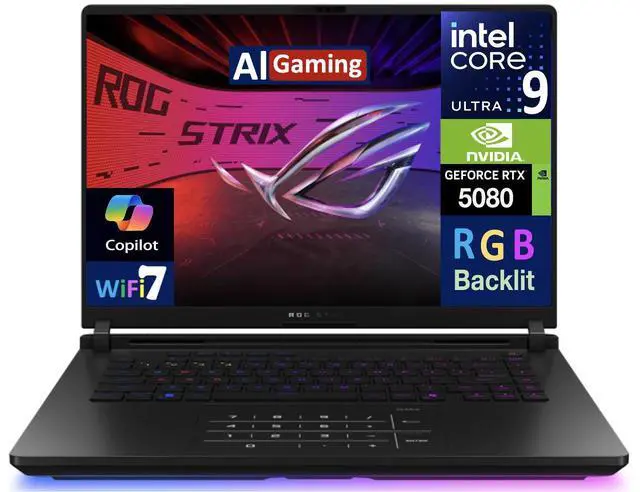
ASUS ROG Strix SCAR 16 (2025) RTX 5080 Gaming Laptop
Our top recommendation for this category
Price as of Jun 4, 2026 — see current price on Amazon.
The ASUS ROG Strix SCAR 16 (2025) is the RTX 5080 laptop to buy. It holds the GPU's full 175W under sustained load, and its 16-inch Mini LED panel with 2,000+ local dimming zones is the best screen on any gaming laptop right now. The MSI Raider 18 HX AI is the alternative if the laptop will live on a desk: an 18-inch QHD+ 240Hz display, the highest average frame rate in this guide, and 64GB of DDR5 with a 2TB SSD in the box. Right now these are the only ones we'd recommend that are in stock.
The RTX 5080 laptop GPU is the chip reviewers recommend below the RTX 5090. At full 175W TDP it pushes 120+ FPS average in Cyberpunk 2077 at 1440p and handles 4K with DLSS 4 without trouble. This guide draws on the major reviews from GamersNexus, Tom's Hardware, FrameLimit and UltraBook Review.
Quick Picks
| Laptop | Display | Weight | Best For | |
|---|---|---|---|---|
| ASUS ROG Strix SCAR 16 | 16" Mini LED 240Hz | 5.7 lbs | Best display + performance | Check Price |
| MSI Raider 18 HX AI | 18" QHD+ 240Hz | 7.1 lbs | Best desktop replacement | Check Price |
ASUS ROG Strix SCAR 16
ASUS ROG Strix SCAR 16 (2025) RTX 5080 Gaming Laptop
Pros
- Mini LED display with 2,000+ dimming zones is the best screen on any gaming laptop right now
- Tri-fan cooling keeps GPU temps genuinely comfortable for sustained workloads
- Tool-less access panel for RAM/SSD upgrades
- Full MUX switch for direct GPU output bypasses iGPU overhead
Cons
- Gaming performance is close to other full-power RTX 5080 machines, so the display is most of what sets it apart
- Battery life at ~3.5 hours under gaming is short
- Somewhat dated aesthetic if RGB isn't your thing
Price as of Jun 4, 2026 — see current price on Amazon.
The SCAR 16's killer feature is the Mini LED panel. ASUS crammed 2,000+ local dimming zones into a 16-inch 240Hz display and the result is something you have to see in person to fully appreciate. Deep blacks that actually look black, HDR highlights that don't bleed into shadows, vivid contrast on dark games like Control or Alan Wake 2. It's the closest a laptop display gets to OLED without being OLED.
Performance is strong. Tom's Hardware measured 145 FPS in Forza Horizon 5 at extreme settings, and 105 FPS in Spider-Man 2 at Very High with DLSS Quality. The Tri-Fan cooling system and Conductonaut Extreme liquid metal on the CPU keep thermals in check even during long sessions, and the GPU keeps its full 175W power budget under sustained load.
The display is the reason to pick it. If you have a specific use case where HDR content quality matters (video editing, photo work alongside gaming), the Mini LED earns its place. The tool-less access panel is a bonus: RAM and SSD upgrades later take minutes.
MSI Raider 18 HX AI
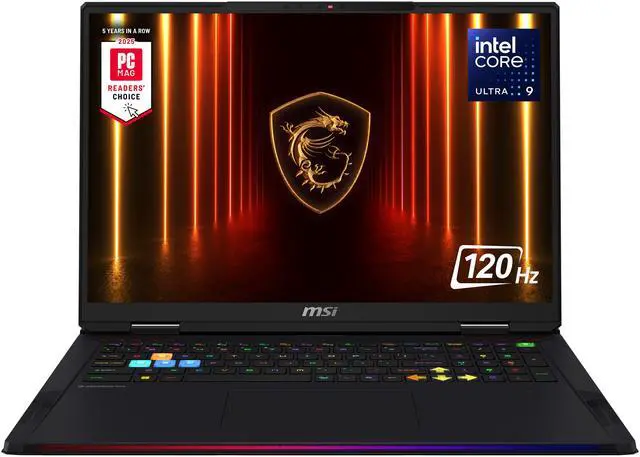
MSI Raider 18 HX AI Gaming Laptop (RTX 5080, Core Ultra 9 285HX)
Pros
- 18-inch QHD+ 240Hz display is genuinely immersive for gaming
- Highest average FPS in this roundup (124 fps average)
- 64GB DDR5 and 2TB SSD included at base price
- Dedicated numpad, nice for productivity alongside gaming
Cons
- 7.1 lbs chassis: this is a desktop replacement, not a portable machine
- Plastic construction feels cheaper than the SCAR 16's metal body
- IPS panel has less contrast than OLED or the SCAR 16's Mini LED
Price as of Jun 4, 2026 — see current price on Amazon.
The MSI Raider 18 HX AI is the raw performance leader in this guide. FrameLimit found it hit 124 FPS average at 1440p Ultra. That edge comes from a combination of the larger chassis allowing more aggressive cooling and the Core Ultra 9 285HX (a slightly faster chip than the 275HX used in many competing machines).
But let's be honest: you're buying this because you want an 18-inch screen, not for a couple of extra frames. The 18" QHD+ 240Hz panel is legitimately immersive, especially for story-driven games where more screen real estate genuinely matters. It's essentially a portable monitor you don't have to carry separately.
The trade-off is weight and build quality. At 7.1 lbs, this lives on a desk. You can take it somewhere, but you won't want to do it daily. Its plastic body, while durable, feels noticeably cheaper than the SCAR 16's. If portability and build quality matter, the SCAR 16 is the better fit. If pure display size and raw frame rates are the priority, the Raider delivers.
If you want more options
These guides cover the closest alternatives:
- Best RTX 5070 Ti Gaming Laptops covers the tier just below, which delivers most of the RTX 5080's performance.
- Best Gaming Laptops Under $2,000 covers 1440p gaming machines if you want a firm budget ceiling.
- Best Gaming Laptops covers every tier from budget RTX 5050 machines up.
RTX 5080 Laptop Buying Guide
Laptop RTX 5080 vs Desktop RTX 5080: How Big Is the Gap?
This question comes up constantly on r/buildapc and r/laptops, so let's address it directly. The laptop RTX 5080 at 175W delivers roughly 70-75% of the performance of the desktop RTX 5080 at 320W. That's actually better than previous generations: the laptop-to-desktop gap has shrunk noticeably with Blackwell's efficiency improvements.
In practical terms: the desktop RTX 5080 averages around 140-150 FPS in Cyberpunk 2077 at 4K Ultra. The laptop RTX 5080 at full 175W lands around 100-110 FPS at the same settings. That's still over 100 FPS at 4K Ultra in one of the most demanding games available. Factor in DLSS 4 with quality mode and multi-frame generation and you're looking at effectively uncapped performance for most games.
The calculus changes if you're doing creative work alongside gaming. Video encoding and AI rendering tasks show a bigger gap because they can fully saturate the desktop GPU's higher power limit for longer periods.
Power Limit Matters More Than Anything Else
Every RTX 5080 laptop nominally has the same GPU, but they don't all run it the same way. Thinner machines that cap the GPU at 150W instead of 175W lose roughly 8-12% in sustained gaming performance. Before buying, confirm the specific power limit of the configuration you're looking at, since some cheaper variants of the same model ship with lower TDP settings.
The ASUS SCAR 16 maintains its full 175W under sustained load. MSI's Raider 18 can push even higher in Turbo mode (up to 200W+ briefly).
Display Technology Breakdown
These two picks take different routes. The SCAR 16's Mini LED panel delivers high peak brightness (over 1,000 nits local) with no risk of burn-in from static HUD elements, which is a real consideration if you log thousands of hours on a single game. The Raider 18's IPS panel trades some contrast for sheer size: 18 inches of QHD+ at 240Hz.
For competitive gaming, refresh rate and response time matter more than panel technology. Both machines here hit 240Hz, so you won't gain a competitive advantage choosing one over the other on refresh rate alone.
RAM and Storage at This Tier
The SCAR 16 starts at 32GB DDR5, and the Raider 18 ships with 64GB. For gaming, 32GB is plenty. For gaming plus video editing or running virtual machines, 64GB is worth it. The SCAR 16's tool-less access panel makes adding RAM or a second SSD later easy.
Storage on both is fast M.2 PCIe, with the Raider including 2TB out of the box. Either is fast enough for any practical gaming use case.
Which One Should You Actually Buy?
For most people: the ASUS ROG Strix SCAR 16. It holds full 175W, has the best display on any gaming laptop and weighs 5.7 lbs. If you're buying a desktop replacement that never moves, the MSI Raider 18 gives you the bigger screen, the highest average frame rate here and more memory out of the box.
Frequently asked questions
- Is the RTX 5080 laptop worth it over the RTX 5070 Ti laptop in 2026?
- Yes, if you're gaming at 1440p or higher and want to avoid bottlenecking your display. The RTX 5080 laptop at 175W delivers roughly 20-25% more performance than the RTX 5070 Ti laptop, which closes the gap on demanding titles like Cyberpunk 2077 and Alan Wake 2 with ray tracing. At 1080p for competitive gaming, the 5070 Ti is more than enough and costs considerably less.
- Can RTX 5080 laptops actually do 4K gaming without DLSS?
- Yes, but results vary by game. In Cyberpunk 2077 at Ultra with ray tracing, native 4K drops to around 60-70 FPS. DLSS 4 Quality mode adds minimal visual loss and pushes those numbers to 110-130 FPS. For most games at 4K Medium-High settings, native rendering runs above 60 FPS without upscaling.
- How does the RTX 5080 laptop GPU compare to the desktop version?
- The laptop RTX 5080 at full 175W delivers approximately 70-75% of the desktop RTX 5080's performance at 320W. This generation's gap is smaller than RTX 40-series. For gaming, that means you're looking at roughly 100-110 FPS average at 4K Ultra in demanding titles, versus 140-150 FPS on the desktop card. DLSS 4 narrows the practical gap significantly for most gaming scenarios.
- Which RTX 5080 laptop has the best display?
- The ASUS ROG Strix SCAR 16. Its Mini LED panel has 2,000+ local dimming zones and over 1,000 nits peak brightness, excellent for HDR content with no burn-in risk. The MSI Raider 18's 18-inch QHD+ panel is bigger but has less contrast. Both run at 240Hz.
- Are RTX 5080 laptops too heavy for daily carry?
- Depends on the model. The ASUS SCAR 16 at 5.7 lbs is manageable in a backpack. The MSI Raider 18 at 7.1 lbs is a desktop replacement: you can move it, but you won't enjoy it regularly.
- Should I wait for RTX 5090 laptop prices to drop instead?
- Probably not. The RTX 5090 laptop GPU delivers around 20-25% more performance than the RTX 5080 laptop at 175W, but costs considerably more for the same configuration. That's a poor value ratio. RTX 5090 laptop prices have been sticky since launch. The RTX 5080 already handles everything at 1440p and most things at 4K, so waiting for 5090 price cuts that may not materialize in 2026 means missing months of gaming.
Bottom Line
The ASUS ROG Strix SCAR 16 is the default answer for most buyers: full 175W, the best display on any gaming laptop, tri-fan cooling and tool-less upgrades. The MSI Raider 18 HX AI is the pick if the laptop never leaves your desk and you want an 18-inch screen with the highest average frame rate in this guide.
How We Pick
We pick products by combining spec-level research, price checks, trusted third-party benchmarks, and owner sentiment from high-signal sources.
- Performance and real-world value in the category this guide targets
- Price-to-performance and deal consistency over recent pricing windows
- Build quality, reliability patterns, and known long-term issues
- Recommendation refresh cadence to keep these picks current
Author
TheTechSearch Editorial Team
Independent product reviewers & PC builders
We compare real-world specs, reviews and owner reports, price trends, and user feedback to recommend gear that actually makes sense to buy.