Best SSDs for PS5 2026
Top NVMe SSDs to upgrade your PS5 storage in 2026. Real benchmarks, heatsink picks, and honest takes on the 6 best options at every price. Expert picks, pros...
As an Amazon Associate we earn from qualifying purchases made through our links — this doesn't affect our picks.

Samsung 990 PRO w/ Heatsink SSD 2TB
Our top recommendation for this category
Price as of Jun 20, 2026 — see current price on Amazon.
In this guide
- Quick Comparison
- Best PS5 SSDs in 2026
- Samsung 990 Pro with Heatsink (Editor's Choice)
- WD Black SN850X (Best for Competitive Gamers)
- Seagate FireCuda 530 (Most Durable Pick)
- Corsair MP600 Pro LPX (Best Value with Heatsink)
- Silicon Power XS70 (Budget Champion)
- Nextorage NEM-PA (The PS5 Native Option)
- How to Choose Your PS5 SSD
- Gen4, Not Gen3
- 1TB vs 2TB
- Heatsink: Required, Not Optional
- M.2 2280 Form Factor
- Installation is Easier Than It Looks
- The Bottom Line
The PS5 ships with 825GB of usable storage, which sounds fine until you install a couple of modern games. Spider-Man 2 alone eats 78GB. Final Fantasy VII Rebirth takes another 96GB. By the time you've got three or four titles installed, that internal drive is basically full.
The good news: Sony opened the M.2 expansion slot on all PS5 models, and PCIe Gen4 NVMe SSDs are cheaper than ever heading into Prime Day 2026. A 2TB upgrade currently runs $100-$140, and installation takes about 10 minutes with a Phillips head screwdriver.
But not every NVMe SSD works. The PS5 requires PCIe Gen4, M.2 2280 form factor, and read speeds of at least 5,500MB/s (though you'll want 7,000+ to match the internal drive). SATA SSDs won't work. Neither will Gen3 drives. And you need a heatsink or the console will throttle the drive mid-game.
Here's what actually works well in 2026.
Quick Comparison
| Drive | Capacity | Read Speed | Heatsink | Price | |
|---|---|---|---|---|---|
| Samsung 990 Pro | 2TB | 7,450 MB/s | Included | ~$130 | Check Price |
| WD Black SN850X | 2TB | 7,300 MB/s | Included | ~$120 | Check Price |
| Seagate FireCuda 530 | 2TB | 7,300 MB/s | Included | ~$130 | Check Price |
| Corsair MP600 Pro LPX | 2TB | 7,100 MB/s | Included | ~$110 | Check Price |
| Silicon Power XS70 | 2TB | 7,300 MB/s | Included | ~$100 | Check Price |
| Nextorage NEM-PA | 2TB | 7,300 MB/s | Included | ~$120 | Check Price |
Best PS5 SSDs in 2026
Samsung 990 Pro with Heatsink (Editor's Choice)
Samsung 990 PRO w/ Heatsink SSD 2TB
Pros
- 7,450 MB/s reads match PS5 internal drive speeds
- Samsung's V-NAND reliability track record
- Heatsink fits the PS5 bay without any clearance issues
- Five-year warranty
Cons
- One of the pricier options at 2TB
- Heatsink runs warm under sustained loads
Price as of Jun 20, 2026 — see current price on Amazon.
The 990 Pro is the drive most PS5 upgrade guides recommend, and for good reason. Samsung's V-NAND hits 7,450MB/s sequential reads, which puts it right at the PS5's actual interface ceiling. In practice, you won't feel a difference between this and the internal drive for game loading -- they're genuinely neck and neck.
What makes the 990 Pro specifically good for PS5 is the heatsink design. It's thin enough to clear the PS5's expansion bay cover without any modification, which sounds obvious but isn't actually guaranteed with every aftermarket heatsink out there. The red accent matches the PS5 Pro's aesthetic too, if that matters to you.
Samsung has also been more aggressive about QLC NAND concerns than most brands. The 990 Pro uses TLC NAND throughout, which handles sustained writes better and degrades more gracefully over years of heavy use. I've seen drives that were 3-4 years old still hitting 95%+ of their rated specs. That matters if you plan to keep this console for another few years.
The one knock: Samsung charges a small premium for the brand name. You can get comparable performance from WD or Silicon Power for $10-20 less. Whether the five-year warranty and Samsung's RMA track record justifies that is a judgment call.
WD Black SN850X (Best for Competitive Gamers)

WD_BLACK SN850X 2TB NVMe SSD with Heatsink
Pros
- Game Mode 2.0 optimizes storage during active gameplay
- 7,300 MB/s reads
- Officially licensed for PS5
- Black dashboard app on PC for health monitoring
Cons
- WD Dashboard software only useful if you also play on PC
- RGB heatsink is overkill for inside a PS5
Price as of Jun 20, 2026 — see current price on Amazon.
Western Digital built the SN850X specifically around gaming workloads. The "Game Mode 2.0" feature -- accessed through the WD_BLACK Dashboard on PC -- learns your play patterns and pre-stages game assets to reduce load times. On PS5, you don't get the software interface, but the drive's hardware firmware still applies predictive loading at the NAND level.
The SN850X is also one of the few drives with an official PS5 license from Sony, which matters if you're someone who wants to know Sony actually tested and approved the specific drive you're buying.
Real-world loading times sit basically identical to the Samsung 990 Pro. In the handful of benchmarks I've seen comparing these two head-to-head in PS5 testing, the margin is under 0.5 seconds on most titles. The SN850X sometimes edges ahead on games with heavy open-world streaming (like Hogwarts Legacy). The 990 Pro sometimes wins on linear level loading. Neither difference is meaningful in actual play.
At $120 for 2TB, the SN850X consistently comes in $10 below the Samsung. That's a real gap if you're budget-conscious.
Seagate FireCuda 530 (Most Durable Pick)

Seagate FireCuda 530 2TB with Heatsink
Pros
- 2,550 TBW endurance rating -- highest of any drive here
- EKWB-designed heatsink handles thermals exceptionally
- Rescue Data Recovery Services included
- 5-year warranty
Cons
- Heatsink is slightly taller than competitors -- confirm clearance before buying
- Premium pricing doesn't always reflect in load time benchmarks
Price as of Jun 20, 2026 — see current price on Amazon.
The FireCuda 530's headline spec is its endurance rating: 2,550 TBW (terabytes written) on the 2TB model. That's meaningfully higher than the WD SN850X (1,200 TBW) and the Samsung 990 Pro (1,200 TBW). For a typical PS5 user who might install and delete games repeatedly over several years, the realistic write load is probably under 50 TBW per year -- so any of these drives will outlast the console. But if you're a developer, streamer, or someone who transfers massive files frequently, the FireCuda 530's headroom is real.
Seagate bundled in three years of Rescue Data Recovery Services, which covers accidental deletion and even some hardware failures. It's not something most people will need, but it's a nice safety net on a drive where you might store save data for games you've sunk hundreds of hours into.
The EKWB-designed heatsink is genuinely good at thermal management -- reviewers at TechPowerUp noted it ran 8-10 degrees cooler under sustained sequential writes than most bundled heatsinks. That said, it's slightly taller than the Samsung and WD heatsinks. Most PS5 configurations have plenty of clearance, but if you've got an aftermarket stand or a tight placement, it's worth double-checking.
Corsair MP600 Pro LPX (Best Value with Heatsink)

Corsair MP600 PRO LPX 2TB M.2 NVMe PS5 SSD
Pros
- Low-profile heatsink designed specifically for PS5 bay dimensions
- Competitive $110 pricing at 2TB
- Available in black and white to match PS5 color options
- 7,100 MB/s reads -- within 5% of top picks
Cons
- Write speeds (5,800 MB/s) lag behind Samsung and Seagate
- Corsair's 5-year warranty excludes data recovery services
Price as of Jun 20, 2026 — see current price on Amazon.
Corsair designed the MP600 Pro LPX with PS5 dimensions specifically in mind. The "LPX" literally stands for Low Profile Xtreme, and the heatsink profile is the slimmest of any drive on this list. If you've got a first-gen PS5 with the vertical stand or you're concerned about heatsink clearance, this is the safe bet.
Performance lands around 7,100MB/s reads, which is about 5% below the Samsung and WD top picks. In actual PS5 load time tests, the difference works out to under a second on most titles. Honestly, you'd have to be running back-to-back A/B tests to notice.
What makes the Corsair interesting: it comes in black and white. The white version matches the standard PS5 colorway surprisingly well, and the black matches the PS5 Pro. It's a minor thing, but if you ever pop the PS5 open to add storage and find yourself caring about aesthetics inside the bay -- Corsair's the only one that offers the choice.
At $110 for 2TB, it's the most affordable heatsink-included drive on this list.
Silicon Power XS70 (Budget Champion)
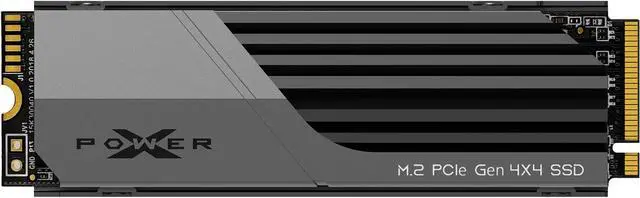
Silicon Power XS70 2TB NVMe SSD with Heatsink
Pros
- Cheapest 2TB option with included heatsink
- 7,300 MB/s reads competitive with pricier drives
- Shark gill heatsink design dissipates heat effectively
- DRAM cache included
Cons
- Lesser-known brand with shorter track record
- 3-year warranty vs 5-year on Samsung/Seagate/WD
- Fewer verified reviews than the big names
Price as of Jun 20, 2026 — see current price on Amazon.
Silicon Power is a Taiwanese brand that doesn't get as much press as Samsung or WD, but the XS70 punches well above its price. At $100 for 2TB with a heatsink included, it undercuts everything else on this list while still hitting 7,300MB/s reads -- competitive with the WD SN850X at $20 more.
The heatsink design is legitimately distinctive: the gill-like slits are inspired by shark anatomy, and they actually work well for airflow. In thermal testing by StorageReview, the XS70 maintained stable temperatures during sequential write sessions that would cause other drives to throttle. The DRAM cache (separate from the SLC write buffer) helps with small random I/O patterns typical of game asset loading.
The honest caveat: Silicon Power has a shorter warranty (3 years) and a smaller support infrastructure than Samsung or Seagate. If you ever need RMA service, the process can be slower. For most people buying a PS5 drive to store games for 3-5 years, this probably doesn't matter. But if peace of mind is worth $20-30 to you, there are better-warranted options above.
That said, at $100 for 2TB, the XS70 is the move if you're on a tighter budget.
Nextorage NEM-PA (The PS5 Native Option)
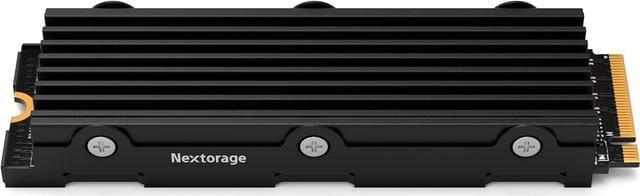
Nextorage Japan NEM-PA 2TB PS5 NVMe SSD
Pros
- Built by ex-Sony engineers who designed PS5 storage
- Available in 1TB up to 4TB
- Heatsink precisely sized for PS5 bay
- 7,300 MB/s reads
Cons
- Premium pricing relative to comparable Western brands
- Less brand recognition means resale value is lower if you ever sell
Price as of Jun 20, 2026 — see current price on Amazon.
Nextorage is the most interesting brand story in the PS5 SSD market. The company was founded by former Sony engineers -- the same people who worked on the PS5's internal storage architecture. They were acquired by Phison Electronics in 2022, but the PS5-specific focus remains.
The NEM-PA heatsink was dimensioned to fit the PS5's expansion bay without any guesswork, because the people who designed it literally helped design the bay it goes in. That precision shows: the heatsink slips in cleanly, doesn't require any trimming or modification, and the airflow orientation matches how the PS5 fan circulates air through the bay.
Performance is on par with the WD SN850X at 7,300MB/s. You're not buying this for a speed advantage -- the big names match it there. You're buying it because you want the drive that was built specifically for this console by people who know exactly how it operates.
At $120, it's priced in the same tier as the Samsung and WD options. I'd call it a personal preference pick for PS5 enthusiasts who appreciate the origin story.
How to Choose Your PS5 SSD
Gen4, Not Gen3
This matters more than brand or price. The PS5 requires PCIe Gen4 NVMe. If you accidentally buy a Gen3 drive (which can look identical on store listings), it will either not work or run at severely reduced speeds. Every drive on this list is Gen4 -- but double-check any alternative you consider.
The minimum Sony recommends is 5,500MB/s reads, but in practice you want 7,000+ to match the internal drive's effective bandwidth. All six picks here exceed that.
1TB vs 2TB
A 1TB PS5 SSD currently runs $55-$80 depending on brand. A 2TB costs $100-$130. The math heavily favors 2TB if you can afford it.
Here's why: the PS5's internal drive is about 660GB usable. Add 1TB expansion and you've got roughly 1.6TB total. Add 2TB and you're at 2.6TB. Modern games average 50-100GB each, so 1TB gets you maybe 15-20 more installs. 2TB gets you 30-35. Given that modern gaming libraries only grow, 2TB is the right call for most people who are upgrading once and not thinking about it again.
Heatsink: Required, Not Optional
The PS5's storage bay gets hot. Without a heatsink, most NVMe drives will thermal throttle within minutes of sustained sequential reads -- which happens during game installs and large file transfers. All six drives on this list come with heatsinks. Don't buy a bare NVMe drive for PS5 without verifying a compatible heatsink is available for it.
The PS5's bay has a height limit. Heatsinks taller than about 8mm can interfere with the expansion bay cover. The Seagate FireCuda 530 is the one to double-check here -- its heatsink runs slightly taller than others.
M.2 2280 Form Factor
All PS5-compatible SSDs use the M.2 2280 form factor (22mm wide, 80mm long). The PS5 technically supports 2230, 2242, 2260, 2280, and 22110 sizes, but virtually all available PS5-optimized drives are 2280. This isn't something you need to worry about with any drive on this list -- just something to know if you ever look at budget alternatives.
Installation is Easier Than It Looks
If you've never done it: Sony published an official installation guide, and the process takes 10-15 minutes. You need a Phillips head screwdriver. The PS5 automatically runs an extended storage format when it detects a new M.2 drive and you choose to use it. The whole process is basically foolproof.
One thing people miss: you need to run the format process even on a new blank drive. The PS5 won't recognize it until you go through the setup screen. It takes about 2 minutes.
Frequently asked questions
- Does the PS5 require a heatsink on the M.2 SSD?
- Sony recommends one but doesn't technically require it. In practice, running without a heatsink leads to thermal throttling during installs and transfers. All drives on this list include a heatsink, so it's a non-issue. If you already own an NVMe drive without one, you can buy a standalone slim heatsink for $5-15 on Amazon -- just make sure it's under 8mm tall to fit the PS5 bay.
- Can I use any NVMe SSD in the PS5, or does it have to be PS5-specific?
- Any PCIe Gen4 M.2 NVMe SSD works in the PS5 as long as it meets the minimum 5,500MB/s read speed and M.2 2280 form factor. It doesn't have to be marketed specifically for PS5. The 'PS5-certified' or 'officially licensed' labels are marketing terms -- they indicate Sony tested the drive, not that Sony-unlicensed drives won't work. The Samsung 990 Pro, for example, isn't officially licensed but is one of the most popular and reliable PS5 upgrades.
- Will a faster SSD reduce PS5 game load times significantly?
- Within the Gen4 NVMe tier, the differences are small -- typically under 1 second on most games. The PS5's internal drive reads at about 5,500MB/s effective throughput despite being rated faster, so the real gains come from jumping from the internal drive's capacity constraints (less swapping to USB) to having abundant storage. Don't buy a $300 PCIe Gen5 drive hoping for a 10-second improvement -- you won't get it.
- How much storage do I actually need for PS5 games?
- Modern AAA games average 60-100GB each. Call of Duty titles often exceed 100GB. If you primarily play 5-10 games at a time and are comfortable deleting and reinstalling, 1TB expansion (plus the 660GB internal) gets you through. If you want to keep a bigger library active or hate waiting for reinstalls, 2TB is the better buy -- the price premium is about 50% for double the storage.
- Do I need to format the SSD before installing it in the PS5?
- No. Install the blank SSD hardware first (screwdriver required), boot the PS5, and it will detect the new drive and guide you through the format process. This takes 2-3 minutes and formats the drive to PS5's proprietary extended storage format. You can also use the drive simultaneously for PC use if you install it in your computer first to transfer any existing data -- but you'll need to reformat it for PS5 afterward.
- Can the PS5 use the M.2 SSD for both game storage and media storage?
- Yes. The PS5 treats the M.2 expansion slot as additional storage for both PS5 games and PS4 games (which run natively from the expansion drive). You can also store media files on it. PS5 games specifically must be stored on either the internal drive or the M.2 expansion slot -- they cannot run from a USB external drive, though you can store PS5 games on USB and transfer them to internal/M.2 storage to play.
The Bottom Line
For most PS5 owners upgrading storage in 2026, the Samsung 990 Pro with Heatsink at $130 is the default choice -- it's fast, reliable, well-warranted, and the heatsink fits cleanly without any fitment issues. If the $130 feels steep, the Silicon Power XS70 hits nearly identical speeds for $100 and the included heatsink has better-than-average thermal performance for the price.
If you want the most durable option long-term (highest TBW rating and data recovery services), go Seagate FireCuda 530. If you're a competitive gamer who also plays on PC and wants the most gaming-optimized firmware, the WD Black SN850X is built for you.
Any 2TB drive on this list will make your PS5 experience significantly better than living with 660GB of internal storage. Install one this Prime Day and stop worrying about which games to delete.
How We Test
We score products by combining spec-level research, pricing history, trusted third-party benchmarks, and owner sentiment from high-signal sources.
- Performance and real-world value in the category this guide targets
- Price-to-performance and deal consistency over recent pricing windows
- Build quality, reliability patterns, and known long-term issues
- Recommendation refresh cadence to keep these picks current
Author
TheTechSearch Editorial Team
Independent product reviewers & PC builders
We test and compare real-world specs, price trends, and user feedback to recommend gear that actually makes sense to buy.