Best USB Audio Interfaces for Streaming and Recording 2026
The five best USB audio interfaces for home recording, streaming, and podcasting. Ranked for every use case and budget. Expert picks, pros and cons, and side...
As an Amazon Associate we earn from qualifying purchases made through our links — this doesn't affect our picks.
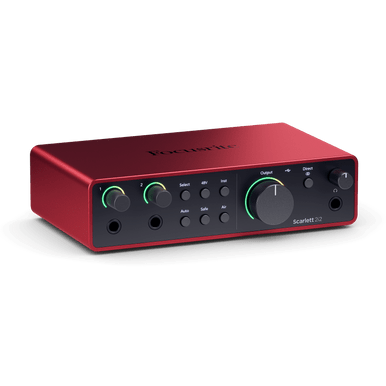
Focusrite Scarlett 2i2 4th Gen
Home recording, podcasting, streaming
Price as of Jul 13, 2026 — see current price on Amazon.
The USB microphone you started with got you through year one. But if you're serious about audio quality, whether you're running a podcast, streaming on Twitch, recording vocals, or capturing guitar tracks at home, a USB audio interface paired with an XLR mic is a completely different league. Better preamps. Lower noise. More control. And honestly, most of these interfaces are cheaper than a decent USB mic anyway.
The differences between these five interfaces matter more than you'd think at these price points. Here's what's worth buying in 2026.
| Interface | Price | Inputs | Bit/Rate | Platform | Best For | |
|---|---|---|---|---|---|---|
| Focusrite Scarlett 2i2 4th Gen | $199 | 2 XLR/Inst | 24-bit/192kHz | Mac/Win/iPad | Best Overall | Check Price |
| TC-Helicon GoXLR Mini | $149 | 1 XLR + USB | 24-bit/48kHz | Windows Only | Streamers | Check Price |
| Audient iD4 MkII | $199 | 1 XLR + 1 Inst | 24-bit/96kHz | Mac/Win/iOS | Audio Quality | Check Price |
| Focusrite Scarlett Solo 4th Gen | $139 | 1 XLR + 1 Inst | 24-bit/192kHz | Mac/Win/iPad | Solo Creators | Check Price |
| MOTU M2 | $169 | 2 XLR/Inst | 24-bit/192kHz | Mac/Win | Pro Studios | Check Price |
Focusrite Scarlett 2i2 4th Gen: Best Overall
Focusrite Scarlett 2i2 4th Gen
Best for: Home recording, podcasting, streamingPros
- Auto Gain sets your recording levels automatically
- Clip Safe saves a backup track if you clip
- 120dB dynamic range matches much pricier interfaces
- Two inputs handle voice plus instrument simultaneously
- Works on Mac, Windows, and USB-C iPad
Cons
- $199 is not cheap if you only need one input
- Doesn't include a microphone (you'll need XLR separately)
Price as of Jul 13, 2026 — see current price on Amazon.
The Scarlett 2i2 has been the default recommendation for home recording for years. The 4th Gen version, released in late 2023, added two features that actually justify upgrading if you own an older one. Auto Gain points your mic at a sound source, taps the button, and the interface figures out the right gain level on its own. Clip Safe keeps a secondary recording running at a lower level so if you clip during a loud moment, you still have a clean take underneath it.
Both of those sound like gimmicks until you actually need them. During a long podcast recording or a performance where the volume swings unpredictably, Clip Safe can be the difference between a ruined take and a usable one. It works as a safety net you don't have to think about.
The preamps themselves hit 120dB dynamic range, which puts them in the same class as interfaces that cost two or three times as much. Air Mode adds a presence boost to the high-mids that gives vocals a bit more brightness and forward energy. It's subtle but useful for spoken word content. With two combo XLR/instrument inputs, you can run a mic and a guitar simultaneously without running out of connections.
Two actual limitations worth knowing: you don't get loopback on a single channel the way the GoXLR Mini handles it for gaming audio routing. And at $199, you're paying for quality you probably won't outgrow rather than a feature set that rewards experts. For most people, that's exactly right.
TC-Helicon GoXLR Mini: Best for Streamers
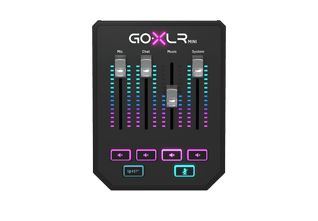
TC-Helicon GoXLR Mini
Best for: Twitch, gaming streams, DiscordPros
- Physical faders control mic, game, chat, and music volumes independently
- Built-in voice effects and noise gate for live streaming
- Award-winning Midas preamp sounds genuinely good
- USB audio routing separates app volumes on Windows
Cons
- Windows only, no Mac support at all
- 48kHz max sample rate limits mixing/mastering use
- Larger than a typical interface; needs a dedicated desk footprint
Price as of Jul 13, 2026 — see current price on Amazon.
The GoXLR Mini is not a conventional audio interface. It's a streaming mixer with an audio interface built into it, and that distinction matters. The physical faders let you control your microphone, game audio, Discord chat, and music simultaneously with separate hardware controls. If you've ever tried to balance those four sources in software while also paying attention to a live stream, you know why that matters.
The routing runs through TC-Helicon's Windows software, which creates multiple virtual audio devices that different apps can send to independently. OBS Studio picks up your mic. Discord sits on a separate virtual device. Game audio routes through another one. You can mute each with dedicated buttons and see levels on the GoXLR app. It's the closest thing to having a real broadcast mixer at a price point most streamers can actually afford.
The Midas preamp sounds good. Not as clean as the Audient or MOTU at the high end, but noticeably better than budget USB mics, and the built-in noise gate handles fan noise and keyboard chatter well.
Look, I need to say this clearly: if you use a Mac, stop reading about the GoXLR Mini. TC-Helicon has not released Mac support and has not committed to a timeline. The Windows-only limitation is real and not going away. For Windows-based streamers, it's outstanding. For anyone else, it's the wrong tool.
Audient iD4 MkII: Best for Audio Quality

Audient iD4 MkII
Best for: Guitarists, musicians, serious home recordingPros
- Class A console preamp from Audient's professional console design
- JFET instrument input sounds warm and natural on guitar
- Two headphone outputs for simultaneous monitoring
- USB-C bus powered, compatible with Mac, Windows, and iOS
Cons
- Only one mic preamp limits two-person setups
- No loopback for streaming without additional software routing
Price as of Jul 13, 2026 — see current price on Amazon.
Audient makes professional studio consoles. Real ones, the kind you'd find in a serious recording facility. The iD4 MkII uses a single preamp derived from that console design, scaled down to an interface that costs $199. That lineage is audible. Vocals through the iD4 have a warmth and clarity that sounds different from the more clinical output of typical budget interfaces.
The JFET instrument input is specifically worth calling out for guitarists. It captures the feel of a higher-impedance guitar signal in a way that sounds more natural and reactive than most interfaces at this price. Run an acoustic guitar through it and A/B it against a cheaper interface. The difference is noticeable.
Where it loses to the Scarlett 2i2 is flexibility. One mic preamp means one singer or one mic'd instrument at a time. There's no loopback, which complicates streaming setups that need to route system audio back through the interface. But for a solo guitarist or vocalist who cares about the quality of what they're capturing more than how many sources they can run simultaneously, the iD4 MkII is the best-sounding option at this price.
The two headphone outputs are a useful feature that gets less attention than it deserves. If you're recording with a vocalist and need both of you monitoring simultaneously without splitting a headphone output, the iD4 has that built in.
Focusrite Scarlett Solo 4th Gen: Best for Solo Creators
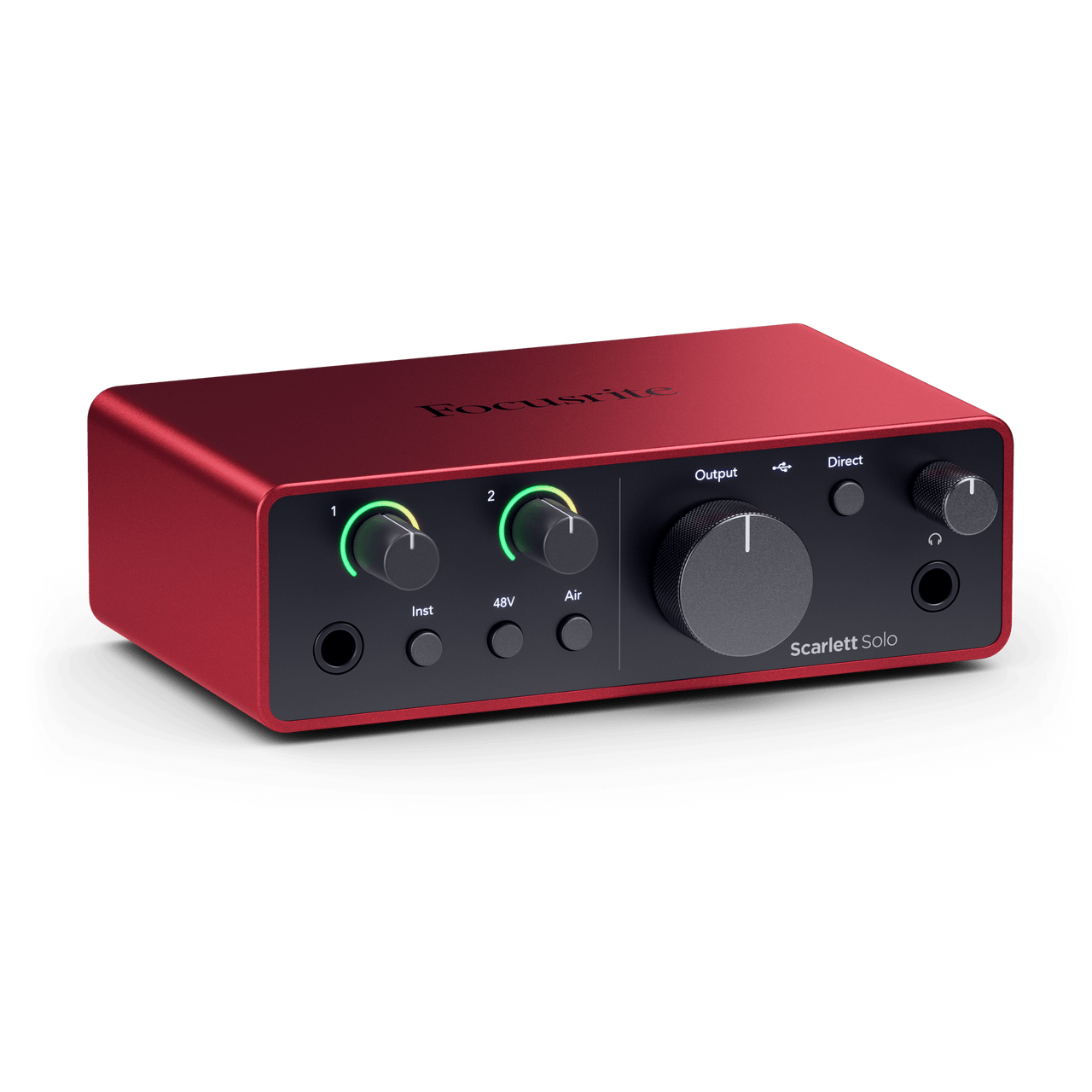
Focusrite Scarlett Solo 4th Gen
Best for: Podcasters, solo vocalists, YouTubersPros
- Same 120dB dynamic range and preamp quality as the 2i2
- Auto Gain and Clip Safe carry over from the larger model
- $60 cheaper than the 2i2 if you never need two inputs
- Works on USB-C iPads for mobile recording
Cons
- Only one mic preamp, no simultaneous two-person recording
- No Air Mode toggle on this model (4th Gen removed it)
Price as of Jul 13, 2026 — see current price on Amazon.
If you're recording solo content, the Solo is essentially the same interface as the 2i2 with one input removed and a lower price tag. You get the same 4th Gen preamp, the same 120dB dynamic range, Auto Gain, Clip Safe, and the Focusrite Control 2 software suite. For a podcaster running a one-person show, a YouTuber doing voiceover, or a vocalist laying down solo tracks, you're not sacrificing anything meaningful compared to the more expensive model.
The $60 difference is real money if you're just starting out. And honestly, most home recording setups only ever use one input at a time anyway. Two inputs sound useful until you realize your recording sessions are almost always one mic, one person.
The one legitimate downside is that the 4th Gen Solo dropped the Air Mode button that the 3rd Gen had. Air Mode is now only available through software in Focusrite Control 2 rather than as a physical toggle. Minor complaint, but worth noting if you switch it on and off frequently.
MOTU M2: Best for the Discerning Home Studio

MOTU M2
Best for: Music production, mixing, masteringPros
- ESS Sabre32 Ultra DAC delivers 120dB dynamic range on the outputs
- Exceptionally clean and transparent preamps with low noise floor
- 32-sample round-trip latency at 96kHz -- under 3ms
- Full-color LCD metering is a standout feature at this price
Cons
- No bundled DAW software, unlike Focusrite or PreSonus
- Less name recognition means fewer YouTube tutorials for beginners
Price as of Jul 13, 2026 — see current price on Amazon.
MOTU made a name building professional studio equipment before USB audio interfaces existed as a category. The M2 carries that background. The ESS Sabre32 Ultra DAC technology that MOTU uses in the M2 is the same chip architecture found in high-end audiophile gear. On the outputs, you get 120dB dynamic range that's genuinely on par with the official specs, not just marketing language.
The round-trip latency at 96kHz with a 32-sample buffer is under 3ms. That matters less for recording vocals where you're not monitoring through the interface, but for guitar players using amp simulation software like Helix Native or Neural DSP, it's the difference between an interface that feels like playing through a real amp and one that has a noticeable delay that throws off your timing.
The full-color LCD on the front panel is a nice-to-have that becomes genuinely useful during complex routing sessions. You can see your levels, sample rate, and buffer size without opening a software window.
What you don't get with the MOTU M2 that you'd get with a Focusrite: a bundled DAW. The Scarlett lineup comes with Ableton Live Lite, Pro Tools Artist, and a stack of plugins that would cost real money to buy separately. If you already have a DAW, the MOTU's superior output quality is worth the trade. If you're starting fresh without a DAW, the Focusrite ecosystem makes more financial sense.
Buying Guide: How to Choose a USB Audio Interface
XLR vs USB Microphone: Do You Even Need an Interface?
USB microphones plug directly into your computer without an interface. They're simpler and often cheaper for the first purchase. But they have real limitations: typically lower quality preamps built into the mic itself, no way to upgrade the preamp without replacing the entire mic, and limited flexibility if you want to expand your setup.
Once you have an interface, you can use any XLR microphone, which opens up a massive range of professional-grade options from $50 to several thousand dollars. The interface becomes a long-term investment rather than a throwaway purchase.
If you're recording one person, occasionally, without plans to upgrade your audio quality over time, a USB mic is fine. If you're building a setup you'll use for years, an interface and a separate XLR mic gives you more room to improve piece by piece.
Sample Rate and Bit Depth: What Numbers Matter
Most of the interfaces on this list record at 24-bit/192kHz. For comparison, CD quality is 16-bit/44.1kHz, and professional studio projects typically record at 24-bit/96kHz.
For streaming and podcasting, 24-bit/48kHz is more than sufficient. The extra headroom from higher sample rates matters more for music production where you're applying heavy processing that can degrade quality with each generation. For spoken word content, you're not going to hear the difference between 48kHz and 192kHz on a podcast.
The bit depth matters more than sample rate for most real-world use. 24-bit gives you roughly 144dB of dynamic range in theory, versus 96dB for 16-bit. In practice, this means you have much more room to record at lower gain levels and bring them up in post without introducing noise.
Latency: Why It Matters More for Musicians Than Streamers
Latency is the delay between making a sound and hearing it through the interface. For podcasters and streamers, this matters less because you're usually monitoring directly through headphones, not through the interface.
For musicians playing instruments through amp simulation software, latency above 10ms starts to feel wrong. The MOTU M2's sub-3ms round-trip latency at low buffer sizes is a genuine advantage for this use case.
Software Bundles: Free DAW Software Has Real Value
Focusrite's 4th Gen interfaces include Ableton Live Lite, Pro Tools Artist, Cubase LE, and Hitmaker Expansion (which includes Celemony Melodyne Essential, worth $99 on its own). If you're starting without any recording software, that bundle alone justifies a significant portion of the purchase price.
MOTU doesn't bundle a DAW. TC-Helicon includes their GoXLR software which is specific to their streaming mixer routing. If you need a full recording setup from scratch, add DAW costs to your mental budget when comparing options.
Platform Compatibility: The Mac/Windows Question
Every interface on this list except the GoXLR Mini works on Mac and Windows. The GoXLR Mini is Windows-only, no exceptions. TC-Helicon's software routing system that makes the GoXLR useful for streaming has not been implemented on macOS, and there's no indication that's changing.
The Focusrite interfaces and Audient iD4 MkII also work on USB-C iPads, which is useful for mobile recording setups.
Frequently asked questions
- Do I need phantom power for my microphone?
- Condenser microphones require 48V phantom power, which all the interfaces on this list supply. Dynamic microphones like the Shure SM7B do not need phantom power. Check your microphone's specs before buying, but any condenser mic will need an interface that provides it.
- Can I use the GoXLR Mini with a Mac?
- No. TC-Helicon's GoXLR Mini is officially supported on Windows 7, 8, 10, and 11 only. There is no Mac driver and no official timeline for Mac support. If you use a Mac, this is a dealbreaker with no workaround.
- What microphone should I pair with a Focusrite Scarlett?
- The Audio-Technica AT2020 ($99) is the most popular pairing and a solid choice for podcasting and vocals. For streaming and gaming, the Blue Microphones Ember ($99) works well. If budget allows, the Rode NT1 ($269) is a significant step up in quality.
- Will my computer's USB port limit my audio quality?
- USB 2.0 is sufficient for all the interfaces on this list. None of them require USB 3.0 for data transfer, though USB-C connections on newer computers are fine and often preferred for their connector durability. Don't worry about this unless you're connecting through a cheap hub, which can introduce noise.
- Can I use two interfaces simultaneously for more inputs?
- This is technically possible on Mac using Aggregate Device in Audio MIDI Setup, but it often introduces sync issues. Windows does not support this natively. A better approach is to buy an interface with the number of inputs you actually need from the start, or to upgrade to a multichannel interface later.
- Is the Focusrite Scarlett 2i2 4th Gen worth upgrading from a 3rd Gen?
- If you frequently record loud sources or dynamic content, Auto Gain and Clip Safe alone make the upgrade worth it. The preamp improvements in the 4th Gen are measurable but subtle at normal listening volumes. If your 3rd Gen is working fine for your current needs, wait. If you're building a new setup, go straight to the 4th Gen.
Bottom Line
For most people starting with audio interfaces in 2026, the Focusrite Scarlett 2i2 4th Gen is the right answer. Two inputs, Auto Gain, Clip Safe, a serious software bundle, and preamps that will hold up as your skills improve. If you're a solo creator who'll never need two inputs simultaneously, the Scarlett Solo saves you $60 with no real sacrifice.
Streamers who want hardware fader control over their audio routing and are on Windows should look at the GoXLR Mini. Musicians who care most about raw preamp quality should look at the Audient iD4 MkII. And anyone building a serious home studio who already has a DAW and wants the cleanest possible signal chain should consider the MOTU M2.
None of these are bad choices. The differences are about matching the right tool to what you actually need.
How We Test
We score products by combining spec-level research, pricing history, trusted third-party benchmarks, and owner sentiment from high-signal sources.
- Performance and real-world value in the category this guide targets
- Price-to-performance and deal consistency over recent pricing windows
- Build quality, reliability patterns, and known long-term issues
- Recommendation refresh cadence to keep these picks current
Author
TheTechSearch Editorial Team
Independent product reviewers & PC builders
We test and compare real-world specs, price trends, and user feedback to recommend gear that actually makes sense to buy.