Best Wireless Gaming Keyboards 2026
Top wireless gaming keyboards with sub-1ms latency, rapid trigger switches, and long battery life for competitive and casual gamers alike. Expert picks, pros...
As an Amazon Associate we earn from qualifying purchases made through our links — this doesn't affect our picks.

SteelSeries Apex Pro TKL Wireless Gen 3
Our top recommendation for this category
Price as of Jun 18, 2026 — see current price on Amazon.
Wireless gaming keyboards have crossed a threshold. The old excuse for sticking with cables was latency, but that argument basically died in 2025 when sub-1ms 2.4GHz connections became standard across every major brand. Now in 2026, the bigger story is Hall Effect magnetic switches bringing rapid trigger to wireless keyboards, which means you can shave milliseconds off counter-strafes without managing a single cable. If you're still on a wired board out of habit, this guide is for you.
I've been following this category closely for a couple of years and the jump from 2024 to 2026 keyboards is bigger than any previous two-year window I can remember. The Keychron K2 HE arriving at $129 with full rapid trigger support essentially forced every other brand to either match the feature set or justify a premium differently. The result is a market where you can spend $129 or $249 and both choices make sense depending on what you prioritize. That's a good problem to have.
Quick Picks
| Keyboard | Layout | Switch Type | Battery | Price | |
|---|---|---|---|---|---|
| SteelSeries Apex Pro TKL Wireless Gen 3 | TKL (87%) | Hall Effect (OmniPoint 3.0) | Up to 200 hrs | $249 | Check Price |
| Keychron K2 HE Wireless | 75% | Hall Effect (Gateron Magnetic) | Up to 4000 hrs | $129 | Check Price |
| Razer BlackWidow V4 Pro 75% Wireless | 75% | Razer Orange Mechanical | 100 hrs | $199 | Check Price |
| Logitech G PRO X TKL Lightspeed | TKL (87%) | GX Red / GX Brown | ~40 hrs | $149 | Check Price |
| Corsair K70 PRO Mini Wireless | 60% | Cherry MX (hot-swap) | 200 hrs | $179 | Check Price |
SteelSeries Apex Pro TKL Wireless Gen 3
SteelSeries Apex Pro TKL Wireless Gen 3
Pros
- OmniPoint 3.0 switches with 0.1mm rapid trigger sensitivity
- Up to 200 hours battery on 2.4GHz
- Dual wireless (2.4GHz + Bluetooth 5.0)
- OLED screen + per-key RGB
- Game-Ready Presets for popular titles
Cons
- $249 is genuinely expensive
- 60% layout fans need to look elsewhere
- Heavier than ultralight competitors
Price as of Jun 18, 2026 — see current price on Amazon.
The Apex Pro TKL Wireless Gen 3 is the current benchmark for wireless gaming keyboards, and it's not particularly close. SteelSeries' OmniPoint 3.0 switches let you adjust actuation per-key from 0.1mm all the way to 4.0mm, which sounds like a spec sheet gimmick until you actually try setting your WASD keys to 0.2mm for movement. Counter-strafes feel noticeably crisper.
The rapid trigger implementation here is among the best I've tested. The "Protection Mode" feature deserves mention too because it prevents accidental double-inputs in games that ban rapid trigger, which has been a real competitive scene headache. That's thoughtful engineering.
Battery life is class-leading at up to 200 hours with RGB off, and even with full RGB lit up you're looking at 50-plus hours. The 2.4GHz connection at 1000Hz polling is indistinguishable from wired in blind tests. At $249 it's definitely premium pricing, but if you want the absolute best wireless gaming keyboard you can buy right now, this is it.
Keychron K2 HE Wireless
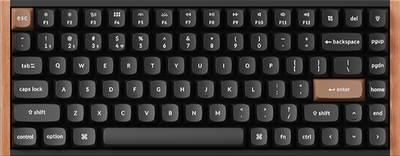
Keychron K2 HE Rapid Trigger Wireless Keyboard
Pros
- Hall Effect switches with rapid trigger at half the Apex Pro price
- QMK/VIA support for deep customization
- 2.4GHz, Bluetooth 5.2, and USB-C wired all in one
- Hot-swappable switches
- Insane battery life (thousands of hours with backlight off)
Cons
- 75% layout drops numpad and some function keys
- Software is web-based (Launcher), not a desktop app
- Build feels slightly less premium than SteelSeries at the price
Price as of Jun 18, 2026 — see current price on Amazon.
Here's the thing about Keychron in 2026: they basically democratized Hall Effect switches. The K2 HE gives you Gateron magnetic switches with rapid trigger and adjustable actuation for $129. A year ago this technology cost $250-plus. That price shift is the real story.
The 75% layout keeps arrow keys and a condensed function row while cutting the numpad, which works well for desk setups where you want more mouse room. QMK support means you can remap literally any key without relying on proprietary software. I've spent time with the web-based Launcher and it's honestly solid, though I understand why some prefer a desktop app.
One thing worth knowing: the battery life estimates (up to 4,000 hours) assume backlight is completely off. With RGB at moderate brightness you're getting more like 100-200 hours, which is still excellent. If you want rapid trigger technology without spending $250, the K2 HE is the clear call.
Razer BlackWidow V4 Pro 75% Wireless

Razer BlackWidow V4 Pro 75% Wireless Gaming Keyboard
Pros
- True 4K Hz polling rate (4000Hz) wirelessly
- OLED display with Command Dial
- Hot-swappable PCB, 3-pin and 5-pin compatible
- Multi-device Bluetooth (up to 3 devices)
- Snap Tap / SOCD cleaning built-in
Cons
- Razer Orange switches divide people (some want clicky, some want linear)
- 100-hour battery is shorter than competitors
- Wrist rest is included but adds bulk
Price as of Jun 18, 2026 — see current price on Amazon.
Razer went a different direction with the BlackWidow V4 Pro 75%. Instead of Hall Effect switches, they focused on making their HyperPolling technology work wirelessly at a genuinely insane 4,000Hz polling rate. That's four times what SteelSeries offers over 2.4GHz, and in extremely fast competitive play it translates to slightly more consistent input registration.
The OLED display and Command Dial are Razer's signature flex here. You can set the dial to control volume, DPI if you're using a Razer mouse, or custom macros. It's premium-feeling in a way that the SteelSeries OLED (which is smaller) isn't. Hot-swap support means you're not locked into Orange switches either, though I'd note the PCB accepts both 3-pin and 5-pin switches which opens up a ton of options.
The battery life at 100 hours with RGB is the weakest point comparatively. You will charge this more often than the Keychron or SteelSeries. But the 4K Hz polling is a legitimate differentiator if competitive performance is your primary concern.
Logitech G PRO X TKL Lightspeed Wireless
Logitech G PRO X TKL Lightspeed Wireless Gaming Keyboard
Pros
- Battle-tested LIGHTSPEED 2.4GHz wireless (1ms connection)
- Esports-clean TKL design, no frills
- Compatible with Logitech's Powerplay wireless charging mousepads
- GX switches are reliable and well-reviewed
- Lighter than the SteelSeries and Razer options
Cons
- No Hall Effect / rapid trigger support
- Battery life around 40 hours with RGB on
- G Hub software has a history of reliability complaints
Price as of Jun 18, 2026 — see current price on Amazon.
Logitech's LIGHTSPEED wireless is still one of the most proven 2.4GHz gaming connections in the industry. The G PRO X TKL uses it well. This is a keyboard that esports pros have actually used on stage, and the clean TKL design without any extra widgets or screens keeps weight down.
What it doesn't have is Hall Effect switches. You're getting GX Red (linear) or GX Brown (tactile) switches here, and both are good, but you won't have rapid trigger or adjustable actuation. At $149, you're paying for Logitech's build quality and wireless reputation rather than the latest switch technology.
The Powerplay compatibility is genuinely underrated if you already use a Logitech Powerplay mousepad, since you can keep your keyboard battery topped off. But honestly, the 40-hour battery with RGB on is shorter than I'd like. Turn RGB off and you get dramatically more, closer to several hundred hours.
Corsair K70 PRO Mini Wireless 60%
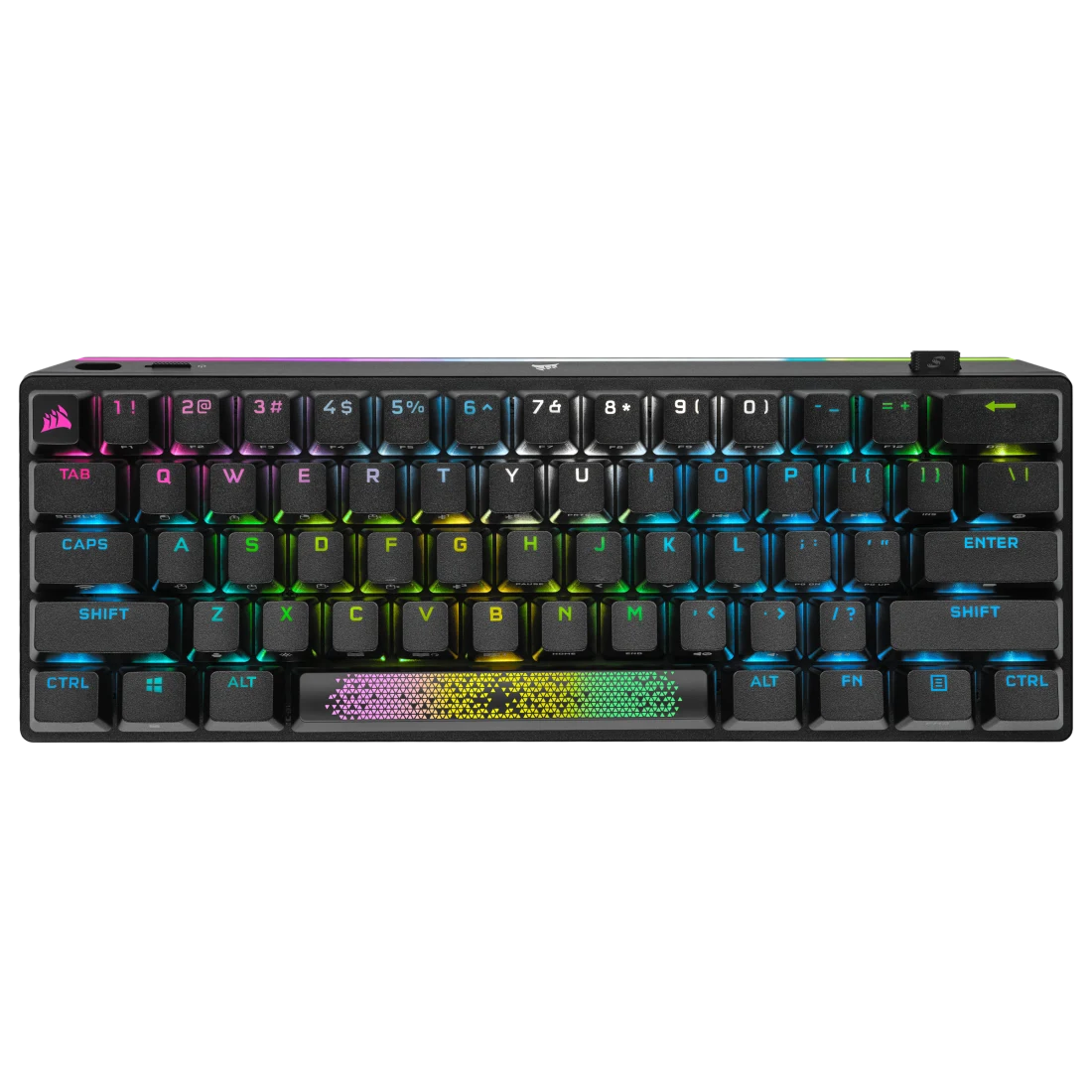
Corsair K70 PRO Mini Wireless RGB 60% Gaming Keyboard
Pros
- 60% layout is the most portable option here
- Sub-1ms SLIPSTREAM wireless connection
- Up to 200 hours battery (backlight off)
- Hot-swappable Cherry MX switches
- PBT keycaps included
Cons
- No arrow keys or function row requires muscle memory adjustment
- No rapid trigger / Hall Effect support
- Cherry MX is solid but not the most exciting switch in 2026
Price as of Jun 18, 2026 — see current price on Amazon.
If your priority is the smallest possible footprint, the K70 PRO Mini Wireless is the only 60% on this list. Corsair's SLIPSTREAM wireless is fast (sub-1ms), the aluminum frame feels genuinely premium, and 200 hours of battery life with backlighting off is outstanding.
But let's be real: the 60% layout is polarizing. No arrow keys, no function row, no numpad. If you game on a small desk or travel with your keyboard, it's liberating. If you do anything outside of pure gaming, you'll constantly be hitting the function layer for things that used to be dedicated keys. Know yourself before buying this one.
The hot-swappable Cherry MX switches are a nice touch. Cherry MX Red in the black version feels fine, and you can swap in whatever MX-compatible switch you prefer. At $179 it's priced between the budget Keychron and the premium SteelSeries, which makes it a solid mid-range option for someone who specifically needs the 60% form factor.
What to Look For in a Wireless Gaming Keyboard
Hall Effect vs Traditional Mechanical Switches
This is the biggest decision point in 2026. Hall Effect magnetic switches (found in the SteelSeries and Keychron here) use magnets instead of physical contact points to register keypresses. This means you can adjust the actuation point per-key, and rapid trigger becomes possible: the switch re-registers on the way back up, not just on the way down. For FPS games, this is meaningful because you can counter-strafe faster.
Traditional mechanical switches (Razer, Logitech, Corsair on this list) are proven, reliable, and have a massive ecosystem of switch options. They just can't do rapid trigger. If you play strategy games, MOBAs, or slower-paced titles, you probably won't notice the difference.
2.4GHz vs Bluetooth for Gaming
Use 2.4GHz for gaming. Full stop. Bluetooth is fine for office work and typing sessions but it introduces inconsistent latency that you'll feel in competitive games. Every keyboard on this list supports both, but plug in the 2.4GHz dongle when you're actually gaming.
Polling Rate: 1000Hz vs 4000Hz
The Razer BlackWidow V4 Pro 75% is the only keyboard here offering 4K Hz (4000Hz) polling wirelessly. At 1000Hz, a keypress registers within 1ms. At 4000Hz, that drops to 0.25ms. Practically speaking, in competitive play that difference can matter at very high frame rates above 360fps. For most gamers at 144-240Hz, 1000Hz is perfectly adequate.
Battery Life Expectations
Ignore the maximum battery life claims on box marketing because they always assume no backlighting. Here's the real-world breakdown for daily gaming with moderate RGB:
- SteelSeries Apex Pro TKL Gen 3: 50-60 hours
- Keychron K2 HE: 100-200 hours
- Razer BlackWidow V4 Pro 75%: 80-100 hours
- Logitech G PRO X TKL: 35-45 hours
- Corsair K70 PRO Mini: 100-150 hours
Most people charge a wireless keyboard once a week. All of these qualify.
Layout: TKL, 75%, or 60%?
TKL (tenkeyless) removes just the numpad and keeps everything else. It's the safest choice if you're coming from a full-size board. 75% adds a compressed function row and keeps arrow keys but gets significantly smaller. 60% is maximally compact but drops arrows and the function row, which some people love and others find unusable. Think about how you actually use your keyboard outside of gaming before committing.
Build Quality and What It Actually Means
Aluminum frames show up on every marketing page but the quality range is huge. The SteelSeries Apex Pro Gen 3 and Corsair K70 PRO Mini have genuinely thick, solid aluminum that doesn't flex. Keychron's K2 HE at $129 has a more standard aluminum frame that's still good but feels lighter. The Razer BlackWidow V4 Pro 75% is somewhere in the middle. None of these boards feel cheap. But if you're the kind of person who likes to push down hard on keycaps and wants zero flex, the SteelSeries and Corsair win that comparison.
PBT keycaps are included on all five keyboards here, which wasn't the case even two years ago at these price points. PBT resists shine and texture wear much better than ABS, so the keycaps will still feel good 3 years from now instead of turning smooth and shiny. That's worth noting because keycap quality is one of those things that doesn't show up in specs but matters every single day you use the keyboard.
Frequently asked questions
- Is wireless gaming keyboard latency actually the same as wired now?
- Yes, in practice. SteelSeries, Logitech, Razer, and Corsair all offer sub-1ms 2.4GHz connections that measure identically to wired in controlled testing. Bluetooth is still slower and less consistent, so always use the included 2.4GHz dongle for gaming. The days of 'wired is faster for competitive play' are essentially over.
- What is rapid trigger and do I need it?
- Rapid trigger re-registers a keypress each time the switch moves a set distance on the upstroke, not just on the downstroke. In practice, it lets you counter-strafe faster in games like CS2 because movement keys reset sooner. If you play competitive FPS games, rapid trigger from Hall Effect keyboards (SteelSeries Apex Pro Gen 3, Keychron K2 HE) gives a real edge. For RPGs, strategy games, and casual play, you won't notice a difference.
- Can I use a wireless gaming keyboard for both gaming and work?
- Absolutely. Every keyboard on this list supports both Bluetooth and 2.4GHz, so you can pair to your work laptop via Bluetooth and switch to 2.4GHz for your gaming PC. The Razer BlackWidow V4 Pro 75% pairs to 3 Bluetooth devices simultaneously, making device switching the most seamless. The 75% layout also keeps a compressed function row for shortcuts.
- How often will I need to charge these keyboards?
- With moderate RGB and daily gaming, expect to charge roughly once a week for most of these. The Keychron K2 HE and Corsair K70 Pro Mini have the longest real-world battery life. The Logitech G PRO X TKL charges most frequently at 35-45 hours under typical use. None of them will leave you scrambling mid-session as long as you plug in once a week.
- Is the SteelSeries Apex Pro Gen 3 worth $249 over the $129 Keychron K2 HE?
- Depends what you value. Both have Hall Effect switches and rapid trigger. The SteelSeries has a better build quality, an OLED screen, and the OmniPoint 3.0 switches feel slightly more refined. The Keychron has QMK support (deeper customization), hotter battery life, and costs $120 less. For most gamers, the Keychron K2 HE is the better value. If you want the premium experience and don't mind paying for it, the Apex Pro earns that price.
- What wireless dongle should I use if my PC doesn't have a spare USB-A port?
- All these keyboards include USB-A dongles. If you're short on ports, a small USB-A to USB-C adapter works fine, or you can use a USB hub. The Logitech G PRO X TKL supports Powerplay charging and can share a dongle with compatible Logitech mice via the LIGHTSPEED unifying receiver, which is convenient. Generally, avoid USB 3.0 ports for 2.4GHz dongles since they can cause interference; USB 2.0 ports or a short USB-A extension cable moving the dongle away from the PC tends to work better.
Bottom Line
For most gamers who want wireless without compromise, the Keychron K2 HE ($129) is the easy recommendation: Hall Effect switches, rapid trigger, QMK support, and a 75% layout that works for both gaming and typing. If budget isn't a concern and you want the absolute best, the SteelSeries Apex Pro TKL Wireless Gen 3 ($249) is worth every penny. Razer's BlackWidow V4 Pro 75% ($199) is the pick if 4K Hz polling rate matters to you and you already use Razer peripherals. The Logitech G PRO X TKL ($149) is for people who trust the LIGHTSPEED ecosystem and don't need Hall Effect. And the Corsair K70 PRO Mini ($179) is the 60% pick for anyone who wants the smallest possible footprint with excellent build quality.
How We Test
We score products by combining spec-level research, pricing history, trusted third-party benchmarks, and owner sentiment from high-signal sources.
- Performance and real-world value in the category this guide targets
- Price-to-performance and deal consistency over recent pricing windows
- Build quality, reliability patterns, and known long-term issues
- Recommendation refresh cadence to keep these picks current
Author
TheTechSearch Editorial Team
Independent product reviewers & PC builders
We test and compare real-world specs, price trends, and user feedback to recommend gear that actually makes sense to buy.