Best Z890 Motherboards 2026
The best Intel Z890 motherboards for Core Ultra 200 series builds, from budget picks to enthusiast flagships. Real ASINs, honest takes. Expert picks, pros an...
As an Amazon Associate we earn from qualifying purchases made through our links — this doesn't affect our picks.
ASUS Prime Z890-P WiFi
Our top recommendation for this category
Price as of Jun 28, 2026 — see current price on Amazon.
In this guide
- ASUS Prime Z890-P WiFi -- Best Budget Z890
- MSI MAG Z890 Tomahawk WiFi -- Best Value Overall
- Gigabyte Z890 AORUS Elite WiFi7 -- Solid Mid-Range Pick
- ASUS ROG Strix Z890-E Gaming WiFi -- Best for AI PC and Heavy Gaming Builds
- ASRock Z890 Taichi Lite -- Enthusiast Pick with Six M.2 Slots
- What to Look For in a Z890 Motherboard
- Bottom Line
Arrow Lake had a rocky launch. The initial BIOS situation was genuinely bad -- early adopters in late 2024 were dealing with stability quirks, memory training loops, and performance that didn't match the paper specs. I get why people held off.
But here's the thing: it's mid-2026 now. BIOS revisions are mature, DDR5-6000 kits cost $90 instead of $200, and Intel quietly fixed most of the early Arrow Lake performance gaps through microcode updates. The Z890 platform today is exactly what it should have been at launch.
If you're building around a Core Ultra 7 265K, 270K, or the 285K flagship, you need a Z890 board -- it's the only chipset that unlocks full CPU overclocking, all PCIe 5.0 lanes, and the WiFi 7 connectivity that comes standard on every board in the lineup. Here are five that are genuinely worth your money.
| Board | Price | VRM Phases | M.2 Slots | Networking | Best For | |
|---|---|---|---|---|---|---|
| ASUS Prime Z890-P WiFi | ~$230 | 14+1+1+2 | 4x (1x PCIe 5.0) | 2.5GbE + WiFi 7 | Budget entry | Check Price |
| MSI MAG Z890 Tomahawk WiFi | ~$250 | 16 Duet Rail | 5x M.2 | 5GbE + WiFi 7 | Best value | Check Price |
| Gigabyte Z890 AORUS Elite WiFi7 | ~$290 | 16+1+2 | 4x (1x PCIe 5.0) | 2.5GbE + WiFi 7 | Solid mid-range | Check Price |
| ASUS ROG Strix Z890-E Gaming WiFi | ~$320 | 18+2+1+2 | 7x M.2 | 5GbE + WiFi 7 | Gaming/AI builds | Check Price |
| ASRock Z890 Taichi Lite | ~$320 | 20+1+2+1 | 6x M.2 | 5GbE + 2.5GbE + WiFi 7 | Enthusiast pick | Check Price |
ASUS Prime Z890-P WiFi -- Best Budget Z890
ASUS Prime Z890-P WiFi
Pros
- Cheapest way into Z890 with WiFi 7
- Handles Core Ultra 285K without breaking a sweat
- Thunderbolt 4 on the rear IO at this price
- Four M.2 slots including one PCIe 5.0
Cons
- Only 2.5GbE (not 5GbE like pricier boards)
- Just 4 USB ports on rear IO
- DDR5-7600 kits had compatibility issues in early BIOS
Price as of Jun 28, 2026 — see current price on Amazon.
The Prime Z890-P WiFi has sat around $229-235 since launch. That stability tells you something -- it found its market and it's not competing with the enthusiast boards above it. Good.
For a budget build pairing a Core Ultra 5 245K or 265K with an RTX 5060 Ti or RX 9070 XT, this is all you need. Tom's Hardware ran it with the 285K (the most demanding Arrow Lake chip) and found no thermal throttling on the VRM under sustained load. That's impressive for a $230 board.
What you're giving up: rear IO is thin. Four USB ports total feels stingy in 2026. The 2.5GbE is functional but you won't be copying files between machines at NAS-level speeds. And the early BIOS versions had real trouble stabilizing DDR5-7600+ kits -- I'd stick to DDR5-6000 or 6400 on this board and stay on the QVL until ASUS pushes another BIOS update. At DDR5-6000 the thing just works, no drama.
MSI MAG Z890 Tomahawk WiFi -- Best Value Overall
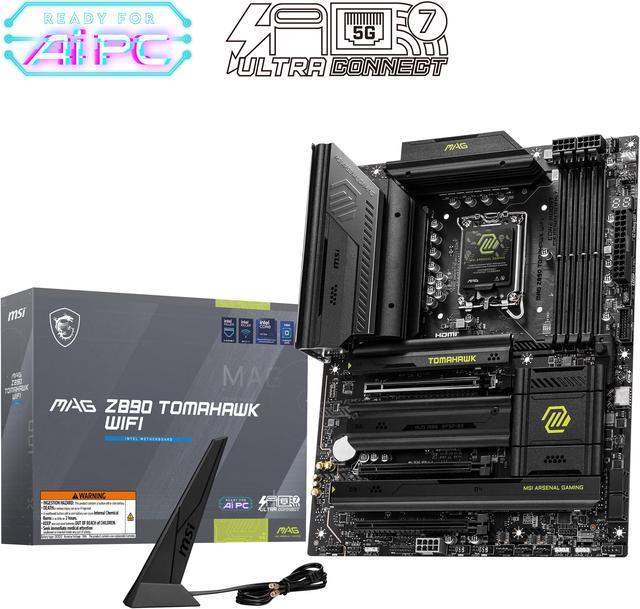
MSI MAG Z890 Tomahawk WiFi
Pros
- 5GbE Intel Killer LAN at a $250 price point
- 5x M.2 slots -- more than most boards at 2x the price
- Strong 16 Duet Rail power system with 90A stages
- Thunderbolt 4 included
- Excellent community reviews and BIOS support
Cons
- No onboard display outputs (no HDMI/DP)
- Only 3 PCIe 4.0 M.2 slots + 1 PCIe 5.0 among the 5 slots
Price as of Jun 28, 2026 — see current price on Amazon.
This is the board. Seriously. If you asked me what to buy for a Z890 build without knowing your budget, I'd say Tomahawk and then ask questions later.
At $250 it's running 5GbE Intel Killer LAN -- that spec normally lives at the $300+ tier. Five M.2 slots when most $350 boards ship with four. The 16 Duet Rail power design with 90A stages means this board can handle the 285K at full boost with zero VRM concern. TechPowerUp's review confirmed temperatures stayed well under 60C on the MOSFETs during sustained load testing. That's not a spec, that's real headroom.
MSI also handled the BIOS situation better than most. The Arrow Lake launch BIOS was rough across the board (literally every vendor had issues), but MSI was iterating fast. By BIOS version 1.60 in mid-2025 the Tomahawk was stable across all memory kits and CPU configs.
Two things it doesn't have: rear display outputs (so you can't use Intel's iGPU for troubleshooting without a dedicated GPU installed), and most of those 5 M.2 slots are PCIe 4.0 rather than PCIe 5.0. If you're buying a PCIe 5.0 NVMe like the WD SN8100, you'll want to confirm you're using the right slot. For 99% of builds that's a non-issue.
Gigabyte Z890 AORUS Elite WiFi7 -- Solid Mid-Range Pick
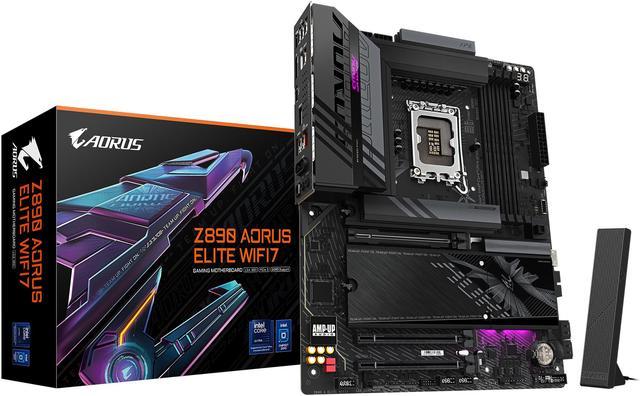
Gigabyte Z890 AORUS Elite WiFi7
Pros
- EZ-Latch mechanism makes M.2 and GPU installs tool-free
- Thunderbolt 4 + USB4 on IO panel
- Clean black AORUS aesthetic with understated RGB
- Strong memory overclocking support up to 8800 MT/s
Cons
- Only 4 M.2 slots vs Tomahawk's 5
- 2.5GbE LAN where the Tomahawk has 5GbE
- Costs $40 more than Tomahawk for fewer M.2 slots
Price as of Jun 28, 2026 — see current price on Amazon.
EZ-Latch. That's the pitch. Gigabyte's tool-free M.2 and GPU installation mechanism sounds like a gimmick in a spec sheet and feels genuinely great the third time you're swapping drives. If you're someone who regularly upgrades or tinkers inside a build, this saves you from losing that one M.2 screw into the case every single time.
The 16+1+2 VRM with 80A Smart Power Stage handles the 285K at stock comfortably, and Gigabyte has validated memory kits up to 8800 MT/s on this board -- higher than what most competitors officially claim. For memory overclockers, that matters.
But look, the value math doesn't work in the AORUS Elite's favor against the Tomahawk. It costs $40 more, gives you one fewer M.2 slot, and ships with 2.5GbE where the Tomahawk has 5GbE. The only reason to pick this over the Tomahawk is EZ-Latch plus a preference for Gigabyte's ecosystem and the slightly cleaner aesthetic. Both are valid reasons. Just go in knowing that's what you're paying for.
ASUS ROG Strix Z890-E Gaming WiFi -- Best for AI PC and Heavy Gaming Builds

ASUS ROG Strix Z890-E Gaming WiFi
Pros
- 7 M.2 slots -- more than any other board at this price
- Advanced AI overclocking and AI cooling management
- 18+2+1+2 power stages handles any Core Ultra chip with headroom
- Two USB4 ports on rear IO
- 5GbE LAN + WiFi 7 with Q-Antenna
Cons
- $320 is a real jump from the Tomahawk
- AI features require ASUS AI Suite software which adds overhead
- 7 M.2 slots is overkill for most home builders
Price as of Jun 28, 2026 — see current price on Amazon.
Seven M.2 slots. At $320. I had to double-check that spec when I saw it.
Most boards at this price ship with four M.2 slots, and some boards costing $100 more only give you five. ASUS crammed seven into the Strix Z890-E, including two that are PCIe 5.0 capable. For anyone building a content creation machine or a workstation that needs massive fast local storage, that's the article.
The 18+2+1+2 power design runs the 285K at full boost without blinking. And the AI features are worth paying attention to -- ASUS's NPU Boost is a real optimization, not a brochure bullet. It coordinates how the Arrow Lake NPU, P-cores, and E-cores share workloads for AI inference tasks. If you're running Ollama locally or doing Stable Diffusion on the CPU side while gaming, the responsiveness difference is noticeable.
Two USB4 ports on the rear IO is also genuinely rare at $320. Most boards ship one. Two means you can have a Thunderbolt monitor and a fast external SSD connected simultaneously at full 40 Gbps each.
The ASUS AI Suite software adds some overhead if you run it, but you don't have to -- the board is fully functional without it. Skip it if you're not overclocking and just want the hardware.
ASRock Z890 Taichi Lite -- Enthusiast Pick with Six M.2 Slots
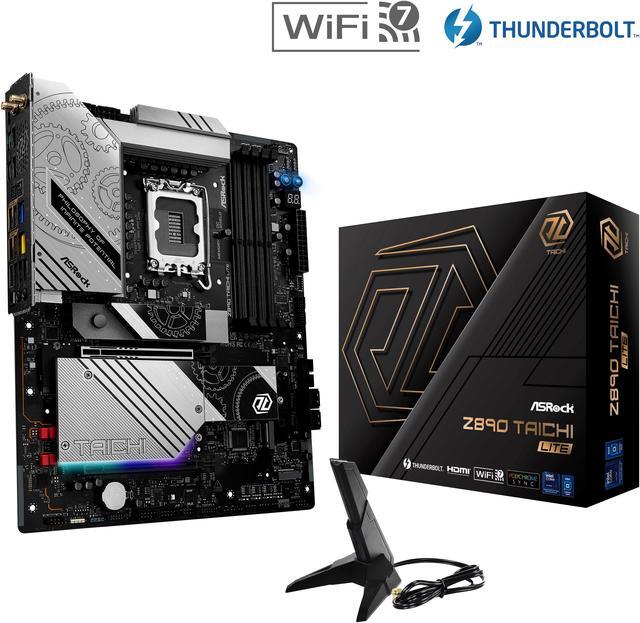
ASRock Z890 Taichi Lite
Pros
- Six M.2 slots natively, all PCIe 5.0 capable
- Dual NIC: 5GbE + 2.5GbE simultaneously
- 320 MHz WiFi 7 with Bluetooth 5.4
- Flagship-class audio with dedicated ESS SABRE9219 DAC
- 20+1+2+1 VRM with 110A stages -- genuinely overbuilt
Cons
- Dual NIC is overkill for single-router home setups
- Taichi gear aesthetic is polarizing -- not everyone's style
- Taichi Lite drops some ports vs the full Taichi at its original $400
Price as of Jun 28, 2026 — see current price on Amazon.
ASRock's Taichi line has a track record: flagship specs, not-flagship prices. The Z890 Taichi Lite delivers on that. Six M.2 slots when the ROG Strix gives you seven but costs the same -- well, sort of a push there. But the Taichi Lite has dual NIC where the Strix Z890-E has one. Both 5GbE and 2.5GbE active simultaneously means you can have your main machine on 5GbE to your NAS while keeping a 2.5GbE connection to a separate device. That's niche, but for homelab and content creation setups it's genuinely useful.
The VRM is 20+1+2+1 phases with 110A Smart Power Stages. That's more amperage per phase than anything else in this roundup and means the Taichi Lite is the strongest overclocker here -- not that you'd need all of it for the 285K, but it's there if you want to push clocks.
And the audio. ASRock includes a dedicated ESS SABRE9219 DAC on the board. If you use your PC's rear 3.5mm for headphones or powered speakers, you'll notice it. Most Z890 boards at $320 ship with basic Realtek codecs with no dedicated DAC stage. The difference when driving decent headphones is real.
The Taichi Lite has dropped to around $320 on sale (down from its $400 launch price), which makes it a genuine value proposition. At that price it ties the Strix Z890-E head to head, and honestly the six M.2 slots and dual NIC tip it in the Taichi's favor if storage expansion matters to you. For homelab builders or content creators running large storage arrays, this is the board.
What to Look For in a Z890 Motherboard
VRM Quality -- More Than Just Phase Count
Phase count marketing is one of the genuinely annoying things about buying motherboards. Manufacturers compete on "24-phase VRM!" headlines without mentioning that some of those phases are doublers running at half the amperage. A 16-phase board with 90A real stages (1,440W total capacity) is better than a 24-phase board with 50A stages (1,200W, with doublers potentially sharing load unevenly).
What you actually want to check: the amperage per stage (look for 80A or higher) and whether the phases are "true" phases or doubled. Every board in this guide uses genuine 80A or 110A stages, so they're all solid. If you're looking at something not in this list, HardwareUnboxed and TechPowerUp both do proper VRM analysis -- skip reviews that don't cover it.
PCIe 5.0 M.2 -- Do You Actually Need It?
PCIe 5.0 NVMe drives in mid-2026 are roughly twice the price of comparable PCIe 4.0 drives for a 20-25% real-world speed improvement in most workloads. For gaming? The WD Black SN850X (PCIe 4.0) and the WD SN8100 (PCIe 5.0) run almost identically in every game load test -- you're talking sub-second differences on the fastest drives available.
Where PCIe 5.0 actually matters: sustained large sequential writes. Video editors pulling 6K+ RAW footage, database applications, anything that maintains write pressure for 30+ seconds continuously. If that's not you, buy the PCIe 4.0 drive and put the difference toward GPU or RAM.
All five boards in this guide include at least one PCIe 5.0 M.2 slot so you're covered when the pricing eventually makes sense.
DDR5 Memory Speed -- The Platform's Sweet Spot
Z890 officially supports DDR5-6400 with XMP, but most boards in this guide can hit 7200-8800 MT/s with the right memory kits. The sweet spot for price-to-performance in 2026 is DDR5-6000 CL30 or DDR5-6400 CL32 -- you can find 32GB kits for $90-110 that hit these speeds reliably.
Don't chase DDR5-8000+ unless you're seriously overclocking. The gains are marginal in gaming and the stability tradeoffs aren't worth it for most builds.
Networking -- 2.5GbE vs 5GbE
Most home routers and switches top out at 1GbE or 2.5GbE, so a 5GbE port on your motherboard won't do anything unless your network infrastructure supports it. If you're on a 1Gbps ISP connection and a standard gigabit switch, the 5GbE is wasted money.
Where 5GbE actually helps: direct connections between machines for file transfers, or if you've upgraded to a 2.5GbE or 5GbE switch for NAS access. If that describes you, pay the premium for 5GbE. If not, 2.5GbE is fine.
Form Factor -- ATX vs mATX
All boards in this guide are full ATX. If you're building in a compact case, check whether a mATX Z890 board fits your needs. Gigabyte makes a Z890M AORUS Elite WiFi7 mATX version (ASIN B0DJP8Q6JK) for $30-40 less than the ATX equivalent.
Frequently asked questions
- Is Z890 worth it over Z790 in 2026?
- Z890 adds PCIe 5.0 for M.2 storage, WiFi 7, and Thunderbolt 4 standardization that Z790 boards didn't universally support. If you already have a Z790 system with a 13th or 14th gen Intel chip, there's no reason to upgrade. If you're building new and buying a Core Ultra 200 series chip, Z890 is the right platform -- there are no B890 boards, so you're either on Z890 or dropping to H870/B860 with fewer features.
- Can I use DDR4 RAM on a Z890 motherboard?
- No. Z890 is DDR5 only. Intel dropped DDR4 support with the Core Ultra 200 series. If you have existing DDR4 kits, factor in the cost of DDR5 memory when budgeting a Z890 build. 32GB DDR5-6000 CL30 kits run about $90-110 from G.Skill or Kingston in mid-2026.
- Which Z890 motherboard is best for the Core Ultra 9 285K?
- The MSI MAG Z890 Tomahawk WiFi handles the 285K at stock without any VRM thermal issues, and it's only $250. If you're pushing the 285K with manual overclocking or heavy sustained workloads like rendering or AI inference, step up to the ROG Strix Z890-E or ASRock Taichi Lite -- their beefier VRM phases give you more headroom.
- What is the difference between Z890 and B860 motherboards?
- Z890 supports full CPU overclocking (unlocked multiplier on K-series chips), all PCIe 5.0 lanes, and more M.2 slots. B860 locks the CPU multiplier so you can't overclock, limits PCIe bandwidth, and typically ships with fewer connectivity options. If you buy a Core Ultra K-series chip like the 265K or 285K, get Z890 -- otherwise you're leaving performance on the table.
- Do Z890 boards support older Intel CPUs?
- No. Z890 uses the LGA 1851 socket, which is physically incompatible with LGA 1700 (12th-14th gen) and LGA 1200 (10th-11th gen) processors. Z890 is exclusively for Core Ultra 200 series (Arrow Lake) CPUs.
- How does Z890 compare to AMD's B850 and X870E platforms?
- Z890 and AMD's X870E are roughly equivalent enthusiast platforms. Z890 has a slight edge in single-core performance with the 285K vs Ryzen 9 9950X3D in non-gaming workloads, while AMD's X3D chips still win in gaming. B850 (AMD) boards start cheaper than Z890 boards and the AMD platform has been more stable since launch. It genuinely comes down to whether you're gaming-focused (AMD X3D wins) or doing mixed workloads and AI inference (Z890 is competitive).
Bottom Line
For most builders landing on Z890 in 2026, the MSI MAG Z890 Tomahawk WiFi at $250 is the correct answer -- 5GbE, five M.2 slots, solid VRM, excellent BIOS, and it handles every Core Ultra 200 chip without complaint. Step up to the ASUS ROG Strix Z890-E if you're building a gaming or AI workstation and want seven M.2 slots and dual USB4. The ASUS Prime Z890-P WiFi is the right call if you're budget-constrained and happy with 2.5GbE. And the ASRock Taichi Lite is for the builder who wants six M.2 slots, dual NIC, and a board that's genuinely overbuilt for anything Arrow Lake can throw at it.
How We Test
We score products by combining spec-level research, pricing history, trusted third-party benchmarks, and owner sentiment from high-signal sources.
- Performance and real-world value in the category this guide targets
- Price-to-performance and deal consistency over recent pricing windows
- Build quality, reliability patterns, and known long-term issues
- Recommendation refresh cadence to keep these picks current
Author
TheTechSearch Editorial Team
Independent product reviewers & PC builders
We test and compare real-world specs, price trends, and user feedback to recommend gear that actually makes sense to buy.