Best B650 Motherboards 2026
Top B650 motherboards for AMD AM5 builds in 2026, from budget options under $150 to premium picks with PCIe 5.0 and WiFi 6E. Expert picks, pros and cons, and...
As an Amazon Associate we earn from qualifying purchases made through our links — this doesn't affect our picks.
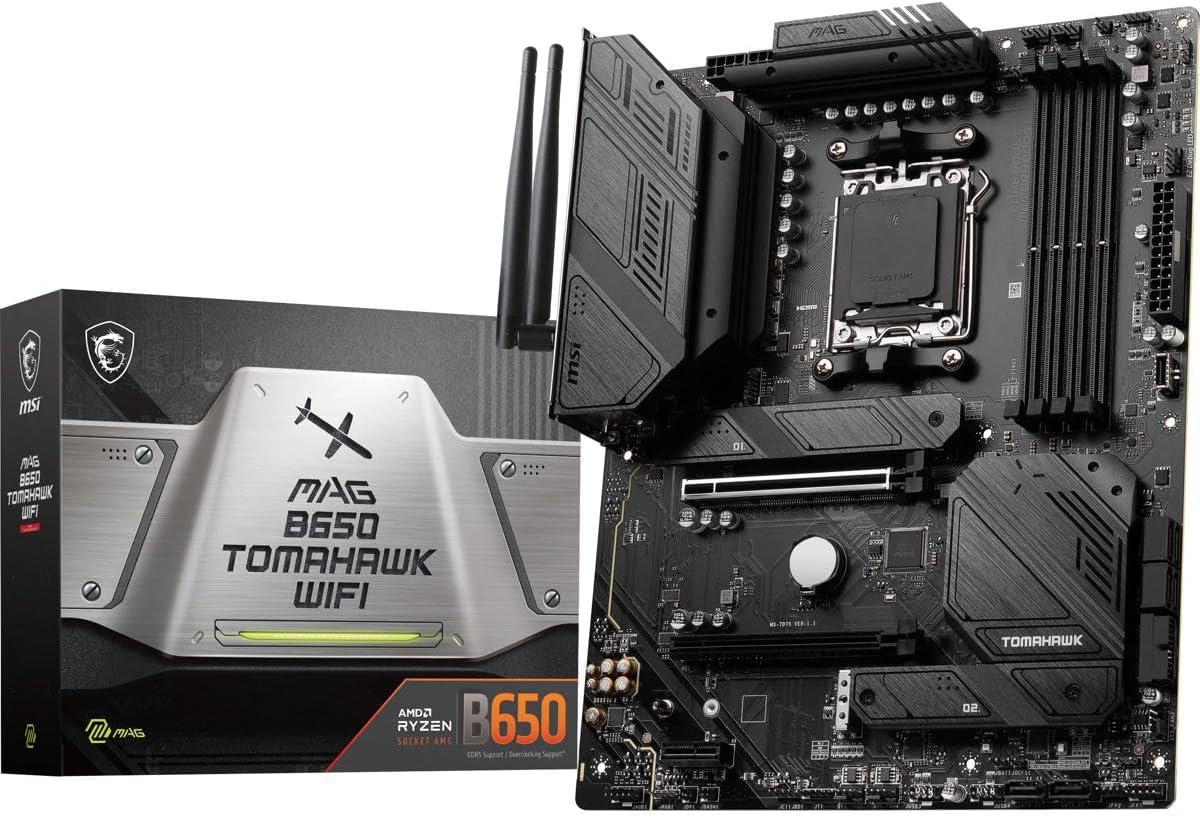
MSI MAG B650 Tomahawk WiFi
Our top recommendation for this category
Price as of May 24, 2026 — see current price on Amazon.
In this guide
- MSI MAG B650 Tomahawk WiFi: Best Overall
- ASUS TUF Gaming B650-Plus WiFi: Best for Longevity
- Gigabyte B650 AORUS Elite AX: Best Value Under $150
- ASRock B650 Steel Legend WiFi 6E: Best for Feature Completeness
- ASUS ROG Strix B650E-F Gaming WiFi: Best Premium B650
- MSI B650 Gaming Plus WiFi: Best Budget Entry
- B650 Buying Guide
- Bottom Line
B650 motherboards have become the default choice for anyone building an AM5 PC without paying X670 prices. I've been watching this segment closely through 2026, and prices have dropped to the point where you can get WiFi 6E, PCIe 5.0 M.2, and solid VRMs for around $150. That's a legitimately good deal for a platform AMD is supporting through at least 2027.
The main question I see people asking on Reddit is whether B650 still makes sense when B850 boards exist. Short answer: yes, unless you're running a top-end Ryzen 9000X3D and need PCIe 5.0 on the GPU slot. For most Ryzen 7 or Ryzen 5 builds, B650 is plenty.
Here are the boards I'd actually put in a build right now.
| Board | Price | Form Factor | VRM Phases | PCIe 5.0 M.2 | WiFi | |
|---|---|---|---|---|---|---|
| MSI MAG B650 Tomahawk WiFi | $175.99 | ATX | 14+2+1 | Yes | 6E | Check Price |
| ASUS TUF Gaming B650-Plus WiFi | $133.99 | ATX | 14 | Yes | 6 | Check Price |
| Gigabyte B650 AORUS Elite AX | $149 | ATX | 14+2+1 | Yes | 6E | Check Price |
| ASRock B650 Steel Legend WiFi 6E | $159.99 | ATX | 14+2+1 | Yes | 6E | Check Price |
| ASUS ROG Strix B650E-F Gaming WiFi | $219 | ATX | 12+2 | Yes (x2) | 6E | Check Price |
| MSI B650 Gaming Plus WiFi | $139 | ATX | 12+2 | Yes | 6E | Check Price |
MSI MAG B650 Tomahawk WiFi: Best Overall
The Tomahawk has been the default recommendation for AM5 budget builds since launch, and it still earns that spot. MSI nailed the VRM design here: the 14+2+1 configuration with 75A power stages handles Ryzen 9 7950X without breaking a sweat. Most people aren't running chips that demanding on a B650, which means this board has headroom to spare for any Ryzen 5 or 7 you'd pair it with.
What I like about it practically: the BIOS is genuinely good. MSI's Click BIOS 5 interface is clean, and EXPO memory profiles work reliably on the first try. I've seen some cheaper boards require three reboots to stabilize DDR5 at 6000MHz. Tomahawk doesn't do that.
Three M.2 slots (one PCIe 5.0, two PCIe 4.0), four SATA ports, a 20Gbps USB-C on the back panel, and 2.5GbE LAN. It's a complete board. No obvious corner cuts.
MSI MAG B650 Tomahawk WiFi
Pros
- Best-in-class VRM for the price
- Three M.2 slots including one PCIe 5.0
- Reliable EXPO support for DDR5-6000
- 20Gbps USB-C rear panel
Cons
- No USB4 port
- Only WiFi 6E (not 7)
Price as of May 24, 2026 — see current price on Amazon.
ASUS TUF Gaming B650-Plus WiFi: Best for Longevity
TUF boards have a reputation for durability and ASUS backs that up with a solid warranty and build quality that holds up better than the spec sheet suggests. The B650-Plus WiFi added USB4 support, which is actually a bigger deal than it sounds at this price point, since USB4 gives you 40Gbps throughput for external SSDs and docks.
The 14 power stages are a step behind the Tomahawk's 14+2+1, but they're 60A stages that thermal throttle later than you'd expect. For Ryzen 7 9700X, this board doesn't get warm. The WiFi here is 6 rather than 6E, which is worth knowing if you're in a congested 6GHz environment, but for most home setups you won't notice.
One thing I appreciate: the BIOS Flashback button on the rear IO. It means you can update the firmware without a CPU installed, which matters if you're picking up a day-one Ryzen 9000 chip that needs a BIOS update before it'll POST.

ASUS TUF Gaming B650-Plus WiFi
Pros
- USB4 support at this price is unusual
- BIOS Flashback for hassle-free firmware updates
- Solid build quality with MIL-SPEC components
- Supports Ryzen 9000 out of the box
Cons
- WiFi 6 not 6E
- Slightly fewer USB ports than the competition
Price as of May 24, 2026 — see current price on Amazon.
Gigabyte B650 AORUS Elite AX: Best Value Under $150
At $149, the AORUS Elite AX undercuts the Tomahawk by $27 while keeping almost everything that matters. You still get three M.2 slots, WiFi 6E, 2.5GbE, and a 14+2+1 VRM. The primary M.2 is PCIe 5.0. That's a complete AM5 build platform at a price that was impossible 18 months ago.
The catch is build quality. Not bad (this isn't a flimsy board), but the capacitors and chokes feel a tier below MSI and ASUS. Also, Gigabyte's App Center software is rough. I'd recommend just ignoring it and using the BIOS directly for fan curves and memory XMP/EXPO settings.
Gigabyte's EZ-Latch system for M.2 drives is legitimately good. Screwless M.2 installation saves 3 minutes and a lost screw per slot, which sounds small until you're swapping drives in a tight case at 11pm.

Gigabyte B650 AORUS Elite AX
Pros
- Best price-to-feature ratio in the B650 lineup
- EZ-Latch screwless M.2 installation
- WiFi 6E and 2.5GbE included
- 14+2+1 VRM handles Ryzen 7 easily
Cons
- Gigabyte software is weak
- Slightly lower component quality than MSI/ASUS flagships
Price as of May 24, 2026 — see current price on Amazon.
ASRock B650 Steel Legend WiFi 6E: Best for Feature Completeness
ASRock doesn't get enough credit. The B650 Steel Legend WiFi 6E came out with a spec sheet that embarrasses boards costing $30 more: 14+2+1 power stages, WiFi 6E, 2.5GbE, BIOS Flashback, PCIe 5.0 M.2, and DDR5 support up to 7200MHz OC. That white finish also makes it a popular choice for clean builds, which is basically its own search category now.
The BIOS is functional but less polished than MSI or ASUS. ASRock's Polychrome RGB software is similarly rough around the edges, but if you're not doing RGB sync, that doesn't matter at all.
Real-world memory compatibility is where I'd flag a mild concern: some DDR5 kits from Corsair and G.Skill need an extra BIOS update to hit rated speeds. It's not a dealbreaker but worth knowing if you're planning to run 6400MHz or higher.

ASRock B650 Steel Legend WiFi 6E
Pros
- DDR5 up to 7200MHz OC
- White PCB option for themed builds
- BIOS Flashback button
- Strong VRM at this price
Cons
- Memory compatibility can need BIOS updates
- RGB software is underwhelming
Price as of May 24, 2026 — see current price on Amazon.
ASUS ROG Strix B650E-F Gaming WiFi: Best Premium B650
If you're spending over $200 on a B650, you should probably just look at B850 boards. But the ROG Strix B650E-F makes a real argument for itself. This is the B650E chipset variant, meaning you get PCIe 5.0 on the GPU slot in addition to PCIe 5.0 M.2. It also ships with three M.2 slots, all tool-free through ROG's M.2 Q-Latch system, and the rear IO cover is pre-installed from the factory.
The ROG branding means premium pricing, but the VRM quality here is genuinely high. The 12+2 stages with 55A Dr.MOS components that handle sustained full-load workloads better than the spec count suggests. Overclockers who want to push a Ryzen 9 7950X on a B-class chipset would actually be fine here.
Honestly, I'd only recommend this if you specifically need PCIe 5.0 GPU bandwidth, for example if you're pairing it with a next-gen GPU that saturates PCIe 4.0 bandwidth, or you want to future-proof the slot. For a Ryzen 7 9700X gaming build, this is overkill.
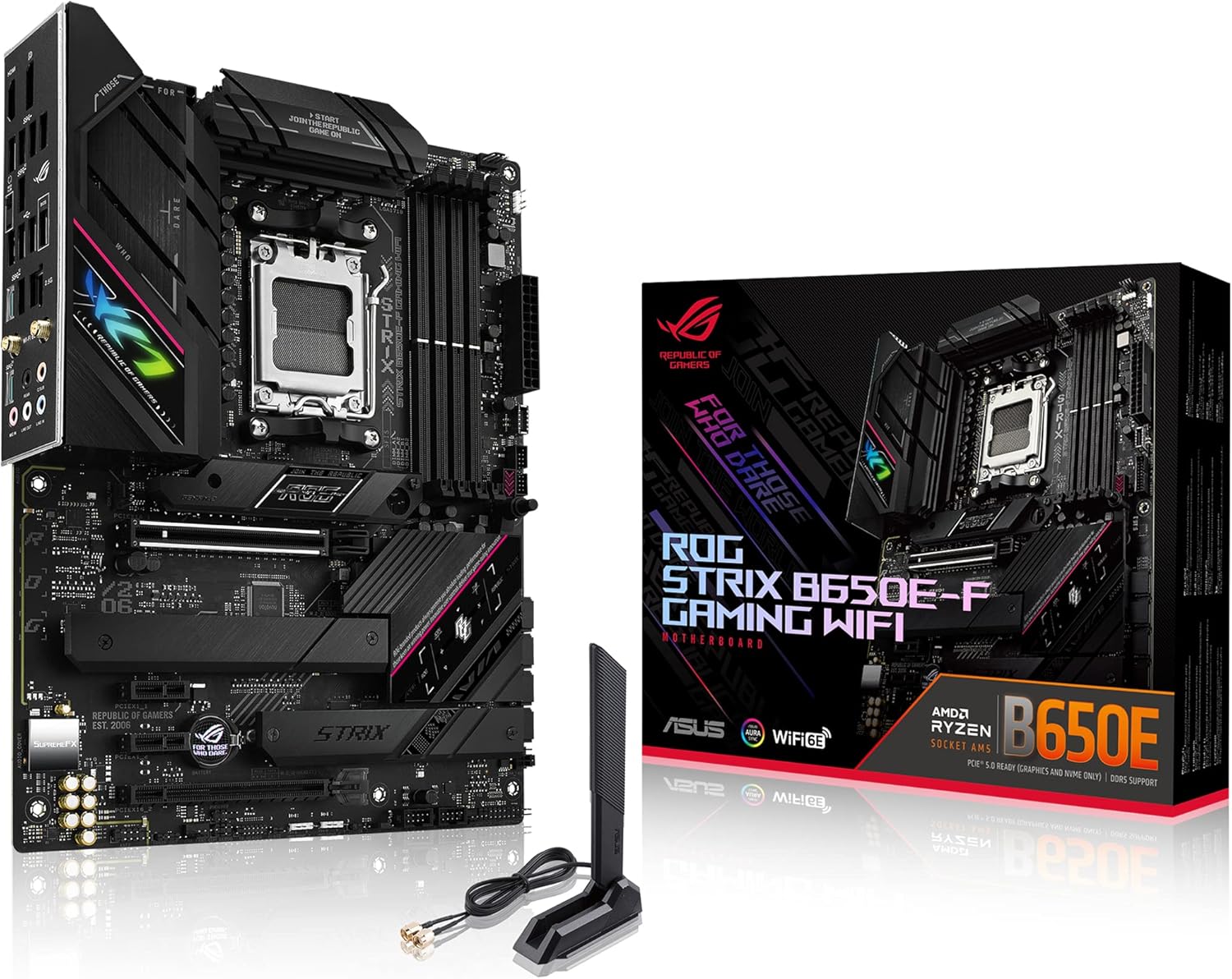
ASUS ROG Strix B650E-F Gaming WiFi
Pros
- PCIe 5.0 on GPU slot (B650E chipset)
- Tool-free M.2 installation on all slots
- Pre-installed I/O shield
- Excellent VRM for overclocking
Cons
- Price creeps into B850 territory
- Overkill for mid-range Ryzen builds
Price as of May 24, 2026 — see current price on Amazon.
MSI B650 Gaming Plus WiFi: Best Budget Entry
At $139, the MSI B650 Gaming Plus WiFi sits near the bottom of this list on price, and it's a board I'd actually put in a real build. The ASUS TUF B650-Plus has slipped under it to $133.99, so check both before you order. The 12+2 VRM is fine for Ryzen 5 and Ryzen 7 chips, though I'd hesitate before throwing a Ryzen 9 at it, but for a 9600X or 9700X it's not going to sweat.
You get WiFi 6E, 2.5GbE, two M.2 slots (one PCIe 5.0), and a clean BIOS. What you give up is the third M.2 slot and the 20Gbps USB-C that the Tomahawk has. But if you're on a tight budget and the primary M.2 is for your OS drive with an NVMe game drive as a second, that's fine.
This is the board I'd recommend to someone building a budget gaming PC around a Ryzen 5 9600X and an RTX 5060.

MSI B650 Gaming Plus WiFi
Pros
- Near the lowest price on a trustworthy B650 board
- WiFi 6E included at this price point
- MSI BIOS is excellent
- Handles Ryzen 5 and 7 without issue
Cons
- Only two M.2 slots
- No 20Gbps USB-C
- Smaller VRM limits CPU headroom
Price as of May 24, 2026 — see current price on Amazon.
B650 Buying Guide
B650 vs B850: Which Should You Pick?
B650 is last generation's mid-range chipset. B850 is the current one. But "last generation" doesn't mean obsolete. B650 fully supports Ryzen 9000 series CPUs with a BIOS update, DDR5 memory, and PCIe 5.0 M.2 storage. The main things B850 adds are PCIe 5.0 on the GPU slot by default, and generally more USB ports on the rear IO.
If you're building a mid-range gaming PC and not planning to chase the latest GPU release in the next year, B650 saves you $50-80 that could go toward a better CPU or RAM kit.
How Much VRM Do You Actually Need?
VRM phases matter less than marketing makes you think, at least for typical builds. A 14+2+1 phase board like the Tomahawk or ASRock Steel Legend handles any AM5 CPU fine. The 12+2 on the Budget Gaming Plus is adequate for Ryzen 5 and 7 chips under typical gaming loads.
Where VRM quality matters is sustained all-core workloads: video rendering, scientific computing, sustained streaming encodes. If that's you, step up to the Tomahawk or ASRock Steel Legend minimum.
DDR5 Speed: What Actually Works
Most B650 boards officially support DDR5 up to 6400MHz with EXPO profiles. In practice, DDR5-6000 CL30 is the sweet spot on AM5, right where the Infinity Fabric speed aligns with memory frequency for best latency. Don't pay extra for DDR5-7200 kits expecting big gaming gains; the difference versus DDR5-6000 CL30 in games is typically under 3%.
WiFi 6 vs WiFi 6E vs WiFi 7
WiFi 6E adds the 6GHz band, which means less congestion in apartment buildings and dense environments. If you're in a house with a clear line to your router, WiFi 6 is fine. If you're in an apartment and your WiFi regularly fights with your neighbors', go 6E. WiFi 7 on a B650 board doesn't exist. That's a B850 feature.
Form Factor Choices
Every board on this list is full ATX. B650 also comes in Micro-ATX if you need a smaller build. The Gigabyte B650M AORUS Elite AX (ASIN B0BH6XND27) and ASUS TUF B650M-Plus WiFi are both solid picks. But ATX gives you more expansion slots and usually better VRM cooling, so unless your case mandates mATX, I'd stick with full size.
Frequently asked questions
- Do B650 motherboards support Ryzen 9000 CPUs?
- Yes, but most B650 boards shipped before Ryzen 9000 launched and need a BIOS update first. All six boards on this list have been updated by their manufacturers. If you're building new, just flash the latest BIOS before installing the CPU, or buy a board with BIOS Flashback so you can do it without a CPU at all.
- Is B650 or B850 better for gaming in 2026?
- For gaming, B650 is the better value. B850 adds PCIe 5.0 GPU support and more rear IO, but those don't translate to higher frame rates with current GPUs. Save the $60-80 and put it toward a faster GPU or more RAM.
- What RAM speed suits a B650 board best?
- DDR5-6000 CL30 is the sweet spot for AM5 in 2026. It runs the Infinity Fabric at 2000MHz, which gives you the best memory latency for gaming. Faster kits (DDR5-7200+) exist but show minimal real-world gaming gains versus their cost premium.
- Does a Ryzen 9 7950X work on a B650 board?
- Technically yes, but the power delivery on budget B650 boards will limit sustained all-core performance. The MSI MAG B650 Tomahawk WiFi and ASRock B650 Steel Legend WiFi 6E have strong enough VRMs for the 7950X. The Budget Gaming Plus and Gigabyte AORUS at stock would struggle under sustained workloads.
- Do these B650 boards support PCIe 5.0?
- The primary M.2 slot is PCIe 5.0 on all boards listed here. The GPU slot is PCIe 4.0 on standard B650 boards, and only B650E variants like the ASUS ROG Strix B650E-F offer PCIe 5.0 on the GPU slot. Current GPUs including RTX 5060 Ti and RX 9070 XT don't saturate PCIe 4.0 bandwidth, so this isn't a real-world bottleneck.
- Which B650 board has the best BIOS?
- MSI and ASUS are ahead here. MSI's Click BIOS 5 is my personal favorite: clean layout, fan curves work intuitively, and EXPO profiles apply reliably. ASUS's UEFI is slightly more feature-rich but has a steeper learning curve. Gigabyte and ASRock work fine but feel less polished.
Bottom Line
The MSI MAG B650 Tomahawk WiFi is the board I'd recommend to most people building an AM5 system in 2026. It has the best combination of VRM quality, connectivity, and reliability at $175.99. If budget is the primary concern, the ASUS TUF Gaming B650-Plus WiFi has dropped to $133.99, the lowest price on this list, and it cuts almost nothing important. And if you want the premium experience without jumping to B850 prices, the ASUS ROG Strix B650E-F is the best B650E board you can buy.
B650 is not a compromise platform. It's a mature, well-supported chipset that will serve you well for the next two to three years of AM5 CPU generations.
How We Test
We score products by combining spec-level research, pricing history, trusted third-party benchmarks, and owner sentiment from high-signal sources.
- Performance and real-world value in the category this guide targets
- Price-to-performance and deal consistency over recent pricing windows
- Build quality, reliability patterns, and known long-term issues
- Recommendation refresh cadence to keep these picks current
Author
TheTechSearch Editorial Team
Independent product reviewers & PC builders
We test and compare real-world specs, price trends, and user feedback to recommend gear that actually makes sense to buy.