Best Monitors for PS5 Pro 2026
The PS5 Pro needs real 48Gbps HDMI 2.1 for 4K 120Hz. These four monitors actually deliver it, from a 32-inch Mini-LED to a 27-inch QD-OLED. Expert picks, pro...
As an Amazon Associate we earn from qualifying purchases made through our links — this doesn't affect our picks.

Samsung 32-inch Odyssey Neo G8 (G85NB) 4K 240Hz Curved Gaming Monitor
Our top recommendation for this category
Price as of Jul 30, 2026 — see current price on Amazon.
The PS5 Pro has been in people's homes for over a year now, and a lot of owners are still running it into a TV. That works fine, but if you want 4K 120Hz on a monitor, the situation is more complicated than it looks. The big trap: a lot of monitors advertise HDMI 2.1 but only wire the port for 18Gbps bandwidth, which is basically HDMI 2.0 in disguise. At 18Gbps you're stuck at 4K 60Hz from the console no matter what. Every monitor in this guide has genuine 48Gbps HDMI 2.1, which is what the PS5 Pro actually needs to hit 4K 120Hz.
These four monitors are worth connecting to a PS5 Pro. All have verified full-bandwidth HDMI 2.1, all support HDMI VRR, and none of them have the hidden bandwidth trap.
| Monitor | Size / Panel | Refresh | HDMI 2.1 | Price | Best For | |
|---|---|---|---|---|---|---|
| Samsung Odyssey Neo G8 (G85NB) | 32" Mini-LED Curved | 240Hz | Yes | $810 | Best Big Screen | Check Price |
| Samsung Odyssey G7 G70D | 27" Fast IPS | 144Hz | Yes | $429 | Best All-Rounder | Check Price |
| ASUS ROG XG27UCSR | 27" Fast IPS | 162Hz | Yes + USB-C | $400 | Best Mid-Range | Check Price |
| ASUS ROG Swift OLED PG27UCDM | 27" QD-OLED | 240Hz | Yes (HDMI 2.1) | $999 | Best OLED | Check Price |
Samsung Odyssey Neo G8 32-inch: Best Big Screen for PS5 Pro
Samsung 32-inch Odyssey Neo G8 (G85NB) 4K 240Hz Curved Gaming Monitor
Pros
- Quantum Mini-LED backlight with real local dimming, so black scenes hold up
- Full-bandwidth HDMI 2.1 for 4K 120Hz from the PS5 Pro
- 32 inches of 4K at a 1000R curve, the most immersive panel here
- 240Hz over DisplayPort if the same screen serves a gaming PC
Cons
- $810 puts it well above budget territory
- 1000R is an aggressive curve and not everyone gets on with it
- Mini-LED blooming is visible on high-contrast edges
Price as of Jul 30, 2026 — see current price on Amazon.
The Neo G8 earns its price with Quantum Mini-LED and zone dimming, so a night scene in a PS5 Pro title holds its blacks while the bright parts actually get bright. On a console where most of what you play is single-player and atmospheric, that is the difference you notice from the sofa.
Connectivity does what this guide demands: genuine full-bandwidth HDMI 2.1, not the 18Gbps port that some manufacturers still label 2.1, so the PS5 Pro gets 4K at 120Hz rather than silently dropping to 60. HDMI VRR is supported.
The 240Hz refresh is beyond anything a console will ask for, since the PS5 Pro tops out at 120Hz. It is not wasted if this monitor also sits in front of a gaming PC, and it is worth nothing at all if it does not, so weigh that honestly against the price.
Two things to know before you buy. The 1000R curve is aggressive at desk distance and people are genuinely split on it. And Mini-LED blooming, a faint halo around bright objects on dark backgrounds, is visible here if you look for it, which is the standing trade against OLED at this size.
Samsung Odyssey G7 G70D: Best All-Rounder Under $500
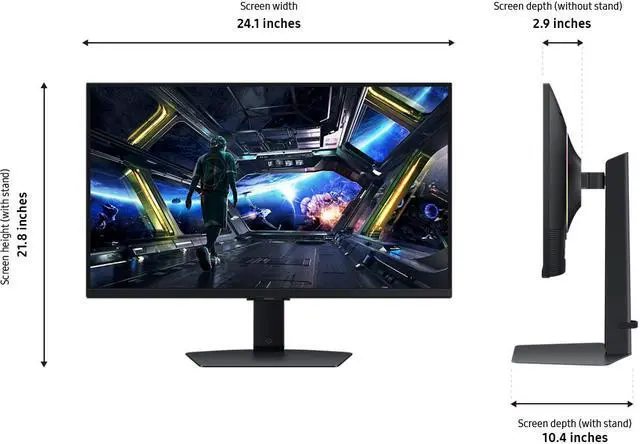
Samsung 27-inch Odyssey G7 G70D 4K UHD 144Hz Smart Gaming Monitor
Pros
- Fast IPS panel with excellent color accuracy out of box
- Full ergonomic stand (height, tilt, swivel, pivot)
- Smart Monitor features (Samsung apps, PC on TV) useful for dual-purpose desks
- 1ms GTG response, genuinely quick for IPS
Cons
- Samsung Smart features add bloat if you only game
- 144Hz max (not a problem for PS5 Pro which caps at 120Hz over HDMI)
- One HDMI 2.1 port, not two
Price as of Jul 30, 2026 — see current price on Amazon.
If I had to pick one monitor for a PS5 Pro on a reasonable budget, it would probably be this one. The 27-inch 4K IPS panel at 144Hz covers everything the PS5 Pro can output, looks excellent at close viewing distances, and the stand adjusts in every direction so you can get the positioning right.
Samsung's Fast IPS technology on the G70D uses a newer panel that achieves 1ms GTG response. That's notably faster than standard IPS and means less ghosting on fast-moving objects. For PS5 games running at 4K 120Hz, the motion is clean.
The "Smart Monitor" side of this product (it runs Samsung's Tizen OS and can function as a TV with built-in apps) is something you'll either love or ignore. On the gaming side, none of that matters. The hardware underneath is a strong 4K gaming monitor. HDMI 2.1 works properly, VRR works, and the image quality in PlayStation games is consistently good.
The full ergonomic stand is worth calling out because many monitors at this price offer tilt-only stands. Being able to set the height and pivot the panel makes a big quality-of-life difference at a desk.
ASUS ROG XG27UCSR: Best for Mixed PC and Console Use

ASUS ROG XG27UCSR 27-Inch 4K 162Hz Gaming Monitor
Pros
- USB-C with 90W power delivery for laptop users
- DCI-P3 95% coverage, the best color of any IPS in this guide
- 160Hz via DisplayPort for PC gaming
- Full ergonomic stand, tripod mount on rear
Cons
- 162Hz is wasted on PS5 Pro which maxes at 120Hz over HDMI 2.1
- Dual-mode switching is a menu dive, not a button
- Single HDMI 2.1 port
Price as of Jul 30, 2026 — see current price on Amazon.
The XG27UCSR is the Gen 2 successor to ASUS's XG27UCS. Same idea, 162Hz instead of 160Hz, a dual-mode 1080p 324Hz option added, and it sells for $399.99.
The XG27UCSR earns its place in a specific scenario: you also use a laptop at the same desk. The USB-C port handles DP Alt Mode and delivers 90W of power delivery, which is enough to charge most ultrabooks and midrange gaming laptops. One cable connects and charges your laptop, then you switch inputs to the PS5 Pro over HDMI. Clean desk, minimal cables.
The color coverage is the best of the IPS options in this guide. At DCI-P3 95%, the XG27UCSR is accurate enough for anyone doing light creative work or photo editing alongside gaming. The G70D doesn't match these numbers.
For pure PS5 Pro gaming, the 162Hz spec is somewhat academic. The PS5 Pro tops out at 120Hz over HDMI 2.1, so you'll never actually use the extra headroom from the console side. You'd need a PC with DisplayPort to hit 162Hz, or the dual-mode 1080p 324Hz setting, which no console will ever ask for. That said, 120Hz on this Fast IPS panel looks excellent and there's no meaningful sacrifice.
There's also a tripod socket on the rear of the monitor, which is useful for photographers who need to grab a quick reference display or for anyone wanting a lightweight portable-ish setup. It's a small thing but one of those "oh, that's actually thoughtful" features.
ASUS ROG Swift OLED PG27UCDM: Best If You're Going Premium
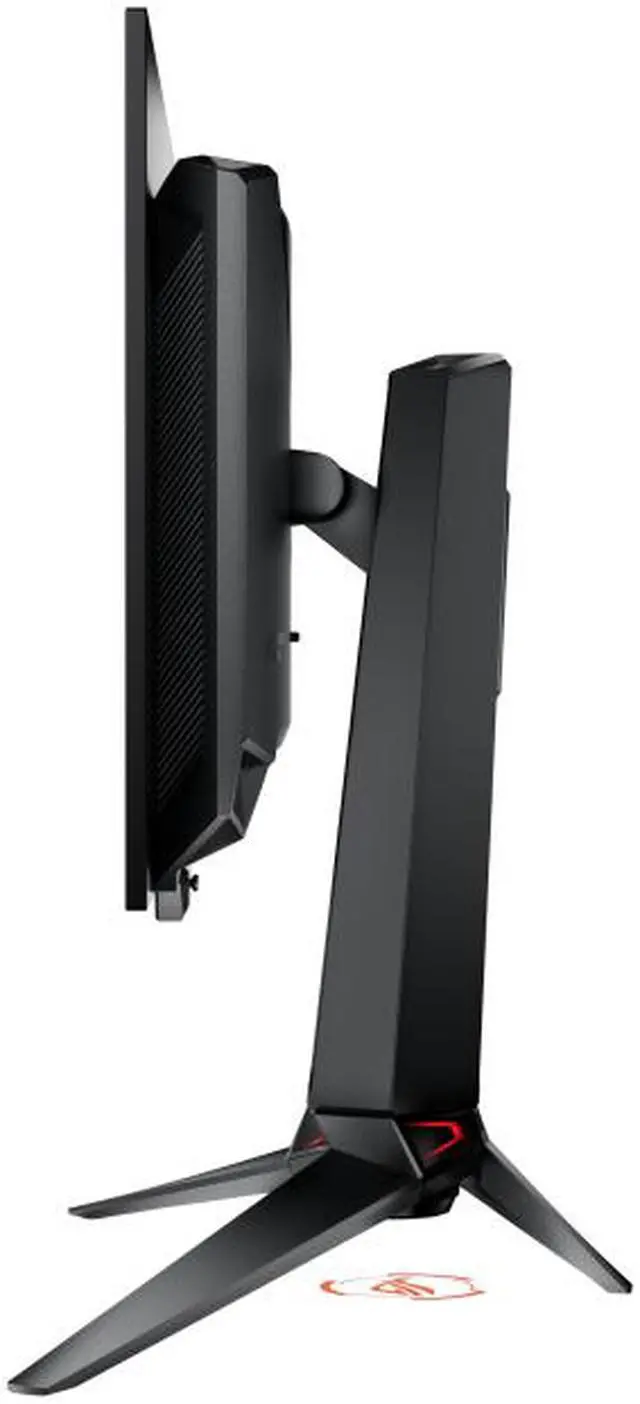
ASUS ROG Swift OLED PG27UCDM 27-inch 4K 240Hz QD-OLED Gaming Monitor
Pros
- Gen 4 QD-OLED panel with 0.03ms response, effectively instant pixel transitions
- 4K 240Hz for PC gaming, 4K 120Hz via HDMI 2.1 for PS5 Pro
- Neo Proximity Sensor dims screen when you walk away, reducing burn-in exposure
- DisplayPort 2.1 with 80Gbps for uncompressed 4K at 240Hz on PC
Cons
- At $999, significantly more expensive than every other option in this guide
- Burn-in remains a long-term concern for static UI elements, though Gen 4 is much improved
- The 240Hz is wasted on PS5 Pro which caps at 120Hz over HDMI 2.1
Price as of Jul 30, 2026 — see current price on Amazon.
If you're ready to spend $999 on a monitor, this is what the PS5 Pro was built to display on. QD-OLED panels have effectively infinite contrast ratio. The difference from LCD local dimming is not subtle. Dark areas in games are actually dark. The image doesn't bloom around bright highlights. Every pixel is individually controlled.
Gen 4 QD-OLED addresses the biggest concern people had about OLED gaming monitors in 2023: longevity. Samsung's fourth-generation panel has better resistance to burn-in than earlier generations. The ASUS Neo Proximity Sensor helps by dimming the display after a short idle period when no one is in front of it. With normal gaming usage (not leaving a static game UI frozen on screen for hours), the longevity concern is much less urgent than it used to be.
The 0.03ms response time is the fastest class of display technology available. For PS5 Pro gaming at 4K 120Hz, that translates to motion that looks noticeably cleaner than any IPS or VA monitor. Fast-paced action games, particularly anything with fast camera movement, look different in a way that's hard to explain until you see it.
The 240Hz spec is more relevant for PC gaming than PS5 Pro. Over HDMI 2.1, the PS5 Pro caps at 120Hz. But if you also use this with a PC via DisplayPort 2.1, the full 240Hz is available without compression.
Spending $999 on a monitor feels like a lot, but consider the math: if you use this monitor for five years, that's about $200 per year more than the Samsung G7 G70D. Whether that image quality difference is worth $200 per year is genuinely a personal call.
What to Look for in a PS5 Pro Monitor
The HDMI 2.1 Bandwidth Trap
This is the most important thing to understand before buying any monitor for the PS5 Pro. HDMI 2.1 is a specification that covers two bandwidth tiers: 18Gbps and 48Gbps. A monitor can technically have an "HDMI 2.1" port and still be wired for only 18Gbps bandwidth. At 18Gbps, 4K at 120Hz is not possible over HDMI. You'd be capped at 4K 60Hz from the PS5 Pro, same as HDMI 2.0.
The 18Gbps cap is especially common in monitors under $300. When evaluating any monitor outside this guide, check the product manual or the HDMI Forum's certified product list to confirm the port delivers the full 48Gbps bandwidth. The spec sheet alone isn't reliable.
4K vs 1440p for PS5 Pro
The PS5 Pro's GPU improvements are designed around 4K rendering. Running the PS5 Pro into a 1440p monitor means the console outputs at 1440p (downscaling from 4K) or uses PSSR upscaling. The result is playable but softer than native 4K. If you're buying a new monitor specifically for PS5 Pro, a 4K panel is the right choice.
VRR and Console Gaming
PC monitors advertise G-Sync or FreeSync compatibility for variable refresh rate support. For PS5 Pro, neither of those certifications matters. The PS5 uses HDMI VRR, which is built into the HDMI 2.1 standard. Any monitor with a proper 48Gbps HDMI 2.1 port will support HDMI VRR from the console. You don't need G-Sync or FreeSync certification for PS5 gaming.
Panel Type: IPS vs VA vs OLED
IPS panels have the best color accuracy, widest viewing angles, and fastest pixel response of the LCD types. VA panels have better contrast ratios, usually 3000:1 to 5000:1 vs 1000:1 for IPS. That contrast advantage is real for dark single-player games. OLED panels eliminate the compromise entirely with per-pixel brightness control, but they cost significantly more.
For PS5 Pro in a typical room with some ambient light, IPS is the practical default. If you game in a dark room and primarily play immersive single-player titles, VA or OLED is worth considering.
HDR on PS5 Pro
The PS5 Pro supports HDR10 and HDR10+. For HDR to look meaningfully better than SDR, you need a monitor with DisplayHDR 600 certification or higher. Monitors with DisplayHDR 400 can display HDR signals but the peak brightness isn't high enough for the highlight impact to be visible. Two of the four monitors in this guide clear the DisplayHDR 600 bar (Samsung Neo G8 and ASUS OLED). The other two are fine gaming monitors but won't give you HDR that looks dramatically different from SDR.
Frequently asked questions
- Does the PS5 Pro support 4K 120Hz on a monitor?
- Yes, but only over an HDMI 2.1 port with full 48Gbps bandwidth. The PS5 Pro can output 4K at 120Hz with HDR through HDMI 2.1. The key is confirming the monitor's HDMI 2.1 port actually delivers 48Gbps, not the limited 18Gbps variant that only reaches 4K 60Hz.
- Do I need G-Sync or FreeSync for PS5 Pro gaming?
- No. The PS5 Pro uses HDMI VRR for variable refresh rate, which is part of the HDMI 2.1 standard. G-Sync and FreeSync are PC gaming certifications for Nvidia and AMD GPU outputs. For PS5 Pro, HDMI VRR support through a proper HDMI 2.1 port is all you need, and all four monitors in this guide support it.
- What is PSSR and does it affect monitor choice?
- PSSR (PlayStation Spectral Super Resolution) is Sony's AI upscaling technology in the PS5 Pro. It lets games render at a lower resolution and upscale to 4K with high fidelity. PSSR works regardless of monitor choice. A 4K monitor gives PSSR the most to work with. At 1440p, the upscaled output gets downsampled to fit, losing some of the benefit.
- Can I use a 4K TV instead of a monitor for PS5 Pro?
- Yes. High-end gaming TVs like the LG C4 have 1-2ms input lag, HDMI 2.1 with 48Gbps bandwidth, and better HDR than most monitors at the same price. TVs are designed for 8-12 feet of viewing distance while monitors are designed for 2-3 feet. If you game on a couch, a 55-65 inch gaming TV is often the better choice for PS5 Pro than any monitor in this guide.
- What size monitor is best for PS5 Pro gaming at a desk?
- 27 inches at 4K gives 163 pixels per inch, which is sharp and detailed at normal desk viewing distances of 24-30 inches. 32 inches at 4K drops to 138 PPI but gives a larger field of view, which some people prefer for immersive single-player games. Most people at desk distance prefer 27 inches for the sharper image. At 3-5 feet of viewing distance, 32 inches is more comfortable.
Bottom Line
In short: the Samsung Odyssey G7 G70D at $429 is the value buy, 27-inch 4K IPS with a proper ergonomic stand and genuine HDMI 2.1. The ASUS ROG XG27UCSR at $399.99 makes sense when you are also running a laptop at the same desk and want USB-C charging to simplify your cable situation, and it is currently the cheaper of the two. The Samsung Odyssey Neo G8 at $810 is the pick if you want the biggest screen and Mini-LED local dimming. And if you are ready to go OLED, the ASUS ROG Swift PG27UCDM at $999 is the best gaming monitor experience available today, full stop.
How We Pick
We pick products by combining spec-level research, price checks, trusted third-party benchmarks, and owner sentiment from high-signal sources.
- Performance and real-world value in the category this guide targets
- Price-to-performance and deal consistency over recent pricing windows
- Build quality, reliability patterns, and known long-term issues
- Recommendation refresh cadence to keep these picks current
Author
TheTechSearch Editorial Team
Independent product reviewers & PC builders
We compare real-world specs, reviews and owner reports, price trends, and user feedback to recommend gear that actually makes sense to buy.