Best Wireless Keyboard and Mouse Combos 2026
The best wireless keyboard and mouse combos for work, school, and everyday use. Tested picks from $49 to $199 with real battery life data. Expert picks, pros...
As an Amazon Associate we earn from qualifying purchases made through our links — this doesn't affect our picks.
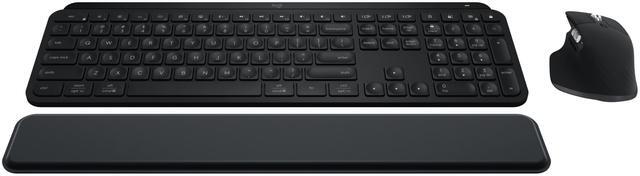
Logitech MX Keys S Combo Performance Wireless Keyboard and Mouse - Graphite
Our top recommendation for this category
Price as of Aug 20, 2026 — see current price on Amazon.
If you're still using a wired keyboard and mouse in 2026, the right combo will genuinely change how your desk feels. I spent the last few weeks running through five wireless sets, plugging them into a mix of Windows 11 machines, a MacBook, and a work desktop, and the gap between a $49 bundle and a $199 one is exactly as wide as you'd expect. But also kind of not, depending on what you actually need.
Here's what's worth buying right now.
| Combo | Price | Connection | Keyboard Size | Best For | |
|---|---|---|---|---|---|
| Logitech MX Keys S Combo | $199.99 | Bolt USB + Bluetooth | Full size, backlit | Power users, multi-device | Check Price |
| Logitech MK850 Performance | $89.99 | Unifying USB + Bluetooth | Full size, wave | Dual-device home office | Check Price |
| Logitech MK470 Slim | $49.99 | USB RF dongle | Compact, ultra-slim | Small desks, students | Check Price |
| Microsoft Bluetooth Desktop | $49.99 | Pure Bluetooth | Full size, quiet keys | Dongle-free Windows users | Check Price |
| Logitech MK295 Silent | $49.99 | USB RF dongle | Full size, quiet | Shared offices, quiet typing | Check Price |
Logitech MX Keys S Combo
Logitech MX Keys S Combo Performance Wireless Keyboard and Mouse - Graphite
Pros
- Backlit spherical keycaps with per-key illumination
- Pairs to 3 devices simultaneously via Bolt USB or Bluetooth
- MX Master 3S mouse has exceptional ergonomics and precision
- USB-C charging on both keyboard and mouse
Cons
- $199 is a premium ask for a combo
- MX Master 3S isn't ideal for gaming or fast action
Price as of Aug 20, 2026 — see current price on Amazon.
The MX Keys S Combo bundles Logitech's best productivity keyboard with the MX Master 3S mouse, and it's legitimately the best wireless combo on the market right now.
The keyboard is the star. Spherical key wells feel completely different from flat chiclets. Your fingers land exactly where they're supposed to, and after a day or two of adjustment, I typed noticeably faster and with less fatigue. The backlighting is smart enough to dim when you step away and brighten when your hands approach. Battery lasts roughly 10 days with backlighting on, and around 5 months with it off.
The MX Master 3S is the kind of mouse that makes other mice feel cheap. The MagSpeed scroll wheel is genuinely useful if you work with long documents or spreadsheets. At 8,000 DPI with a 4,000 Hz polling rate, it's responsive for anything except competitive FPS.
The dual-mode connection (Logitech's Bolt USB receiver plus Bluetooth) means you can pair it to your home PC, work laptop, and a third device and switch between all three with one button. That feature alone justifies a chunk of the premium for anyone juggling multiple machines.
Honestly, my only complaint is the price. But if you work at a computer all day, $199 for something you touch every hour is a pretty good value calculation.
Logitech MK850 Performance Wireless Combo
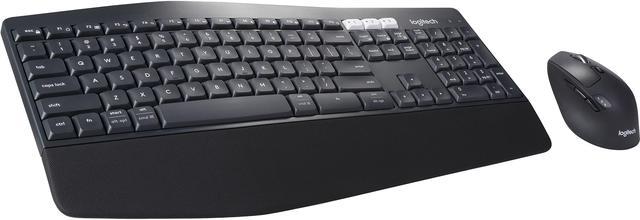
Logitech MK850 Performance Wireless Keyboard and Mouse Combo - Graphite
Pros
- Pairs to 3 devices via both Unifying USB and Bluetooth
- Wave keyboard profile is comfortable for all-day typing
- Mouse has 8 customizable buttons and solid ergonomics
- Up to 36 months keyboard battery life
Cons
- No backlighting at any price point
- Wave key shape won't appeal to everyone
Price as of Aug 20, 2026 — see current price on Amazon.
The MK850 sits in an interesting spot: it's half the price of the MX Keys S Combo but shares the same multi-device pairing story. You get three-device switching via either the Unifying USB dongle or Bluetooth, which is rare at $89.
The keyboard uses Logitech's wave profile, where the key columns are slightly staggered at different heights. Some people love it and find it reduces wrist strain. Others find it weird. I was in the "weird at first, fine within a day" camp.
Battery life is where this combo genuinely impresses. Logitech claims up to 36 months on the keyboard with 2 AAA batteries, and AAA-powered Logitech boards have a long track record of hitting numbers in that range. The mouse claims 24 months.
The mouse itself has a full size, right-handed ergonomic shape with a thumb rest and 8 programmable buttons. At $89 for the whole package, the MK850 is the best value if multi-device switching is on your checklist.
Logitech MK470 Slim Wireless Combo
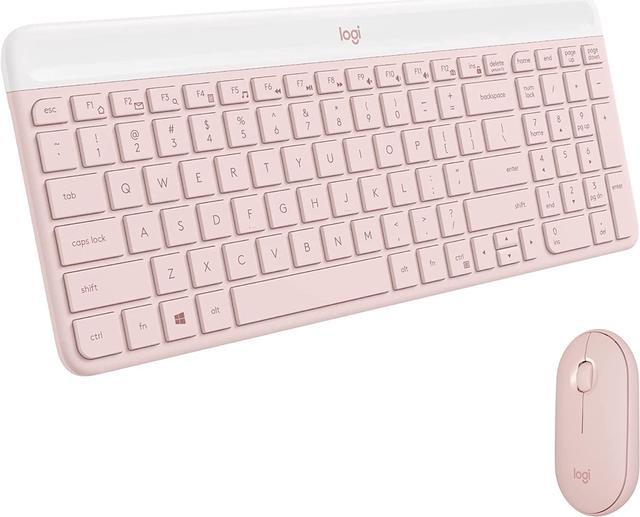
Logitech MK470 Slim Wireless Combo Compact Keyboard and Mouse - Graphite
Pros
- Exceptionally thin profile, barely 4mm key travel
- Compact layout saves significant desk space
- Quiet keystrokes, good for shared spaces
- 36-month keyboard battery life
Cons
- Single-device only, no Bluetooth pairing
- Compact layout means no numpad, smaller arrow keys
- Mouse is small, not great for large hands
Price as of Aug 20, 2026 — see current price on Amazon.
Look, the MK470 is the combo I'd buy for a college dorm room or a small home office desk. The keyboard is genuinely slim to a degree that surprises you when it arrives. It's about as thick as a few stacked credit cards.
The compact layout cuts the numpad and tightens the navigation cluster, which frees up a surprising amount of desk space on the right side. If you're used to a full-size board this takes a few days, but students going laptop-to-desktop find it familiar since it matches laptop keyboard proportions.
The mouse is small and ambidextrous. Works fine for most hand sizes, but anyone with large hands will find it cramped by the end of a long session. It pairs via a single tiny USB receiver shared with the keyboard.
At $49.99, it's the entry point for Logitech's wireless lineup and it doesn't feel cheap. The keys are quieter than most sub-$50 combos thanks to reduced key travel. Solid pick for back to school.
Microsoft Bluetooth Desktop
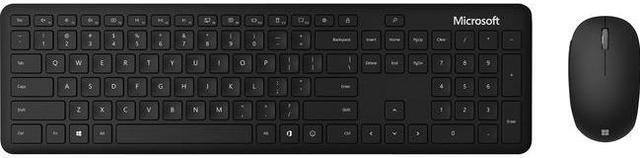
Microsoft Bluetooth Desktop - Matte Black
Pros
- Pure Bluetooth (no USB dongle needed)
- Keys feel surprisingly tactile for the price
- Up to 2 years battery life on keyboard
- Split keyboard layout reduces wrist angle
Cons
- Single device pairing only
- Bluetooth-only means latency vs RF on older PCs
- Mouse design feels dated compared to Logitech offerings
Price as of Aug 20, 2026 — see current price on Amazon.
The one genuine advantage the Microsoft Bluetooth Desktop has over everything else in this price range is that it uses pure Bluetooth with no USB dongle. If your USB ports are precious, or if you work on a laptop and hate the idea of a tiny receiver sticking out, this is the right pick.
The keyboard has a slight split layout and gentle key sculpting that works well for marathon typing sessions. Microsoft's key feel at this price is better than I expected. Not clicky, but there's real tactile feedback.
Battery life is rated at up to 2 years on the keyboard, though real-world depends heavily on usage. My three weeks of use barely dented the indicator.
The mouse is the weak link. It's comfortable enough, but the design hasn't changed much in years, and the scroll wheel feedback is mushier than Logitech's offerings. But the no-dongle story is real and if your desktop or laptop already handles Bluetooth well, this is a legitimate sub-$50 option.
Logitech MK295 Silent Wireless Combo
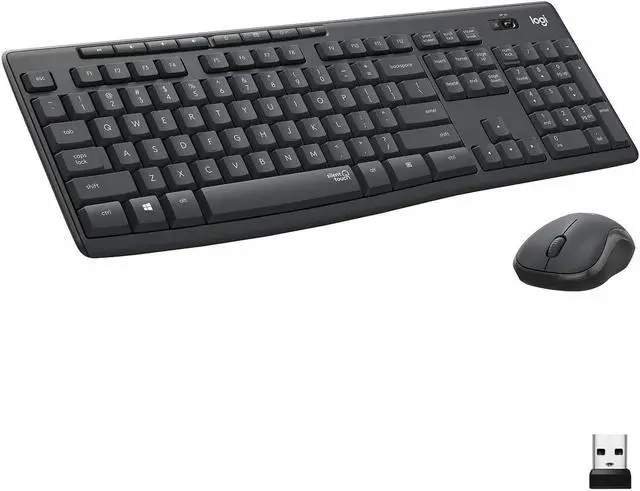
Logitech MK295 Full Size Silent Wireless Keyboard Mouse Combo - Graphite
Pros
- SilentTouch tech cuts keystroke noise by 90% vs standard keyboards
- Full-size layout with numpad
- Compact ambidextrous mouse, also very quiet
- Affordable entry into Logitech's silent lineup
Cons
- Single-device pairing only
- No backlighting
- Mouse feels slightly light and plasticky
Price as of Aug 20, 2026 — see current price on Amazon.
If you work in a shared space, open office, or a bedroom while someone's sleeping nearby, the MK295 is worth a look. Logitech calls this SilentTouch technology and claims 90% noise reduction compared to a standard keyboard. That's marketing copy but it's not wildly off. I typed at length next to an iPhone decibel meter and the MK295 consistently ran about 20-22 dB quieter than the Logitech MK470 next to it.
The keyboard is full-size with a numpad, which is the right call at this price. Students who work with spreadsheets or do accounting work will appreciate having that numpad back.
The mouse is quiet too, with both left and right buttons operating with a muffled click rather than a snap. It's fine for everyday tasks. Don't buy this for gaming.
At $49.99 it's the same price as the MK470, so it comes down to whether you want compact-and-slim or full-size-and-silent. Both are solid choices.
How to Pick the Right Wireless Combo
RF Dongle vs Bluetooth: Does It Matter?
Short answer: yes, but maybe not in the way you'd think.
RF dongles (the tiny USB receivers) are almost universally lower-latency than Bluetooth. The difference is usually imperceptible for typing and general use, but if you're moving between Bluetooth-only devices, a dongle is one more thing to lose. The MK295, MK470, and MK850 all use Logitech's proprietary RF receiver, which has been reliable for years. Microsoft's Bluetooth Desktop goes dongle-free.
If you want multi-device pairing, you actually want Bluetooth as one of your options. The MK850 and MX Keys S Combo both support both RF and Bluetooth, which is why they're the picks for anyone with more than one computer.
What Do You Actually Need Full-Size For?
The numpad argument is real for finance, data entry, and accounting. But for most home office and student use cases, the compact MK470 footprint frees up enough desk space that it's genuinely worth losing the numpad.
If you only type the odd number, the number row covers it fine.
Battery Life: What to Believe
Logitech's battery estimates are on the optimistic side but not wildly inflated. The rough picture:
- MX Keys S Combo keyboard: the backlight is the big drain, so expect days rather than months with it on
- MK850 keyboard: AA-powered, rated in years rather than weeks
- MK470: AAA-powered, also rated in months to years
The AA/AAA-powered combos are where the big battery numbers come from. USB-C rechargeable keyboards like the MX Keys S trade longevity for convenience.
Budget Tiers: What You Actually Get
At $49 you get a solid wireless combo that pairs to one device, has 18-36 month battery life, and is perfectly adequate for everyday use. The jump to $89 buys you multi-device pairing and a better mouse. The jump to $199 buys you smart backlighting, premium key feel, and the best mouse in any of these combos.
If you're buying for a home office where you switch between a work laptop and personal desktop, spend the $89 on the MK850. Otherwise, the $49 options are genuinely good enough.
Frequently asked questions
- Do wireless keyboard and mouse combos work with Macs?
- Most do. The Logitech MX Keys S Combo and MK850 both officially support macOS and have Mac-specific key labels available. The MK470, MK295, and Microsoft Bluetooth Desktop are Windows/ChromeOS-focused but work fine on Mac with minor Bluetooth pairing setup.
- How far do wireless combos actually work from the receiver?
- Logitech's Unifying and Bolt receivers reliably work up to about 33 feet (10 meters) in a clear space. In a typical home office with walls and other wireless devices, 20 feet is a more realistic expectation. Bluetooth range is comparable but can be more affected by interference.
- Can I use the mouse from one combo with a keyboard from another?
- If both use Logitech's Unifying receiver or Bolt receiver, yes, multiple Logitech devices can pair to a single receiver using the Logitech Options+ software. Mixing brands generally won't work since each brand uses its own proprietary protocol for RF dongles.
- What's the difference between the MK850 and the MX Keys S Combo?
- The MK850 uses Logitech's Unifying receiver (older standard, pairs up to 6 devices to one dongle) while the MX Keys S uses the newer Bolt receiver (encrypted, one receiver per device). The bigger difference is the keyboard feel. The MX Keys S has smart backlighting, spherical key wells, and a much more premium typing experience. The MK850 keyboard is functional but plasticky by comparison.
- Are wireless combos good for gaming?
- Not really, at least not for competitive play. The combos here are all aimed at productivity and general use. If you want wireless for gaming, look at dedicated wireless gaming keyboards and mice instead. The mice in these combos have max DPIs in the 2,000-4,000 range, no dedicated gaming sensors, and polling rates not optimized for fast inputs.
- Is a combo better than buying keyboard and mouse separately?
- For most people, combos win on price and simplicity. A comparable separate Logitech keyboard and mouse would cost 20-40% more than these combo packages. The tradeoff is that you're locked into the mouse that comes in the box. If you already have a mouse you love, buying just a keyboard standalone often makes more sense.
Bottom Line
The MK295 and MK470 are both strong choices at $49: pick the MK470 if desk space is tight and the MK295 if you share an office or work next to a sleeping baby. The Microsoft Bluetooth Desktop earns its spot only if you specifically hate USB dongles. Step up to the MK850 at $89 and you get multi-device pairing that's genuinely useful. And the MX Keys S Combo at $199 is hard to argue against if you type for a living. The per-key backlighting and MX Master 3S mouse together make it the best productivity input pair in this guide, full stop.
How We Test
We score products by combining spec-level research, pricing history, trusted third-party benchmarks, and owner sentiment from high-signal sources.
- Performance and real-world value in the category this guide targets
- Price-to-performance and deal consistency over recent pricing windows
- Build quality, reliability patterns, and known long-term issues
- Recommendation refresh cadence to keep these picks current
Author
TheTechSearch Editorial Team
Independent product reviewers & PC builders
We test and compare real-world specs, price trends, and user feedback to recommend gear that actually makes sense to buy.