Best Portable Monitors 2026
The best portable monitors for working on the go, gaming, and extending your laptop screen. We compared USB-C powered displays from 13 to 17 inches. Expert p...
As an Amazon Associate we earn from qualifying purchases made through our links — this doesn't affect our picks.
ViewSonic VX1655-4K-OLED 16-inch 4K UHD OLED Portable Monitor
Our top recommendation for this category
Price as of Jan 23, 2026 — see current price on Amazon.
A portable monitor does more for working on the road than almost any other gadget. Having a second screen at a coffee shop or hotel room makes you measurably more productive, and there's actual research on this.
The portable monitor market has matured. You can get a good one for $150. A great one, with a 4K OLED panel, for around $500. And you no longer need to carry a power brick, most run off a single USB-C cable from your laptop.
Quick comparison
| Monitor | Size | Resolution | Panel | Price | |
|---|---|---|---|---|---|
| ViewSonic VX1655-4K-OLED | 16" | 4K | OLED | $500 | Check Price |
| Lenovo ThinkVision M15 | 15.6" | 1080p | IPS | $200 | Check Price |
| UPERFECT True 4K 15.6" | 15.6" | 4K | QLED | $250 | Check Price |
| Viewsonic VG1655 | 15.6" | 1080p | IPS | $192 | Check Price |
| ASUS ROG Strix XG17AHPE | 17.3" | 1080p 240Hz | IPS | $400 | Check Price |
ViewSonic VX1655-4K-OLED
ViewSonic VX1655-4K-OLED 16-inch 4K UHD OLED Portable Monitor
Pros
- 4K OLED: perfect blacks and the sharpest panel on this list
- HDR500 certified, unusual in a portable
- Single 60W USB-C cable for video and power
- Smart cover doubles as a stand, built-in stand as well
- Mini HDMI input alongside USB-C
- Built-in speakers that don't sound terrible
Cons
- $499.99 is the most expensive pick here by a wide margin
- OLED burn-in risk with static elements
- Glossy screen is a nightmare in bright rooms
- 60Hz only, so it is a work panel, not a gaming one
Price as of Jan 23, 2026 — see current price on Amazon.
The top pick is the ViewSonic VX1655-4K-OLED at $499.99. That's real money for a portable monitor, and the 4K OLED panel is the reason to pay it.
This is a portable monitor that doesn't feel like a portable display. The OLED panel produces inky blacks and vibrant colors that make everything from code editors (dark mode looks incredible) to photo editing look fantastic. Side by side with IPS options, the difference is immediately obvious, contrast ratio on OLED is essentially infinite.
At 16 inches and 4K, this is the sharpest panel on the page by a distance, and it is the reason to spend the money. You are not going to see individual pixels at any working distance. As with any 4K screen this size you will run it at scaling rather than native, so treat the resolution as sharpness rather than as extra desktop space. The included smart cover folds into a stand, and there is a built-in stand as well, which most portables do not bother with.
Single USB-C connection handles both video and power from most modern laptops, and the port does 60W two-way, so a powered VX1655 will also top your laptop up. Some older laptops may need to use both the USB-C and a separate power connection via the included adapter.
The OLED burn-in concern is real if you display the same static image for hours daily. Modern OLED panels include pixel-shift and refresh routines, but your Windows taskbar or macOS dock could theoretically leave marks over time.
Lenovo ThinkVision M15
Lenovo ThinkVision M15
Pros
- Thin, light, and well-built
- Two USB-C ports, daisy chain possible
- Tilt-adjustable built-in stand
- Matte display reduces glare
- Business-class reliability
Cons
- Colors are accurate but not vibrant
- No built-in speakers
- Stand wobbles slightly on uneven surfaces
- IPS viewing angles are just okay
Price as of Jan 23, 2026 — see current price on Amazon.
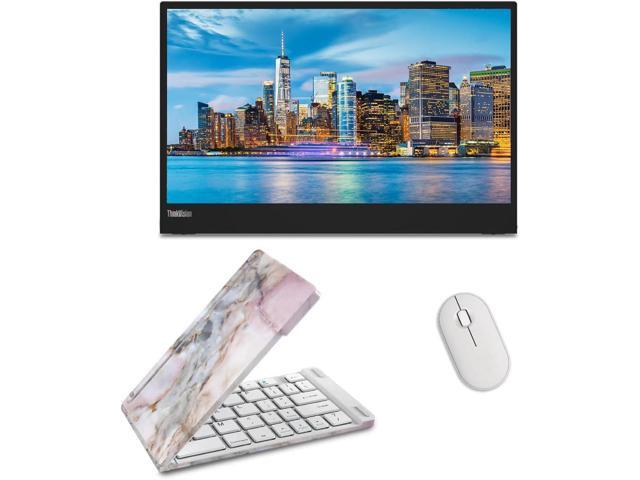
Lenovo's ThinkVision M15 is the boring-in-a-good-way pick. It's thin (5.9mm), light (590g), and the matte display means you can actually use it near windows without squinting at reflections. Colors are accurate rather than flashy, sRGB coverage is solid, but it won't wow you with saturation like the ASUS OLED will.
The dual USB-C setup is clever. You can daisy-chain it with compatible laptops, running video through one port and passing power through the other. The built-in kickstand adjusts for tilt, which is more than most portable monitors offer.
No speakers. If that matters to you (it probably doesn't for a work monitor), look elsewhere.
UPERFECT True 4K Portable Monitor

UPERFECT True 4K 15.6-inch QLED Portable Monitor
Pros
- 4K resolution at this price is impressive
- 600 nits and 100% AdobeRGB, genuinely bright for a portable
- Great for photo/video editing on the go
- Mini HDMI input for consoles/cameras
- 16:10 3840x2400 panel, extra vertical space over 16:9
Cons
- 4K on 15.6 inches makes everything tiny at native res
- Needs more power than 1080p options
- Color uniformity varies at edges
- Build quality feels budget
Price as of Jan 23, 2026 — see current price on Amazon.
If you need 4K resolution in a portable form factor, maybe you're a photographer reviewing shots on location, or a video editor who needs to check details, the UPERFECT True 4K delivers a real 3840x2400 panel at 600 nits for $249.99. That's hard to argue with.
The practical issue: 4K on a 15.6-inch screen means everything is tiny at native resolution. You'll want to run it at 200% scaling, which makes it effectively 1080p in terms of usable space but with sharper text and images. Whether that's worth the extra cost and power draw depends on your workflow.
A Mini HDMI input lets you connect game consoles, cameras, or any HDMI source, making this more versatile than USB-C-only options. Build quality is the weakest on this list, with thin plastics and wider bezels than the competition. For the feature set at this price, that's a fair trade.
ViewSonic VG1655

ViewSonic VG1655
Pros
- Cheapest screen on this list at around $192
- Solidly built for the price
- USB-C and mini HDMI inputs
- Decent color accuracy for office work
- Slim and easy to carry
Cons
- 250 nits brightness is dim in sunlit rooms
- 60Hz only
- Colors look washed out next to OLED or better IPS panels
- Stand is flimsy
Price as of Jan 23, 2026 — see current price on Amazon.
The ViewSonic VG1655 proves you don't need to spend $500 to get a functional portable monitor. At $192, it does the basics well: 1080p IPS panel, USB-C connectivity, and enough brightness for indoor use. Colors are fine for spreadsheets, documents, and web browsing, just don't try to color-grade photos on it.
Its 250-nit brightness is the main limitation. In a well-lit office, it's fine. In direct sunlight or near a window, you'll struggle. The included cover/stand works but doesn't inspire confidence in its longevity.
For the price, this is the best second screen you can add to your laptop bag.
ASUS ROG Strix XG17AHPE
ASUS ROG Strix XG17AHPE
Pros
- 240Hz refresh rate for competitive gaming
- 17.3-inch screen is big for portable
- Built-in 7,800mAh battery, use without laptop power
- Adaptive-Sync support
- ROG Tripod stand is actually stable
Cons
- $400 is expensive
- Heavy at 1,060g with battery
- Only 1080p at this size means visible pixels
- Overkill for non-gaming use
Price as of Jan 23, 2026 — see current price on Amazon.
This is the gaming pick. 240Hz on a portable monitor is absurd in the best way, plug your laptop into this at a LAN party or hotel room and you get a smooth gaming experience that most desktop monitors can't match. Adaptive-Sync eliminates tearing, and the 3ms response time keeps motion clear.
The built-in battery is the hidden feature. You can use this monitor for 3-4 hours without drawing power from your laptop, which means your laptop battery lasts longer. Or use it standalone with a Nintendo Switch for a big-screen portable gaming setup.
At 17.3 inches and 1,060g, it's the largest and heaviest option here. This isn't something you casually toss in your bag. But if gaming on the go is your thing, nothing else competes at this refresh rate.
What to consider
USB-C compatibility, Make sure your laptop supports DisplayPort Alt Mode over USB-C. Not all USB-C ports carry video. Thunderbolt ports always work.
Power draw, Portable monitors draw 5-15W from your laptop. Budget an extra hour or two of battery drain per day.
Glossy vs matte, Glossy screens look better in controlled lighting. Matte screens work better in variable environments. For travel, matte wins.
Built-in battery, Only the ASUS ROG has one. For everyone else, the monitor dies when your laptop does.
What I'd pick
The ViewSonic VX1655-4K-OLED at $499.99 if you want the best image quality, and it is a real step up on the ASUS ZenScreen OLED that used to hold this spot. Take the Lenovo ThinkVision M15 at $199.99 for reliable, no-fuss productivity. On a tight budget, the ViewSonic VG1655 at $192.08. Each one genuinely earned its spot.
As an Amazon Associate, we earn from qualifying purchases. This doesn't affect our recommendations or editorial independence.
Related guides
Frequently asked questions
- What should I look for in a portable monitor?
- Key specs are panel type (IPS for color accuracy), resolution (1080p minimum, 1440p preferred on 14 to 16 inch panels), brightness (250 nits minimum, 350+ nits for outdoor use), and connectivity (USB-C with DisplayPort Alt Mode for single-cable setup). Weight under 0.9 kg is important if you will carry it daily. Most portable monitors power over USB-C, eliminating a second power adapter.
- Can a portable monitor run entirely from a laptop USB-C port?
- Many can, but it depends on your laptop's USB-C port capabilities. Your laptop needs to support DisplayPort Alternate Mode over USB-C to output video, plus enough power delivery to run the monitor. Some portable monitors have their own USB-C power input and also support video over a second USB-C connection. Check compatibility with your specific laptop model before buying.
- Is a portable monitor worth it for remote work?
- If you frequently work from hotels, co-working spaces, or coffee shops and need more screen real estate than a single laptop display, yes. A 15.6-inch portable monitor unfolding next to your 14-inch laptop effectively doubles your screen space for about 0.7 kg of extra carry weight. For developers, content creators, and analysts who use multiple windows, the productivity gain justifies the weight.
- What is the maximum brightness I should expect from a portable monitor?
- Most portable monitors are rated 250 to 400 nits, with premium models hitting 400 to 600 nits. For indoor office use, 250 nits is sufficient. For use near windows with natural light, 350 nits or higher helps. Outdoor or direct sunlight use is difficult for most portable monitors since they lack the aggressive anti-glare coatings of outdoor-rated displays. Shade or indoor environments are where portable monitors perform best.
- Do portable monitors work with gaming consoles?
- Yes, if the monitor has an HDMI input. The Nintendo Switch connects via HDMI to the monitor's dock output. PS5 and Xbox Series X also work via HDMI, though most portable monitors cap at 60Hz so you will not benefit from 120fps modes. Many travel gamers carry a portable monitor specifically for Switch, PS5, or Xbox in hotel rooms. Confirm the monitor has HDMI input, not just USB-C input, if you need console compatibility.
How We Pick
We pick products by combining spec-level research, price checks, trusted third-party benchmarks, and owner sentiment from high-signal sources.
- Performance and real-world value in the category this guide targets
- Price-to-performance and deal consistency over recent pricing windows
- Build quality, reliability patterns, and known long-term issues
- Recommendation refresh cadence to keep these picks current
Author
TheTechSearch Editorial Team
Independent product reviewers & PC builders
We compare real-world specs, reviews and owner reports, price trends, and user feedback to recommend gear that actually makes sense to buy.