Best Email Marketing Software in 2026
ConvertKit and HubSpot lead for most people. Here is how five top email platforms stack up on price, automation, and deliverability. Expert picks, pros and c...
As an Amazon Associate we earn from qualifying purchases made through our links — this doesn't affect our picks.
Email marketing still returns more per dollar than almost any other digital channel. The commonly cited figure is around $36 back for every $1 spent, and that range has held steady for years despite every new social platform claiming email is dead. What HAS changed: the software gap between the cheap tools and the expensive ones has nearly closed. You can get serious automation, segmentation, and deliverability tools starting at $0 or $9 a month now.
But "email marketing software" covers a lot of ground. A solo creator selling digital downloads needs something completely different from a SaaS company running nurture sequences for thousands of trial users. The five platforms below represent the full range, and two of them I'd recommend without hesitation for most use cases.
| Platform | Starting Price | Free Tier | Best For | Automation |
|---|---|---|---|---|
| ConvertKit | $33/mo yearly (1K subs) | Yes (up to 10,000) | Creators, newsletters | Strong |
| HubSpot | $0 (CRM) / $20/mo (Marketing) | Yes | SMBs, CRM-linked email | Very strong |
| Mailchimp | $13/mo (500 contacts) | Yes (250 contacts) | General small business | Moderate |
| Brevo | $0 (300/day sends) | Yes | Volume sends, transactional | Moderate |
| ActiveCampaign | $15/mo | No | Automation-heavy teams | Best in class |
ConvertKit

Email marketing
Kit
Best pick for newsletters, creators, and anyone building an audience from scratch.
Free to 10,000 subscribers; Creator from $33 a month, yearly. Billed monthly instead, Creator is $39 a month at 1,000 subscribers.
Read our Kit pageConvertKit is what I'd tell most people starting from zero. The pricing model makes sense for creators: free up to 10,000 subscribers for broadcasts, forms and landing pages, then $39 a month for the Creator plan at 1,000 subscribers ($33 a month billed yearly) once you need automations. You're not being charged for fancy CRM features you'll never use. The interface stays out of your way.
The automation builder is visual and genuinely usable without a tutorial. You can set up a basic welcome sequence in 20 minutes. The tagging system is how ConvertKit handles segmentation: instead of separate lists, you tag subscribers based on behavior (clicked a link, bought a product, joined through a specific form), then target those tags. It's flexible once you understand it, though it takes an adjustment if you're coming from a list-based platform like Mailchimp.
Deliverability is consistently strong in third-party benchmarks. That matters. A platform with 98% deliverability vs. 90% deliverability is the difference between reaching your actual list and wondering why open rates are tanking.
The landing page builder is basic but functional. Good enough for a lead magnet or newsletter signup. ConvertKit Commerce lets you sell digital products directly, which is actually a decent add-on if you're a creator selling guides or templates.
Where ConvertKit falls short: it's not a CRM. There's no contact-level activity timeline, no deal pipeline, no sales team features. And the reporting is lighter than HubSpot or ActiveCampaign. For a solo creator or small newsletter, none of that matters. For a business with a sales team, look elsewhere.
HubSpot
CRM
HubSpot
The move if you want email tied directly to your CRM and sales pipeline.
Free for 2 users; Starter from $7 a seat a month (annual). Starter is $10 a seat a month billed monthly; the regular price is $20 a seat.
Read our HubSpot pageHubSpot is a different beast. The free CRM is genuinely free: not a trial, not a limited version with ads, actually free for as many contacts as you want with basic email sending, forms, and deal tracking. The Marketing Hub (where the real email features live) starts at $20 a month for the Starter tier, and scales up to the Enterprise tier with features most small businesses will never need.
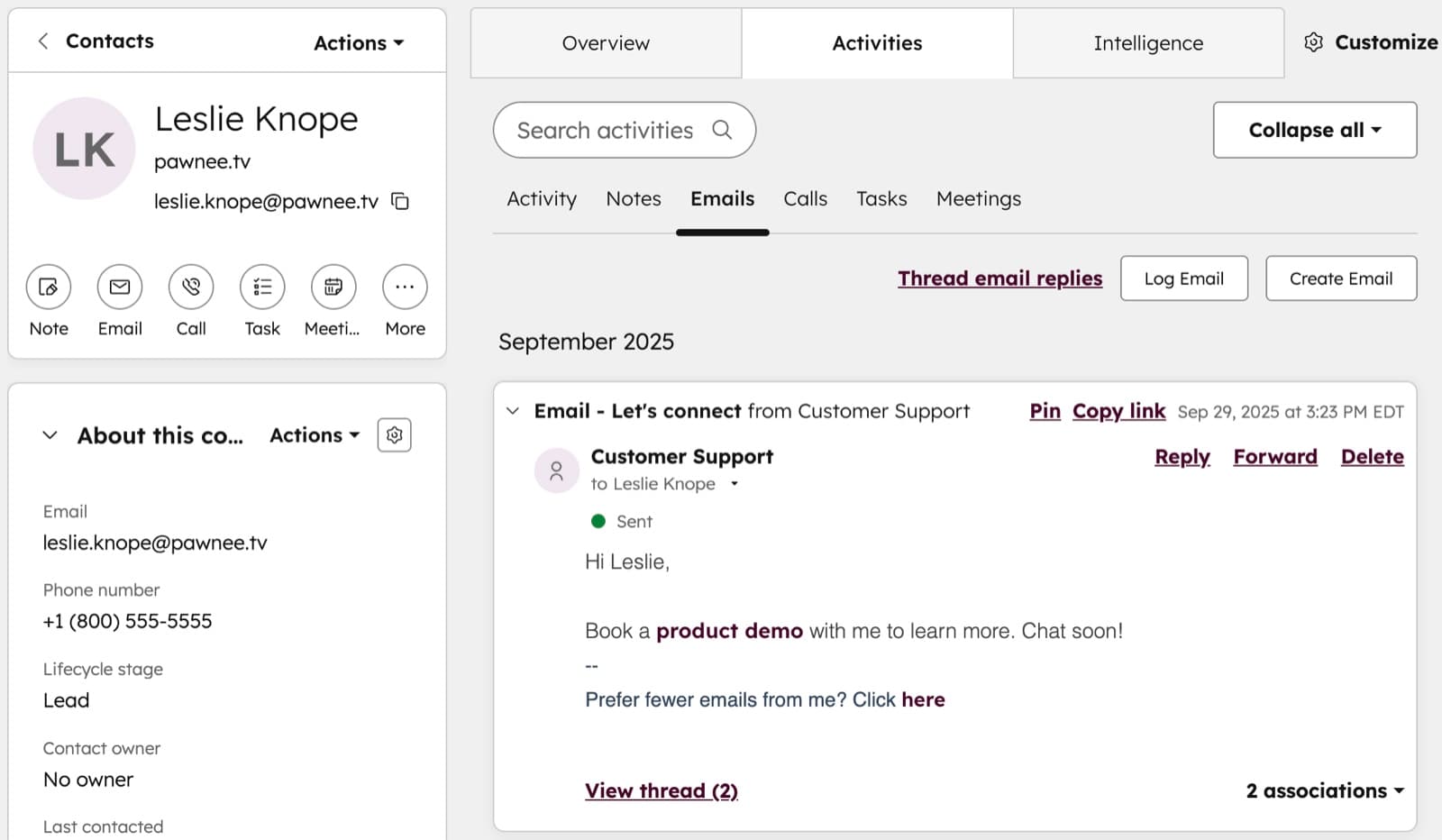
What makes HubSpot worth it over something simpler: every email you send ties to a contact record with a full activity history. You can see exactly which emails a contact opened, what links they clicked, and what pages they visited on your website, all connected. If you have a sales team, that context is invaluable. Your SDR can look at a lead and see they opened the product comparison email three times before reaching out.
The automation in HubSpot Marketing Hub is visual and powerful. Workflows can branch based on contact properties, deal stage, form submissions, or any combination. You can trigger sequences from CRM actions. That level of integration between email and sales CRM is something ConvertKit and Mailchimp genuinely can't match.
The interface is denser than ConvertKit. HubSpot has a lot of features, and the navigation reflects that. New users typically spend a few hours getting oriented before they feel comfortable. The tradeoff is capability: once you know where things live, you can build campaigns that would require stitching together multiple tools on other platforms.
HubSpot pricing scales quickly at higher tiers. The free and Starter tiers are good value. Professional and Enterprise get expensive fast. Know which tier you actually need before committing.
Mailchimp
Mailchimp is the default recommendation for a lot of small businesses, and there are good reasons for that. The free plan covers 250 contacts and 500 emails per month, down from 500 contacts before January 2026. The interface is clean and has been refined over a decade of mass-market use. Template selection is wide. Basic automation (welcome series, abandoned cart for e-commerce) works without much setup.
That said, Mailchimp has drifted upmarket on pricing while the interface hasn't kept pace in sophistication. The Essentials plan starts at $13 a month for 500 contacts, which is reasonable but starts climbing fast as your list grows. At 10,000 contacts, you're at $100+ a month, and at that price point, ConvertKit Creator Pro or HubSpot Marketing Starter are delivering more.
The automation builder (now called "Customer Journey Builder") is better than it was a few years ago but still more limited than ActiveCampaign or HubSpot. If your needs are straightforward (welcome series, one-time campaigns, basic segments), Mailchimp handles it fine. If you want to get into behavior-triggered sequences or complex multi-branch automations, you'll hit walls.
Mailchimp works best as a starting point. It's a low-friction way to build your list and send your first few thousand emails. Plan to revisit platform choice once you hit 2,000-3,000 subscribers or when you need automation that goes beyond the basics.
Brevo
Brevo (rebranded from Sendinblue in 2023) takes a different pricing approach from everyone else on this list: it charges based on emails sent per month, not contact list size. The free plan includes unlimited contacts but caps sends at 300 per day (roughly 9,000 per month). Paid plans scale on volume.
This model is genuinely better for some use cases. If you have a large contact list but only send occasionally (quarterly promotions, annual newsletters), you'd pay a lot on a contact-based plan while sitting on 90% of your contacts doing nothing. Brevo lets you keep the list and only pay when you send.
The transactional email tools (order confirmations, password resets, account notifications) are a strength. Brevo's SMTP and API infrastructure is solid, and the pricing for high-volume transactional sends is competitive. If you're running an e-commerce store and want to handle both marketing emails and transactional emails on one platform, Brevo is worth evaluating seriously.
The marketing automation builder is functional but shows its roots as a transactional email tool that added marketing features. It's less intuitive than ConvertKit or HubSpot. The CRM features are minimal. Deliverability is good but not class-leading.
ActiveCampaign
ActiveCampaign is the automation-first choice, and it genuinely earns that reputation. The automation builder is the most powerful of any platform in this roundup. You can build branching logic based on dozens of conditions: contact properties, email behavior, site visits (via their site tracking pixel), CRM stages, custom fields. For teams that live and die by their email sequences, it's the right tool.
The pricing starts at $15 a month for the Lite plan (up to 1,000 contacts), and scales with both contacts and feature tier. There's no free tier beyond a 14-day trial. That's the first friction point. The second is the learning curve. ActiveCampaign's power comes with complexity, and new users typically spend a meaningful chunk of time in documentation before building their first non-trivial automation.
The built-in CRM (available on Plus and higher plans) is solid and integrates tightly with the automation engine. Deals can trigger email sequences; email behavior can update deal stages. It's the closest to HubSpot's CRM integration without the HubSpot price on the higher tiers.
For most small businesses and solo creators, ActiveCampaign is more tool than they need. Where it shines is mid-market SaaS companies, agencies, and e-commerce brands with complex customer journeys. If you're building a funnel with 15 touchpoints and conditional logic, ActiveCampaign is probably where you end up.
What to Look For When Choosing
List size vs. send volume pricing. Most platforms charge on contacts. Brevo charges on sends. If you have a large inactive list you want to keep but rarely email, send-based pricing saves money. If you email your whole list frequently, contact-based pricing is usually cheaper.
Deliverability above marketing promises. Every email platform claims great deliverability. Look for third-party audits from sites like EmailToolTester or MXToolbox's inbox placement tests. ConvertKit and HubSpot consistently score above 95% in independent tests. Deliverability differences compound fast across thousands of subscribers.
Automation depth you'll actually use. ActiveCampaign's automation is overkill for a three-email welcome series. ConvertKit's is limiting if you need complex branching. Be honest about what you're actually going to build: buying for the automation you imagine needing in two years is a good way to overpay today.
CRM integration. If email is one part of a larger sales and marketing operation, pick a platform where email connects to contact records (HubSpot, ActiveCampaign). If email is your whole marketing strategy, you don't need that overhead.
Support and documentation. Especially important when you're first learning. ConvertKit and Mailchimp have strong self-service documentation. HubSpot's Academy is a legitimate resource. ActiveCampaign's support is responsive but the tool's complexity means you'll use it more.
Frequently asked questions
- Is free email marketing software actually usable?
- Yes, with limits. ConvertKit and HubSpot both offer real free tiers, not crippled demos. ConvertKit free works up to 10,000 subscribers with broadcasts, forms and landing pages, though automations now need a paid plan. HubSpot free gives you CRM plus basic email. Mailchimp free (250 contacts and 500 sends a month since January 2026) is enough for a first test and not much more. For under 1,000 contacts and basic needs, free plans are legitimate starting points.
- What is the best email marketing platform for newsletters?
- ConvertKit is the standard answer for newsletter creators, and the reasons are solid: pricing based on subscriber count not arbitrary features, a clean subscriber management system, and the Creator Network for cross-promotion with other newsletters. Ghost also handles newsletters natively if you want the platform and CMS together. Beehiiv is worth mentioning for monetization features if that is a goal. For pure email marketing without the platform-as-blog angle, ConvertKit wins.
- How many emails should I send per month?
- More than most people think, less than most marketing gurus recommend. Two to four times a month is the sweet spot for staying top of mind without burning out your list. Weekly if your content is genuinely valuable and expected. The real metric is not sends per month. It is open rate trend. If opens are steady or growing, frequency is fine. If they are declining, you are either sending too much or the content quality dropped.
- Does email marketing still work in 2026?
- Yes. Despite years of predictions that social media or messaging apps would kill it, email consistently outperforms every other owned channel on ROI. The reasons are structural: you own the list (no algorithm between you and your subscriber), inboxes are less crowded than social feeds in terms of attention per message, and email intent is different. Someone who subscribed to your list wants to hear from you in a way a social follower often does not.
- What is the difference between email marketing and marketing automation?
- Email marketing usually means campaigns and broadcasts. You write an email, you send it to a segment, you look at the results. Marketing automation means behavior-triggered sequences that run without your manual involvement. A welcome series that goes out over five days when someone subscribes is automation. An abandoned cart sequence that fires six hours after someone leaves your e-commerce site is automation. Most email platforms include some automation. ActiveCampaign and HubSpot are built around it. ConvertKit handles the core use cases well.
Bottom Line
ConvertKit is the right starting point for creators, newsletter writers, and anyone building an email audience from scratch. The free tier is real, the automation handles the essential use cases, and the pricing stays reasonable as you grow.
HubSpot is the choice when email is part of a bigger sales and marketing operation. The CRM integration is the differentiator: if you have a sales team or want email behavior connected to contact records, the free CRM plus Marketing Hub Starter is competitive at $20 a month.
Mailchimp works fine as a starting point. Brevo wins if you want send-based pricing and solid transactional email. ActiveCampaign is the right answer for teams who live in automation logic and need the most powerful builder available.
Pick based on where you are now, not the tool you'll theoretically need in three years. You can migrate lists between platforms in a few hours.
If it's down to the two most common names, our Kit vs Mailchimp breakdown prices both at 500, 1,500, 5,000 and 10,000 subscribers.
If you're weighing an email tool against a CRM rather than choosing between email tools, that's a different question: our guide to whether you need a CRM covers which shape of business needs which.
How We Pick
We pick products by combining spec-level research, price checks, trusted third-party benchmarks, and owner sentiment from high-signal sources.
- Performance and real-world value in the category this guide targets
- Price-to-performance and deal consistency over recent pricing windows
- Build quality, reliability patterns, and known long-term issues
- Recommendation refresh cadence to keep these picks current
Author
TheTechSearch Editorial Team
Independent product reviewers & PC builders
We compare real-world specs, reviews and owner reports, price trends, and user feedback to recommend gear that actually makes sense to buy.